Journal of the Korea Institute of Building Construction, Vol. 12, No. 6
http://dx.doi.org/10.5345/JKIBC.2012.12.6.558 www.jkibc.org
Development of a Flash-based Schedule Management Tool for Smart Devices
Jang, Myunghoun
*1)Department of Architectural Engineering, Jeju National University, Jeju, 690-756, Korea
Abstract
Schedule management of construction work is critical to completing construction projects within a given period of time. Many efforts have been made and multiple tools have been developed to support the management of construction projects using smart devices such as smartphones and tablet PCs. This study proposed a method for managing construction schedules via a smart device using Flash. The interactive and graphic properties of Flash enable the development of an app that can allow a field manager to manage schedules easily and efficiently. A prototype was implemented using Adobe Flex Builder, and a sample network was applied in a smartphone. It is convenient for a construction manager to manage construction schedules using the tool because Flash controls graphic components easily. In further studies, network diagrams such as CPM (Critical Path Method) should be developed and applied to the app.
Keywords : schedule management, smart device, bar chart, schedule network
1. Introduction
1.1 Research background and objective
Smart devices such as smartphones and tablet PCs have been widely adopted thanks to the convenience they offer users, including their usefulness and swiftness for checking data or making notes. With this trend, the mobile office[1], which allows a worker to work anytime and anywhere using a mobile device, has also gained popularity, along with the smart work system (home-based teleworking + mobile working + smart work center).
With respect to construction sites, it is now possible to change the information handling process from the office (company level) to the
Received : May 3, 2012
Revision received : June 12, 2012 Accepted : June 13, 2012
* Corresponding author : Jang, Myunghoun [Tel: 82-64-754-3704, E-mail: [email protected]]
ⓒ2012 The Korea Institute of Building Construction, All rights reserved.
construction site without a time delay (person, construction manager level)[2], and smart devices will be utilized in decision-making for construction management, including schedule management. In the schedule management of a construction project, the schedule will often need to be checked and revised, which is mostly done on a PC. Some companies are currently adopting web-based schedule management[3], and smart devices are mainly used to check information on construction progress while at construction sites. Considering this current situation, this paper proposes a flash-based schedule management tool to utilize on smartphones at construction sites.
1.2 Research method and scope
The research method and process to develop a schedule management tool for smart devices are as follows:
1) The tools and previous research related with
construction project management on smart
devices are first researched and analyzed.
Development of a Flash-based Schedule Management Tool for Smart Devices
2) The management fields in a construction project that can be easily managed on the smart device were checked, and the implementation direction was drawn.
3) A schedule management tool for smart devices was developed, and then the prototype was implemented.
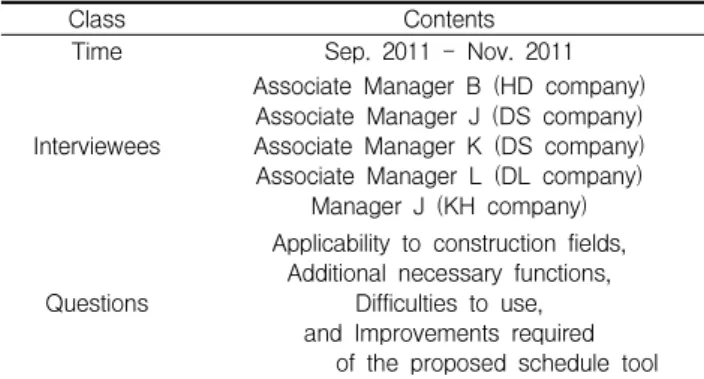
4) To verify the practicability of the tool, the tool was used at actual construction sites and its applicability was verified through the advice of professionals.
This research focuses on the development of a schedule management tool for smart devices including smartphones and tablet PCs. Resources management and cost accounting are excluded from the scope of research.
2. Schedule management for smart devices
2.1 Schedule management applications for smartphones There are a variety of schedule management applications (hereinafter ‘apps’) for smart devices that are mostly for personal work scheduling, and for this reason they are insufficient to apply to schedule management of a construction project.
There are few apps appropriate for schedule management of a construction project with a bar-charted format.
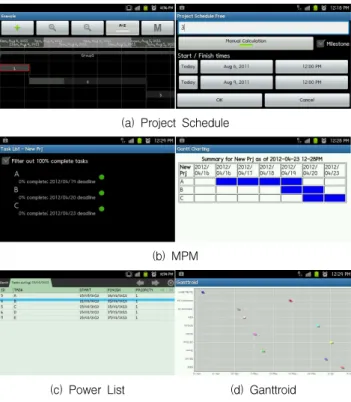
Project Schedule, MPM, Power List, and Ganttroid are existing schedule management apps for Android-based smart devices. Project Schedule enables managers to input each activity, and shows the activity in a bar chart. Different activities can be grouped, but if the grouping function is used, it is difficult to manage the activity list, and impossible to input and retrieve one activity individually.
MPM simply displays the list of activities input by the user. It provides a bar chart function in
HTML (HyperText Markup Language), but the user cannot revise the bar chart himself/herself. Power List creates activities by the user entering the start date and end date of each activity. A user can check the bar chart with a move function, but is unable to enlarge or reduce it. Ganttroid displays the schedule the user has entered in the calendar in the smart device on the screen. It provides the information in a zoomable bar-charted format that can be scrolled through easily, but the schedule cannot be revised on the screen directly.
These schedule management apps are appropriate for simple notes, such as a personal schedule, but are inappropriate for checking the relationship of works in progress, completion rate and resources.
(a) Project Schedule
(b) MPM
(c) Power List (d) Ganttroid
Figure 1. Scheduling apps for Android phones
In the schedule management apps available for
smartphones, it is relatively difficult to enter and
edit activities due to the smartphone ’s small
screen. In addition, it is impossible to check the
entire construction schedule at a glance on the small
supported, and images may not be displayed in an appropriate manner due to the resolution discrepancy. To resolve these problems, apps designed specifically for tablet PCs should be developed.
2.2 Research on smart device-based construction project management
The rapid diffusion of smart devices has led to a number of studies being carried out on the use of smartphones as a tool in construction projects. The studies considered how smartphones could be utilized in overall construction management, including safety management, material management and progress management, but few cases were concretely implemented. Most of them only presented a superficial system or development plan.
The study that researched the software types used at construction sites and analyzed the development direction of an app[4] presented an app customized for construction sites, including functions such as schedule management, communication, document management, picture/voice management, weather checking, and payment management. To resolve the information disconnect between a construction site and the office and information management structure managed at the company level, a plan to connect a smartphone with the Project Management Information System and smartphone-based system for construction site management was proposed[5].
The types of construction project management that can be carried out using a smartphone were analyzed, and the implementation scope of construction site management was presented[6].
Since the performance of a smartphone is limited, it is noted that the optimal functions should be utilized by using technologies appropriate for construction site management. While these studies
smartphones, system components or screen design have not yet been presented concretely.
The study that proposed a PMIS (Project Management Information System)-based app for smartphones for safety management of a construction project[7] presented a safety guide app by work type at the site that offered pictures, figures and text, the application concept of real-time safety management at a construction site and the user interface. However, only simple and basic content and concept were presented, including the screen composition and menu setting for site managers, and no concrete system was developed.
After bar code, QR code and RFID were considered for collecting information from mobile devices[8], a method utilizing only RFID and QR code was proposed. A materials management app [9] was presented following an analysis of the existing problems and a survey. Conventional construction management methods using IT, including methods employing PDA, bar code, RFID, web cameras, etc. are noted to have caused re-work or inefficiency due to a lack of real-time information processing technology and the separation of the management office from the construction site. The materials management app presented was designed to provide various functions, including auto-entry of information, real-time processing and checking of materials information, and location check of materials being delivered. The concept of tracking materials using the GPS function in a smartphone and entering materials using QR(Quick Response) codes was presented, but a concrete app was not developed.
There was a study that presented a method of
construction progress management on a
smartphone using an augmented reality app [10].
Development of a Flash-based Schedule Management Tool for Smart Devices
It provides the user interface of the smartphone app, but the system has not yet been developed. A corporation for which location information is important, such as Korea Expressway Corporation, can utilize the LBS(Location-based Service) of a smartphone. Road Management System[11] uses the LBS in managing and repairing roads, leading to reductions in time and expense. While it is appropriate for a company or corporation to utilize LBS when the road information is important, construction work is mostly done in a restricted space, and the need for LBS in construction work is relatively low.
There are some cases in which construction companies apply smartphones to their actual practice, and these include the mobile office and smart work-oriented examples. Company G is planning to operate EIP(Enterprise Information Portal) + TPMS(Total Project Management System) using smartphones, and it has already applied Mobile EIP to its mail and bulletin board system.
Some product improvements and cost reductions have been reported by implementing manpower management at a site and materials management based on the daily work management process through the Mobile TPMS. Mobile systems are in development and some have already been applied as exemplary cases; however, feedback to the utilization results still has a long way to go.
In the previous studies and developments, smart devices were not fully utilized. The smart devices were restrictedly used to check the information of construction sites. Furthermore, the studies that proposed system development only presented concepts, factors or ways of development, and for this reason, more active applications of smart devices should be presented.
3. Development of a schedule management tool for smart devices
3.1 Development direction
The efforts made in the previous studies are at the initial stage of using smart devices for purposes that go beyond collecting and storing data and checking the construction project ’s progress. For the active application of smart devices to construction management, a diversity of appropriate apps are needed, but there is a restriction on the type and number of apps that can be currently utilized. As mentioned earlier, schedule management, document management, picture/voice management, weather search, and payment management are appropriate items for customized construction site apps[4], and this study proposes a basic schedule management app for construction management.
For the schedule management of a construction project, considering that a certain level of information is required, the app should provide the function to input and revise a number of pieces of information, and the function to be linked to a site office to check and update the original and revised information at the office. Taking into account the screen size and performance of the smart devices, it is difficult to manage a whole construction project via a smart device. But the user interface should be able to be enlarged and reduced for the user ’s convenience when checking the detailed schedule information. In addition, a function allowing the user to adjust the schedule easily would be desirable.
3.2 Tool development
Apps run on smart devices are usually developed
using a tool like the Java-based Eclipse. However,
the prototype of the app for an Android-based
using Flash, as Flash not only provides a good graphic environment but also is user-friendly, but can also be run by diverse OS and environments including Microsoft Windows, Android and web.
Adobe Flex was used as a tool in developing the Flash app. With Flex, it is possible to develop an app that can be distributed en masse regardless of web browser type, desktop or operating system.
Flex provides the function of user entering and retrieving factors in the name of control, and DataGrid was also used to show the activity name, period, start date and end date in the schedule.
3.3 Implementation of the prototype
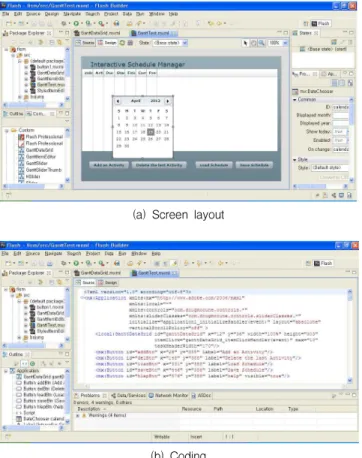
(a) Screen layout
(b) Coding
Figure 2. Adobe Flash/Flex Builder (version 4.6)
To implement the prototype Flex was used, and Adobe Flash Builder was also used, particularly for the concrete implementation of the app. Figure 2
Builder. DataGrid and diverse types of buttons were placed on the screen, and the program was written in Java programming language to activate the controls on the screen. The source code written was saved in MXML (XML-based user interface markup language) format. MXML is usually used to write the screen layout for a program, and for this reason, it was used to develop the designated screen composition of and the controls to be used on the prototype app.
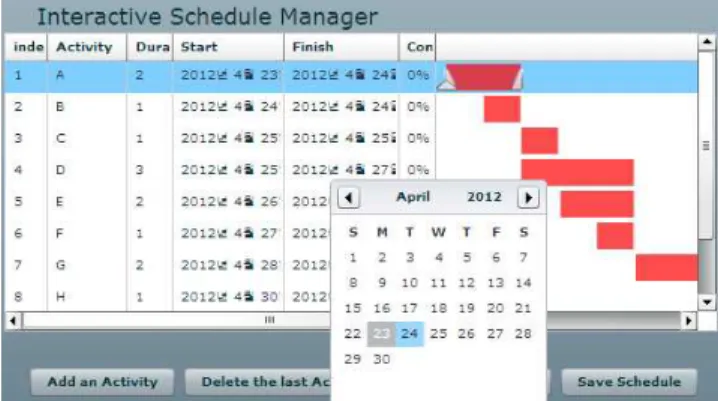
The prototype of the schedule management app can display an activity as shown in Figure 2(a), and the interface consists of DataGrid, activity addition/deletion button, and schedule saving and retrieving button. The calendar on which the start date and end date is entered was included in DataGrid. DataGrid was composed of Table and Graphic, each of which shows activity information and bar chart, respectively, and these were interworking on a screen. As shown in Figure 2, the detailed parts were programmed in the MXML format, including the controls to enter an activity and adjust the date.
Diverse controls are used to implement the
prototype, but the code to activate the schedule
management tool was written directly. The
composition of the main code for prototype
implementation is indicated in Figure 3. Fism.mxml
is an execution function, which composes the screen
of the prototype, enables a user to enter and
retrieve the schedule and delivers information to
other functions if necessary. FismDataGrid.mxml
designates the DataGrid format, including activity
name, period, start date and end date for schedule
management. FismItemEditor.mxml has the function
of handling the value entered or revised by the user
within the DataGrid. The important variables and
values used in the prototype were set in Global
Development of a Flash-based Schedule Management Tool for Smart Devices
VArs.as and saved in the ActionScript format.
Fism.mxml
FismDataGrid.mxml FismIdemEditor.mxml
? Main function
? Prototype layout
? User input
? Set DataGrid layout
? Display activities and their information
? Manage internal processes
? Manage outlines of prototype GlobalVar.as
? Definition for global variances
? Written in actionscripts Load/Save
data
Arrange information Display
activities information Transfer
user input
Request process
Send processed data
Transfer user input