그래피칼 프로그램을 이용한 계측 및 제어 공학 실험실습
Engineering Experiments and Practices on Measurement and Control using Graphical Program
갈 리*, 최 성 주**
Mikhail Ghaly*, Seong-Joo Choi**
요 약
이 연구에서는 LabVIEW와 NI ELVIS를 이용하여 컴퓨터 기반의 공학교육 사례 즉 다양한 컴퓨터 기반의 공학실습을 소개한다. 여러 유명대학이나 연구소, 회사 등에서 웹/인터넷 또는 네트웍으로 제어되는 원격 실험과 같은 형태의 원격 실습이 가능하다. 컴퓨터 및 그래피칼프로그래밍 기술의 공학실습교육 적용을 통하여 공학 실험 실습의 흥미와 효과를 제고하였다.
Key Words : computer based practice, remote labs, virtual instruments, Graphical Program ABSTRACT
This paper introduces computer based practice for engineering education through using NI-ELVIS and virtual instruments of LabVIEW as application software. Different laboratory experiments "Labs"
will be presented as convenient paradigms of adopting computer based practice for the efficacy of engineering education. Remote labs as web/internet or network-enabled controlled by remote server computer have been extensively used by a number of universities, national laboratories and companies for different kind of application around the globe. Overtime, as technology proceed in its progress, more developed techniques are being used particularly in the field of engineering education.
* 한국기술교육대학교 대학원 기계정보공학부([email protected])
** 한국기술교육대학교 기계정보공학부([email protected]) 제1저자 (First Author) : Mikhail Ghaly
교신저자 : 최성주 접수일자:2012년 4월 18일 수정일자:2012년 5월 16일 확정일자:2012년 6월 01일
Ⅰ. Introduction
Computer based practice in education generally refers to using computers as a central part of the educational experience. Also, computer based practice can be considered as a medium that produce the effect of full engrossment in a motivated way for students. In the presence of computer networks and internet, computer based practice has become a fundamental base for adopting beneficial education. Moreover, the continuing endeavor to develop capabilities of computers and information technology media and improving technologies leading to reduction of hardware cost enable better quality and cost-effective education.
The cases presented in this paper uses the practice oriented education for experimental lab for engineering students. In this paper, a number of measurements and control experiments will be introduced and discussed and conclusion will be given at the end of this paper.
The system hardware is basically built up as follows; a computer having labVIEW as application software, different experiments platforms mounted on data acquisition devices from National Instruments such as NIELVIS and (DAQ-USB6009), a webcam of good resolution and internet connection with convenient broadband.
Thus, the user (student) can access to any chosen experiment enabled to be remotely controlled through the configurations of LabVIEW.
For each experiment, the parameters being measured are sent through sensors signals to the main computer where they are acquired, processed and manipulated by the configurative virtual instrument created by graphical program LabVIEW.
One of the practical advantages found with such a system is that expensive laboratory equipment becomes available to be used by users who don't have such equipment. Based on this general method, other applications and experiments can be developed; we only need to develop the program
using LabVIEW for controlling different experiments locally and then design the procedure and content for the new experiment quickly and smoothly.
The current engineering education lecture/laboratory will likely continue, and economic pressures will probably dictate how quickly network learning strategies are adopted. If network-enabled learning methods are shown to decrease costs and to increase access, learning, and student satisfaction, then rapid acceptance of the network-based teaching and learning paradigm may be expected. These resources can be accessible via the virtual lab framework through the Internet using a generic web browser.
The computer based practice will be put forward along with quite detailed discussion in the following context.
Ⅱ. System description
Four different experiments are going to be shown for this model as follows:
- Acquiring and analyzing Electrocardiogram (ECG)
Simulation of Coutte flow (Numerical solution) Blood pressure measurement
Various measurement and control application PID control of DC-Motor
The hardware construction comprises the following:
- The main computer that has running operating system and it has labVIEW installed as application software which handles signals acquisition and return them to
the user interface representing the interactive platform for the student according to CBI considerations.
- Four experimental setups; three of them mounted on two platforms (Electronic breadboards) belonging to two NIELVIS devices and connected to the main computer representing the server of the remote lab.
- Another experiment setup for PID Control of DC-Motor connected to the same main
computer via DAQ-USB6008.
- An informative medium such as internet or intranet
- Client software running on the remote user's computer and embedded into a genric browser through which the user can access to any chosen experiment.
The remote laboratory, shown in Fig. 1. with experiments that can be run through comprehensive instructions , interactive way with motivation for a remote users (students).
A remote laboratory for engineering education should realize an integrated environment for a user controlling the real device through the remote site and conducting the actual experiments in the remote laboratory through a computer network.
The core of the remote laboratory is a cluster of general-purpose and/or specialized instruments interfaced to a set of personal computer systems connected to the internet with the ability to configure instruments and data analysis remotely via software, the laboratory will facilitate the sharing of expensive instruments and equipment and it may be the next important step in remote distance learning[5].
Fig. 1. Remote Lab layout
The remote lab system is accessed from the internet through a generic web browser (user interface) containing different experiments designated as workshops. Normally, every experiment needs to be conducted by a remote
user that can access with the following steps.
The remote lab system is accessed from the internet through a generic web browser (user interface) containing different experiments designated as workshops. Normally, every experiment needs to be conducted by a remote user that can access with the following steps.
1) The desired workshop is first chosen from the web browser (Experiment).
2) Control is requested over the VI
3) Experiment is started (initializing the hardware to work) by clicking start
4) Having done or seen the experiment, stop button can be clicked.
5) Then, the control returns to the server (Main PC) after the experiment has been done.
Next, these steps will be show more clearly by real examples.
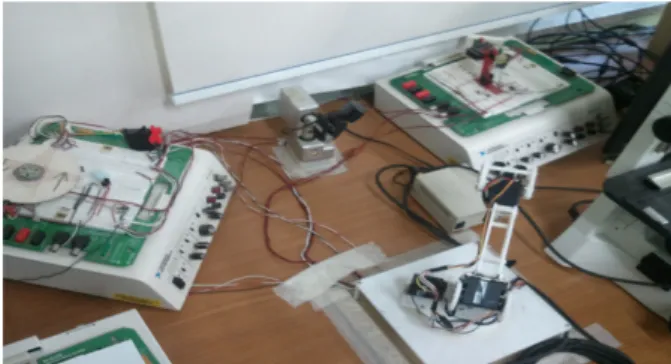
Fig. 2 shows the setup of the experimental apparatus.
III. Selected cases
1. Acquiring and analyzing Electrocardiogram (ECG) signal
In this experiment, the signals that cause the human heart to contract and relax are acquired and analyzed by means of a special sensor (Vernier ECG sensor) that traces the bioelectric signal generated by the cardiac muscle from three different position electrodes on the human body.
the signal strength is plotted against time in order to be analyzed.
Fig. 3 Electrocardiogram user interface
At the remote lab, there is a hardware circuit device that emulates the human electro-cardiac signal attached to the electrodes of the sensor.
Once a user logs in this lab, an initialization GUI prompts the user with the instructions needed to where to position the electrodes. When the instructions and explanations have been gone through, the user clicks “Start” to start collecting electro-cardiac signal for 60 seconds. An electrocardiogram (Fig. 3) is developed and hence the user apply the analysis according to the instructions given by the intial user interface.
2. Blood pressure measurements
This lab introduces the user how to measure the systolic and diastolic blood pressures by a pressure sensor connected via a hose to an arm cuff that can be inflated of deflated by a hand air pump. In fact, this measuring device is mounted on another air cushion which is electronically controlled to simulate blood pressure streaming in brachial artery of bicep muscle.
Fig. 4 Oscillatory waveform of blood pressure – systolic & diastolic and heart beats
This remote lab uses oscillometric method to evaluate the blood pressure measurement. The use is first instructed by a prompting window that explains the concept and methodology of using oscillometric method as nonevasive method to measure the pressure of blood. Having read the instructions carefully, the user is guided step by step run this lab accordingly. To start, “START”
button is pressed and the session takes 90 seconds to run. The user can follow up the on going process in the user interface. Once the measuring time finishes. the user interface VI returns the data as indicated in Fig. 4.
3. Couette Flow Simulation (Numerical Method)
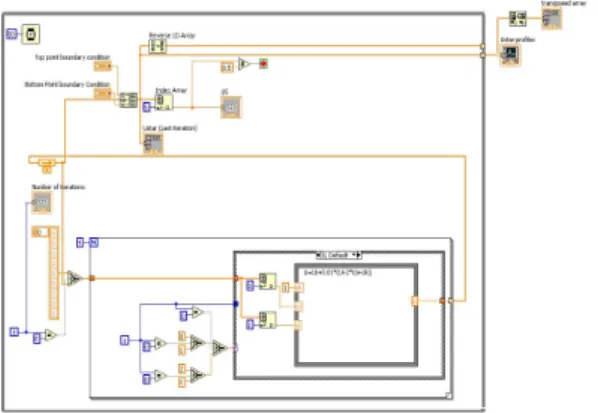
This VI shows the velocity profile of fluid layers between two infinite plates; one is fixed and the other moves at fixed speed U. Having remotely accessed, the remote user (student) is able to notice the behavior of fluid in case of couette flow solved numerically and simulated by labVIEW VI which shows an intuitive code to simulate the behavior as of starting at a fixed velocity U until steady state condition. Fig. 5 shows the block diagram to achieve the simulation numerically.
Fig. 5 Block diagram of couette flow sim.
Once the VI runs, the remote user would see the velocity profile based on a time stamp of 0.0001second one by one as indicated in Fig. 6 below.
Fig. 6 Front panel with simulation result
The figure above shows each iteration for each time stamp of the simulation until the flow attains the steady state condition.
4. Various measurement and control applications
A lot of experiments can be developed by using a DC-motor and several types of sensors. These sensors are as follows; Hall sensor, photo coupler and accelerometer sensor. These components are placed and connected together on the breadboard of NIELVIS so that all signals can be acquired, processed and presented by using LabVIEW software and “Remote library” (Fig. 7). In this experiment the remote user can vary the voltage, providing to the motor. User will notice the data acquired from sensors in form low and high peaks. By analyzing the time intervals of these peaks, the user can calculate the motor speed
from the apparent data displayed. Such experiment can be given as a task to students to remotely access the experiment and to investigate the relation between the supplied voltage to the motor and the speed indicated and plotting a graph relating applied voltage to indicated speed. Also different controllers can be applied.
Fig. 7 Setup for the DC-Motor rotation measurement
Servo-motor control experiments can be used for different purpose, with “Hitec” motors. First, students learn how to control servo motor, and then they apply new knowledge to control manipulator (Fig. 8). Students can practice different ways to provide PWM on the motor’s input. These experiments can be useful for students, who are interested in the robotics area.
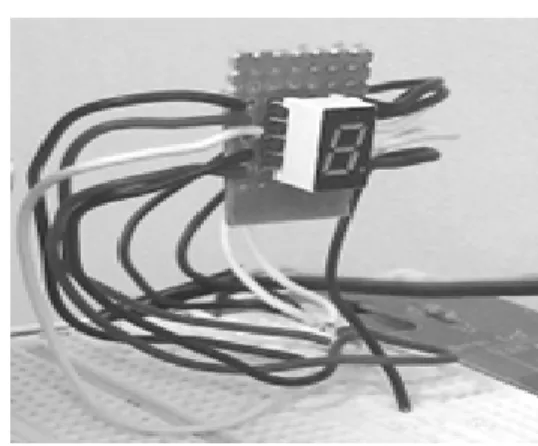
Different digital hardware, like LED and 7 segments for simple examples can be used (Fig.
9). It is easy to use digital hardware and it can realize a lot of student’s ideas. Also user can work with different hardware simultaneously, and use LED like indicators or flags. RES provides several examples with LED, like digital dice and traffic light.
Fig. 8 Control of the manipulator
Fig. 9 Digital practice with 7 segment
5. PID control of DC-Motor
The remote user can test PID algorithms and parameters, change reference velocity values and register the motor output velocity profile to optimize the values of PID coefficient according to requirements.
This experiment setup is conducted using USB-6009. In this practice, we use analog output to supply voltage to DC motor meanwhile we check speed signal through analogue input. PID algorithm is developed using LabVIEW code that regulate DC motor speed by receiving feedback through analog input signal (acquired from photo transistor sensor) and controlling the output voltage applied to the DC-moto(Fig. 10).
The user interface is illustrated in Fig. 11.
The access to the experiment is the same way as before. This experiment includes the DC-Motor used in the previous experiment. The feedback signal can be received from any available sensors (such as Photo transisitor sensor) where the signal is acquired through DAQ USB 6008 and hence sent to the PC containing application software “LabVIEW”.
At then, LabVIEW contains PID control sub VI so that the received signal is processed and the control signal is sent back again to the system. In the beginning, user first sets the reference speed (set point) and then manipulates PID parameters noticing the time response graph indicated on the chart on front panel. The values at then can be
optimized if the remote user notices a good response from the system. Such experiment can be an effective tool during a lecture about the control of DC-motor.
Fig. 10 PID speed control of DC-Motor
Fig. 11. PID control user interface VI.
IV. Discussion
In the previous section , the computer based practices applied in engineering education were introduced From the implementation of computer based practice in engineering education in general , the following benefits can be obtained:
Practice : Computer based practice in engineering education has the qualities of patience, interest, and economy. Namely, for many different topic to be covered in a field or subject matter, computer based practice may be the most feasible and cost-effective way to provide it.
Simulation for expensive or inaccessible
equipment : If equipment costing substantially more than desk-top computer systems can be simulated appropriately to meet the engineering education objectives at hand, then it is likely that computer based practice through interactive and simulated approaches, used in place of actual equipment will lower costs and increase education accessibility.
Stand-alone materials for physically dispersed students : Distance learning frequently focuses on the use of distributing class room learning using video technology. In many instances, this an appropriate approach. However, computer based practice can be provided outside of classroom settings, presented at arbitrary times and places, and delivered cheaply.
V. Conclusion
Based on the practice cases through out this paper and from the data and experiences, it can be concluded that computer based practice with graphical program :
- can be used to accomplish a wide range of equational objectives across a variety of instructional settings
- is often more effective than other more commonly used approaches in engineering education.
- is often less costly than other more commonly used to engineering education promises to be more cost-effective than other, more commonly used approaches to engineering education.
References
[1] M. Naghedolfeizi, S. Arora, and S. Garcia,
“Survey of LabVIEW Technologies for Building Web/Internet-Enabled Experimental Setups”, Proceedings of the 2002 ASEE Annual Conference&Exposition, 2002, pp.
2248-2257.
[2] S. C. Brofferio, “A University Distance Lesson System: Experiments, Services, and Future Developments”, IEEE Transactions
on Education, Vol.41, No.1, 1998
[3] Ji Hua, Aura Ganz, “Web Enabled Remote Laboratory (R-Lab) Framework”, 33rd ASEE/IEEE Frontiersin Education Conference ,SessionT2C, November 2003
[4] C. Chiculita, L. Frangu, “Remote Laboratory Allowing Full-Range Student-Designed Control Algorithm”, Proceedings for 9th International Conferenceon Electronics, Circuits and Systems,Vol.3, 2002, pp.1235-1238.
[5] S. H. Chen, R. Chen, V. Ramakrishnan, S. Y.
Hu, Y. Zhuang, C. C. Ko, and B. M. Chen,
“Development of remote laboratory experimentation through internet,” Proc. 1999 IEEE HongKongSymp, July 1999, pp. 756–
760.
[6] Compuler-Based Instruction in Mililary Environments. New York: Plenum Press.
This research was carried out by the support of KUT education and research promotion Fund.
Seong Joo Cho 종신회원 1981년 2월:한양대학교 기계 공학과 석사 1987년 8월:한양대학교 기계 공학과 박사 1992년 3월~현재:한국기술교 육대학교 기계정보공학부 교수
<관심분야> 생산공학,
CAD/CAM, Graphical Program
Mikhail Ghaly
2007년 2월:Alexandria University 기계공학과 학사 2009년 8월: 한국기술 교육대 학교 대학원 기계공학과 석사 2010년 3월~현재:한국기술 교육대학교 대학원
기계정보공학과 박사과정
<관심분야> 친환경 자동차