1. Introduction
In the past 20 years, people increasingly feel the need for efficient text entry on mobile devices. A virtual keyboard based on a multi-touch points screen, a physical keyboard
based on finger presses, and voice input based on speech recognition are three main methods.
According to research institute Creative Strategies data, 70% even more on iPhone users say they rarely or occasionally use voice assistants[1]. Since speech input is a very new
Study on Improved Interactive Mode of Delete in Mobile Phone’s Full Keyboard and Its Usability
Guo Haoyue
1, Pan Younghwan
2*, Luo Tao
21
M.A. student, Dept. of Experience Design, Graduate School of Techno Design, Kookmin University
2
Professor, Dept. of Experience Design, Graduate School of Techno Design, Kookmin University
휴대폰의 풀 키보드에서 향상된 대화식 삭제 모드 및 사용성에 관한 연구
곽호월
1, 반영환
2*, 루오타오
21
국민대학교 테크노디자인전문대학원 스마트경험디자인학원 석사과정
2
국민대학교 테크노디자인전문대학원 스마트경험디자인학원 교수
Abstract The text has always been an important recording channel for the development of human civilization. The delete text function is essential. The current method of deleting text is to "press" the delete button to complete the operation. It does not meet the user's need to delete large amounts of text. This article focuses on a new interactive approach to this problem. We consider problems and find solutions from the perspective of zero-order position control and first-order rate control. Through experimental design analysis and comparison, the new keyboard interaction method greatly improves efficiency and user experience. This article hopes to evaluate the usability of the new keyboard through usability studies.
Key Words : Delete, Keyboard, HCI, Usability, User experience
요 약 문본은 인류문명발전의 중요한 기록방식이다.문본의 삭제기능은 매우중요하다.현재 문본삭제의 방법은 ‘삭제’버 튼을 누르는 것으로 완성한다.이는 대량적인 문본삭제의 고객요구에 맞지않다.본문은 중점적으로 이문제를 해결하는 새로운 인터렉티브의 방식에대해 소개했다.우리는 이문제를 고려하며 제0위치공제와 제1속도공제중에서 해결방안을 찾았다.분석과 실험걸계를 통하여 새로운 키보드 인터렉비트의 방법의 효율과 고객의 체험을 크게 향상시켰다.본문은 가용성 연구를 통해 새로운 키보드의 가용성을 평가하기를 바라는바이다.
주제어 : 삭제, 키보드, HCI, 사용성, 사용자 경험
*Corresponding Author : Pan Younghwan([email protected]) Received February 28, 2020
Accepted April 20, 2020
Revised April 1, 2020
Published April 28, 2020
technology, there are still many recognition errors, and it lacks privacy[2]. Therefore, the design of the mobile phone's virtual keyboard is still the focus of mobile phone input design.
After the first iPhone was released in 2007, people could interact with gestures on the touch screen. These gestures elicit a close personal connection with content and enhance the sense of direct manipulation of onscreen objects[3]. It wasn't until 2015 that the iPhone added 3D Touch technology that mobile phone keyboards were liberated from simple "press" methods. The pain points of the current mobile phone deletion method can be summarized as three points: First, the finger is too large to accurately select the position. Second, after entering the quick delete, it is recognized as a priority word, half of the words cannot be deleted. Third, the speed cannot be adjusted. Article combines gestures with keyboard to solve current problems and improve interactivity.
2. Research Purpose and Program
2.1 Research purposes
On the computer, we can use the mouse to click exactly on the screen. But on a mobile phone, if you use a finger to operate, there is no way to be so precise. The appearance of gestures alleviates this problem to a certain extent, and it provides a possibility to operate without precision. Like mentioned above: How to delete text quickly or precisely? How do I let users know that this feature is available and easy to use? Our team designed two solutions for
"Delete".
The “unique” touch and swipe operation of mobile devices can achieve many experiences that cannot be felt with a keyboard and mouse[4].
Gesture interaction is a new excitement in industry. The increasing size, power consumption, and cost of microprocessors, memory, cameras,
and other sensing devices now make it possible to control with swipes and flicks, gestures, and body movements[5]. The design of the two deletion methods also makes full use of gestures.
2.2 Solution design
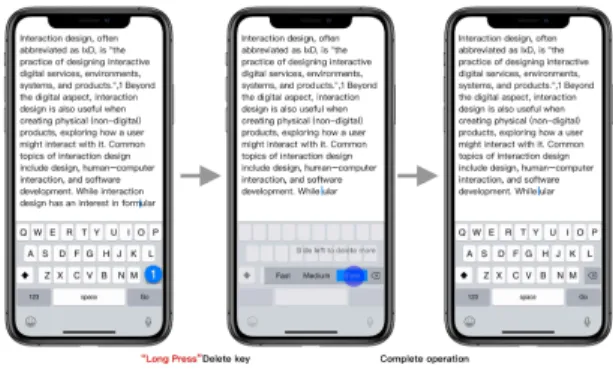
The first option is to control the deletion by redesigning the speed aspect. Speaking of speed, we all know that when the iPhone deletes long text, the longer the "long press" of the delete button, the more characters are deleted, which is called "k" interaction[6]. In the process of this operation, the user can neither control the speed in the middle, nor from the beginning, and because of the inability to control, the error rate is very high, so it is a poor user experience product. Our design solution is that the way you can delete by clicking the delete button is still saved, but the speed of deletion is made into an operable mode. Speed is divided into three gears:
slow, medium and fast. To use it, long press and hold the delete button, the speed options will be displayed. Swipe to choose one of the speed options, the text will be deleted at the selected speed. Stop deleting as soon as your finger leaves the screen. According to the four principle in Jakob Nielsen ’s 10 Heuristics[7], the visual design of scheme is maintained consistency and standards.
Fig. 1. “Delete speed” keyboard
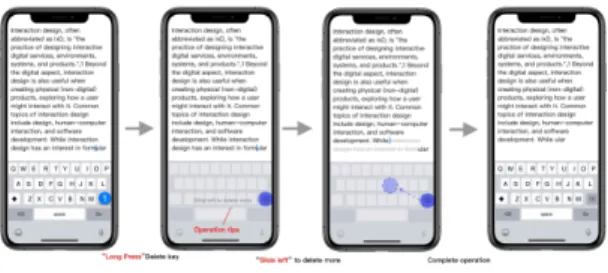
Our second deletion method is to control the
position of the cursor to delete the selected text.
There is currently an operation method that double-tap with finger to select a word, and then select the range of characters you want to delete by moving the two insertion points. The most common problem with this method is that you need to move the cursor position multiple times. The root cause is that the finger is too large to control the position of the insertion point, and some narrow areas on the screen cannot be touched, which will make the user feel that the operation is "blocked". Supplementary note:most people mistakenly believe that the hot area of the finger on the screen is eternal, but in fact the hot area of the finger will shrink as the device becomes larger[8]. Our second design is to still save the way that “click” can be deleted. But if you long press the “Delete” button, the keyboard will become a trackpad. Swipe left to select the range of deleted text. To let users know what to delete, we also provide visual cues.
After the user selects the deleted text range, the selected content can be deleted as long as the hand leaves the phone screen, and the keyboard will return to the original appearance. This design solution solves the problems mentioned above, and the operation method is convenient, free and fast.
Fig. 2. “Delete drag” keyboard
3. Experimental design
3.1 Availability
Different researchers have different definitions of the concept of usability. The ISO-9241-11
defines usability in terms of effectiveness, efficiency and satisfaction in a particular context of use[9]. The purpose is to emphasize that usability is the result of interaction. Relatively speaking, those three dimensions are internationally recognized standards. Therefore, this article will study the three dimensions of effective, efficiency and satisfaction.
3.2 Methods
We conducted usability tests to obtain data on effectiveness and efficiency. Need to design many experiments, asking users to complete a series of tasks designed, and recording the time for users to complete each task. As for researching user satisfaction, we use the System Usability Scale[10]. It could quickly and easily collect a user's subjective rating of a product's usability. [11]. The SUS provides a "quick and rough" reliable tool to measure usability. It contains 10 questions, ranging from totally agree to completely different, with a total of 5 answers.
Users can choose what they want. We use it to summarize and analyze the subjective satisfaction of users.
3.3 Participants
Since our keyboard was specifically designed for English during the test, we chose only English speaking participants. With the popularity of modern mobile devices, each participant has experience using a keyboard to delete, but because each participant is different in age, typing speed and time are also different, so there will be some deviations in the experiment.
Because the testers are all schoolmates, the
testers in this article are young people under 35
years old. As mentioned above, there are two
deletion designs. Each program has 9
participants to offset the impact of the test
sequence. Because these are two new methods,
worry about whether participants are familiar
with the operation affect the test results.
Therefore, the other 10 participants were divided into two groups. Record before and after they are familiar with the "Delete Drag" and "Delete Speed" methods.
3.4 Apparatus
The experiment selects the iPhone full keyboard as the test carrier, and each tester will use the original keyboard and the developed new keyboard. Questionnaire assessing satisfaction is printed and ready to be distributed to testers.
The recording equipment used is: mobile phone camera, fixed frame, notebook. The test was conducted in a memo that comes with the iPhone, which is the only device used by the participants.
3.5 Procedure
A detailed test plan is developed before the test begins. I will invite the participants to sit down in the classroom, and then briefly introduce the purpose of the experiment to each participant, and introduce the participants to the experimental method and the function of the new keyboard, including visual demonstration.
The phone was then handed over to the participants, asking to delete the underlined text area using both the old and new keyboards.
The experiment about deleting was to type two paragraphs of English in the memo of the mobile phone beforehand, one paragraph set 10 words to be deleted (underlined where to delete), and the other paragraph set 10 sentences to be deleted. Eighteen people were divided into two groups of nine people each. Both groups need to be tested using the original iPhone method. Then one group uses the "speed delete" method and the other uses the "drag delete" method for testing. The other 10 people were divided into 2 groups. After testing with two new methods, they were familiar with their corresponding deletion
methods again and tested again.
4. Data analysis
The following data analysis and statistical information uses SPSS software. Its ease of use, non-technical quantitative data analysis methods allow me to quickly become familiar with SPSS[12]. Effectiveness includes accuracy and completeness. Since text entry and modification are more commonly used functions, there is no great difficulty. Most users can do this correctly.
Validity has no reference value in the tests in this article, so no validity data was collected at the time of data collection. The output analyzed using this software will contain the following sections. One-Sample Statistics. Provides the sample size, mean, standard deviation, and standard error of the mean for the target variable[13]. The value of “t” is obtained by the formula and then converted to the value of “p".
When interpreting a P value, it can be concluded that there is a significant difference between groups if the P value is small enough, and less than 0.05 (5%) is a commonly used cutoff value[14].
Efficiency data occupies a very important position in this paper. A total of two keyboard methods are designed in this article. The first method is called "delete drag" and the second method is called "delete speed". The length of the text in the task will affect the experiment. In this experiment, the unique variable is the length of the text, and the dependent variable is the time it takes to complete the task. In the table below,
“Er” represents the experimental group, this group uses the "delete drag" keyboard.“Cr”
represents the control group, which uses the
iPhone keyboard. T1 group is the test word
group, T2 group is the test sentence group:
T1 T2 t P Er 23.82±6.01 40.14±8.10 -5.789 0.000 Cr 26.89±6.95 62.71±13.37 -9.002 0.000
Table 1. Delete drag analysis
Fig. 3. Test word group data chart
Fig. 4. Test sentence group data chart
The independent sample t test was used to compare the differences in T1 and T2 scores.
The paired sample t test was used to compare the differences between T1 and T2 in the experimental and control groups. After testing, there was a significant difference between T1 and T2 in the experimental group, because the T2 score was significantly higher than T1. There was a significant difference between T1 and T2 in the control group, indicating that the T2 score was significantly higher than T1. That is, the delete drag method has a greater impact on sentences than on words.
Because this is a new way to interact, users in the experimental group were not familiar with the operation before. The control group was operated using routine methods. To make the experiments more rigorous, comparisons were made before and after becoming familiar with
the new interaction method. As can be seen from the above, the "delete and drag" method has a greater impact on sentences. The number of participants is limited, only comparisons before and after sentence deletion are compared. In the table below, T1 represents the novice group and T2 represents the novice group.
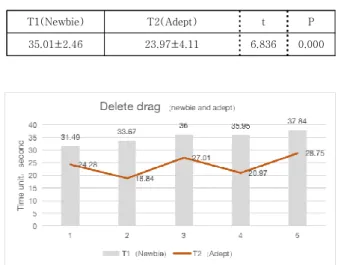
T1(Newbie) T2(Adept) t P
35.01±2.46 23.97±4.11 6.836 0.000
Table 2. Delete drag newbie and adept analysis
Fig. 5. Comparison between newbie and adept
A paired sample t test is used to compare the differences between T1 and T2. After testing, there was a significant difference between t1 and T2. The performance of T1 is significantly higher than T2. In other words, the first time operation does take longer than the adept. If the user is familiar with the operation, the efficiency will be greatly improved.
In the second way "delete speed" test. I find that when people delete words, they are reluctant to use this new method and consider it more complicated than the original operation. So only have delete the data of the sentence. In the table below, "Cr" is also the group using the iPhone keyboard. “Er” represents the experimental group, this group uses the "delete drag"
keyboard.
Er Cr t P 47.64±8.03 63.36±12.11 -4.533 0.002
Table 3. Delete speed analysis
Fig. 6. Test sentence group data chart
The paired sample t test was used to compare the difference between the Er and the Cr. After testing, there was a significant difference between the experimental group and the control group, the performance of the experimental group Er was significantly lower than the control group Cr. That is to say, the "delete speed"
method has a significant effect on the time used to delete sentences. The specific comparison of each group is shown above.
In this way, comparison experiments before and after familiarization are also performed. In the table below, T1 represents the newbie group, T2 represents the adept group.
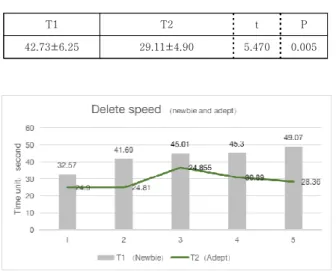
T1 T2 t P
42.73±6.25 29.11±4.90 5.470 0.005
Table 4. Delete speed analysis
Fig. 7. Comparison between newbie and adept
The paired sample t test was used to compare the differences between T1 and T2. After testing, there was a significant difference between t1 and T2. The performance of T1 was significantly higher than T2. That is to say, in the "delete speed" mode, the first use takes significantly longer than the familiar use.
To calculate the SUS score, for all odd statements a one is subtracted from the respondent’s choice where as in the even statements the respondent’s choice is subtracted from five. The results will be transformed scores of values (0–4); four being the most favorable response and zero being the least favorable response. The last step is to accumulate the responses for each respondent and multiply it by 2.5, this transforms the range to (0–100)[15].
Fig. 8. Delete drag (SUS) score
Fig. 9. Delete speed (SUS) score
Note that the average score in the data used to
create the Sauro–Lewis CGS was 68, which was
by design the exact center of the CGS (a grade of
C). There is a total of 11 grades[16]. This means
that the original SUS is higher than 68, higher than SUS, and lower than 68 lower than SUS.
Through statistical calculations, it is known that the three schemes are higher than the average score. The final score of delete drag is 90 points.
According to the level table, the level is A +, the delete speed is 77.22 points, and the level is B +.
5. Results
The purpose of this article is to propose a new deletion method and study its usability. The advantages and disadvantages of the original method and the new concept are compared through experiments and analysis. The overall goal of this article has been achieved. The efficiency of "delete drag" in the evaluation is the best of the three methods. Its score on the SUS scale It is also higher than "delete speed", and people are willing to accept it. The reason is that nothing more than "sliding" on the screen is something that everyone is accustomed to. In fact, the user has established an experience-based cognition[17]. The "delete drag" solution fits the vague mental model of people's hearts. The two solutions mentioned in the article are actually thinking about actually manipulating objects. We can be sure that it is not the perfect solution. Even though "delete drag" is excellent in all aspects, some users are more interested in "delete speed".
In the existing methods, people often use the
"speed" method, even if people find that they do not have a strong sense of control, but this does not affect its continuity on the mobile terminal, so we have done the corresponding "delete speed
”method, so that people can determine the speed of the current control. Although the experimental findings in the article are not very good, there must be a reason that has continued to this day.
How to combine speed and position perfectly without conflicts becomes a difficult point for
future research.
Due to the development cost reasons, only the full keyboard interaction mode of the iPhone is currently developed. But this interaction is not limited to iPhones. It is hoped that it can be used in all devices with a touch screen and keyboard, such as iPad, learning machine and so on.
Although this article only studies the delete method in the keyboard, in the future research, other functions in the keyboard will be analyzed and improved methods will be proposed to assist the delete method for better interaction. I hope this article can provide a reference for the gesture interaction method of the virtual keyboard on the touch screen.
REFERENCES
[1] Milanesi C. (2016). Voice Assistant Anyone? Yes Please, but Not in Public! [Online].
https://creativestrategies.com/voice-assistant-anyone -yes-please-but-not-in-public/
[2] Marco Romano, Luca Paolino, Genoveffa Tortora &
Giuliana Vitiello. (2014). The Tap and Slide Keyboard:
A New Interaction Method for Mobile Device Text Entry. International Journal of Human–Computer Interaction, 30(12), 935-945.
DOI : 10.1080/10447318.2014.924349
[3] Human Interface Guidelines. (2020). [Online].
https://developer.apple.com/design/human-interface- guidelines/ios/user-interaction/gestures/
[4] Pang Xiaoyue, GUO Rui-zhen, YAO Nai-lang, YU Jia-lin, YU Shi-xian, WANG Ci & GAO Zai-feng.
(2014.03). Human factor studies on gestural interaction: Past, present, and future[J]. Chinese Journal of Applied Psychology, 20(3), 243-251.
DOI : 10.3969/j.issn.1006-6020.2014.03.007.
[5] Norman, D. A. (2010). The way I see it: Natural user interfaces are not natural. Interactions, 17(3), 6.
DOI : 10.1145/1744161.1744163
[6] Luo Tao. (2018). Designing the beauty of interactions.
[Brochure]. Beijing China. Tsinghua University Press.
[7] Mirkowicz, M. & Grodner, G. (2018). Jakob Nielsen’s Heuristics in Selected Elements of Interface Design of Selected Blogs. Social Communication, 4(2), 30-51.
DOI : 10.2478/sc-2018-0013
[8] Dai Dai. (2018). Starting from "gesture interaction",
analyze the principles behind product design.
[Online].
https://www.uisdc.com/gesture-interaction-analysis-p roduct
[9] Bevan, N., Carter, J. & Harker, S. (2015). ISO 9241-11 Revised: What Have We Learnt About Usability Since 1998? Lecture Notes in Computer Science, 143-151.
DOI : 10.1007/978-3-319-20901-2_13
[10] Klug, B. (2017). An Overview of the System Usability Scale in Library Website and System Usability Testing.
Weave: Journal of Library User Experience, 1(6).
DOI : 10.3998/weave.12535642.0001.602
[11] Neal Krause, & Elena Bastida. (2009). Religion, suffering, and health among older Mexican Americans, 114-123.
DOI : 10.1016/j.jaging.2008.11.002
[12] Bryman, A. & Cramer, D. (2011). Quantitative Data Analysis with IBM SPSS 17, 18 & 19. London:Routledge.
DOI : 10.4324/9780203180990
[13] DeCoster J. & Claypool H. (2004). Data analysis in SPSS. Retrieved October, 2, 2015. [Online].
http://www.stat-help.com/notes.html
[14] Bewick, V., Cheek, L. & Ball, J. (2004). Statistics review 9: One-way analysis of variance. Crit Care 8, 130.
DOI : 10.1186/cc2836
[15] AlGhannam, B. A., Albustan, S. A., Al-Hassan, A. A. &
Albustan, L. A. (2017). Towards a Standard Arabic System Usability Scale: Psychometric Evaluation using Communication Disorder App. International Journal of Human–Computer Interaction, 34(9), 799-804.
DOI : 10.1080/10447318.2017.1388099
[16] James R. Lewis. (2018). The System Usability Scale:
Past, Present, and Future, International Journal of Human–Computer Interaction, 34(7), 577-590.
DOI: 10.1080/10447318.2018.1455307
[17] Card, S. K., Moran, T. P. & Newell, A. (2018). The Psychology of Human-Computer Interaction.
DOI : 10.1201/9780203736166
곽 호 월(Guo Haoyue) [학생회원]
․ 2014년 9월 ~ 2018년 7월 : 鲁 迅美 术学院 (루쉰 미술 대학교)
․ 2018년 9월 ~ 현재 : 국민대학교 테크 너디자인전문대학원(석사)
․ 관심분야 : HCI, 인터랙션디자인, UX, UCD,
․ E-Mail : [email protected]
반 영 환(Young-Hwan Pan) [정회원]
․ 1991년 2월 : 한국과학기술원 산업공 학과(공학사)
․ 1993년 2월 : 한국과학기술원 인간공 학(공학석사)
․ 1999년 8월 : 한국과학기술원 인간공 학(공학박사)
․ 2006년 9월 ~ 현재 : 국민대학교 테 크노디자인전문대학원 교수
․ 관심분야 : 인터랙션 디자인, 사용자경험(UX)
․ E-Mail : [email protected]
루오타오(Luo Tao) [정회원]