• 검색 결과가 없습니다.

pLog: User Generated Media for Personal LBS

N/A
N/A
Protected

Academic year: 2021

Share "pLog: User Generated Media for Personal LBS"

Copied!
9
0
0

로드 중.... (전체 텍스트 보기)

전체 글

(1)

pLog: User Generated Media for Personal LBS

Hideki Kaji * Masatoshi Arikawa **

Abstract This paper proposes a framework for personal location based services with personal life content, for example diaries, schedules and to-do lists. A lot of Internet users are recording their personal experiences and knowledge as text and other digital media on the network. Our proposed tool provides users with an environment to store personal records with related place attributes, and to retrieve these personal records at the right place. There are two applications on this tool, a place-enhanced blog and a LBS client on a mobile phone. The place enhanced blog provides users with blog interfaces for inputting place information. The place reminder is a browser for spatial data on the place enhanced blog. Users can generate place information by writing personal records on their blog. Furthermore, using the LBS client, other users can retrieve personal records at the appropriate spots.

Keywords : Location-Based Service, Blog, Mobile

**

Ph. D. Candidate, Graduate School of Interdisciplinary Information Studies.University of Tokyo, [email protected](corresponding author)

**
Associate Professor, University of Tokyo, [email protected] Manuscript received:2009.05.12 Accepted:2009.06.19

1. Introduction

Location based services (LBS) have become common. People often use GPS and maps on mobile phones. The GPS integrated mobile phones allow users to find their positions, search points of interest (POI), generate itineraries of their trips using com- plex time tables of public transportation, and navigate in the real world [2]. Although these commercial LBS can record only using histories and some spatial bookmarks, they cannot record and retrieve user gen- erated personal spatial content on them. On the other hand, people are documenting their lives on the net- work today, reporting on their emotions, tughts, plans and actions, to remember and share their experiences [3]. Many of these personal records include spatial information which can be provided as spatial content in LBS.

From these points, we propose a blog based per- sonal LBS in this paper. Personal LBS can provide users with their personal information or services based on locations and their personal information which are managed in blogs. Also, users can easily launch user-generated LBS for themselves as well as other users on the Internet.

User Generated Media that uses geographic in- formation is increasing. Flickr[4], photo and media file

sharing service can add location information to media files or use embedded GPS data in photos. Then these files can be put and viewed on digital map.

ALPSLAB video [1] provides user uploaded videos with routes on the map and vertical interval of the routes the three are synchronized through the timeline. Location-based Reminders (LBR) are one of the types of location-based services using personal spatial content. LBR works as Personal Information Manager (PIM) by managing users' everyday tasks like meetings, contacts, documents, events, and so on.

Also it provides these tasks depending on location of users [7]. Dey and Abowd [5] defined many types of context-aware reminders. They needed to set all sit- uations and information for delivery. comMotion [8]

allows users to command the reminder with speech.

PlaceMail [7] has a Web based interface for manag-

ing place information and spatial content. Also it has

special applications for mobile phones for controlling

delivery timing and receiving messages. LBR can be

useful to make use of blog records by pushing ap-

propriate past blog entries to users at the right place

and time when the users go near the places asso-

ciated with the blog entries. In common blogs, a user

writes memos about some interesting places on the

blog. The user view the records only on the blog

system by pulling entries on Web browsers, and then

(2)

Fig. 2. Recalling pLog Entries, that is, POIs, depending on the Location.(Map images: copyright

2009 Google, copyright 2009 ZENRIN) most of these records will be hidden in dead storage.

But if these records can be used as LBS content, users can use them more efficiently.

We have implemented a place enhanced blog which can integrate a blog that has personal information management, and spatial information of places. Most current blogs realize the user environment to manage personal records, for example diaries, schedules, to-do lists and memos. We extend a blog system to spatial information managing functions. We have also devel- oped a personal LBS client application on mobile phones. Furthermore, users can write and read per- sonal spatial information on the place enhanced blog, and can be reminded of appropriate blog entries based on the location of the user through their mobile phone.

2. Recording and Utilizing Personal Spatial Information for LBS

Our proposed system named pTalk which is a software family to realize our proposed framework of personal LBS. pTalk is composed of the following three software components. (1) Place enhanced blog, pLog: A blog with functions for dealing with spatial information. (2) LBS Interface script: LBS clients connect to pLog through this interface script. (3) LBS client application, pCatcher: It is a front-end software running on a mobile device to realize personal LBS through interaction with users. Using this system, users can utilize personal life content that they have generated themselves through normal blogging on the appropriate locations.

2.1 Future Diary: Setting Location-based Reminders 2.1.1 Making an itinerary as a future diary on a

place enhanced Blog

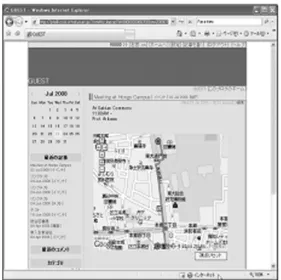
When we have schedules, location-based reminders can be useful to automatically provide us with appro- priate information at the right places. Our framework pTalk is suitable for such uses. Figure 2 shows an example of registering a schedule of a meeting at Hongo campus of the University of Tokyo on pLog.

In advance, a user created the entry of the schedule on pLog. Examples of POIs created by the users are Hongo-Sanchome station, the places to have the meetings and a path from the station to the meeting room. The present pLog uses Google Maps to create and show POIs, paths represented by red lines on maps and diaries.(Figure 1)

Fig. 1. A schedule Entry of a Meeting at Hongo Campus on pLog.

2.1.2 Personal LBS of the path through pCatcher on a mobile device

When the scheduled day comes, we view pLog en- tries pushed up to the location on mobile devices.

Examples of pLog entries are “When I have arrived at Hongo-Sanchome Station, pCatcher shows me the path”. pCatcher can also provide a map centered on the current location. The map can display some other POIs that were entries representing past diaries.

Also, more POIs can be provided by other pLog resi- dents and commercial LBS providers. For example, a Hongo campus guide created by a student can be chosen to be added on the map on the mobile device.

2.2 Ubiquitous collaborative learning of shapes

of big fireworks for children

(3)

Fig. 4. Architecture of pTalk.

Fig. 5. Entry View and Place Information Input Form.(Map images: copyright 2009 Google,

copyright 2009 ZENRIN) Children often wonder if the shapes of big fire-

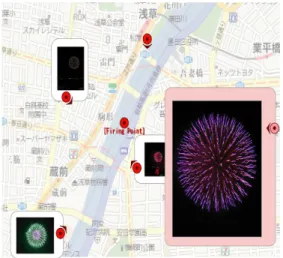
works in firework festivals are the same if viewed from different locations. pTalk can be an appropriate platform for children to learn that shapes of fireworks look like circles from any location. Children can col- laborate with one another, take photographs of fire- works from arbitrary positions with their GPS in- tegrated mobile phone cameras, and send the photo- graphs with email messages including the locations where they are taken and other related information to pLog through pCatcher. Children view many photo- graphs of fireworks taken by different children from different locations, and the locations of cameras on maps on pLog through a Web browser (Figure 3).

Red circle icons represent locations of cameras. The red circle icons may have their directions from cam- eras to the location of launching fireworks. The de- scriptions of directions of cameras can be indicated in the input form on mobile devices

Fig. 3. Photographs of Fireworks in a Firework Festival and their Representative Red Circle Icons

attached with Short and Wide Arrows are placed at the Locations of Cameras taking the

Photographs on Google Maps.

3. Architecture and Implementations

Figure 4 shows the architecture of pTalk which is designed as an open platform to realize personal LBS based on protocols of the Internet.

pLog and a LBS interface script are coded as Web CGI applications, and they communicate with client

applications using HTTP. pCatcher is a client software of personal LBS. It connects the interface script with HTTP to interactively retrieve and display POIs from the pLog through user-friendly GUI on the screen of a mobile device. Web browsers and LBS clients using LBS interface scripts can choose an HTTPS connection instead of an HTTP connection to protect their communication channels.

3.1 pLog: a Place enhanced Blog

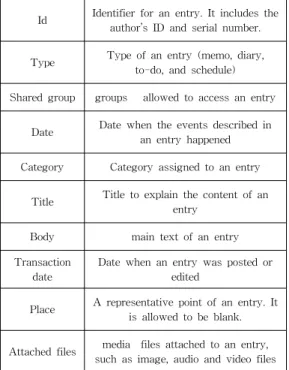
pLog provides users with an extended function of dealing with spatial information such as point of in- terest (POI) and area of interest (AOI) in addition to general functions of common blog systems such as browsing and managing personal information. Users add place descriptions to their blog entries through blog input interfaces on Web browsers. An entry of pLog is composed of the attributes listed in Table 1.

Characteristic attributes of an entry stored in pLog

are described in the following sections.

(4)

Table 1. Attributes of an Entry stored in pLog

Id Identifier for an entry. It includes the author’s ID and serial number.

Type Type of an entry (memo, diary, to-do, and schedule) Shared group groups allowed to access an entry

Date Date when the events described in an entry happened Category Category assigned to an entry

Title Title to explain the content of an entry

Body main text of an entry Transaction

date

Date when an entry was posted or edited

Place A representative point of an entry. It is allowed to be blank.

Attached files media files attached to an entry, such as image, audio and video files

3.1.1 Entry types and behavior.

The Type attribute of all entries must be set to one of the selections including memo, diary, to-do and schedule. The Type attribute is used for calcu- lating the importance levels for displaying blog en- tries on a screen or a map. Memo entries are consid- ered general information and less important in the order of visualization, because they do not have spe- cific date attribute settings. Diary entries have spe- cific date attribute settings, but they are also consid- ered less important in the order of visualization. They can be selected and set away by temporal queries.

To-do entries are considered more important in the order of visualization. They do not have specific date attribute settings. Examples of To-do entries are pla- ces to go and things to buy. Schedule entries are considered more important in the order of visual- ization if the specific date or time is close to the cur- rent date or time. They are treated as the most im- portant when the specific time is now. To-do and schedule entries have special behaviors on pLog and pCatcher. All to-do entries and entries about sched- ules within one week float to the top of the entry list on the web browser to hold the attention of the blog owner. Moreover, our system pushes to-do and schedule entries to the LBS client when a user meets conditions for distribution. pTalk server delivers a

to-do entry when a user locates near the place re- lated to the information in the to-do entry in the real world. Also it delivers today's schedules. This fea- ture works as a location based reminder. For in- stance, a user registered a memo about some books he wants to read on the pLog with his favorite book store location and he runs pCatcher on his mobile phone. pCatcher notifies his current location to the server regularly and when he moves near the book store, the server sends the to-do entry to him.

3.1.2 Access Control.

On the pLog, users can control accessing entries flexibly. For utilizing personal information what a user does not want to open (ex. Personal schedules, closed messages within fellows and announcements for registered users), pLog provides the shared group attribute. This attribute is used for managing data access control. Special instances of the attribute val- ues are “private” and “public” for entries to be pro- hibited and to be opened to the public. “friend” set- ting in the attribute “Shared group” is prepared for setting and creating groups for sharing entries. Only users belonging to group A can access entries of group A.

In common blogs, users can control accessing each entry but they cannot control accessing each arbi- trary part of an entry body text. On the pLog, blog owners can limit access to each arbitrary part of an entry body text by using group tag [gourp gid].

Group tag is a paired tag so it has a start tag [group gid], gid represents a target group to allow showing the part, and an end tag [:group], the tag word starts with a colon. Owners put a part of a text between the start and end tags.

Doors open at 6:00pm

[group Staff] Staff must come at 4:00pm [:group]

Members of group Staff view the whole text on this entry but other users can view only first line on this entry.

3.1.3 Spatial Objects on User Content.

Spatial objects have location data and six other at- tributes(see Table 2.).

When users click an object to check its in- formation, it expands an information balloon on the digital map if it has a name or description attribute.

Area is a set of points. It is constructed by four

corner points and a representative point. Users can

edit locations of all corner points freely and the repre

(5)

Fig. 6. PCatcher: a Personal LBS Client on Mobile Phone.(Map Images: copyright 2009 Google,

copyright 2009 ZENRIN) Table 2. Attributes of Spatial Information.

Geometry type Type of geometry for aspatial object (Point, Line, and Area)

Direction Direction of a spatial object. The semantics of the direction is flexible.

Latitude-Longi tude, Zoomlevel

The location of aspatial object and the zoom level of a map displaying thes patial object are generated from the Web API of Google Maps.

Object name Name of a spatial object

Category Category name assigned to aspatial object

Description Description of a spatial object.

sentative point is defined automatically from the lo- cations of corner points. Name, category and descrip- tion data are set as the attributes of the representa- tive point.

Continued multiple line type point objects make a polyline, which doesn't have a representative point.

Line type points that have names or descriptions are clickable to check their information.

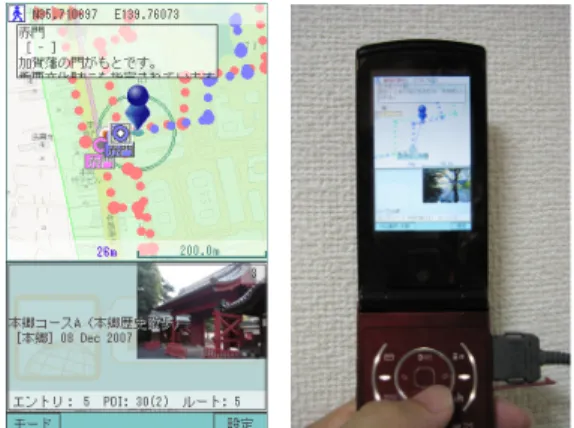
3.2 pCatcher: Mobile Client for personal LBS A LBS client can provide a rich environment for a user to interactively retrieve and display entries of the user's interest and other spatial information stor- ed on the place enhanced blog. Users can send their queries to a place aggregator on a personal LBS server through the place catcher interface, and then the place catcher displays spatial query results with digital maps. Moreover, place catcher can have other high-level functions like a pedestrian navigation sys- tem, a digital content viewer and so on.

pCatcher is an implementation of a place reminder as a software application on a mobile phone. It allows users to browse blog entries and other spatial content including not only text and image data. In addition, pCatcher can track a line on digital maps at levels of walking speed if users select a line from multiple lines on the maps. Maps are scrolled automatically and choose spatial information closest to the center.

This function can be used as a simple navigation method for a pedestrian.

4. Creating Blog Entries with Place Descriptions

In this section, we introduce a software module to create pLog entries or blog entries with place de- scriptions through web browsers respectively. pLog can deal with assigning place information such as POI and AOI to blog entries. It is almost the same to create entries on pLog as to create entries on com- mon blog systems through web browsers.

4.1 Creating Place Information on pLog pLog allows users to create and modify spatial ob- jects in the database of pLog by creating and operat- ing place markers on Google Maps (Figure 7).

Figure 7 is an interface of pLog to create spatial objects. The followings are step-by-step explanations for using the pLog place description module.

(1) Choosing “Marker type”.

(2) Moving the map and centering a target point.

(3) Filling in input fields of place information, such as POI/AOI, Title, Category and Description.

All the fields are not mandatory.

(4) Pressing the “Mark” button to put a location marker

4.2 Creating poi Tags Referring to POIs from Entries

pLog can indicate many to many connections be-

tween an entry body text and included points of in-

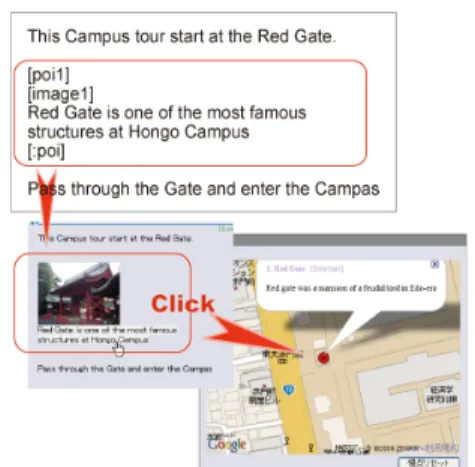
terest in an entry using PoI tag, [poi #]. PoI tag is a

paired tag so it has a start tag [poi #], The number

(#) represents a target spatial object, and end tag

(6)

Fig. 7. Input Form for creating Place Information (Map Images: copyright 2009 Google, copyright

2009 ZENRIN)

[:poi], the tag word starts with a colon. Owners put a part of a text that can include other tags, between the start and end tags.

A part of text will turn to a highlight when it has connected to a spatial object and a user mouses over it. If users click a highlighted part then the map view on the browser centers on the spatial object and ex- pands the information balloon of the spatial object on the digital map. Moreover, connected parts are deliv- ered to LBS clients as description texts of the spatial objects included in XML.

Fig. 8. A POI Tag makes a Connection between a Part of Body Text and a Spatial Object.

5. Recalling Entries Depending on the Locations

The LBS interface script provides accessibility for personal spatial content on the pLog to LBS client applications using HTTP and XML. When users

make spatial queries, the interface script searches matched available personal spatial content, and re- turns the results of the queries to the client with XML text. The interface script allows each type of HTTP client to connect and use personal spatial con- tent on pLog. Users make queries to pLog using pLog interface script to retrieve spatial content. For example, a user sends the following query to the in- terface script.

uid=smith pass=pass date=all

place=“139.7,35.7,1”

“place” represents location and range for searching.

The first and second numbers mean longitude and latitude of the center point. The third number is the radius from the center point.

pLog interface script searches blog entries of user smith and the search area is 1km square around the center of the area located at longitude 139.7 N, lat- itude 35.7 E. pLog interface script returns an XML text containing spatial content information

<ENTRY>

<UID>09823</UID>

<EID>0982320071102</EID>

<TITLE>Colloquium</TITLE>

<CATEGORY>Schedule</CATEGORY>

<DATE>8 Nov 2007</DATE>

<TEXT>At iii building 1F meeting room 10:00-

</TEXT>

</ENTRY>

<POI>

<POIID>0982300001</POIID>

<PARENT>0982320071102</PARENT>

<TYPE>0</TYPE>

<DIRECTION>0</DIRECTION>

<LONGITUDE>139.7610</LONGITUDE>

<LATITUDE>35.7117</LATITUDE>

<ZOOM>17</ZOOM>

<CATEGORY>Place</CATEGORY>

<NAME>iii office</NAME>

<DESCRIPTION>Main office of iii

</DESCRIPTION>

<DESCRIPTION>Next door of the entrance of the Library</DESCRIPTION>

</POI>

Figure 9. Sample XML Text of a pLog Entry.

(7)

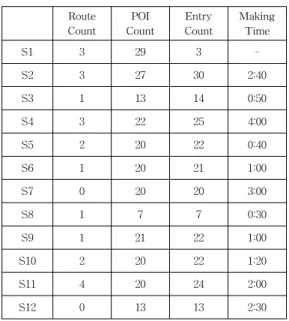
Table 3. Numbers of Entries and Spatial Objects in Content

Route Count

POI Count

Entry Count

Making Time

S1 3 29 3 -

S2 3 27 30 2:40

S3 1 13 14 0:50

S4 3 22 25 4:00

S5 2 20 22 0:40

S6 1 20 21 1:00

S7 0 20 20 3:00

S8 1 7 7 0:30

S9 1 21 22 1:00

S10 2 20 22 1:20

S11 4 20 24 2:00

S12 0 13 13 2:30

In this sample query, an interface script returns a blog entry from pLog and map image data of the area from the map server.

A spatial object has multiple description nodes on the POI object in XML text, when the object is in- cluded and connected from multiple entries. For ex- ample, when entry A, B and C have poi tags that are connected to the spatial object O then O and the en- tries are retrieved through a LBS client,

6. Using pTalk

To evaluate a prototype system of our proposed personal LBS, we tried out the system in a class.

Four graduate students of the University of Tokyo used pTalk and each student created town guide content on the pTalk system then students experi- enced this content on these sites in December 2007 and December 2008.

6.1 Creating Spatial Content

Students created content as an assignment after a lecture using pTalk for an hour. The content was a walking guide for an area around Tokyo. Students created some entries including related POIs and lines on the pLog. POIs represent favorite restaurants, in- teresting hobby shops, view points and so on. Lines represent some route to walk the area.

Most students created his/her content in a night.

The target area and numbers of spatial objects in the content is in Table 3. From entry time stamps, they did not spend much time for creating content.(see Table 3.).

6.2 Writing Styles of Entries

There were two writing styles of relevance be- tween body text and geographical objects on an entry. One to one relationships and many to many relationships.

Most students created entries and spatial objects with one to one relationships. It includes only a topic and a related spatial object in an entry on their blog.

With this style the relationship between a blog text and a spatial object is easy to understand, thus own- ers don't need to put poi tags in their entries to rep- resent connections between a spatial object and a re- lated part of text.

A student can put multiple spatial objects in each entry, but these entries don't have any poi tags,

hence users need matching between lines and spatial objects. Using poi tags, owners can indicate the con- nections explicitly, and many to many entries must have equivalent understandability as one to one entries.

We will provide owners with easier interfaces to make connections between a part of text and a spa- tial object. For example, an owner selects a spatial object and a part of text that is related to it then the owner clicks the Make connection button.

6.3 Experience on the Sites

Fig. 10. Experience of Spatial Content on pTalk

Students experienced pTalk spatial content with each other using pCatcher application. They tracked a route in a content and checked places of POI described.

Current pCatcher does not use GPS thus users

must read the digital map and match his/her position

to the displayed position on the mobile phone. Hence

some students lost his/her way.

(8)

There are some students' voices after this experi- ence in the following lines. “pCatcher needed some getting used to” “It is very interesting to relive the experiences of someone else.” “I was prone to get lost with GPS-less navigation.” “It was easy to make spatial information on the pLog and it was very use- ful to create spatial content.”

7. Conclusion

In this paper, we have proposed the personal LBS framework and reported our implemented prototype system of the personal LBS for using personal life content. The prototype system provided users with a useful environment to create and use personal life content with spatial information as an extended blog system. Then, we confirmed the effectiveness of our proposed personal LBS.

Useful interfaces and easy operations of pLog al- lows trial users to create many blog entries as a spatial content on the pLog in a short time, after only a simple short lecture for using pTalk.

n the experience of pTalk, we acknowledge that personal spatial information is valuable as spatial content of LBS. It helps users to purchase a product or helps to choose a restaurant, and so on. But it is not enough that an LBS contains only personal spa- tial information. Therefore it is important to integrate between personal LBS and commercial LBS. For in- stance, when a user walks around Akihabara down- town in Tokyo, this system retrieves user's to-buy list in personal records and related shops' information on the commercial services, then this information is displayed on his/her mobile device synchronized with places of the users. Pushing users' past blog entries to each user can make them remember past forgotten memories and clarify their present situation from the life-span viewpoint.

We have proposed a place enhanced blog for per- sonal LBS in this paper. LBS are generally developed on the commercial telecommunication network serv- ices, and are usually not open in technical and use senses. Our proposal of place enhanced blogs are open on the platform of the Internet. Individuals can create and modify their own services by themselves using web browsers and special software on mobile devices.

Acknowledgement

We appreciate that Mr. Sung-Ha Back kindly supported us by fitting our paper to this Journal style.

Reference

[1] ALPSLAB video, http://video.alpslab.jp/, (Japanese) [2] Arikawa, M., Konomi, S., Ohnishi, K. NAVITIME:

Supporting pedestrian navigation in the real world. IEEE Pervasive Computing, Special Issue on Urban Computing, 6 (3), 2007, pp. 21-29.

[3] Bonnie, A. N., Diane J. S., Michelle G., Luke S., Why we blog, Communications of the ACM, v.47 n.9, Dec. 2004, pp. 41-46.

[4] Flickr, http://www.flickr.com/

[5] Ludford, P. J., Frankowski, D., Reily, K., Wilms, K., Terveen, L. Because I carry my cell phone anyway: functional location-based reminder applications. Proceedings of the SIGCHI confer- ence on Human Factors in computing systems, ACM Press, 2006, pp. 889-898.

[6] Tarumi, H., Morishita, K., Nakao, M., and Kambayashi, Y. SpaceTag: An Overlaid Virtual System and its Application, Proceedings of International Conference on Multimedia Com- puting and Systems (ICMCS'99), IEEE, Vol.1, 1999, pp. 207-212.

[7] Terada, T., Tsukamoto, M., Nishio, S. Active GIS: A Geographic Information System Using Active Database Systems, Proceedings of Sym- posium on Asia GIS 2001, 2001, (CD-ROM).

[8] Nair, S., Kumar, A., Sampat, M., Lee, J.C., McCrickard, D.S. Alumni campus tour: capturing the fourth dimension in location based notifica- tion systems, ACM Southeast Regional Conference archive, Proceedings of the 44th an- nual Southeast regional conference, 2006, pp.

500-505.

(9)

Hideki Kaji

1998 Dept. of Computer Sciences.

Hiroshima City University(B.S.) 2006 Graduate School of Business Sciences, University of Tsukuba (M.S.)

2007~Present Ph. D Candidate, Graduate School of Interdisciplinary Information Studies, University of Tokyo

Research Interests : Location-Based Services, Web System, Ubiquitous

Masatoshi Arikawa 1992 Dept. of Computer and Communication Engineering, Kyushu University(Ph.D.)

1988~1993 Research Associate, Kyushu University

1993~1994 Research Associate, Kyoto University,

1994~1999 Associate Professor, Hiroshima City University

1999~Present Associate Professor, University of Tokyo

Research Interests : Location-Based Services, Spatial

Databases, Virtual Reality

수치

Fig.  2.  Recalling  pLog  Entries,  that  is,  POIs,  depending  on  the  Location.(Map  images:  copyright
Fig.  5.  Entry  View  and  Place  Information  Input  Form.(Map  images:  copyright  2009  Google,
Table  1.  Attributes  of  an  Entry  stored  in  pLog
Fig.  6.  PCatcher:  a  Personal  LBS  Client  on  Mobile  Phone.(Map  Images:  copyright  2009  Google,
+3

참조

관련 문서

Data sampled at the scan interval is recorded in the internal memory as measured data for each specified data type (display data and event data).. Measured value at

이 무렵을 전후로 세계적으로 UCC(User Created Contents) 또는 UGC(User-Generated Contents)라는 용어가 알려지기

Download and install WinSCP (FTP client for Windows): https://winscp.net/eng/download.php WinSCP is a convenient FTP client for copying the ABAP installation files from your

And then if you select PLC #N(station no.: N, PLC #1 FEnet slot: 2) from Remote Connection of online menu, the logical connection by RS-232C and Ethernet will be

Module Initialization function block is used in a program with setting of A/D conversion module located base number, slot number of located module on base, specifying a

An Android program generally forms a Java program with APIs in Android platform. Using the APIs, one can build user interfaces to make a phone call, play a game, and so on. An

Fig. Security Threats in Cloud Environments.. completely removed when the user leaves the existing cloud environment [4-12]. A user who has left creates a problem if he /

 Ad-hoc search: Find relevant documents for an arbitrary text query.  Filtering: Identify relevant user profiles for