Ⅰ. Introduction
Nowadays, robots become part of our world in many ways. Robots are used to accomplish many functions, from helping people in homes, workplaces, and schools, to replacing people to assemble things in the industrial unit and even perform security services. Among kinematics mobile robot we have TurtleBot 2. TurtleBot 2 is a personal mobile robot made for research and academic purposes [1].
Therefore, TurtleBot 2 can act as a domestic robot meant to accomplish many kinds of tasks such as bringing water, drive in an internal platform and take pictures, used as a basket to transport items in the office and so forth.
Until now, several projects using Robot Operating
* corresponding author
System (ROS) to navigate TurtleBot robot have been implemented such as navigate in a new and unknown platform using Simultaneous Localization and Mapping (SLAM) algorithms which are used to build a map [2]. However, ROS has its strengths and weaknesses. ROS is mainly running on Ubuntu and has no real support for microcontrollers and other embedded systems. Therefore, to control TurtleBot, ROS must run only on a computer. In addition, compared to Microcontroller, it uses lots of more power and storage and has no guarantee of real-time control [3]. Hence, using another operating system which supports smaller devices will result in increased performance and economic benefit. In that context, Windows 10 IoT core as the Operating System can be a good fit.
Windows 10 IoT Core is an optimized version of Windows 10 which is made to run on smaller devices [4]. Designed for the internet of things
Windows 10 IoT Core 기반
Non-ROS TurtleBot2용 원격 제어 소프트웨어 구현
인가바어 원스포어* · 김민영 · 장종욱 동의대학교 컴퓨터공학과
Implementation of NON-ROS remote control software of TurtleBot 2 based Windows 10 IoT core
Ingabire Onesphore* · Minyoung Kim · Jongwook Jang Dong-eui University
E-mail : [email protected]
ABSTRACT
This paper intends to implement a software that controls TurtleBot 2 remotely. The moving of the robot TurtleBot 2 can be controlled using command control based on Windows 10 IoT core instead of the Robot Operating System (ROS). The implemented software allows the user to move remotely TurtleBot 2 in any specified direction and perform the monitoring such as reading feedback data from the robot. Through TCP/IP and serial communication technology, TurtleBot 2 can successfully receive command control and send feedback to the user. Using C# programming language, two Universal Windows Platform apps (client app and server app) have been implemented to allow communication between the user and TurtleBot 2. The result of this implementation has been verified and tested in an indoor platform.
Keyword
TurtleBot 2, Windows 10 IoT core, UWP, TCP/IP communication, serial UART
111
한국정보통신학회 2019년 춘계 종합학술대회 논문집
projects, the optimized Operating System works on the ARM (Advanced RISC Machine) devices and let us use windows functionalities to build connected devices with affordable computation solutions and low power consumption such as the Raspberry Pi.
Furthermore, it allows objects, physical devices such as robots to exchange data and to be controlled across network connectivity [5].
In this paper, the implementation of NON-ROS software is for the purpose of controlling remotely TurtleBot 2 using windows 10 IoT core instead of the Robot Operating System (ROS). Raspberry Pi has been used as the embedded device, while TCP/IP protocol and serial UART (Universal Asynchronous Receiver-Transmitter) has been employed as communication technology. Universal Windows Platform (UWP) is known as the platform used overall Windows 10 versions [6], especially on Windows 10 IoT core. In this project, two UWP apps have been implemented to provide communication between the computer and TurtleBot 2.
In the following of this paper, I will show you the system design, the materials used, the software implementation, the result, and the conclusion.
Ⅱ. System design and implementation In the development of this project, in order to remotely control the TurtleBot 2, the user is required to be in an environment where all devices are connected. The computer and the Raspberry Pi must be on the same wireless network infrastructure.
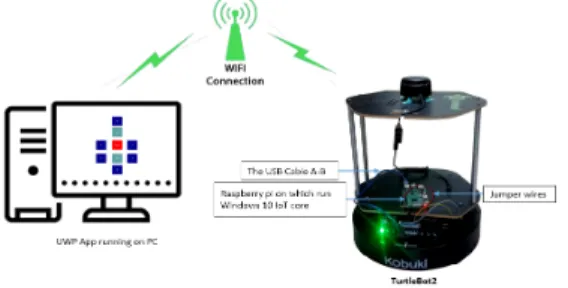
Below is the system design of our project
Figure 1. The system design of NON-ROS remote control software
The system design of our implementation consists of one computer on which run the remote-control software. With its benefit of built-in Wi-Fi, Raspberry Pi 3 exchange data with the computer via the Wireless network. Raspberry Pi is connected to
the robot via the USB cable and exchange data with it using the UART serial communication. The jumper wires are used to supply power to the Raspberry Pi when the robot is powered on(Figure 1).
2.1 Materials and descriptions
To implement our robot controller, a couple of components has been used. Below, are the hardware components used in this project:
a. A computer (Cross compiler): Inter® Core
™ i7-6700 [email protected], RAM: 8GB; 64 bit of operating System type.
b. Raspberry Pi 3 Model B: incorporated Wi-Fi and Bluetooth with 1GB of RAM
c. Jumper wires: male to female wires which have connectors and used to connect the components of breadboards or other prototyping tools.
d. Kobuki robot TurtleBot2: a mobile robot made or developed for researchers, hobbyists and for educational purposes
e. The USB Cable A-B Male/Male type peripheral which is compatible with most of Raspberry Pi boards.
2.2 TurtleBot 2 description
TurtleBot 2 is the most well-known low-cost, open source mobile robot developed for education and research. TurtleBot 2 is equipped with a powerful Kobuki robot base [7]. The driver of Kobuki exchanges data with the robot by using the predetermined protocol. Normally, the robot receives command control from the driver and send back some feedback information or sensor reading. Then, the feedback data sent, and the commands received are converted into bytestreams that will be used for exchanging data via the interface [8]. The process of moving or controlling TurtleBot 2 remotely consist of sending the command control using serial UART and control the wheel motors to move the robot.
Then, according to the command received, TurtleBot can move in any distinct direction. The table below describes the structure of bytestream which control the wheel motors of the robot.
Table 1. The bytestream structure [8]
A bytestream consists of 4 parts: two headers,
112
한국정보통신학회 2019년 춘계 종합학술대회 논문집
length, the payload, and Checksum. The headers:
header 0 (AA) and header 1 (55), are the bytes that can’t be changed for both bytestreams, command control, and feedback data. The length specifies the length of the next bytes, the payload holds the actual data of bytestream and contains several sub-payloads. The checksum certifies the integrity of bytestream [8]. Table 2 shows the structure of the entire bytestream with sub-payload included:
Table 2. Entire bytestream and sub-payload included [8]
Knowing the structure of the entire bytestream, and the part of the Payload that controls the wheel motors to move TurtleBot, then it’s up to the user to determine the velocity in order to control the robot in any direction.
At the other side, when the robot is powered on, it sends some feedbacks data occasionally in 50Hz. The figure below shows the feedback sent by the robot.
Figure 2. Feedback data from the robot
Knowing the structure of the bytestream, the start points of the payload and the length of the following bytes, the user can read some feedback from the robot such as signals from the docking station, cliff sensors data, basic core sensor data and so forth.
2.3. Software implementation
To implement our project, a computer and Raspberry Pi are used to exchange data over Wi-Fi.
The computer runs Windows 10 as Operating System (OS) and Windows 10 IoT core has been used on the Raspberry Pi as OS. The target of this project is to implement a NON-ROS remote control software that allows the computer to control the TurtleBot 2 remotely. UWP applications are considered as the main app type for Windows 10 IoT core. Therefore, in this project, UWP is used to implement a client app and server app. The client app will run on a computer and the server app on Raspberry Pi.
More specifically, Raspberry Pi is mounted on the
robot and communicate with the robot through the serial port. With its advantage of built-in Wi-Fi, it exchanges data with the computer through Wireless network. Using Visual Studio, the server app will be deployed remotely to the Raspberry Pi and begin listening for the incoming connections. Then, the client app will run locally on the computer and connect to the Raspberry Pi by providing the address and port on which the server app is listening to.
After this step, the Raspberry Pi can now receive a command from the computer through TCP/IP.
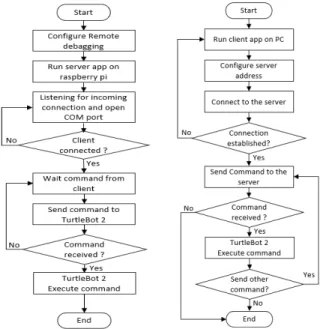
Moreover, when receiving the command control from the computer, the Raspberry Pi needs to send it to the robot via the serial port. When launching the server app and waiting for the incoming connections, at the same time, the server app will open the COM port for communication using serial UART technology. Then, once the command is received from the computer, the command is sent automatically to the TurtleBot 2. The flowchart of this implementation is shown in figure 3.
Figure 3. Flowchart of server app and client app
Ⅲ. Results 3.1 Sending command control
To control TurtleBot 2, the computer is communicating with the Raspberry Pi via WiFi.
When the server app is launching on Raspberry Pi, it will begin listening for the incoming connections and open COM port for communication to the robot.
Hence, the client app will be launched on a
113
한국정보통신학회 2019년 춘계 종합학술대회 논문집
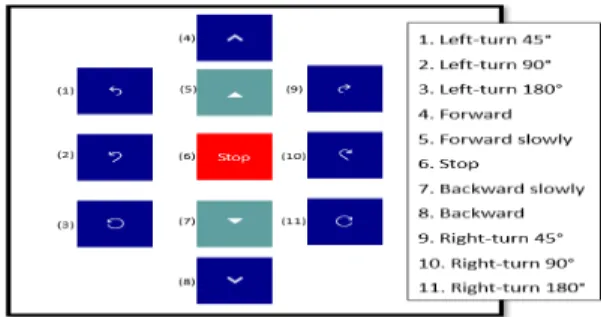
computer and connect to the server app using the address and the port on which the server app is listening. Then, the user can control remotely TurtleBot 2 using the UI (User Interface).
Figure 4. The UI of controlling the robot
As can be seen in figure 5, clicking on any button on the user interface will execute a command control that is sent to the TurtleBot 2 and allows the robot to move in any specified direction.
According to the desired direction, the TurtleBot 2 can perform different movements: left-turn, right-turn, forward, backward and stop.
3.2 Reading feedback data from TurtleBot 2 Normally, when TurtleBot 2 is powered on, it sends occasionally some feedbacks data in 50Hz. In our project, battery status and the signals from the docking station were chosen to be read from the robot. When the server app is running, it reads the bytestream which contains the information we need and send it to the client remotely.
Figure 5. Feedback results from TurtleBot 2
As shown in figure 6, the client app displays the current time and the remaining volts in the battery.
Kobuki has 3 IR receivers. When the TurtleBot is located into the field of a docking station, the robot will catch the signal according to the IR receiver which is facing the docking station. As can be seen in figure 6, the IR receiver left is facing the docking station and has the value 32.
Ⅳ. Conclusion
This study has successfully implemented NON-ROS remote control software-based windows 10 IoT core. UWP has been used as an open source API to implement the software. Raspberry Pi which is mounted on TurtleBot has been employed to communicate with the computer and exchange data over a Wi-Fi network. The robot can now receive the command control remotely and move in any specified direction. This was the first step of our project to build a program that controls the robot remotely. The next step will be to add other features that allow the robot to move autonomously and accomplish several tasks in an internal platform.
Acknowledgment
This study was conducted as a result of the research on the ICT Research Center support project of Ministry of Science, Technology, Information, and Communication and the Institute of Information and Communication Planning and Evaluation (IITP-2019- 2016-0-00318).
References
[1] Robotnik automation. Applications of Kobuki robot TurtleBot2 [internet], available : www.robotnik.eu/
aplicaciones-del-nuevo-robot-kobuki-turtlebot-ii/.
[2] Arbnor Pajaziti, Petrit Avdullahu, “SLAM – Map Building and Navigation via ROS#”, in International Journal of Intelligent Systems and Applications in Engineering, IJISAE, 2014, 2(4), 71–75.
[3] Yukihiro Saito, Takuya Azumi, Shinpei Kato, Nobuhiko Nishio, “Priority and Synchronization Support for ROS”, in 4th International Conference on Cyber-Physical Systems, Networks, and Applications (CPSNA), 2016 IEEE.
[4] Windows 10 IoT Core documentation, available:
https://docs.microsoft.com/en-us/windows/iot-core/w indows-iot-core.
[5] Mohamad Khairi Ishak, Muhammad Izzat Roslan and Khairol Anuar Ishak “Design of Robotic Arm Controller based on Internet of Things (IoT)”.
[6] Windows IoT Core documentation, Developing foreground applications. Available: https://docs.
microsoft.com/en-us/windows/iot-core/develop-your- app/buildingappsforiotcore.
[7] Turtlebot Tutorials, available:
www.clearpathrobotics.com/assets/guides/turtlebot/[8]
Kobuki Protocol Specification, available:
https://yujinrobot.github.io/kobuki/enAppendixProto colSpecification.html.
114