에 의한 의료영상의 전송
CDMA PDA
이명호*, 임재동**, 안병주***, 이훈재****, 이상복****
청주대학교 정보통신학과
*대원과학대학 방사선과
**전남대학교병원 영상의학과
***남부대학교 방사선학과
****PDA Transmission of Medical Images by CDMA
Myong-Ho Lee
*, Jae-Dong Lim
**, Bung-Ju Ahn
***, Hwun-Jae Lee
****, Sang-Bock Lee
****Dept. of Information Communication, Chongju University
*Dept. of Radiology, Daewon Science College
**Dept. of Medical Imaging, Chunnam University Hospital
***Dept. of Radiology, Nambu Ubiversity
****< 요 약 >
본 논문은 유비쿼터스 의료를 위한 의료영상의 무선전송의 개발을 목적으로 한다 컴퓨터 시스템의.
발달로 인해 의료 장비와 의료 기록 체계에 대한 많은 변화가 일어났다 그 중 병원내의 진료 및 의무.
기록을 자동화하고 관리하는 HIS(Hospital Information System) 시스템과 환자에게서 촬영된 영상에
대한 관리 체계인PACS(Picture Archiving Communication System)은 대표적인 예라할 수 있다 이러.
한 자동화된 진료 시스템은 병원 내에 있지 않을 경우 이용이 곤란하며 응급상황이나 의사 부재시에,
신속한 영상 판독이 요구되는 경우 이를 즉시 수행하기는 곤란하였다 이러한 이동에 따른 단점을 보완.
하기 위하여 각 의사마다 지급된PDA를 사용하여 병원내의 영상 획득 장치로부터 생성된 환자 영상을
원격에서CDMA망을 사용하여 검토할 수 있는 시스템을 구현하였다 이를 위하여 의사 및 환자의 계.
정 관리와 환자 영상을 영상획득 장치로부터 수신 받아 각 의사별로 할당하도록 하는 서버 시스템을 구
현 하였으며, PDA를 사용하여 서버에 접속하여 환자의 영상을 검토할 수 있도록 구현하였다 개인별로.
시스템 사용에 대한 인증을 위하여PDA에서는 데이터베이스RDA(Remote Data Access)방식을 사용
하여 서버 데이터베이스를 엑세스하였으며 환자 영상을 서버로부터 다운로드 하기 위하여, FTP(File
를 사용하였다 실험 결과 한 파일의 크기가 인 영상 매를
Transfer Protocol) . 0.37Mbyte 832x488*24 30
보낸다고 가정하였을 때 약90초 정도의 시간이 걸렸으며 이는 긴급히 또는 원격에서 영상의 수신과 검
토에 문제가 없음을 나타낸다.
Abstract
The purpose of this study was to survey a development of the wireless transmission system of medical images for ubiquitous medicine. There have been many changes in medical equipments and medical record
systems due to the development of computer system. HIS(Hospital Information System) which automates medical treatment and medical record within hospital and PACS(Picture Archiving Communication System) which is picture management system for patients can be typical cases. It is difficult to use these automated medical systems unless they are within hospital and in case of rapid image reading in the emergency cases or in absence of doctor, it is difficult to perform it immediately.
The present study implemented an image transmission system using CDMA connection so that images in the server can be viewed at any time and in any place. Remote wireless diagnosis based on medical images using PDA is applicable to medical areas that require mobility, and the use of PDA can be an ideal alternative for point of care.
The use of PDA enables prompt and accurate access to digital medical images, which in turn reduces medical accidents and improves the quality of medical services through high productivity and efficiency of medical practitioners’ works. It also enables quick response to patients’ demands and high quality medical services and,‐ consequently, patients’ high satisfaction.
Key word
Personal Digital Assistant(PDA), Medical Images, CDMA
I. Introduction
The aging of the population increases the cases of incurable geriatric diseases, which in turn raises demand for medical services and increases medical expenses.
The increase of incurable geriatric diseases and medical expenses work as hindrances to national competitiveness. To solve these problems, many countries are exerting various efforts and one of the solutions is the use of electronic computer technologies such as ubiquitous healthcare. Recently emerging ubiquitous healthcare and ubiquitous medicine mean environment in which health management and medical service can be done without the limitation of time and space using electronic, computing and communication technologies.
PDA, a portable communication device, is being studied actively for its use in ubiquitous healthcare and ubiquitous medical service. Communication systems embedded in or externally connected to PDA include IRDA, Bluetooth, wireless LAN (WLAN) and wireless mobile communication(CDMA Code Division Multiple: Access). IRDA is a low speed communication system‐ for a very short distance, and Bluetooth is a short‐ range communication system at a speed of 1Mbps for communication within an office space, and is
commonly used as protocol for simple communication between devices. Like Bluetooth, wireless LAN implements wireless communication within a space such as an office, and its speed is similar to that of ordinary LAN (Local Area Network). For wireless LAN, however, there should be APs (access points) around and APs should be connected to routers or hubs used in wired LAN. Thus, wireless LAN is not feasible where such facilities are not available. The mobile DICOM image inquiry system has been developed using wireless LAN, but it can be used limitedly where required facilities are provided[10]. Wireless mobile communication uses CDMA communication network established for voice communication, a chip manufactured by Qualcom, and EV DO (EVolution‐ Data Optimized) modem, a wireless data
‐
communication technology adopted as the standard by 3GPP2(3rd Generation Partnership Project2) and ITU(International Telecommunication Union).
As the EV DO modem was developed for data‐ communication, it does not support voice communication and is a terminal exclusive for the EV DO network. Currently CDMA based cellular
‐ ‐
phone connection networks have been built extensively and voice call using a cellular phone is possible almost everywhere. The wireless data transmission through
CDMA, a wireless communication network, is being spotlighted as a next generation wireless transmission‐ system. The present study used a CDMA communication network for enabling doctors with PDA to access patients’ images at any time and in any place.
II. Methodology
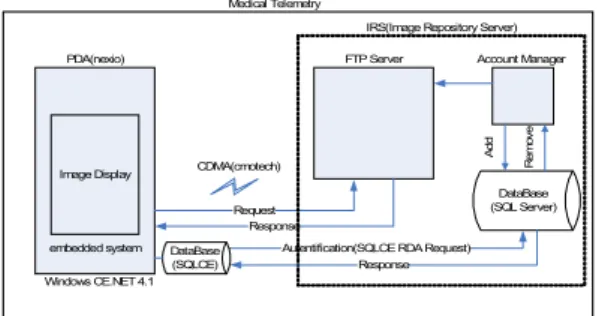
1. System implementationThe system implemented in this research is largely composed of the server system and PDA. Figure 1 shows the schema of the system. The server system classifies image files received from imaging machines by patient served by each doctor, stores them, and provides them to PDA at the user’s request. The server will be called IRS(Image Repository Server) hereinafter.
PDA(nexio)
Image Display
embedded system
IRS(Image Repository Server)
DataBase (SQL Server) CDMA(cmotech)
Medical Telemetry
Windows CE.NET 4.1
Request Response
Autentification(SQLCE RDA Request) Account Manager
Add Remove
FTP Server
DataBase
(SQLCE) Response
Fig. 1. Construct of total system
IRS is an IBM compatible workstation that runs the Microsoft Windows OS. IRS manages the connection of PDA and registers, deletes and updates information about doctors, patients, images, etc. It also authenticates remotely connected users and functions as a file server.
IRS used the FTP (File Transfer Protocol) protocol for the connection of PDA, and a database based‐ authentication system for authentication of PDA users.
Microsoft Visual Studio.NET 2005 C# was used as the tool for developing the IRS system, and Microsoft SQL Server 2000 SP4 was used as the database management system. In Figure 1, IRS can be divided into two systems, namely, the FTP server and the account manager. The account manager creates new accounts
and manages images by patient, and the FTP server manages clients’ connection. When a new account is registered, the account manager creates an account and repository necessary for FTP. If necessary, the user account created in the account manager is duplicated and used in the portable system. Major database schemas used in the system are as follows.
Doctor Information
Patient Information
Images Information
doc_info(d_number, d_id, d_license, d_pass, d_name, d_etc)
pat_info(p_number, p_name, p_licnum, p_doc, p_sickname)
img_info(i_pat,i_date,i_num,i_etc) Fig. 2. IRS Database Schema
In IRS, image files are managed separately from the database. The database maintains information about doctors, patients, and the serial numbers of images.
Image files created by imaging machines at hospitals are kept by IRS in the repositories for the corresponding patients of each doctor in a file format as in the figure below. Thus, the database stores doctor data, patient data and image numbers but not image files.
101034_201001_20060102_001.jpg
[101034] : Doctor No(1 ID_No,01 Date,034 Serial No.) : : : [201001] : Patient No(2 ID_No,01 Date,001 Serial No.) : : : [20060102] : Exposure Date(Year/Month/Day)
[001] : Serial No.
Fig. 3. Formation of Data File
For example, the image files of Patient 201001 will be stored in FTP_root/doctor/ 201001, the repository for Patient 201001 under the care of a doctor whose ID is ‘doctor’ and whose registration number is 101034.
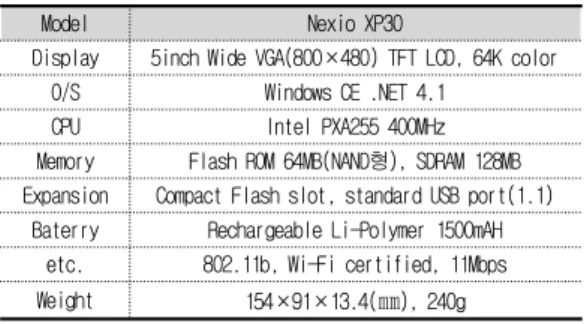
Following this rule, a user who connects to the server from a portable device is linked to the corresponding repository based on the user’s ID, and can download images under the user’s management. The PDA that we used to connect to IRS is the Nexio XP30 model of Samsung Electronics. The hardware features of Nexio XP30 are as in Table 1.
Model Nexio XP30
Display 5inch Wide VGA(800×480) TFT LCD, 64K color
O/S Windows CE .NET 4.1
CPU Intel PXA255 400MHz
Memory Flash ROM 64MB(NAND ), SDRAM 128MB 형 Expansion Compact Flash slot, standard USB port(1.1)
Baterry Rechargeable Li-Polymer 1500mAH etc. 802.11b, Wi-Fi certified, 11Mbps Weight 154×91×13.4( ㎜ ), 240g Table 1. Principal specification of Nexio XP30
Because XP30 supports high resolution (640x480) different from other portable systems, it is convenient for displaying and processing image data. In addition, because most PDAs provide a USB port as a client, they cannot use external devices connected through a USB port. However, XP30 provides the USB host function for the connection of peripheral devices such as memory sticks and external LAN cards. Using the USB host function, we established communication connection between IRS and CDMA using external USB type EV DO modem CCU 550 of Cmotech‐ ‐ ‐ Co., Ltd. Despite the advantage, however, the OS of XP30 is Windows CE.NET 4.1, which is outdated compared to Windows CE Mobile 5.0. For this reason, the support of SDK for serial control, Web based‐ applications, etc. is not satisfactory and this restricts the implementation of applications. The portable system adopted wireless communication using a CDMA modem. CCU 550 adopted in this research uses the‐ frequency range of 800 MHz. When EV DO is used,‐ the model can transmit data at a rate of up to 2.4Mbps. CCU 550 is a USB type external CDMA‐ ‐ modem and can be used in Nexio XP30. To use the model, first the driver should be registered at the system in order to use the USB port of XP30, and the device should be recognized using the port detection program distributed by the manufacturer. After the recognition of the device, the modem is registered and connected through the usual procedure and then it can be used together with wireless LAN. Using these systems, this research implemented a wireless image
transmission system that uses a CDMA network. The whole system is composed of IRS running on a desktop and the portable system running on PDA.
2. programs
First, the flow of IRS program is as follows.
program start
main Form
search doctor add
patient add
images
add modify
doctor add form
DataBase patient add
form
images add form
modify form
add remove search update DBMS
Fig. 4. IRS Flow-Chart
In the IRS system, remote connection is processed using FTP, and when a new doctor or patient account is created, a repository is created in the root directory of the designated FTP according to predefined rules.
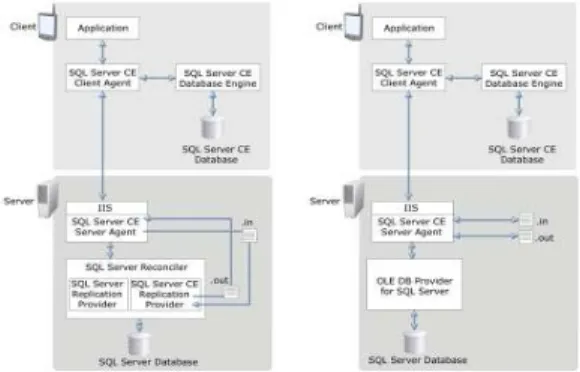
The account manager program displays main menus on [mainFrm] and waits for the user’s input. The menus include account creation, deletion and change. Second, the portable system uses the CDMA modem as a connector, and receives files using FTP. To view image information in the portable system, the user should be authenticated through the authentication system based on the user’s ID and password and this process requires the PDA’s access to the server database. The main DBMS of the server used Microsoft SQL 2000 SP4 system, and a SQLCE2.0 database system was built for access to the database through PDA. The two software architectures are as in the figure below.
Fig. 5. Connection between PDA and DB
In the figure, IIS (Internet Information Server) performs Web services on the server side. It is synchronized with the SQL server through the server agent implemented as ISAPI (Internet Server Application Programming Interface). SQLCE plays the role of delivering a client agent’s request to the SQL server through the SQL Server CE Server Agent (sscesa20.dll).
Depending on use, the server interacts with clients in two ways, RDA and MR. The figure below shows RDA and MR.
Fig. 6. Diagram of connected construction of MR, RDA, DB
MR synchronizes with SQLCE using the merge replication function of DBMS. In the method, the server’s database is replicated and stored in the database of SQLCE of PDA running as a client. In SQLCE database, a database is kept as a single physical file.
RDA, which accesses a remote SQL server through network connection and performs desired tasks, is similar to MR but it accesses the SQL server directly
through the OLE provider on the server’s side.
Connection to the server by RDA needs continuous activation of communication for access to the data, so it may have the problems of high communication load and cost. Through PDA, the user can view patients’
images in the server at any time and in any place, and the database authentication system through network connection was implemented in RDA in order to control users’ access. Authenticated users can browse, enlarge and reduce downloaded patients’ images through the image navigator and, if necessary, can connect to the server system and download new images. The OS of the Nexio XP30 model is Windows CE.NET 4.1. This is not supported in Windows Visual Studio 2005, and can be developed using development tools such as Embedded Visual Studio 4.0 and higher versions and Windows Visual Studio.NET 2003. Thus, we developed PDA client using Windows Visual Studio.NET 2003 C#. Major modules and flows of PDA are as in the block diagram below.
Program start
Connection
Form Server
connection Add files nothing
downloadfile
login user Infor. exit view
images
login Form
Connection
Server RDA check ID login fail
main menu
viewer Form
listview
click zoom
in view
images display
image
truetrue
false false
Fig. 7. PDA flow-chart
PDA performs database synchronization through RDA, image file download through FTP, display of downloaded images, etc. Here, the implementation of FTP will be explained in detail. FTP is the best protocol for file transmission/reception during Internet
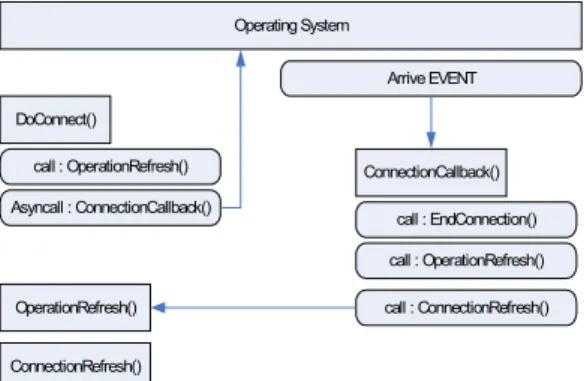
services. Thus, we used the FTP protocol for image transmission, and a part of FTP client was implemented in PDA and used in server directory listing and file download. FTP functions include initialization, connection setting, command transmission, command result reception and data reception. FTP supports active/passive mode and binary/ASCII mode and was implemented in multiple threads. The program was developed 100% in managed codes. Here, managed codes mean codes that can be recognized and executed by .NET Framework, and unmanaged codes mean codes that can be executed directly by Windows without the involvement of .NET Framework. As the FTP command is executed by synchronization with the server, the reply can be made immediately after the command has been sent or after a moment. Thus, each operation was implemented in asynchronous callback.
Asynchronous callback creates a new work thread and executes it separately from the main thread. Thus, due to the characteristic of callback, if a call function is registered at asynchronous callback, the registered function is called in response to any event change in the OS. The figure below shows FTP connection procedure using asynchronous callback.
DoConnect()
Operating System
call : OperationRefresh() Asyncall : ConnectionCallback()
OperationRefresh()
ConnectionCallback()
ConnectionRefresh()
call : EndConnection() call : OperationRefresh() call : ConnectionRefresh() Arrive EVENT
Fig. 8. FTP connection procedure using asynchronous callback
In the following source code, parameters for FTP connection are initialized by initiateFTP( ) when DoConnect( ) is called. To display the initialized FTP state and the current process on the screen,
OperationRefresh( ) is invoked and then BeginConnection( ) is called. The argument of the function is function ConnectCallback( ) to be called by asynchronous callback. After FTP connection is tried, if the connection signal arrives from the FTP server, the registered ConnectCallback( ) function is called by the OS.
private void DoConnect( ) { initiateFTP( );
Invoke (new EventHandler (OperationRefresh));
BeginConnect (new AsyncCallback (ConnectCallback));
} private void OperationRefresh (object sender, EventArgs e) { }
private void ConnectCallback (IAsyncResult asyncResult) { EndConnect (asyncResult);
Invoke (new EventHandler (OperationRefresh));
Invoke (new EventHandler (ConnectRefresh));
} private void ConnectRefresh (object sender, EventArgs e) { }
Fig. 8. Source code example
III. Results and discussion
The present study developed a system using a CDMA network in order for doctors to be able to view patients’ images at any time and in any place. To control users’ access right to the system, a database was used and RDA was used as the database synchronization method. The implemented system is as in the figure below.Fig. 9. The implemented system
As shown in the figure, Nexio XP30 uses a USB‐ type external device for CDMA communication. To use the image management system on the initial screen of the program, the user should log in first. The figure below is the login screen through CDMA. After login to the remote database, the system displays, as shown in the figure 11, a list of patients’ image files available in the server repository corresponding to the login doctor’s account. If the user select files to view, the files are marked as in the figure 12, and they can be downloaded and viewed.
Fig. 10. The login screen through CDMA
Fig. 11. Patients’ image files displays
Fig. 12. The user select files can be downloaded and viewed
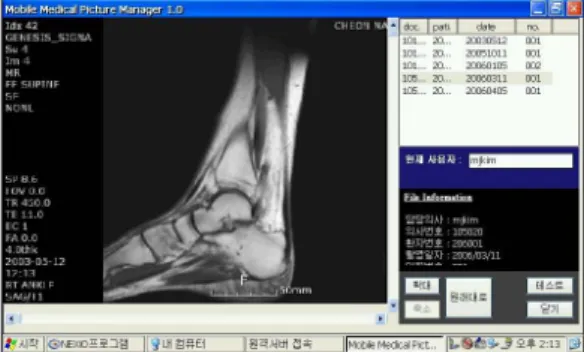
MR images and CR images downloaded from the server can be browsed, enlarged or reduced through the viewer implemented in PDA as in Figure 13, 14 and are viewed as in the figure below.
Fig. 13. MR images downloaded from the server
Fig. 14. CR images downloaded from the server
In the image management system, original CT and MRI images are converted into jpg files of 832x488 24 bit resolution for PDA display and stored in the
‐
repository of the corresponding account, and necessary patients’ images are downloaded to PDA through the CDMA module. As to time for wired transmission using a T1 exclusive line, an ordinary CT image is 0.4 Mbytes (512*512*12). In order to send 30 CT slices, a T1 exclusive line takes 62.1 seconds, and a modem takes around 174 seconds. A MR image is around 0.1 Mbytes (256*256*12). In order to send 50 MR slices, T1 takes 25.9 seconds and a modem takes around 174 seconds. If the speed in wireless transmission is compared under the same condition as wired transmission, assuming that each image is 0.37Mbyte (832x488*24) and 30 images are sent, it takes around 90 seconds. Table 2 shows downloading time according to file size.
file number Size (byte) Estimation Time (sec)
1 37,457 1.5
2 93,930 5
3 134,213 9
5 278,528 15
Table 2. downloading time according to file size
In the table above, [file number] shows the number of files sent at once. Although file size is similar, transmission time is 1.5 seconds for one file but 5 seconds, not 3 seconds, for two files. This is because,
due to the characteristic of ftp transmission, there is two seconds’ delay after a file is transmitted for the PDA to receive and recognize a signal from the server for the completion of transmission. If three files are transmitted in sequence, a delay happens for the same reason.
IV. Conclusion
The present study implemented an image transmission system using CDMA connection so that images in the server can be viewed at any time and in any place. Remote wireless diagnosis based on medical images using PDA is applicable to medical areas that require mobility, and the use of PDA can be an ideal alternative for point of care. The use of PDA enables prompt and accurate access to digital medical images, which in turn reduces medical accidents and improves the quality of medical services through high productivity and efficiency of medical practitioners’
works. It also enables quick response to patients’
demands and high quality‐ medical services and, consequently, patients’ high satisfaction.
For this, we implemented a server system for managing images and image users, and implemented a portable image transmission and examination system using Nexio XP30 PDA. In general, a PDA storage device has a memory of 32~64 Mbyte, which cannot store large capacity data. Thus, a DICOM image is‐ converted into a jpg file, a lossy compression image format, and provided to PDA. The image conversion may lower the precision of delicate medical images.
However, Nexio XP30 can express 64k colors at 800x480 resolution and, according to previous researches, the loss of visible range unrecognizable by human does not affect the analysis of images because of the limitation in the resolution of human vision [16].
The conversion of images into jpg files reduced the volume of image data significantly and accordingly the load of transmission and storage on PDA. The system
developed in this research has very high mobility and functionality in that the transmission of medical images allows doctors to examine patients’ images and diagnose their symptoms at any time and in any place.
Images taken at local medical institutions where there is no radiologist can be sent through communication networks and analyzed promptly by radiologists in other areas. Although there are still many problems and difficulties for the commercialization and popularization of remote wireless medical image system, the introduction of remote medical image system is an obvious demand along with the advance of information society and civilization and is expected to spread and settle through intensive research and cooperation among the government, academic circles and medical circles.
The body produces various visual biosignals as well as physical signals such as temperature, motion, blood pressure, ECG, EEG and SpO2. Our system for the transmission of medical images can be the base for implementing systems for doctors to monitor and analyze various biosignals separately or compositely regardless of time and place, and future researches will go on in this direction. Goals at the early stage will be offline implementation due to limitations in system software and hardware, and gradually move to systems for online observation. If online systems are built, it will be unreasonable to receive and process all real‐ time biosignals. We may need to receive biosignals necessary in the portable device selectively so that the doctor can view various types of patient information and make accurate diagnosis from a remote place.
REFERENCES
[1]
Hyung-Su Kim, "The Aged Problem of Aging Society", The Korean Association of Humanities and Social Sciences, Vol. 23, No. 4, pp. 80-99, 2000.
[2]
D. Raskovic, T. Martin, E. Jovanov, "Mobile Monitoring Application for Wearable Computing", Journal of The Computer, Vol. 47, No. 4, pp. 495-504, 2004.
[3]
R.S.H. Istepanian, E. Jovanov, and Y.T. Zhang, "Guest Editorial Introduction to the Special Section on M-Health:
Beyond Seamless Mobility and Global Wireless Health-Care Connectivity", IEEE Trans. on Information Technology in Biomedicine, Vol. 8, No. 4, pp.
405-414, 2004
[4]
J. H. Hong, N. J. Kim, E. J. Cha, T. S. Lee,
"Development Brief of A Body Area Network for Ubiquitous Healthcare An : Introduction to Ubiquitous Biomedical Systems Development Center", Journal of Biomedical Engineering Research, Vol. 26, No. 5, pp.
331-335, 2005.
[5]
D. S. Kim, H. Y. Park, "A Study of Information Situation
& Growth Strategy in a Korea Large Hospital", Information Policies, Vol. 11, No. 4, pp. 13-29, 2004.
[6]
D. S. Kang, "Teleradiology Wooljin Medical Center and : Kyungbook National University Hospital", Journal of The Korean Society of PACS, Vol. 1, pp. 49-52, 1995.
[7]
S. W. Choi, "Interview Internet Teleradiology System", : Journal of The Korean Society of PACS, Vol. 2, pp.
29-33, 1996.
[8]
K. B. Kwun, I. K. Kim, "Web-Based Medical Information System Supporting DICOM Specification", Journal of The Korea Information Science Society, Vol. 7, No. 4, pp.
317-323, 2001.
[9]
K. B. Kwun, I. K. Kim, "P2P DICOM System Using Multiagent Systems Communicating with XML Encoded ACL", Journal of The Korea Information Science Society, Vol. 8, No. 5, pp. 598-606, 2002.
[10]
J. Cho, D. S. Kim, D. K. Shin, D. Y. Kim, "A Study on the Development of Mobile Emergency Medical Image Management System Using Personal Digital Assistance", Journal of The Korean Society of PACS, Vol. 9, pp.
17-22, 2003.
[11]
Y. Lin, I. Jan, P. Ko, Y. Chen, J. Wong and G. Jan, "A Wireless PDA Based Physiological Monitoring System for Patient Transport", IEEE Trans. Inform. Technol.
Biomed., Vol. 8, No. 4, Dec. 2004.
[12]
B. Woodward, R. S. H. Istepaniam, and C. I. Richards,
"Design of a Telemedicine System Using a Mobile Telephone", IEEE Trans. Inform. Technol. Biomed., Vol. 5, pp. 13-15, 2001.
[13]
S. Fischer, T. E. Stewart, S. Mehta, R. Wax, and S. E.
Lapinsky, "Handheld Computing in Medicine", J. Amer.
Med. Inform. Assoc., Vol. 10, No. 2, pp. 139-149,
2003.
[14]
I. Maglogiannis, N. Apostolopoulos, P. Tsoukias,
"Designing and Implementing an Electronic Health Record for Personal Digital Assistants(PDA's)", International Journal for Quality of Life Research, Vol. 2, Issue 1, pp. 63-67, 2004.
[15]