• 검색 결과가 없습니다.

Development of Mobile Social Network Game by using Web Service

N/A
N/A
Protected

Academic year: 2021

Share "Development of Mobile Social Network Game by using Web Service"

Copied!
6
0
0

로드 중.... (전체 텍스트 보기)

전체 글

(1)

Development of Mobile Social Network Game by using Web Service

1)

Syoungog An*, ManJe Kang*, Soo Kyun Kim*

Abstract

In the field of mobile games, social network games are steadily increasing in market scale and public interest every year. This paper proposes a method to design a social network game, which is one of the most successful genres in mobile games. The method uses Unity3D, the most commonly used engine for mobile game development. NGUI, a versatile developmental tool of Unity3D, is used to create shops and battle UIs. This paper particularly focuses on how to use the web hosting service to search and operate the necessary data from the database in the server. In addition, the proposed social network game is easy to implement real-time battle using Animator and Raycast, and is characterized by efficient battle implementation through time delay using Coroutine function.

▸Keyword: Coroutine, NGUI, Unity3D, mobile social network game, Web Service

I. Introduction

Social network game is a game based on social network service, and refers to games that are played using user interaction as the main contents such as SNS.

User Interaction using servers has become an essential part of network society, and many games utilizing this have achieved successful results. Of the various game genres social network games take the lead. In social network games, the users can interact with other players through real-time manipulation of the character, and draws people into the game through rewards and emotional exchanges.

This paper proposes method for database construction using web hosting server and production of a mobile social network game using Unity3D.

II. RESEARCH BACKGROUND

1. The Growth of Mobile Games

Due to the popularization of smartphones and convenience of development, the domestic game market is reforming with mobile games at the center[1].

According to statistics from Super Data Research, a market research enterprise, global game market sales grew at a record of $45.7 billion last year. Mobile games are not restricted by location or situation and do not require complicated operations, leading to great popularity. This paper proposes a design for a mobile social network game that can be enjoyed by the general public using Unity3D engine suitable for mobile game development.

∙First Author: Syoungog An, Corresponding Author: Soo Kyun Kim

*Syoungog An ([email protected]), Dept. of Game Engineering, Pai Chai University

*ManJe Kang ([email protected]), Dept. of Game Engineering, Pai Chai University

*Soo Kyun Kim ([email protected]), Dept. of Game Engineering, Pai Chai University

∙Received: 2018. 09. 21, Revised: 2018. 10. 17, Accepted: 2018. 10. 18.

∙This work was supported by the research grant of Pai Chai University in 2018.

(2)

Fig. 1. The Growth of Mobile Games

2. Characteristics of Social Network Games Most games within the social network genre[2] are played by managing and developing a village while fighting wars with other users. Social network games can be divided into PC games and mobile games. PC games are within the same genre of web-based games, but are not as portable as mobile games and therefore are not as popular. Also, the main objective of social network games is not only just the leisure of the game itself, but more so to form human relationships, focusing on exchanges and competition between the players rather than individual–

centered play. This paper will design a war simulation game that falls in the RTS (real time strategy) genre.

There are two main RTS games in the mobile environment.

The first is Supercell’s masterpiece, “Clash of Clans,”

the most successful game in this field. Main contents of this game include constructing villages and generating troops to use for making alliances with or invading other users. The second is DomiNations developed by Big Huge Games. The composition of the game is similar, although in DomiNations users can develop civilizations starting from the Stone Age.

This paper uses asynchronous access method instead of real-time access in the network. Not all players need to be connected and if only one player is connected then the other players’ information is drawn up to proceed the game.

This method is commonly used in war games to allow long-term development of villages, generation of troops, and battles conquests. In addition, the user can continue to construct a personalized village through combat rewards and goods produced within the village.

III. GAME DESIGN

Fig. 2. Game flowchart

1. Diagram

The player starts off in the login screen, and then connects to their village to construct buildings and produce units. The units are utilized during battles and the buildings are used for defense. The player returns to the village after rewards are obtained from the battle and the game continues in this cycle.

2. Coroutine Function

In game programming, synchronism is important for the smooth interaction of the various game objectives.

Unity3D[3, 4, 5, 6] expresses synchronism through Coroutine[7]. Coroutine is a powerful Subroutine that determines the designated the return location after execution is resumed or stopped by extending C#’s Subroutine.

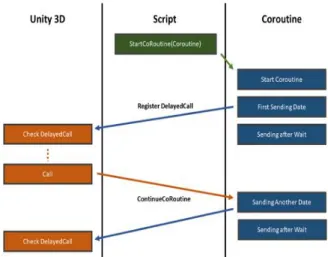
Unlike a typical Subroutine, Coroutine remembers its previous state. This allows the player to return to a designated location instead of the returning to the caller when the execution is resumed. In addition, this operation can be carried out simultaneously. The progression of the Coroutine function used in this paper is illustrated in Fig. 3.

Fig. 3. Progression of the Coroutine Function

(3)

3. Servers and Database

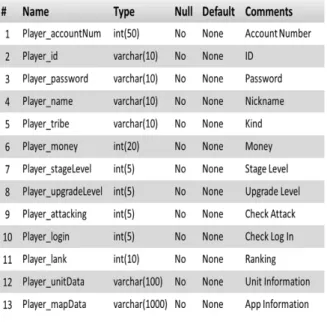
In Unity, data is usually stored using PlayerPrefs. In this paper, data is stored using a database on the Web Server instead of the more convenient PlayerPrefs because it requires not only the user’s own data but also the other player’s data. Fig. 4 shows the structure of the database used in this paper.

Fig. 4. Database Structure

Fig. 5 displays the server communication diagram. This paper uses the WWW class provided by Unity to exchange data with the web server database through Http transmission and receiving. In other words, the GET method is used to exchange data. The GET method is characterized by connecting to the database through a PHP file uploaded to the web server and fetching data one by one for each key value.

Fig. 5. Server Communication Diagram

There is always a slight delay when receiving data from the web. In order to prevent the data from getting tangled during transmission, a Coroutine function IEnumerator is used to download the data from WWW.

When the data is moved from the server into the project, the data is sent as a text type. The data must be converted into UTF-8 or the text characters might become distorted. Data received from the server is converted back to String type or Int type as needed.

4. Map Data Connection

When the user reconnects to the game, previously created building layouts or towers constructed in order to attack other users’ villages must be reproduced exactly the same as they were originally. The nodes clicked by the user in order to create towers are converted into a form of arrays. The placement of the number data from the building within this array depends on which number node was selected by the user. In order to easily transmit data into the server, all the data in the node array are combined into one string structure.

When retrieving map data from the server, first a string-type map data stored in the server is loaded then cut at regular intervals using Substring. Then the cut data is inserted into the node array one by one to allow easy retrieval of the building’s free peptides. This method allows the map to generate a free peptide field of the buildings according to the numbers in the node array. The pseudo code for map data connection is shown in Fig. 6.

string str = Load Map Data from Server;

for (int NodeNum = 0; NodeNum < 63; NodeNum++) { string strNodeNum;

M_data[NodeNum] =

int.Parse(str.Substring(NodeNum, 1));

switch (M_data[NodeNum]) { case 1:

strNodeNum = NodeNum.ToString();

Instantiate(Creating Building, Location of Building);

break;

} }

Fig. 6. Map Data Connection Pseudo Code

5. Raycast

Raycast[8] is a method of processing information by

shooting an invisible ray from a specific location and

recognizing the colliding object. It is mainly used in FPS

games when shooting guns. In this paper, Raycast is used

(4)

to for selecting specific locations when summoning a unit or using magic.

Ray ray

= Camera.ScreenPointToRay(Locaction of Mouse);

RaycastHit hit;

if (Input.GetMouseButtonDown(0)) { if (Physics.Raycast(ray, out hit, 1000)) {

if (hit.collider.tag == "map“) { if (selectUnit[0])

unitNum = 0;

else if (selectUnit[1])

Instantiate(summonUnit, hit.point, hit.transform.rotation);

} } }

Fig. 7. Raycast

6. NGUI

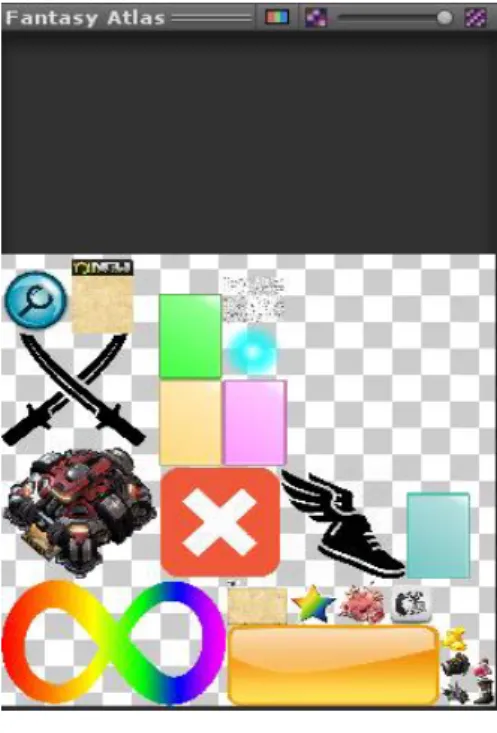
In order to start the NGUI (Next-Gen User Interface)[9, 10, 11], one must understand the concept of Atlas. In order to easily control 2D images that are needed for game development, they are combined into one image then converted into texture.

Fig. 8. Atlas

Atlas can be defined as a collection of these converted images. Therefore even if numerous UI resources are created, one Atlas can be used to reduce the number of

draw call. Fig.8 displays an Atlas that combines multiple image resources into one single file. This Atlas is used for faster loading of UI.

7. Scroll View

Scroll view (see Fig. 9) is useful when expressing multiple cells within a confined space, such as the item storage space. The basic UI Scroll View component provided by Unity sets the vertical scroll view movement to horizontal, and the horizontal scroll view movement to vertical.

Fig .9. UI Scroll View

When UI Scroll View component is used to launch sprites up to the desired number they can overlap. As shown in Fig.

10, UI Grid component can be used to adjust the Cell Width and Cell Heights back to the original sprite.

Fig .10. UI Grid

8. Store Management Using Singleton Pattern

Singleton Pattern is a design pattern that provides a

global point of contact by limiting to a single instance

when creating n number of objects within a program of a

specific class. It is useful for managing data shared by

(5)

different Scenes. Data values can be managed as global variables when using Singleton Pattern, allowing much easier data management designs. The pseudo code for generating Singleton Pattern is shown in Fig. 11.

public class Singleton {

private static Singleton instance = null public static Singleton Instance { get {

if (instance == null) instance = new Singleton();

return instance;

} } }

Fig .11. Pseudo Code of Singleton Pattern

IV. The Experiment

1. Start Screen

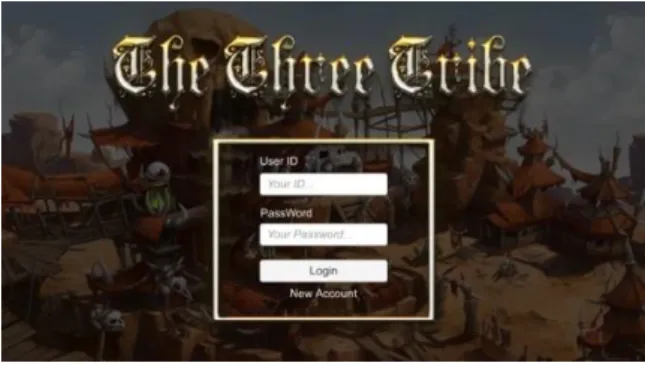
As shown in Fig. 12, the game start screen is a login screen where the player can create an account, select a race, and log on. The information of the created account is managed through the server. Once the login button is clicked the user is moved to the village screen that corresponds to the account.

Fig .12. Start Screen

2. Village Screen

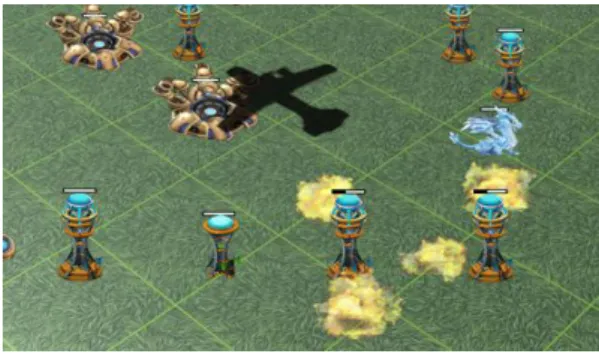
After logging on from the start screen the player is moved to the village screen that corresponds to the account, as shown in Fig. 13, and can now construct buildings or product units from the store. Building construction nodes appear when the store UI is clicked, and the player can freely create buildings within the specified range of the nodes. There are production buildings, technological buildings, and defense buildings, as shown in Fig. 14. Click on a production building

to create a Unit store UI, which can be used to produce units.

The units are then stored in the server and the player can use troops to attack other player’s villages or arbitrarily created villages by clicking on the attack button in the lower left corner.

Fig .13. Basic Village Screen

Fig .14. Unit Store Screen

3. Battle Selection Screen

Click on the treasure box button in the village screen to bring up the battle selection screen. As shown in Fig.

15, click the village navigation button to navigate an opponent’s village and click the stage button to enter different levels of stages. The screen to select a village navigation or stage is displayed in Fig. 15.

Fig .15. Stage Selection Screen

4. Battle Screen

Different battle screens will be displayed depending on

which UI is selected. Select a unit in the UI and click or

touch a desired location on the screen and the unit will be

(6)

summoned to that location and automatically searches for the nearest target to attack. The number of units in the player’s possession is retrieved from the server, and the player may only use that many units.

The player wins when the opponent’s main building is destroyed. If the building is not destroyed within the time limit then the player loses and obtains rewards according to the results of the battle. Fig. 16.

Fig .16. Battle Screen

IV. Conclusions

This paper proposes a social network game that implements real-time combat Animator and Raycast, and is characterized by efficient suggestion of combat through time delay using Coroutine function. Furthermore, a web hosting server is used for transmission and receiving of data from a database within a server. This allows for designing a multiplayer game where users can interact with each other. NGUI is used to place an intuitive UI, which allows the game to be progressed with simple operations.

The time delay function of Coroutine is used to fetch data in sequential order from the server’s database and minimize the draw call within the operation and AI execution. Raycast is used to perform strategic unit summons and Singleton Pattern is used for efficient management of information.

REFERENCES

[1] The Statistics Portal, https://www.statista.com/statistics/

292512/mobile-contents-market-value-worldwide/

[2] WIKIPEDIAl, https://en.wikipedia.org/wiki/Social_netwo

rk_game

[3] JaehYeon Lee, “Absolute Class! Unity5”, Wiki Books 2015.

[4] Patrick Felicia, “Unity 5 From Zero to Proficiency (Foundations): A step-by-step guide to creating your first game with Unity”, Amazon Kindle, October 2015.

[5] Matt Smith, “Unity 5.x Cookbook”, Packt Publishing; 1 edition ,October 2015.

[6] Alan Thorn, “Unity Animation Essentials”, Packt Publishing, June 2015

[7] Lucas Faustino, “Coroutines: Unity Focused Learning”, Amazon Kindle, December 2015.

[8] Unity Reference, https://docs.unity3d.com/kr/current/Sc riptReference/Physics.Raycast.html

[9] Sung-Su Kim, User-Interface Development Research using Unity3D in Practice, Graduate school of Paichai University, Master's Thesis, 2013.

[10] Charles Pearson, Learning NGUI for Unity, Packt Publishing, December 2014.

[11] DeuKu Lee, Unity Game Development 4 Art of Seduction (Korean edition), 2012.

Authors

Syungog An received the Ph.D. degrees in Computer Science and Engineering from Korea University, Korea, in 1989. She is currently a Professor in the Department of Game Engineering, Paichai University.

ManJe Kang received the B.S. degrees in Game Engineering from Paichai University, Korea,

Soo Kyun Kim received Ph.D. in Computer

Science & Engineering Department of

Korea University, Seoul, Korea, in 2006. He

joined Telecommunication R&D center at

Samsung Electronics Co., Ltd., from 2006

and 2008. He is now a professor at

Department of Game Engineering at Paichai University,

Korea. His research interests include multimedia, pattern

recognition, image processing, mobile graphics, geometric

modeling, and interactive computer graphics. He is a

member of ACM, IEEE, IEEE CS, KACE, KMMS, KKITS and

KIIT.

수치

Fig.  3.  Progression  of  the  Coroutine  Function
Fig.  4.  Database  Structure
Fig  .10.  UI  Grid
Fig  .14.  Unit  Store  Screen
+2

참조

관련 문서

For the purpose, we explore the domestic game market from the past to the present, and forecast the game industry ecosystem using the Scenario Network

We assumed that commercial purpose of mobile SNG is to improve uses' intention of use of the game, and from previous researches we selected flow, social

Music SNS has following features such as online advertisement based business model, streaming service based on mobile web or Smartphone application,

Mobile App에서 업무 UC 기능은 조직도 및 조직 검색 기능, 업무를 위한 메시지 전송 기능, 공지사항 전송기능, FMC 통화기능 개발(Voip, 안드로이드 기 반)과

This paper proposes a mechanism for efficient construction of a cluster sensor network connecting all sensor nodes and base stations using connections

Abstract Focusing on the Chinese market of MSNG (Mobile Social Network Game), perceived flow and satisfaction were designed as parameters, purchasing

이에 국내 게임 시장의 장점인 온라인 게임과 요즘 유행하고 있는 SNS 개념을 통합하여 국내 게임 시장에 맞는 새로운 형태의 게임 즉 , SNOG(Social Network Online
In this study, we introduce a Web-based platform system consisting of a knowledge authoring tool, technology database, semantic database, and Web portal service for