Journal of Internet Computing and Services(JICS) 2014. Aug.: 15(4): 135-140 135
모바일 앱을 위한 소프트웨어 개발 프로세스
A Software Development Process for Mobile Applications
강 병 도
1양 승 원
2*1이 종 석
2Kang Byeong Do Yang SeungWeon Lee Jong Seok 요 약
본 논문에서는 모바일 앱을 위한 개발과정 모델을 제안하였다
.
이 개발과정에는 요구분석,
아키텍쳐설계,
네비게이션설계,
페이지설계 구현과 테스팅 단계를 포함한 다섯가지 개발단계가 있다
.
그리고 다이어그램이 있는 설계방법도 제안하였다.
프로그램개발자는기능적 요구사항과 설계앱을 정의하는데 본 논문에서 제안한 개발방법을 이용할수 있다
.
또한 개발시간과 노력을 줄일 수도 있다.
본 논문에서는 모바일 앱 개발에 이 방법을 적용하였고
,
개발과정을 수행한 결과물로 다이어그램을 제시하였다.
☞ 주제어
:
모바일앱,
개발과정모델,
다이어그램을 이용한 설계ABSTRACT
In this paper, we present a development process model for mobile applications. It consists of five development phases including requirements analysis, architecture design, navigation design, page design, and implementation and testing phase. It provides a design method with diagrams. Our development method helps program developers define functional requirements and design applications architecture and functional flow. Through our method, they can reduce their applications development time and effort. We applied our method to developing a mobile application, and then presented the diagramming products as the result of performing development phases.
☞
keyword : Mobile Application, Development Process Model, Design Method with Diagram
1. Introduction
Applications running on mobile devices are becoming so popular that they are representing a revolution in the IT sector [1]. A mobile platform consists of various source codes to control a microprocessor and hardware. So, mobile applications must include various software that use APIs supported by the mobile platform [2]. This paper presents a development process model to help software engineers to improve productivity and quality of mobile applications.
In section 2, we introduce the characteristics of mobile applications. We present a development process model in section 3. We apply our method to an application example in section 4. Finally we come to a conclusion in section 5.
1Dept. of Computer and Information Technology, Daegu University, Deagu,712‐714, Korea
2Dept of Game Contents, Woosuk University, Wanju‐gun, 565‐701, Korea
* Corresponding author ([email protected])
[Received 24March 2014, Reviewed 02May 2014, Accepted 02 July 2014]
☆ This Study was financially supported by Daegu University in 2011.
2. Mobile Applications
There are two kinds of traditional mobile applications:
web-based applications and native applications.
Web-based applications consist of web pages optimized for mobile devices and can be developed by using HTML, JavaScript and CSS. They usually run on a server, so they cannot access the mobile devices’ feature(for example, the physical camera device).
Native applications are developed for specific mobile devices. They can access the functionalities of mobile devices, such as GPS, file storage, databases, SMS, mail box, etc. They can be downloaded, installed, and sold in an application store[3]. In this paper, mobile applications refer to native mobile applications.
2.1 Characteristics of Mobile Applications Mobile devices, in particular smart phones, have become popular in our lives. Mobile applications are necessary for
ISSN 2287-1136 (Online)http://www.jksii.or.kr
providing smart phone devices with functionalities for mobile data services.
Mobile applications are different from desktop applications because smart phone devices are resource-limited embedded systems and are developed separately on different development platforms with different operating systems such as RIM of Blackberry, Windows Phone, iOS, Symbian, and Android [4].
Some of the challenges involved in mobile application development include handling different devices, multiple operating systems, and different programming languages such as Java, Objective-C, and Visual C++. In addition, mobile applications are developed in small-scale, fast-paced projects to meet competitive market demand [5].
2.2Architecture of Mobile Applications Development of mobile application program with Android requires Java programming language using the Android SDK which provides the tools and APIs necessary for development [6]. An applications program is packaged as an Android package, “apk” file. An APK file includes all the files related to a single Android application. Figure 1 shows the Android applications architecture.
Figure 1. Android System Architecture.
3. A Development Process Model
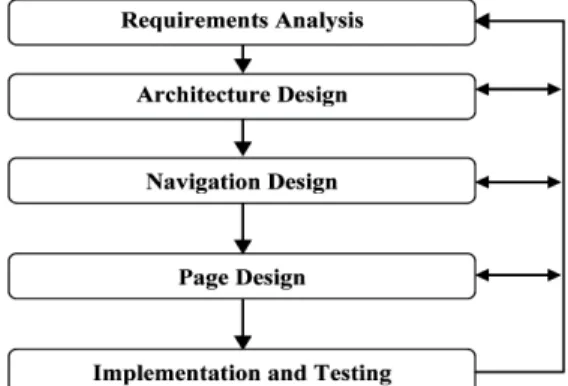
We propose a development process model for mobile applications, which includes five phases: requirements analysis, architecture design, navigation design, page design, and implementation and testing. Figure2 shows the entire
development cycle. This process model is iterative between phases to support feedback. The iterative feedback improves the product quality through recursive review and evaluation.
3.1 Development Phases
Requirements Analysis. Developers define the goals and functions of the mobile applications. The purpose of the requirements analysis phase is to analyze the application domainthrough the viewpoint of users. Therefore, the communication between developers and users is very important. The success or failure of a project is dependent on the degree of understanding the user’s requirements.
Figure 2. A Development Process Model for Mobile Applications.
In this phase, developers define the target users who will use the application. They also analyze the contents, functions, constraints, and who is going to provide new content. The product of this phase is requirements specification.
Architecture Design. Developers determine the most suitable architecture according to the result of the requirements analysis phase. Developers divide the application domains into sub-applications. Well-defined architecture can reduce the complexity of the system and provide the work boundaries for developers. The product of this phase is the architecture design diagram.
Navigation Design. Developers define navigation relationships
between pages (screens of smart phones) of the mobile
applications. The navigation relationship includes the link
relationship and data migration between the pages and makes
the mobile applications different from general applications. The
mobile applications program generally consists of more than one page. Users of applications navigate the pages to retrieve information or to accomplish what they want to do. The product of this phase is the navigation design diagram.
Page Design. Developers design the screen layouts and functions for all of the pages. The pages can be classified into static pages and dynamic pages according to their functions. The function of static pages is to show their contents. The function of dynamic pages is to accomplish tasks such as data processing or accessing databases. The products of this phase are the page detail design diagrams.
Implementation and Testing. The analysis and design specifications can be implemented in a straightforward manner by programming all of the page detail design diagrams. The behavior of the mobile applications must be tested on the emulator and on the mobile device because the applications on an emulator may perform differently from them running on a mobile device with various hardware and software versions [7].
3.2 Graphic Notations
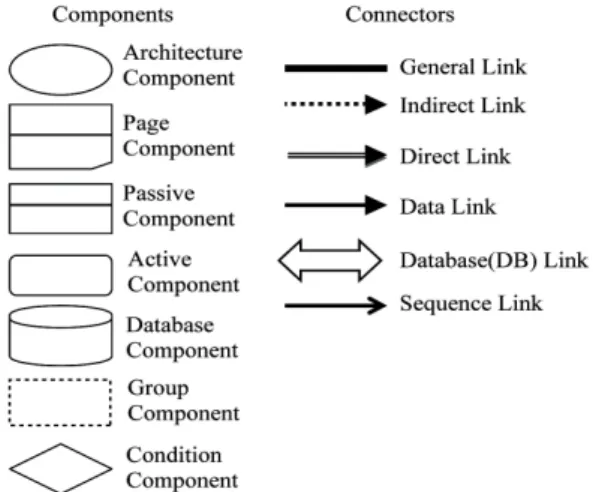
Our method provides program developers with two main notations, components and connectors, for modelingdiagrams for analysis and design phases. Components represent the functional modules of the system while connectors represent the interactions between components. Figure3represents the notations of the diagrams for modelingmobile applications.
Figure 3. Graphic Notations for Design Diagrams
Components in the diagrams are classified intoseven categories: architecture, page, passive, active, database, group, condition.
The architecture component is used to represent the structure of applications in the architecture diagram and represents the function of an application. The page component represents a page in the navigation design diagram. The passive component represents a static functional module. The active component represents a dynamic module. The database component represents a data repository. The group component can be used to combine a set of components into one group of functions. The condition component is used to specify a condition. All of these components are used in the page detail design diagram.
Connectors in the diagrams are classified intosix categories:
general link, indirect link, direct link, data link, DB link, sequence link.
The general link represents the existence of any relationships between two components in the architecture design diagram. The indirect link and the data link represent the transitions occurred by a user’s clicking on a button. The indirect link does not contain a data transmission between two components. But the data link contains a data transmission between two components. The direct link represents an automatic page link in the applications program. The Database link represents a data transmission between a functional module and a database. The sequence link represents the sequence of the activation of components. The Database link and the sequence link are used in the page detail design diagram.
3.3 Diagrams
The following three kinds of diagrams are produced after we analyze and design an application:
- The architecture design diagram - The navigation design diagram - The page detail design diagram.
The Architecture Design Diagram. Thearchitecture of
software is defined by computational components and
interactions among components. The well-defined structure
makes it easy to integrate and maintain the parts of a large
application. The architecture design diagram shows the vertical and horizontal structure between functions of applications and does not include the information about the detail algorithms. This diagram is concretized in the navigation design diagram and the page detail design diagram.
The Navigation Design Diagram. The most important characteristic of mobile applications is the navigation feature.
Because mobile applications consist of pages(one screen form of a smart phone),users of the applications have to explore multiple pages to search for information or accomplish what they want to do.
The navigation design diagram represents the navigation relationships among pages. It shows the link relationships and data transformation among pages.
The Page Detail Design Diagram. The page detail design diagram represents each page in detail. The pages are classified into static pages or dynamic pages according to their tasks. Some pages may include the characteristics of both.
The static pages display their contents and are described by the design patterns. On the other hand, the dynamic pages perform some tasks and are described by the functional flows to represent the algorithms for the tasks.
4. Mobile Application Example
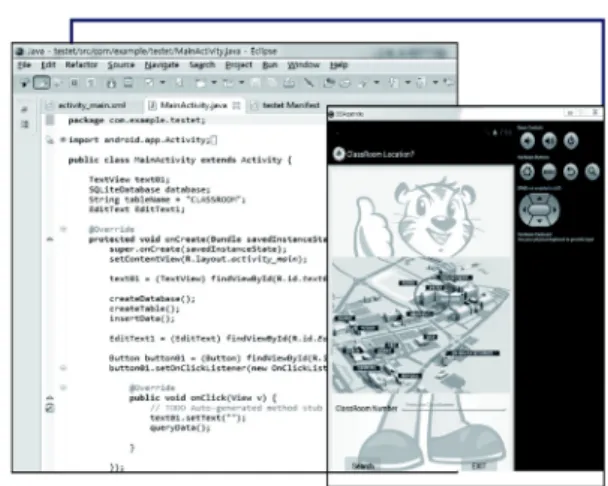
We apply our method to developing a mobile application that provides the information about the locations of classrooms. It requires a classroom number as an input from users, and then shows the information about the location of the classroom. Figure 4 shows the application development environment supported by Android and Eclipse.
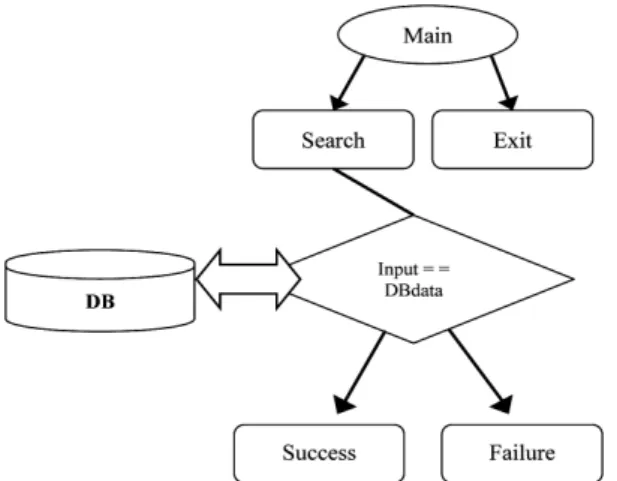
Figure 5 shows the architecture design diagram for the main starting page. Here you can see the simplicity and high level nature of our method. The application includes two computational components: Search and Exit. The component Search is processed by the two components, Success and Failure, checking the validation of the input from users. The architecture design diagram includes architecture components and general links.
Figure 4. Application Program Development Environment
Figure 5. The Architecture Design Diagram
If users enter a correct classroom number, the information system prints its location. If they don’t, it prints failure message. The component Exit includes the procedures for users’ exiting the information system.
Figure6 shows the navigation design diagram for the
architecture design diagram in Figure5. Figure6 represents
the navigation relationships between pages for the
application by using the page component, the direct link, the
data link, and the database link. The component in this
diagram is concretized in the page detail design diagram.
Figure 6. The Navigation Design Diagram
Figure 7 shows the page detail design diagram for Figure 6. Figure 7(a) is the screen layout of the start page of the application. It shows users tow button types, Search and Exit. These can be implemented differently for different OS allowing for a native user experience while maintaining a simple design diagram. The position of input that user enter a classroom number is above two buttons. The result of users’query is printed at top. Figure7(b) represents the functional flows of the function “Search”. It performs the component Success or the component Failure after it compares the input from users with data already stored in the DB.
(a) The Design Patterns
(b) The Functional Flows
Figure 7. The Page Detail Design Diagram.
Comparison of our approach with other mobile development models shows advantages in the areas of simplicity and elegance as outlined by the above figures and explanations. Also see section 2 for more detailed information about the differences between our proposed method and preexisting methods.
5. Conclusions
Mobile devices, in particular smart phones, have become popular in our lives. Mobile applications are necessary for providing smart phone devices with functionalities for mobile data services.We present a development process model to help software engineers to improve the productivity and quality of mobile applications. Itconsists of five phases:
requirements analysis, architecture design, navigation design, page design, and implementation and testing.We applied our method to an application example, and produced design products with diagrams supported by our approach. Through our approach, we could easily understand the requirements of a mobile application, and design its architecture and functional flows.
References
[1] H. Muccini, A. Francesco, and P. Esposito, “Software
Testing of Mobile Applications: Challenges and Future
Research Directions,”proceedings of AST, IEEE, 2012,
pp.29-35.
◐ 저 자 소 개 ◑
강 병 도 (Byeongdo Kang)
1986: computer science at Seoul National University(BS) 1988: computer science at Seoul National University(MS) 1995: computer science at Seoul National University(Ph.D)
1998 ~: a professor in the dept. of computer and information technology at Daegu University 1988 ~ 1998: ETRI as a senior member of engineering staff
2004: post‐doctoral research associatein SEITI at Central Michigan University in the USA 2014: included in the dictionary of Who’sWho in the world, 31st edition, Marquis in 2014,
Research interests: software development methodologies, software architectures, software process models, and embedded software development and test
양 승 원 (Seungweon Yang)
1995: computer science at Cheonbuk National University(Ph.D) 1994~: a professor in the dept. of game contents at WoosukUniversity 1997~1998: ETRI as a researcher of Language Processing Lab.
2003~2004: Univ. of GUELPH as visit scholar
Research interests: natural language processing, machine translation, game engineering
이 종 석 (Jongseok Lee)
1988: computer science at Seoul National University(BS) 1991: computer science at Seoul National University(MS) 2001: computer engineering at Seoul National University(Ph.D) 1993 ~: a professor in the dept. of game contents at Woosuk University
Research interests: software development methodologies, software metrics, reliability modelingand analysis, and embedded software development and test