• 검색 결과가 없습니다.

A Design and Implementation of Control Application for Arduino Prime Smart Car

N/A
N/A
Protected

Academic year: 2021

Share "A Design and Implementation of Control Application for Arduino Prime Smart Car"

Copied!
6
0
0

로드 중.... (전체 텍스트 보기)

전체 글

(1)

A Design and Implementation of Control Application for Arduino Prime Smart Car

1)

Jin-Yang Park*

Abstract

In this paper, we design and implement an Application based on android platform, which can control arduino Prime Smart Car using Bluetooth communication. This Application consist of Bluetooth communication module, manual mode module, and line-tracer mode module. In the Bluetooth communication module, it checks the on/off status of Smartphone Bluetooth. If Bluetooth status is off, it activates Bluetooth, selects the corresponding device from Bluetooth device list, and connects with a pair. In order to reduce coding time, we implements Bluetooth communication using inherited class from android Bluetooth package. In the manual mode module, it implements six direction moving button and stop button, which can control arduino Prime Smart Car. In the line-tracer mode module, it implements Prime Smart Car with self-driving function using TCRT5000 sensor. And moving button and stop button is disabled.

▸Keywords : Arduino, IDE Sketch, Prime Smart Car, Android studio, Bluetooth

I. Introduction

최근 초∙중∙고교와 하드웨어 기초 지식이 없는 비전공자들의 소프트웨어 교육에 널리 활용되는 아두이노(Arduino)는 오픈 소스를 기반으로 한 단일 보드 마이크로컨트롤러로 제작한 보 드와 관련 개발 도구 및 환경을 의미한다[1].

아두이노는 조도센서, 적외선센서 등과 같은 다양한 센서의 측정값을 수신하고, 해당 기기를 제어할 수 있다. 아두이노의 장점은 마이크로컨트롤러를 쉽게 동작시킬 수 있다는 것이다.

일반적으로 AVR 프로그래밍은 AVR Studio(Atmel Studio)[2]

와 WinAVR(avr-gcc)[3]의 결합으로 컴파일하거나 IAR E.W.

나 코드비전(Code Vision)등으로 개발하여 별도의 ISP 장치를 통해 업로드를 해야 하는 번거로운 과정을 거쳐야 한다. 하지만 아두이노는 컴파일 된 펌웨어를 USB로 쉽게 업로드 할 수 있 다. 또한 아두이노는 다른 모듈에 비해 비교적 저렴하고, Windows, Mac., OS X, 리눅스와 같은 다양한 운영체제를 지 원한다.

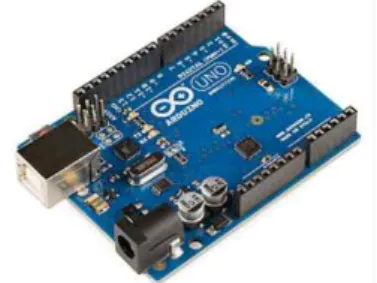
Atmel사의 8비트 AVR 마이크로컨트롤러와 프로그래밍 및 다른 서킷들과 결합이 편리한 부속품들로 구성한 아두이노 보 드는 그림 1과 같다[4].

Fig. 1. Arduino UNO R3 SMD Edition

처음 아트멜(Atmel AVR) 마이크로컨트롤러를 기반으로 만들어졌지만, 용도에 따라 다양한 보드가 있으며 개발 툴과 여 러 기능에 대한 라이브러리가 제공되고 있다. 아두이노와 유사 하게 피지컬 컴퓨팅을 가능하게 하는 마이크로컨트롤러와 플랫

∙First Author: Jin-Yang Park, Corresponding Author: Jin-Yang Park

*Jin Yang Park ([email protected]), Dept. of Computer Science, Inha Technical College

∙Received: 2016. 10. 08, Revised: 2016. 10. 24, Accepted: 2016. 11. 02.

∙This Work was Supported by Research Funds Inha Technical College in 2015.

(2)

Microprocessor ATmega328

Operating Voltage 5V

Input Voltage(recommended) 7 – 12 V Input Voltage(limits) 6 – 20 V

Digital I/O Pins 14

Analog Input Pins 6

DC Current per I/O Pin 40 mA DC Current for 3.3V Pin 50 mA

Flash Memory 32 KB (0.5 KB used by

boot loader)

SRAM 2 KB

EEPROM 1 KB

Clock Speed 16 MHz

폼은 다양하지만 아두이노는 마이크로 컨트롤러를 기반으로 작 업을 단순화하였다. 아두이노 보드는 다른 마이크로컨트롤러 플랫폼에 비해 저렴하며, 크로스 플랫폼 환경을 지원하기 때문 에 Windows, Mac OS, Linux 운영체제 모두에서 작동한다. 또 한 유연성이 높고 사용하기 쉬워 USB로 펌웨어를 쉽게 업로드 할 수 있으며, 오픈 소스 툴이기 때문에 다양한 라이브러리를 구할 수 있으며, 간단하게 자신만의 모듈을 만들고 개선할 수 있다.

본 논문에서는 아두이노 보드로 제작한 Prime Smart Car를 제어할 수 있는 안드로이드(Android) 플랫폼 기반의 앱(App)을 설계하고 구현한다. 이를 위해 2장에서 아두이도 보드와 개발 환경에 대하여 소개하고, 아두이노 보드로 제작한 Prime Smart Car와 펌웨어에 대하여 알아본다. 3장과 4장에서는 Prime Smart Car를 제어할 수 있는 안드로이드 플랫폼 기반의 앱(App)을 설계하고, 구현한다. 그리고 마지막 5장에서 결론을 맺는다.

II. Preliminaries

1. Arduino

아두이노 보드는 ATmega328 마이크로컨트롤러를 기반으 로하며, 14개의 디지털 입/출력 핀을 가진다. 그림 1의 아두이 노 보드에 대한 사양은 표 1과 같다[5].

Table 1. Arduino UNO board specification

2. 아두이노 IDE 스케치

아두이노 IDE 스케치(sketch)는 아두이노 프로그래밍, 컴 파일, 업로드, 시리얼 통신 및 모니터링을 할 수 있는 통합개발 환경(IDE)으로 다양한 라이브러리를 제공하며, 실행 파일을 아

두이노 보드에 업로드 할 수 있다[6]. 아두이노 IDE 스케치의 실행 화면은 그림 2와 같다.

Fig. 2. Arduino IDE sketch

그림 2에서는 기본적으로 제공되는 setup()과 loop() 함수 를 볼 수 있다. setup()함수는 프로그램 초기화 및 설정 기능을 제공하는 함수로 전원이 켜지면 한 번만 실행된다. loop()함수 는 전원이 종료될 때까지 무한 반복되는 함수이다. 아두이노 프 로그램의 기본 구조는 그림 3과 같다.

Fig. 3. Basic architecture of arduino program

3. Prime Smart Car

아두이노 Uno R3 Board, Sensor Shield, DC 모터, L298N 모터드라이버, 초음파 센서, TCRT5000 라인트레이서 모듈, Bluetooth HC-06 Slave 모듈로 구성한 Prime Smart Car는 그림 4와 같다. 주요 부품으로 이루어져 있으며 각각의 주요 부품에 대한 설명은 다음과 같다.

Ÿ 아두이노 Uno R3 Board: Main MCU

Ÿ Sensor Shield: 아두이노 Board에 적층하여 다양한 센서와 모듈과 연동

Ÿ DC 모터: Prime Smart Car의 바퀴 회전을 위해 사용.

Ÿ L298N 모터 드라이버: DC모터의 회전 및 속도 제어

Ÿ 초음파 센서: 음파를 쏘아서 반향 되어 수집되는 음파까지

(3)

의 시간차로 거리를 계산하며, 장애물 감지에 사용 Ÿ TCRT5000 라인트레이서 모듈: 적외선 센서로 본 논문에

서는 3개의 TCRT5000 라인트레이서 모듈을 이용하여 빛 의 반사 여부에 따른 디지털 값을 받아 라인트레이서 모드 구동

Ÿ Bluetooth HC-06 Slave 모듈: Bluetooth 통신을 위한 센 서

Fig. 4. Prime Smart Car

그림 4 Prime Smart Car에 펌웨어 업로드를 위해서 아두이 노 IDE 스케치를 사용한다.

4. Prime Smart Car 펌웨어

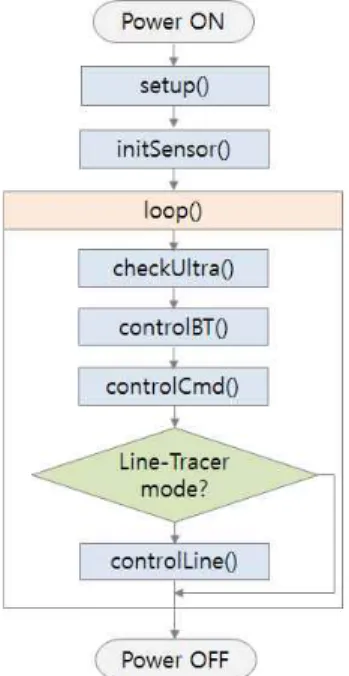
본 논문에서 사용하는 Prime Smart Car의 펌웨어는 (주) 알앤유에서 제공받았다[7]. 이 펌웨어는 총 7개의 함수로 구성 되었으며, 수행 알고리즘은 그림 5와 같다.

Fig. 5. Prime Smart Car firmware execution algorithm

그림 5 펌웨어 수행 알고리즘에서 각 함수의 기능은 다음 과 같다.

Ÿ setup(): 기본 함수로 초기 시작 상태 설정 Ÿ loop(): 기본 함수로 각 모듈들을 반복적으로 실행

Ÿ initSensor(): 각 센서들 초기화

Ÿ controlLine(): 라인트레이서 모드일 때 TCRT5000 라인 트레이서 모드를 이용하여 Prime Smart Car 제어 Ÿ controlBT(): 블루투스로 데이터 해석

Ÿ checkUltra(): 초음파 센서를 이용한 장애물 감지 및 처리 Ÿ controlCmd(): controlBT함수에서 블루투스 통신으로 수

신한 명령어 처리

5. Android Studio

Android studio는 코드 편집, 디버깅, 성능 도구, 유연한 빌드 시스템 및 인스턴트 빌드/배포 시스템을 사용하여 뛰어난 품질의 앱을 빌드 할 수 있는 개발 환경을 제공하는 안드로이 드 플랫폼 기반의 앱 개발 IDE이다[8].

Android studio의 특징은 다음과 같다.

Ÿ 기존 이클립스에 비하여 설치 과정을 간소화 하고 개발 환 경 구축이 간단하며 안정성과 속도 면에서 우수

Ÿ SDK Manager로 SDK 관리 단순화

Ÿ 코드 템플릿을 제공하여 새로운 프로젝트를 구성 편리 Ÿ 멀티 스크린 앱 개발 지원

Ÿ 모든 형태와 사이즈를 지원하는 가상 기계 제공

Ÿ Android Studio와는 독립적으로 움직이는 Gradle 빌드 시 스템 사용

6. Android Bluetooth

안드로이드에서 지원하는 Bluetooth 패키지로 android.

bluetooth 패키지가 있다. android. bluetooth 패키지의 주요 클래스는 다음과 같다.

Ÿ BluetoothAdapter : 블루투스 장치를 제어하기 위해 참조 하는 객체로 이를 이용해 시스템 서비스로 제공되는 블루 투스 서비스 사용

Ÿ BluetoothDevice : 다른 블루투스 디바이스를 나타내는 객체로 다른 디바이스에 연결을 요구하거나 다른 디바이 스의 상태 정보 확인

Ÿ BluetoothSocket : 데이터를 주고받기 위해 사용되는 소 켓 객체

Ÿ BluetoothServerSocket : 데이터를 주고받기 위해 사용 되는 서버소켓 객체

그리고 다른 블루투스 장치와 데이터 송수신을 위해서는 다음과 같은 네 가지의 작업을 순서대로 수행한다.

❶ Bluetooth 활성화

- 단말기의 Bluetooth 기능이 존재 여부 확인

- Bluetooth 기능의 활성화 여부를 확인 후 비활성화 되어있을 시 Bluetooth 기능 활성화

❷ 다른 Bluetooth 단말기 검색

❸ 다른 Bluetooth 단말기와 페어링

❹ 다른 단말기와 Bluetooth 연결

(4)

III. Design Android Application

본 논문에서는 Prime Smart Car를 제어할 수 있는 안드로 이드 플랫폼 기반의 앱을 설계한다. 이 앱의 기본 모듈은 그림 6과 같다.

Fig. 6. Basic module

그림 6에서 블루투스(Bluetooth) 통신 모듈은 스마트폰의 블루투스의 온-오프 상태를 체크하고, 오프 상태이면 블루투스 를 활성화한 후에 블루투스 장치 목록에서 해당 기기를 페어 링한다. 블루투스의 동작 알고리즘은 그림 7과 같다.

Fig. 7. Bluetooth operation algorithm

수동 모드(Manual mode) 모듈은 사용자가 직접 아두이노 Prime Smart Car를 제어할 수 있도록 6개 방향의 이동 버튼과 정지 버튼을 구현한다. 라인트레이서모드(Line-Tracer mode) 모듈은 Prime Smart Car가 TCRT5000 센서를 이용하여 스스 로 이동할 수 있도록 구현한다. 이 때 수동모드에서 사용하는 이동버튼과 정지버튼은 비활성화 된다.

IV. Implementation Android Application

본 논문에서 구현한 Prime Smart Car 제어 앱에서는 블루 투스를 연결한 후에 수동 모드와 라인트레이서 모드에서 Prime Smart Car를 제어할 수 있다. 수동 모드와 라인트레이 서 모드는 서로 전환할 수 있다. 이 앱의 UI 구성은 그림 8과 같다.

Fig. 8. Prime Smart Car Control App

그림 8에서 블루투스 아이콘을 누르면 그림 9의 CheckBlueTooth() 함수를 실행한다.

void CheckBlueTooth() {

mBluetoothAdapter =

BluetoothAdapter.getDefaultAdapter();

if (mBluetoothAdapter == null) {

Toast.makeText(this, "Don’t support Bluetooth", Toast.LENGTH_LONG).show();

finish();

return;

} else { //Support Bluetooth

if (!mBluetoothAdapter.isEnabled()) { //Non active Intent enableBtIntent = new Intent(BluetoothAdapter.

ACTION_REQUEST_ENABLE);

startActivityForResult(enableBtIntent, REQUEST_ENABLE_BT);

} else { //Active

selectDevice();

mBluetoothAdapter.startDiscovery();

} } }

Fig. 9. CheckBlueTooth() method

그림 9에서 Bluetooth 상태를 확인하고 블루투스 기능이 비

(5)

활성 상태이면 startActivityForResult(enableBtIntent, REQUEST_ENABLE_BT) 메서드를 실행하여 그림 10과 같이 블루투스 승인 요청을 보낸다.

Fig. 10. Bluetooth approval request

void selectDevice() {

mDevices = mBluetoothAdapter.getBondedDevices();

mPariedDeviceCount = mDevices.size();

if (mPariedDeviceCount == 0) {

Toast.makeText(getApplicationContext(), "No Pairing deviec.", Toast.LENGTH_LONG).show();

finish();

}

AlertDialog.Builder builder = new AlertDialog.Builder(this);

builder.setTitle("Select bluetooth device");

List<String> listItems = new ArrayList<String>();

for (BluetoothDevice device : mDevices) listItems.add(device.getName());

listItems.add("Cancel");

final CharSequence[] items = listItems.toArray(new CharSequence[listItems.size()]);

builder.setItems(items, new DialogInterface.OnClickListener() { @Override

public void onClick(DialogInterface dialog, int item) { if (item == mPariedDeviceCount) { Toast.makeText(getApplicationContext(), "Don’t select device.", Toast.LENGTH_LONG).show();

finish();

} else {

connectToSelectedDevice(items[item].toString());

} } });

builder.setCancelable(false);

AlertDialog alert = builder.create();

alert.show();

}

Fig. 11. selectDevice() method

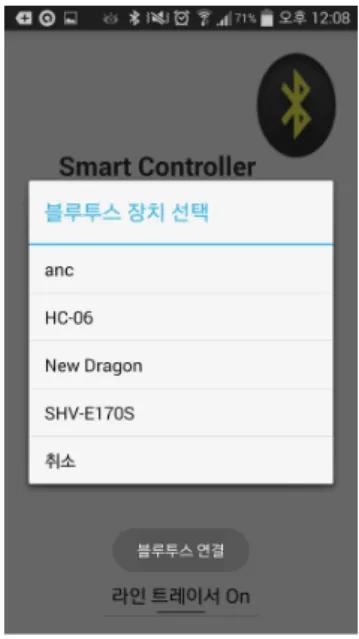
스마트폰의 블루투스가 활성화 상태이면 그림 12와 같이 selectDevice() 함수에서 페어링 대상 장치 목록을 보여준다.

Fig. 12. Bluetooth device list

그림 12의 페어링 대상 블루투스 장치 목록에서 해당 장치 를 선택하면 그림 13의 connectToSelectedDevice()함수를 호 출하여 선택한 기기와 블루투스를 연결한다.

void connectToSelectedDevice(String selectedDeviceName) {

mRemoteDevice =

getDeviceFromBondedList(selectedDeviceName);

UUID uuid = java.util.UUID.fromString("00001101-0000- 1000-8000-00805f9b34fb");

try {

mSocket = mRemoteDevice.createRfcommSocketTo ServiceRecord(uuid);

mSocket.connect();

Toast.makeText(getApplicationContext(), "Success Pairing", Toast.LENGTH_LONG).show();

mOutputStream = mSocket.getOutputStream();

mInputStream = mSocket.getInputStream();

beginListenForData();

Toast.makeText(getApplicationContext(), "Ready data receive..", Toast.LENGTH_LONG).show();

} catch(Exception e) {

Toast.makeText(getApplicationContext(), "Connect device error",

Toast.LENGTH_LONG).show();

finish();

} }

Fig. 13. connectToSelectedDevice() method

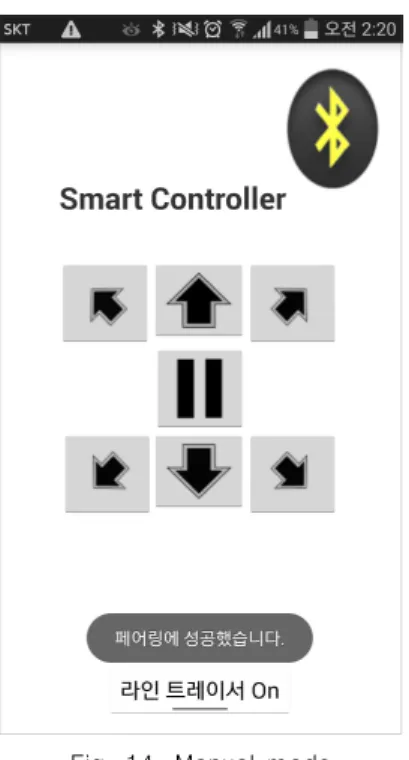
블루투스를 연결하면 그림 14와 같이 기본적으로 수동 모

드로 설정된다. 아래 [라인 트레이서 On] 버튼을 누르면 라인

트레이서 모드로 전환 할 수 있다.

(6)

Fig. 14. Manual mode

라인트레이서 모드에서는 그림 15와 같이 정지버튼 이외 6 개의 이동 버튼들이 비활성화 상태로 설정된다. 모드 전환 버튼 과 제어 버튼들은 sendData()함수를 이용하여 Prime Smart Car의 블루투스 센서와 통신한다.

Fig. 12. Line-Tracer mode

V. Conclusions

본 논문에서는 블루투스 통신을 이용한 아두이노 Prime Smart Car를 제어하는 안드로이드 플랫폼 기반의 앱을 설계하 고 구현하였다. 이 앱은 블루투스 통신 모듈과 수동 모드 모듈, 라인트레이서 모드 모듈로 구성하였다. 블루투스 통신 모듈은 스마트폰의 블루투스의 온-오프 상태를 체크하고, 오프 상태이 면 블루투스를 활성화한 후에 블루투스 장치 목록에서 해당 기 기를 선택하여 페어링으로 연결한다. Android Studio의 android.bluetooth 패키지의 클래스를 상속받아 블루투스 통신 을 구현함으로써 개발 기간을 단축할 수 있었다. 수동 모드 모 듈은 사용자가 직접 아두이노 Prime Smart Car를 제어할 수 있도록 6개 방향의 이동버튼과 정지버튼을 구현하였다. 라인트 레이서 모드 모듈은 TCRT5000 센서를 이용하여 Prime Smart Car 스스로 이동할 수 있도록 구현하였다. 라인트레이 서 모드에서는 수동 모드에서 사용하는 이동 버튼과 정지 버튼 은 비활성화 되도록 설정하였다.

REFERENCES

[1] https://ko.wikipedia.org/wiki/%EC%95%84%EB%9 1%90%EC%9D%B4%EB%85%B8

[2] http://www.atmel.com/tools/atmelstudio.aspx [3] http://www.webring.org/l/rd?ring=avr;id=59;url =

http%3A%2F%2Fwinavr%2Esourceforge%2Enet%2F

[4] https://www.arduino.cc/

[5] https://store.arduino.cc/product/GBX00066 [6] https://www.arduino.cc/en/Main/Software [7] http://www.irnu.co.kr/index.html

[8] https://developer.android.com/studio/index.html

Authors

Jin Yang Park received the B.S., M.S. and Ph.D. degrees in Electronic Engineering from Dankook University, Korea, in 1982, 1984, and 1997, respectively.

Dr. Park joined the faculty of the

Department of Computer Science at Inha Technical

College, Incheon, Korea, in 1988, where he has served as

the Director of the Department of Computer Science. He

is currently a Professor in the Department of Computer

Science, Inha Technical College. He is interested in

Computer system, Digital system, and mobile platform.

수치

Fig.  1.  Arduino  UNO  R3  SMD  Edition
그림  2에서는  기본적으로  제공되는  setup()과  loop()  함수 를 볼 수 있다. setup()함수는 프로그램 초기화 및 설정 기능을  제공하는  함수로  전원이  켜지면  한  번만  실행된다
그림 4 Prime Smart Car에 펌웨어 업로드를 위해서 아두이 노  IDE  스케치를  사용한다.
Fig.  11.  selectDevice()  method
+2

참조

관련 문서

Should a module be used with any of the absolute maximum ratings exceeded, the characteristics of the module may not be recovered, or in an extreme case, the module

In keypad control mode, following parameters can be set: pump displays speed or flow rate, pump state when power on (stop or run), automatic keypad lock and simple

Only after you press the POWER (ON/STAND BY) button on the pro- jector cabinet or the remote control for a minimum of 2 seconds will the power indicator turn to green and

(4) After a certain period of tightening time with tightening torque, Z-axis and rotating axis return in positioning control mode to the retracted

This solution includes Smart Monitoring, which checks the status of miners and the mining in real-time, and provides the information necessary for optimal decision

1. In Control Panel, double-click the System icon. You see the System Properties window.. In System Properties, click the Hardware tab, then click on the Device Manager

The findings showed that the environment education program using the developed Arduino was effective in enhancing environmental literacy and creative

Therefore, the execution of Eco-STEAM program using Arduino can expect the students’ changes in perception of environmental problems, motivation for them