A Novel Web-based Management of Networked Display for
Advanced Collaboration Environment
Vinay Ramachandra*, Sangwoo Han**, Changhyeok Bae***, JongWon Kim****
Networked Media Lab, Gwangju Institute of Science and Technology (GIST)
Abstract Not many years ago, people found the contemporary technology expensive and difficult to use in collaborative type of meetings. Today, with the technology advanced to high standards and accessible at cheaper price, its adaption is becoming more and more ubiquitous with wide range of applications. Today’s meeting rooms are not just plain old telephone systems with microphones and speakers. Today’s meeting rooms are smart and intelligent. They can identify the participants; they can provide natural view of remote participants; they can proactively manage resources for collaboration and so on. More effective collaboration is possible with deployment of devices like high-definition cameras, advanced displays, sensors, gigabit networks, trackers, pointers, and high-end audio devices. Devices alone are not enough in the meeting rooms. We need software infrastructure to manage the devices and meeting contexts. One such software infrastructure is SMeet, a Smart Meeting space, which we have developed to provide an effective multi-party remote collaboration environment. Networked display systems are used in such advanced collaboration environment for better visualization. In this paper we discuss a novel approach to control and manage networked display systems in SMeet environment. 핵심어: ubiquitous computing, networked display, Web 2.0, collaboration, services
*first author: GIST, School of Information and Mechatronics; e-mail: [email protected]
**co-author: GIST, School of Information and Mechatronics; e-mail: [email protected]
***co-author: GIST, School of Information and Mechatronics; e-mail: [email protected]
****professor: GIST, School of Information and Mechatronics; e-mail: [email protected]
Acknowledgment - This work was supported by the IT R&D program of MKE/IITA [2008-F-029-01, Development of e-Organ System based on Cyber Computing] and IT Research Center support program of MKE/IITA [grant number IITA-2008-C1090-0801-0017].
1. Introduction
With the recent advances in ubiquitous computingenvironment there have been ongoing efforts to provide
a scalable and elegant multi-party collaboration solution. SMeet [1], being one such solution, offers a platform for natural sharing of different types of contents like visual data (videos and presentations), audio (conversation) and user actions (mouse gestures) among remote parties. Depending on the user requirements, SMeet facilitates customization of meeting space for multi-group interaction. Under SMeet environment, each meeting room is conceptualized as a meeting node or simply called ‘SMeet node’. In collaboration environment there can be multiple SMeet nodes present, geographically separated. In such advanced collaboration environments there can be different types of display devices present, using which participants can view and share visual elements over.
Devices such as networked tiled display, plasma display, projector display...etc are a common scene in advanced collaboration environments. These display devices are networked and clustered for seamless visualization. Many applications are designed to display contents over these display devices like media streaming programs, desktop sharing programs and image viewing programs and so on. Managing the whole display infrastructure is an important issue. Complex user operations must be simplified, ignoring which, can lead to operator problems and user dissatisfaction rendering the meeting cumbersome and ineffective. It should also be made intuitive and easy-to-use so that first time users should not find any difficulty in handling the display systems and display applications.
To tackle this issue we have designed and developed a web-based display management tool using novel techniques. Through this paper we show how this tool greatly simplifies the management of display systems and display applications in SMeet nodes. The main objective of this work is to improve the users’ quality of experience (QoE) in advanced collaboration environment like SMeet.
The rest of the paper is organized as follows. Section 2 gives a prelude to the proposed solution from software perspective. Section 3 discusses the high-level view of web-based display management tool. It also presents the software architecture of tool in detail. Section 4 briefly describes the implementation and evaluation part. Section 5 talks about a related work and Section 6 conclude the paper by providing a peek into future steps.
2. SMeet
Before discussing about the tool itself, let us have a look at two important components of SMeet software stack; ‘SMeet Mediator’ and ‘SMeet One Display’ (SMOD).
2.1 Mediator
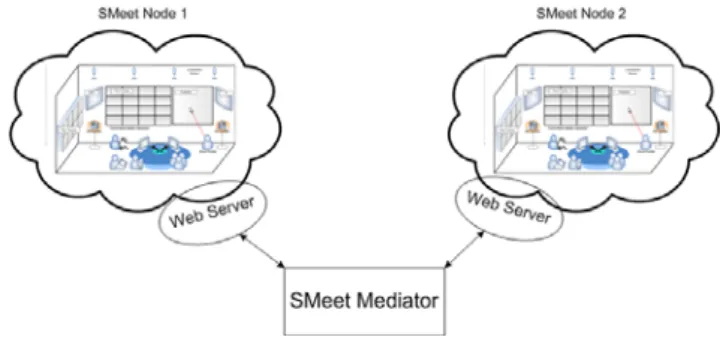
SMeet is designed based on service-oriented design principles. As such, it is composed of different kinds of services offering different functionalities for end user. When multiple nodes are involved we need a mechanism to coordinate communication among remote services. Mediator is exclusively used to perform this task. It manages view information, conducts matching among services and coordinates service level agreements. The web-based display management tool depends on mediator services to exchange messages with devices or software elements in remote SMeet node. Fig. 1 shows the high-level view of mediator from the perspective of display management tool design. As shown in the figure, each SMeet node consists of many devices used for collaborative meeting.
Fig. 1: High level view of Mediator.
Mediator facilitates communication among SMeet nodes’ devices which are active in collaboration environment. Each SMeet node consists of a web server which serves the requests of clients in that node. Clients are basically users of display management tool. While mediator acts as service repository and service matchmaker, web server merely acts as initiator of service operation in mediator. This way, complex service operations and other details can be hidden from web clients (users). Using web server and mediator components, clients can easily perform local as well as remote operations. For example, a meeting participant in node 1 can instruct a server in node 2 to stream video from one of its camera to node 1. Mediator is not only used for facilitating communication among SMeet nodes, it is also used for coordinating communication
among internal components of SMeet (for example SMOD) which is discussed in the next section.
2.2 SMeet One Display (SMOD)
SMOD is a middleware component to visualize data on display systems. The data visualized can be high-resolution image or video or any graphic content. The display systems can include heterogeneous devices such as projector display, networked tiled display, plasma display. The important functionality of SMOD is to stream graphic media across display systems for visual sharing of data. Currently users can control display objects using SMOD command line interface. Some amount of time must be spent to learn all the commands, which is undesirable for novice users. Moreover, SMOD supports many applications like image viewer, video streamer, desktop sharing and so on. There are plans to support more applications in future. Usage of these applications in SMeet environment requires users to know all the command line parameters which might differ across applications. There is high probability of users making errors while invoking applications via command line.
To alleviate these problems we provide a web-based interface for display management. Through this interface, users can easily use their intuition to visually control the display objects without having to spend much effort to learn to operate. The display objects are represented as widgets in the browser. Users unaware of SMOD usage can easily use this tool without much hassle. Another important advantage of these types of browser based applications is that it can be run on any operating system which supports common protocol like HTTP.
3. Web-based Display Management Tool
3.1 High-Level View
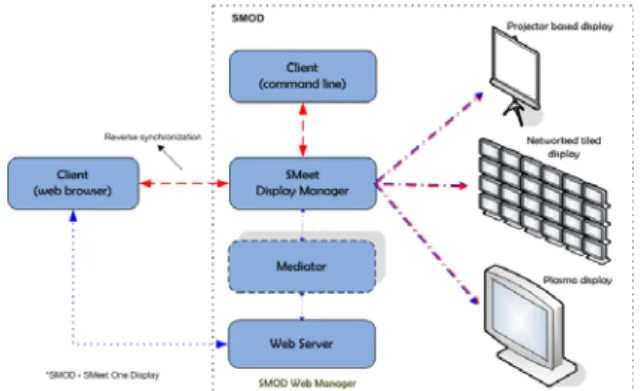
Fig. 2 illustrates the high-level view of our web-based display management tool called SMOD Web Manager. As of now, users rely on command line interface to control the display objects on display systems. With the new SMOD Web Manager, users can use their browsers to operate various display applications in SMeet environment. SMOD Web Manager is deployed in a web server. Each SMeet node consists of one such web server running SMOD Web Manager and users can connect to it using HTTP URL. The basic function of
SMOD Web Manager is to process the requests from
clients (browser), map these requests to actions, and forward all the actions to Display Manager. [Display Manager is the main software module responsible for managing and controlling display aspects of SMeet.] These requests are invoked by using web elements like buttons and widgets on the user interface. The user requests can be as simple as moving or resizing the visual object, or it can be as complex as invoking streaming video application. SMOD realizes these actions on to heterogeneous display systems like networked tiled display, projector-based display, plasma display and so on.
Fig. 2: High level view of web-based display management tool.
The important advantage, as seen from the high level view, is that Display Manager and SMOD Web Manager
modules are deployed on different systems. This makes it easier for web clients to connect to server without requiring the knowledge of Display Manager system. From the usage point of view it is important to consider how users would interact with Display Manager. Some users prefer to use existing command line interface instead of web browser to control and manipulate display objects. Any changes made such way must be reflected on browsers used by other users. Basically we need to update the properties of widgets on browser. This kind of reverse synchronization (from command line to browser) is achieved from our tool using an asynchronous web technique which is explained more in detail in implementation section.
3.2. Software Architecture
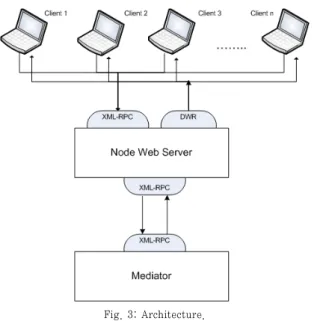
The display management tool architecture (see Fig.3) consists of four main components: client user interface, server programs, XML-RPC component and reverse Ajax component. Client user interface provides users with necessary graphical widgets to control display systems and applications. These controls are translated to requests and then sent to web server. Server
programs residing in SMeet node’s web server contains all the necessary methods to process and forward client’s request to corresponding mediator services.
The communication between web server and mediator is through XML-RPC method which is an industry accepted standard for distributed computing. The mediator then forwards the request to Display Manager
module. The Display Manager module converts the request to necessary operations over heterogeneous display systems. After performing necessary operations the reply is sent back to mediator, which in turn forwards the replies to SMOD Web Manager residing in web server. This reply is then broadcasted to all the connected web clients using reverse Ajax technique. In this technique the server pushes data to all the connected clients. This way all other clients can view the result of the operation performed. For example, whenever a client resizes the application window, all other clients can view the resize operation performed automatically on their browsers.
Fig. 3: Architecture.
Client user interface is implemented using JavaScript. Server programs are implemented as Java servlets and Java Server Pages. Apache XML-RPC is used for realizing XML-RPC based communication. Reverse Ajax technique is implemented with the help of Direct Web Remoting (DWR) tool [4].
4. Implementation and evaluation
4.1 Implementation
We have implemented the web-based display management tool and deployed it in SMeet environment (see Fig.5). Web 2.0 techniques such as AJAX is used to develop the client side user interface module. AJAX technique helps in creating faster interactive web applications. It is already proving to be a good alternative for desktop applications. The core technique of AJAX is that whenever client sends HTTP request to server, server responds with a small amount of data, rather than a complete web page. JavaScript module in client user interface uses this data to modify the page without refreshing the web page. This is faster because less data is transmitted from server to client and client’s browser has less work to do. jQuery AJAX library [3] provides all the JavaScript elements used in our web application. This library basically handles all the HTTP requests and responses. This library provides APIs for creating rich user interfaces meeting users need for faster responsiveness. Advantage of using such library is that they provide cross-platform browser support without any distribution hassles. They help in reduced bandwidth utilization by downloading only the data required.
Server side interface consisting of services module is implemented using Java language to maintain compatibility with other components of SMeet. Services are basically implemented in the form of Java servlets and Java server pages (JSPs). Apache Tomcat web server environment is used to host all the services.
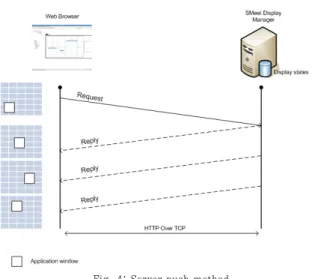
We had explained earlier that the display objects can be controlled in more than one way. Display objects can be modified using command line interface or web browser or mouse tracker [2]. There is a need to synchronize the state of display objects across these interfaces. By state of display object we mean its activation state, its position on the display system, its size and so on. To synchronize the state changes on web browser we have used server push technique using direct web remoting tool. In this technique (see Fig.4) the clients’ web browsers first subscribe to Display Manager using their session.
Whenever user perform any operation, the request is sent as HTTP request to mediator in asynchronous manner i.e. requests do not wait for reply. The request is then further processed and forwarded to Display Manager over TCP network. Display Manager maintains a database to store the states of display objects. The current state of display object is then replied back to SMOD Web Manager and finally it reaches client’s browser as HTTP reply. Based the reply the client UI module updates the UI elements. This whole process is made to run as background process i.e. without requiring user intervention, using AJAX. The asynchronous calls are made at regular intervals depending on number of clients using the web application. With this
capability, browsers can update the UI elements without reloading the web page.
Fig. 4: Server push method
4.2 Evaluation
Our initial tests show that web-based applications greatly simplify management of display systems and its applications in collaboration environment. We have successfully tested our web application on popular browsers like Firefox, Internet Explorer and Opera. We tested with clients located in two different SMeet nodes using our web-based client interface. We found that the delay between user operation and actual realization of action on display devices was negligible. We plan to test the tool with more number of clients located in multiple
SMeet nodes.
Fig. 5: Tiled display objects managed using the tool.
5. Related Work
A similar work can be found in Scalable Adaptive Graphics Environment (SAGE) environment. The SAGE web UI [5] offers a subset of features similar to our interface. SAGE web UI is used as an alternative solution for controlling SAGE. It provides basic features like desktop sharing, application moving, resizing and
closing. One important feature of SAGE web UI is users can connect to multiple sessions simultaneously. Though it is useful, it is not clear from their work how they resolve conflicts when multiple users simultaneously access any application window. We plan to resolve this conflict issue in our tool by including a separate service which can integrate well with our design. This is targeted as future work.
An important drawback of SAGE web UI is that their architecture requires a proxy server between web server and SAGE application. This proxy server is used to communicate data between web server and SAGE application. Our solution does not depend on any such redundant server and is aimed at reducing the resource consumption. Another shortcoming of SAGE web UI architecture is that it uses a combination of XML-RPC and JSON encoding for data exchange. JSON (JavaScript Object Notation) is used for data exchange between web clients and web server whereas XML-RPC is used for data exchange between web server and SAGE proxy server. This kind of architecture requires some special software modules in web server to take care of conversion between XML-RPC and JSON. Our solution makes use of XML-RPC based data exchange between web clients, web server and Display Manager. This has made the whole web communication process lightweight and easy to implement.
6. Conclusion
In this paper we proposed a novel method to manage visual objects on networked display systems. The tool designed is a web-based tool built on top of SMeet’s mediator to control display systems and display applications. This paper also provides a glance of using Web 2.0 techniques in this kind of multimedia collaboration environment where users located remotely can communicate and collaborate effectively. After performing necessary tests we observed that the proposed work simplifies the management and operation of display applications used in conjunction with networked display systems.
As part of future work we plan to test the tool for latency and usability with substantial number of clients remotely connected. The main focus of testing would be to reduce the communication delay (if any). We also plan to provide
more features in future which can prove useful to people participating in the collaboration environment. We plan to extend the service architecture to gather some real-time performance data and display it along with application details for user analysis. Integrating some simple web applications like chat, file sharing, webcam view, session manager and so on are also under pipeline.
References
[1] N. Kim, S. Han, and J. Kim, “Design of software architecture for smart meeting space,” in Proc. Pervasive Computing and Communications WS on UbiWare, Mar. 2008.
[2] S. Ko, N. Kim, and J. Kim, “Design of interaction manager supporting collaborative display and multimodal interaction for advanced collaborative environment,” in Proc.SPIE ITCOM, vol. 6777, 2007.
[3] jQuery, the JavaScript library. http://jquery.com/, 2008. [4] Direct Web Remoting tool, http://directwebremoting.
org
[5] SAGE web UI. http://www.evl.uic.edu/cavern/sage /sagewebui/.
[6] S. Han, N. Kim, K. Choi, and J. Kim, “Design of multi-party meeting system for interactive collaboration,” in Proc. Communication Systems Software and Middleware, Jan. 2007.
[7] H. C. Hong and Y. C. Chen, “Design and implementation of a web-based real-time interactive collaboration environment,” in Proc. The Ninth IEEE Workshop on
Future Trends of Distributed Computing Systems May 2003.
[8] L. Lei, and Z. Duan, “Integrating AJAX and web services for cooperative image editing,” IT Professional , vol. 9, no. 3, May-June 2007.
[9] L. Du and U. Chandra, “Building web-based collaboration services on mobile phones,” in Proc. Collaborative Technologies and Systems, May 2008. [10] J. J. Garrett, Ajax: A new approach to web applications.
http://www.adaptivepath.com/publicati ons/essays/archives/000385.php, 2005. [11] C.T. Sun and C. Chou, “Experiencing CORAL:
Design and Implementation of Distant Cooperative Learning,” in Proc. IEEE Transaction on Education, August 1996, pp. 357-366.
[12] R. Bentley, “Architecture Support for Cooperative Multiuser Interfaces,” in Proc. IEEE Computer Magazine, May 1994, pp. 37-47.
[13] A. Roczniak, S. Janmohamed, C. Roch, A. El Saddik and P. Levy, “SOA-based Collaborative Multimedia Authoring,” in Proc. Montreal Conference on eTechnologies, 2006.