ICCAS2005 June 2-5, KINTEX, Gyeonggi-Do, Korea
1. INTRODUCTION
A crowd scene usually involves hundreds and thousands of extras. Unlike a leading actor, extras do not play an important role in a scenario. However the quality of a crowd scene is important and it greatly affects the overall impression of a film. A virtual crowd scene requires deliberate considerations on interaction between digital characters as well as motion control of each character. Generally interactions between digital characters are unpredictable and complex, and thus manually creating a virtual crowd scene requires great time and effort of an animator. Considering that a crowd scene is a short part of the total film, it is preferable to get a crowd scene with little time and effort.
Previous works on virtual crowd simulation usually use two-phase method that makes a simulation of particles or simple objects first, and then creates appropriate motion of a digital character according to the simulation result. However, this approach is inappropriate for a crowd scene consisting of several kinds of actions. This is because movement of a particle does not give sufficient information on the type of action to be applied to the particle. Existing commercial crowd simulation softwares are complex and have computer program-like script interfaces, which makes an ordinary animator hard to learn and use them.
This paper proposes a crowd simulation method that requires minimal operation by user and a method of connecting simulation result to natural motion of a character. Proposed crowd simulation system was implemented as a plug-in of Maya which is one of the most commonly used modeling, animation and rendering software for movies. It thus appears that an animator can easily learn to use our plug-in software.
2. RELATED WORK
There has been a great deal of past research in crowd simulations, especially, collision detection that is known by bottleneck in computer simulation. I-Collide[1] was adopted as a tow-level approach to control complex and a great number of objects in a large scale environments. Hubbard[2] proposed progressive refinement method to guarantee accuracy while maintaining steady and high frame rate. Kim[3] presented an efficient collision detection algorithm among spheres moving with unknown trajectories. Reynolds[4][5], Xiaoyuan[6], Niederberger[7] solved a collision detection about non-human creature and focused on
the simple behaviours of creature.
In Improv[8], it was suggested a method which controls the interactive actors by interpolation after defining the range of joint angle using script language. Improv consisted of two subsystems, an animation engine and a behaviour engine. The combined system provided an integrated set of tools for authoring the minds and bodies of interactive actors. Lee et al.[9] presented that a connected set of a human-like character is able to be created from non-linear sequences of motion, automatically organized for search, and used real-time control of an avatar using three interface techniques: selecting from a set of available choices, sketching a path, and acting out a desired motion in front of a camera. Kovar et al.[10] constructed a directed graph called a motion graph that includes connections among the database for creating realistic, controllable motion. The motion graph consisted of original motions and automatically generated transitions. Li et al.[11] described motion texture that consisted of LDS(linear dynamic system) for synthesizing complex human character that is statistically similar to the original motion captured data. Pullen et al.[12] discussed a method for creating animations by setting a small number of key-frames and used motion capture data to enhance the reality of produced animation. Arikan et al.[13] created a new motion which performed the specified actions at specified times by assembling the motion capture data from motion database and sketching on the timeline with annotations.
Thalmann[14] and Ulicny[15] presented a method that controls the crowd in real time in a virtual environment. Musse et al.[16] described a model for simulating human crowd by a hierarchy composed of virtual crowds, groups and individuals in real time.
3. SYSTEM OVERVIEW
Proposed crowd simulation system consists of UI(user interface), crowd creation module, crowd simulation module and motion synthesis module. UI was created by using mel script provided by Maya, and a user can set the properties of the crowd to be created. A crowd is created according to the inputted properties and simulated using sensor-brain module. The sensor-brain module calculates the next position of a character in the planar space and determines which action to do. Once the position in the planar space and the action are determined, the root position is determined in the 3-dimensional space based on the terrain information, and
Implementation of a Virtual Crowd Simulation System
Il-Kwon Jeong*, Seongmin Baek*, Choon-Young Lee** and In-Ho Lee** Digital Actor Research Team, Digital Content Research Division, ETRI, Daejeon, Korea (E-mail: {jik, baeksm, leeinho}@etri.re.kr)
**Division of Mechanical Engineering, Kyungpook National University, Daegu, Korea (E-mail: [email protected])
Abstract: This paper introduces a practical implementation of virtual crowd simulation software. Usual commercial crowd simulation softwares are complex and have program-like script interfaces, which makes an animator hard to learn and use them. Based on the observations that most crowd scenes include walking, running and fighting movements, we have implemented a crowd simulation system that automatically generates movements of virtual characters given user's minimal direction of initial configuration. The system was implemented as a plug-in of Maya which is one of the most commonly used 3D software for movies. Because generated movements are based on optically captured motion clips, the results are sufficiently natural.
Keywords: Crowd, simulation, animation, virtual reality
ICCAS2005 June 2-5, KINTEX, Gyeonggi-Do, Korea
key-frames of the character are set using motion capture data.
Fig. 1 shows the overall system diagram.
Fig. 1 System diagram 4. CROWD SIMULATION 4.1 Sensor-brain module
In the proposed system, agents have their own virtual sensors and intelligence to generate an intelligent motion according to the specified scenario. The targeted application, crowd simulation, involves a collection of interacting, highly autonomous and dynamically complex human-like agents. Interactions between agents are carried out via sensor, brain, motion. The time varying interaction can not be tracked by an extensive formal analysis, therefore, the simulation of it is of primary importance [17].
Our crowd simulation software consists of a collection of autonomous agents (Ai), which interact with the surrounding World(W) and other agents. The World is a set of entities and serves as a formal representation of the environment. The entities include autonomous agents, static and dynamic objects, and geometric information of the ground level.
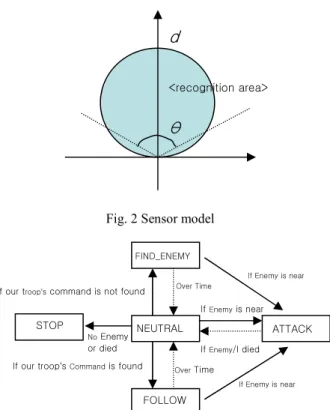
The autonomous agent has its own virtual sensor to catch the current state of the World and surrounding agents. The state of the World includes information about the position of static obstacles. Virtual sensor has the following parameter to simulate various situations: recognition distance (d) and angle(θ) . Adjusting these two parameters makes it possible to simulate natural motion of agents in specific environment, such as foggy or sunny situation. The area can be modeled as a triangle, circle, cone, rectangle, etc. Fig. 2 shows a circular area. Virtual sensor gets available information on the agents or objects in the range of recognition area. The information level is also constrained by some flags.
Brain module in the agent performs processing of data and generates an action command by looking up motion data base. Currently, this brain module has been developed like a state machine. Agent states are defined before simulation. For example, if combat situation between agents is preferred, agents’ states can be “NEUTRAL”, “FOLLOW”, “FIND_ENEMY”, and “ATTACK”. State “NEUTRAL” is the hub state from which directs to other possible state. State “FOLLOW” takes locomotion command to follow commandment from our friendly troops. State “FIND_ENEMY” searches enemies in the environment. State “ATTACK” generates combat motions (Fig. 3).
In the simulation, basic collision avoidance algorithm was
conducted by simulation manager at each time step. Agent state and state transition can be specified by user interface.
Fig. 2 Sensor model
Fig. 3 State model for combat: An example 4.2 Action module
Action module applies motion capture data to the character based on the current position and action command determined by the sensor-brain module explained in the previous section. Action module consists of two parts, selection manager and action manager. Selection manager selects appropriate motion data from the motion database. Action manager applies an appropriate transformation to the selected motion data and applies it to the character.
Selection manager
Motion database is a collection of motion data clips such as walk, run, fight, etc. However it is hard to select appropriate motion data for desired action, so additional information on motion data must be given beforehand.
First, one should define the group that a motion data belongs to. For example, a motion data can be classified into walk group, run group, fight group, and so on.
Secondly, one should keep a record of secondary properties of a motion data specific to the group that it belongs to. The followings are the secondary properties of a fighting motion and a walking motion.
Fig. 4 Secondary properties of motion data: Examples Ft: fight motion group, Up: upper body, Hd: hand attack, Rt: right, St: straight, Lc: locomotion group, Wk: walk, Sp 3.5: speed 3.5m/s NEUTRAL FOLLOW FIND_ENEMY ATTACK If Enemy is near If Enemy/I died If our troop’s Command is found
If our troop’s command is not found
If Enemy is near If Enemy is near STOP No Enemy or died Over Time Over Time
d
θ
<recognition area> UI – Maya Menu Crowd Creation Crowd Option MotionDB Brain Sensor Action Terrain CrowdSimulation() Constraint Interaction Ft Up Hd Rt St L (1 23) R (1 23) K 1 4 12 20 23 Lc Wk Sp 3.5 L (1 12) (20 32) R (10 22) (30 42) K 1 6 10 12 18 …2218
ICCAS2005 June 2-5, KINTEX, Gyeonggi-Do, Korea
In Fig. 4, L(…) or R(…) means a constraint that the left or
right foot should be in contact with the ground for the specified interval. For example L(1 23) means that the left foot is in contact with the ground at frame 1 to 23. Frame numbers that follow after the symbol ‘K’ mean important frames, and these frames are used as key-frames when the motion is imported to Maya.
This paper is focused on creating combat or fighting virtual crowd, so motion groups are defined as the following.
Group 1: Locomotion Group 2: Fight motion Group 3: Fall down motion Group 4: Bravo motion
A user can build an arbitrary motion group specific to his application. Using the pre-described motion properties explained above, selection manager selects motion data that is appropriate for the action command determined by sensor-brain module.
Action manager
It is hard to find a motion data that exactly matches the simulation result from sensor-brain module. For example, we have several locomotion motion data with various moving speeds in the motion database. But, it is difficult to find a match for simulation result. For that reason, a motion interpolation method is needed. In this paper, Squad method was used to interpolate the joint angle data [18].
We have used a character with 23 joints. Putting every frame data to the character requires lots of memory and can cause the total system to be slow and unstable. Especially large memory usage makes a scene heavy and hard to edit, so using small memory is an important issue in CG (Computer Graphics) production industry. We used a small set of key-frames instead of the total frames. The data in the last low in Fig. 4 indicates this key-frame numbers. With only these key-frames, one can reconstruct the original motion data nearly by using the interpolation method. A comparison between the joint angle values in the original motion data and ones interpolated from the key-frame data is shown in Fig. 5.
(a)
(b)
Fig. 5 Original motion (a) vs. interpolated motion (b): Right thigh joint angle values(Rx, Ry, Rz) and key frames(1, 12, 16, 28, 31, 34, 42, 50, 53, 66, 70) were
used
For characters that are fairly distant from the virtual camera need not to have all joint data because it is hard to observe the distant characters in detail. We have used a different number of key frames according to the distance between the character and the virtual camera.
5. IMPLEMENTATION RESULT
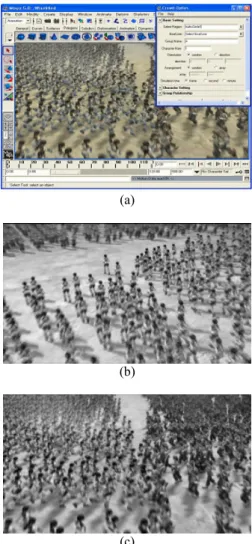
We implemented the proposed crowd simulation system as a plug-in software of Maya and applied to creating a combat scene (Fig. 6).
A user can create a group of character with type A or B. Each group regards the other group as the enemy and seeks for the enemy and moves to them intelligently. If an enemy is found a character starts to fight with him. We have set an energy level to each character, and the level is lowered if hit by an enemy character. A character wins when the energy level of the enemy becomes zero, then he continues to find another nearby enemy by using his sensor.
Fig. 7 shows about 25,000 characters created on the hills. Each group of characters are moving with different speeds to the other group, and various motion data clips were used. Even if we had used one motion data, the result scene would have appeared to be natural due to asynchronous movements.
(a)
(b)
(c)
Fig. 6 Implemented crowd simulation plug-in (a), rendered results (b, c): (b) approach (c) fight
ICCAS2005 June 2-5, KINTEX, Gyeonggi-Do, Korea
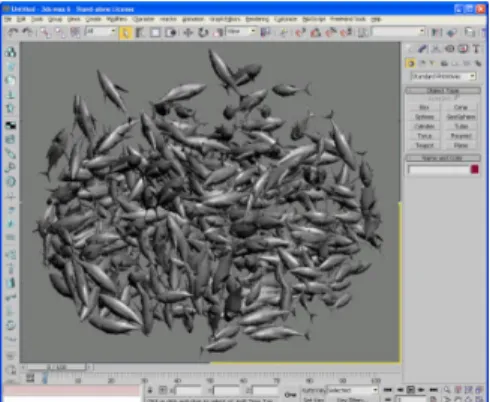
Fig. 7 Crowd scene of 25,000 characters on the hills The proposed crowd simulation method is not confined to human characters. We have applied the system to generating a group of fish. For collision detection and processing, we have used a dynamics simulation engine [19]. Fig. 8 shows the result.
Fig. 8 A group of fish simulated with the proposed system 5. CONCLUSIONS
A crowd scene involves a lot of characters and motions, and realistic interaction between characters and appropriate reaction according to the terrain are important issues. However manually creating each character in a crowd is highly complex and time-consuming task. Thus easy-to-use crowd simulation software is essential to crowd scene generation.
The crowd simulation system proposed in this paper was implemented as a plug-in of Maya, so an animator can get easily accustomed to the plug-in. A user can set properties and number of characters via GUI. Owing to the sensor-brain module the simulation result is quite natural and similar to real crowd movements. Based on the motion database of motion captured data, motion selection and interpolation method produce natural motions.
The extension of our crowd simulator to a more general and powerful simulation of agents with human-like intelligence would be our further research topic. Developing a virtual sensor simulating human eye is another exciting topic for crowd simulation. Distributed simulation and modification method for large crowd data will also be useful functions.
REFERENCES
[1] J. D. Cohen, M. C. Lin, D. Manocha, and M. K. Ponamgi, “I-COLLIDE: An Interactive and Exact Collision Detection System for Large-Scale Environments,” Proc.
of Symposium on Interactive 3D Graphics, pp. 189-196, 1995.
[2] P. M. Hubbard, “Collision Detection for Interactive graphics applications,” IEEE Transactions on Visualization and Computer Graphics, Vol. 1, No. 3, pp. 218-230, 1995.
[3] H. K. Kim, L. J. Guibas, and S. Y. Shin, “Efficient Collision Detection among Moving Spheres with Unknown Trajectories,” Technical report, CS-TR-2000-159, KAIST, 2000.
[4] C. W. Reynolds, “Flocks, herds, and schools: A distributed behavioral model,” Proc. of SIGGRAPH 97, pp. 25-34, 1987.
[5] C. W. Reynolds, “Steering Behaviors for Autonomuos Characters,” Proceedings of the 1999 Game Developers Conference, pp. 763-782, 1999.
[6] Tu, Xiaoyuan, and D. Terzopoulos, “Artificial Fishes: Physics, Locomotion, Perception, Behavior,” Proc. of SIGGRAPH 94, pp. 43-50, 1994.
[7] C. Niederberger and M. Gross, “Hierarchical and Heterogeneous Reactive Agents for Real-Time Applications,” Computer Graphics Forum, Vol. 22, No. 3, 2003.
[8] Perlin, K., and Goldberg, A., “Improve: A System for Scripting Interactive Actors In Virtual Worlds,” Proceedings of ACM SIGGRAPH 1996, pp. 205-216, 1996.
[9] J. Lee, J. Chai, Reitsma, P.S.A., HODGINS, J. K., and Pollard, “Interactive control of avatars animated with human motion data,” Proceedings of ACM SIGGRAPH 2002, pp. 491-500, 2002.
[10] Kovar, L., Gleicher, M., and Pighin, F., “Motion Graphs,” Proceedings of ACM SIGGRAPH 2002, pp. 473-482, 2002.
[11] LI, Y., Wang, T., and Shum, H. Y., “Motion Texture: A Two-Level Statistical Model for Character Motion Synthesis,” Proceedings of ACM SIGGRAPH 2002, pp. 465-472, 2002.
[12] Pullen, K. and Bregler, C., “Motion Capture assisted animation: Texturing and synthesis”, Proceedings of SIGGRAPH 02, pp. 501-508, 2002.
[13] Arikan, O., Forsyth, D. A., and O’brien, J. F., “Motion Synthesis from Annotations,” Proceedings of ACM SIGGRAPH 2003.
[14] D. Thalmman, S. R. Muss, F. Garat, “Guiding and Interacting with Virtual Crowds,” Proc. of EUROGRAPHICS Workshop on Animation and Simulation, pp. 22-34, 1999.
[15] B. Ulicny and D. Thalmman, “Towards Interactive Real-Time Crowd Behavior Simulation,” Computer Graphics Forum, Vol. 21, No. 4, pp. 767-773, 2002. [16] S.R. Musse, D. Thalmann, “Hierarchical Model for Real
Time Simulation of Virtual Human Crowds,” IEEE Transactions on Visualization and Computer Graphics, Vol. 7, No. 2, pp. 152-164, 2001.
[17] Z. Papp, A. Thean, M. Elk, and M. Dorrepaal, “Multi-Agent Based Simulator with High Fidelity Virtual Sensors,” Proceedings of International Conference on Instrumentation and Measurement Technology, pp. 882-887, 20-22 May, 2003. Valley, Seoul, 1989.
[18] D. Eberly. Quaternion Algebra and Calculus, Magic Software, Inc. http://www.magic-software.com, 2002. [19] ODE (Open Dynamics Engine), http://www.ode.org