16 16
Exception Handling
2
© 2006 Pearson Education, Inc. All rights reserved.
It is common sense to take a method and try it. If it fails, admit it frankly and try another. But above all, try something.
—Franklin Delano Roosevelt
O! throw away the worser part of it, And live the purer with the other half.
—William Shakespeare
I never forget a face, but in your case I’ll make an exception.
—Groucho Marx
If they’re running and they don’t look where
they’re going I have to come out from somewhere and catch them.
—Jerome David Salinger
O infinite virtue! com’st thou smiling from the world’s great snare uncaught?
—William Shakespeare
4
© 2006 Pearson Education, Inc. All rights reserved.
OBJECTIVES
In this chapter you will learn:
What exceptions are and when to use them.
To use try, catch and throw to detect, handle and indicate exceptions, respectively.
To process uncaught and unexpected exceptions.
To declare new exception classes.
How stack unwinding enables exceptions not caught in one scope to be caught in another scope.
To handle new failures.
To use auto_ptr to prevent memory leaks.
To understand the standard exception hierarchy.
16.1 Introduction
16.2 Exception-Handling Overview
16.3 Example: Handling an Attempt to Divide by Zero 16.4 When to Use Exception Handling
16.5 Rethrowing an Exception 16.6 Exception Specifications
16.7 Processing Unexpected Exceptions 16.8 Stack Unwinding
16.9 Constructors, Destructors and Exception Handling 16.10 Exceptions and Inheritance
16.11 Processing new Failures
16.12 Class auto_ptr and Dynamic Memory Allocation 16.13 Standard Library Exception Hierarchy
16.14 Other Error-Handling Techniques 16.15 Wrap-Up
6
© 2006 Pearson Education, Inc. All rights reserved.
16.1 Introduction
• Exceptions
– Indicate problems that occur during a program’s execution – Occur infrequently
• Exception handling
– Can resolve exceptions
• Allow a program to continue executing or
• Notify the user of the problem and
• Terminate the program in a controlled manner
– Makes programs robust and fault-tolerant
Error-Prevention Tip 16.1
Exception handling helps improve a program’s fault tolerance.
8
© 2006 Pearson Education, Inc. All rights reserved.
Software Engineering Observation 16.1
Exception handling provides a standard mechanism for processing errors. This is especially important when working on a project with a large team of programmers.
16.2 Exception-Handling Overview
• Intermixing program and error-handling logic
– Pseudocode example
Perform a task
If the preceding task did not execute correctly Perform error processing
Perform next task
If the preceding task did not execute correctly Perform error processing
…
– Makes the program difficult to read, modify, maintain and debug
10
© 2006 Pearson Education, Inc. All rights reserved.
Performance Tip 16.1
If the potential problems occur infrequently, intermixing program logic and error-handling logic can degrade a program’s performance,
because the program must (potentially frequently) perform tests to determine whether the task
executed correctly and the next task can be performed.
16.2 Exception-Handling Overview (Cont.)
• Exception handling
– Removes error-handling code from the program execution’s “main line”
– Programmers can handle any exceptions they choose
• All exceptions,
• All exceptions of a certain type or
• All exceptions of a group of related types
12
© 2006 Pearson Education, Inc. All rights reserved.
16.3 Example: Handling an Attempt to Divide by Zero
• Class exception
– Is the standard C++ base class for all exceptions
– Provides its derived classes with virtual function what
• Returns the exception’s stored error message
Outline
DivideBy
ZeroException.h
(1 of 1)
2 // Class DivideByZeroException definition.
3 #include <stdexcept> // stdexcept header file contains runtime_error 4 using std::runtime_error; // standard C++ library class runtime_error 5
6 // DivideByZeroException objects should be thrown by functions 7 // upon detecting division-by-zero exceptions
8 class DivideByZeroException : public runtime_error 9 {
10 public:
11 // constructor specifies default error message 12 DivideByZeroException::DivideByZeroException()
13 : runtime_error( "attempted to divide by zero" ) {}
14 }; // end class DivideByZeroException
14
©2006 Pearson Education, Inc. All rights reserved.
Outline
Fig16_02.cpp
(1 of 3)
1 // Fig. 16.2: Fig16_02.cpp
2 // A simple exception-handling example that checks for 3 // divide-by-zero exceptions.
4 #include <iostream>
5 using std::cin;
6 using std::cout;
7 using std::endl;
8
9 #include "DivideByZeroException.h" // DivideByZeroException class 10
11 // perform division and throw DivideByZeroException object if 12 // divide-by-zero exception occurs
13 double quotient( int numerator, int denominator ) 14 {
15 // throw DivideByZeroException if trying to divide by zero 16 if ( denominator == 0 )
17 throw DivideByZeroException(); // terminate function 18
19 // return division result
20 return static_cast< double >( numerator ) / denominator;
21 } // end function quotient 22
23 int main() 24 {
25 int number1; // user-specified numerator 26 int number2; // user-specified denominator 27 double result; // result of division
28
29 cout << "Enter two integers (end-of-file to end): ";
Outline
Fig16_02.cpp
(2 of 3)
31 // enable user to enter two integers to divide 32 while ( cin >> number1 >> number2 )
33 {
34 // try block contains code that might throw exception 35 // and code that should not execute if an exception occurs 36 try 37 { 38 result = quotient( number1, number2 );
39 cout << "The quotient is: " << result << endl;
40 } // end try 41 42 // exception handler handles a divide-by-zero exception 43 catch ( DivideByZeroException ÷ByZeroException ) 44 { 45 cout << "Exception occurred: "
46 << divideByZeroException.what() << endl;
47 } // end catch 48
49 cout << "\nEnter two integers (end-of-file to end): ";
50 } // end while 51
52 cout << endl;
53 return 0; // terminate normally 54 } // end main
16
©2006 Pearson Education, Inc. All rights reserved.
Outline
Fig16_02.cpp
(3 of 3)
Enter two integers (end-of-file to end): 100 7 The quotient is: 14.2857
Enter two integers (end-of-file to end): 100 0 Exception occurred: attempted to divide by zero
Enter two integers (end-of-file to end): ^Z
16.3 Example: Handling an Attempt to Divide by Zero (Cont.)
•try Blocks
– Keyword try followed by braces ({}) – Should enclose
• Statements that might cause exceptions and
• Statements that should be skipped in case of an exception
18
© 2006 Pearson Education, Inc. All rights reserved.
Software Engineering Observation 16.2
Exceptions may surface through explicitly
mentioned code in a try block, through calls to other functions and through deeply nested function calls initiated by code in a try block.
16.3 Example: Handling an Attempt to Divide by Zero (Cont.)
•catch handlers
– Immediately follow a try block
• One or more catch handlers for each try block
– Keyword catch
– Exception parameter enclosed in parentheses
• Represents the type of exception to process
• Can provide an optional parameter name to interact with the caught exception object
– Executes if exception parameter type matches the exception thrown in the try block
• Could be a base class of the thrown exception’s class
20
© 2006 Pearson Education, Inc. All rights reserved.
Common Programming Error 16.1
It is a syntax error to place code between a try block and its corresponding catch handlers.
Common Programming Error 16.2
Each catch handler can have only a single parameter—specifying a comma-separated list of exception parameters is a syntax error.
22
© 2006 Pearson Education, Inc. All rights reserved.
Common Programming Error 16.3
It is a logic error to catch the same type in two
different catch handlers following a single try block.
16.3 Example: Handling an Attempt to Divide by Zero (Cont.)
• Termination model of exception handling
– try block expires when an exception occurs
• Local variables in try block go out of scope
– The code within the matching catch handler executes – Control resumes with the first statement after the last
catch handler following the try block
• Control does not return to throw point
• Stack unwinding
– Occurs if no matching catch handler is found
– Program attempts to locate another enclosing try block in the calling function
24
© 2006 Pearson Education, Inc. All rights reserved.
Common Programming Error 16.4
Logic errors can occur if you assume that after an exception is handled, control will return to the first statement after the throw point.
Error-Prevention Tip 16.2
With exception handling, a program can continue executing (rather than terminating) after dealing with a problem. This helps ensure the kind of
robust applications that contribute to what is called mission-critical computing or business- critical computing.
26
© 2006 Pearson Education, Inc. All rights reserved.
16.3 Example: Handling an Attempt to Divide by Zero (Cont.)
• Throwing an exception
– Use keyword throw followed by an operand representing the type of exception
• The throw operand can be of any type
– If the throw operand is an object, it is called an exception object
– The throw operand initializes the exception parameter in the matching catch handler, if one is found
Common Programming Error 16.5
Use caution when throwing the result of a
conditional expression (?:), because promotion rules could cause the value to be of a type different from the one expected. For example, when throwing an int or a double from the same conditional
expression, the conditional expression converts the int to a double. However, the catch handler always catches the result as a double, rather than catching the result as a double when a double is thrown, and catching the result as an int when an int is thrown.
28
© 2006 Pearson Education, Inc. All rights reserved.
Performance Tip 16.2
Catching an exception object by reference
eliminates the overhead of copying the object that represents the thrown exception.
Good Programming Practice 16.1
Associating each type of runtime error with an appropriately named exception object improves program clarity.
30
© 2006 Pearson Education, Inc. All rights reserved.
16.4 When to Use Exception Handling
• When to use exception handling
– To process synchronous errors
• Occur when a statement executes
– Not to process asynchronous errors
• Occur in parallel with, and independent of, program execution
– To process problems arising in predefined software elements
• Such as predefined functions and classes
• Error handling can be performed by the program code to be customized based on the application’s needs
Software Engineering Observation 16.3
Incorporate your exception-handling strategy into your system from the design process’s inception.
Including effective exception handling after a system has been implemented can be difficult.
32
© 2006 Pearson Education, Inc. All rights reserved.
Software Engineering Observation 16.4
Exception handling provides a single, uniform technique for processing problems. This helps programmers working on large projects
understand each other’s error-processing code.
Software Engineering Observation 16.5
Avoid using exception handling as an alternate form of flow of control. These “additional”
exceptions can “get in the way” of genuine error-type exceptions.
34
© 2006 Pearson Education, Inc. All rights reserved.
Software Engineering Observation 16.6
Exception handling simplifies combining software components and enables them to work together effectively by enabling predefined components to communicate problems to application-specific
components, which can then process the problems in an application-specific manner.
Performance Tip 16.3
When no exceptions occur, exception-handling code incurs little or no performance penalties.
Thus, programs that implement exception handling operate more efficiently than do programs that intermix error-handling code with program logic.
36
© 2006 Pearson Education, Inc. All rights reserved.
Software Engineering Observation 16.7
Functions with common error conditions should return 0 or NULL (or other appropriate values) rather than throw exceptions. A program calling such a function can check the return value to
determine success or failure of the function call.
16.5 Rethrowing an Exception
• Rethrowing an exception
– Empty throw; statement
– Use when a catch handler cannot or can only partially process an exception
– Next enclosing try block attempts to match the exception with one of its catch handlers
38
© 2006 Pearson Education, Inc. All rights reserved.
Common Programming Error 16.6
Executing an empty throw statement that is situated outside a catch handler causes a call to function terminate, which abandons
exception processing and terminates the program immediately.
Outline
Fig16_03.cpp
(1 of 2)
2 // Demonstrating exception rethrowing.
3 #include <iostream>
4 using std::cout;
5 using std::endl;
6
7 #include <exception>
8 using std::exception;
9
10 // throw, catch and rethrow exception 11 void throwException()
12 {
13 // throw exception and catch it immediately 14 try
15 {
16 cout << " Function throwException throws an exception\n";
17 throw exception(); // generate exception 18 } // end try
19 catch ( exception & ) // handle exception 20 {
21 cout << " Exception handled in function throwException"
22 << "\n Function throwException rethrows exception";
23 throw; // rethrow exception for further processing 24 } // end catch
25
26 cout << "This also should not print\n";
27 } // end function throwException Rethrow the exception
40
©2006 Pearson Education, Inc. All rights reserved.
Outline
Fig16_03.cpp
(2 of 2)
28
29 int main() 30 {
31 // throw exception 32 try
33 {
34 cout << "\nmain invokes function throwException\n";
35 throwException();
36 cout << "This should not print\n";
37 } // end try
38 catch ( exception & ) // handle exception 39 {
40 cout << "\n\nException handled in main\n";
41 } // end catch 42
43 cout << "Program control continues after catch in main\n";
44 return 0;
45 } // end main
main invokes function throwException
Function throwException throws an exception Exception handled in function throwException Function throwException rethrows exception
Exception handled in main
Program control continues after catch in main
Catch rethrown exception
16.6 Exception Specifications
• Exception specifications (a.k.a. throw lists)
– Keyword throw
– Comma-separated list of exception classes in parentheses – Example
• int someFunction( double value ) throw ( ExceptionA, ExceptionB,
ExceptionC ) {
… }
– Indicates someFunction can throw exceptions of types ExceptionA, ExceptionB and ExceptionC
42
© 2006 Pearson Education, Inc. All rights reserved.
16.6 Exception Specifications (Cont.)
• Exception specifications (Cont.)
– A function can throw only exceptions of types in its specification or types derived from those types
• If a function throws a non-specification exception, function unexpected is called
– This normally terminates the program
– No exception specification indicates the function can throw any exception
– An empty exception specification, throw(), indicates the function can not throw any exceptions
Common Programming Error 16.7
Throwing an exception that has not been declared in a function’s exception specification causes a call to function unexpected.
44
© 2006 Pearson Education, Inc. All rights reserved.
Error-Prevention Tip 16.3
The compiler will not generate a compilation error if a function contains a throw expression for an exception not listed in the function’s
exception specification. An error occurs only when that function attempts to throw that
exception at execution time. To avoid surprises at execution time, carefully check your code to ensure that functions do not throw exceptions not listed in their exception specifications.
16.7 Processing Unexpected Exceptions
• Function unexpected
– Called when a function throws an exception not in its exception specification
– Calls the function registered with function set_unexpected
– Function terminate is called by default
• Function set_unexpected of <exception>
– Takes as argument a pointer to a function with no arguments and a void return type
– Returns a pointer to the last function called by unexpected
46
© 2006 Pearson Education, Inc. All rights reserved.
16.7 Processing Unexpected Exceptions (Cont.)
• Function terminate
– Called when
• No matching catch is found for a thrown exception
• A destructor attempts to throw an exception during stack unwinding
• Attempting to rethrow an exception when no exception is being handled
• Calling function unexpected before registering a function with function set_unexpected
– Calls the function registered with function set_terminate
– Function abort is called by default
16.7 Processing Unexpected Exceptions (Cont.)
• Function set_terminate
– Takes as argument a pointer to a function with no arguments and a void return type
– Returns a pointer to the last function called by terminate
• Returns 0 the first time
• Function abort
– Terminates the program without calling destructors for automatic or static storage class objects
• Could lead to resource leaks
48
© 2006 Pearson Education, Inc. All rights reserved.
16.8 Stack Unwinding
• Stack unwinding
– Occurs when a thrown exception is not caught in a particular scope
– Unwinding a function terminates that function
• All local variables of the function are destroyed
• Control returns to the statement that invoked the function
– Attempts are made to catch the exception in outer try…catch blocks
– If the exception is never caught, function terminate is called
Outline
Fig16_04.cpp
(1 of 3)
2 // Demonstrating stack unwinding.
3 #include <iostream>
4 using std::cout;
5 using std::endl;
6
7 #include <stdexcept>
8 using std::runtime_error;
9
10 // function3 throws run-time error
11 void function3() throw ( runtime_error ) 12 {
13 cout << "In function 3" << endl;
14
15 // no try block, stack unwinding occur, return control to function2 16 throw runtime_error( "runtime_error in function3" );
17 } // end function3 18
19 // function2 invokes function3
20 void function2() throw ( runtime_error ) 21 {
22 cout << "function3 is called inside function2" << endl;
23 function3(); // stack unwinding occur, return control to function1 24 } // end function2
50
©2006 Pearson Education, Inc. All rights reserved.
Outline
Fig16_04.cpp
(2 of 3)
25
26 // function1 invokes function2
27 void function1() throw ( runtime_error ) 28 {
29 cout << "function2 is called inside function1" << endl;
30 function2(); // stack unwinding occur, return control to main 31 } // end function1
32
33 // demonstrate stack unwinding 34 int main()
35 {
36 // invoke function1 37 try
38 {
39 cout << "function1 is called inside main" << endl;
40 function1(); // call function1 which throws runtime_error 41 } // end try
42 catch ( runtime_error &error ) // handle run-time error 43 {
44 cout << "Exception occurred: " << error.what() << endl;
45 cout << "Exception handled in main" << endl;
46 } // end catch 47
48 return 0;
49 } // end main
Outline
Fig16_04.cpp
(3 of 3)
function2 is called inside function1 function3 is called inside function2 In function 3
Exception occurred: runtime_error in function3 Exception handled in main
52
© 2006 Pearson Education, Inc. All rights reserved.
16.9 Constructors, Destructors and Exception Handling
• Exceptions and constructors
– Exceptions enable constructors, which cannot return values, to report errors to the program
– Exceptions thrown by constructors cause any already- constructed component objects to call their destructors
• Only those objects that have already been constructed will be destructed
• Exceptions and destructors
– Destructors are called for all automatic objects in the terminated try block when an exception is thrown
• Acquired resources can be placed in local objects to
automatically release the resources when an exception occurs
– If a destructor invoked by stack unwinding throws an exception, function terminate is called
Error-Prevention Tip 16.4
When an exception is thrown from the constructor for an object that is created in a new expression, the dynamically allocated memory for that object is released.
54
© 2006 Pearson Education, Inc. All rights reserved.
16.10 Exceptions and Inheritance
• Inheritance with exception classes
– New exception classes can be defined to inherit from existing exception classes
– A catch handler for a particular exception class can also catch exceptions of classes derived from that class
Error-Prevention Tip 16.5
Using inheritance with exceptions enables an exception handler to catch related errors with concise notation.
One approach is to catch each type of pointer or reference to a derived-class exception object
individually, but a more concise approach is to catch pointers or references to base-class exception objects instead. Also, catching pointers or references to
derived-class exception objects individually is error prone, especially if the programmer forgets to test
explicitly for one or more of the derived-class pointer or reference types.
56
© 2006 Pearson Education, Inc. All rights reserved.
16.11 Processing new Failures
•new failures
– Some compilers throw a bad_alloc exception
• Compliant to the C++ standard specification
– Some compilers return 0
• C++ standard-compliant compilers also have a version of new that returns 0
– Use expression new( nothrow ), where nothrow is of type nothrow_t
– Some compilers throw bad_alloc if <new> is included
Outline
Fig16_05.cpp
(1 of 2)
2 // Demonstrating pre-standard new returning 0 when memory 3 // is not allocated.
4 #include <iostream>
5 using std::cerr;
6 using std::cout;
7
8 int main() 9 {
10 double *ptr[ 50 ];
11
12 // allocate memory for ptr 13 for ( int i = 0; i < 50; i++ ) 14 {
15 ptr[ i ] = new double[ 50000000 ];
16
17 if ( ptr[ i ] == 0 ) // did new fail to allocate memory 18 {
19 cerr << "Memory allocation failed for ptr[ " << i << " ]\n";
20 break;
21 } // end if
22 else // successful memory allocation
23 cout << "Allocated 50000000 doubles in ptr[ " << i << " ]\n";
24 } // end for 25
26 return 0;
27 } // end main
Allocate 50000000 double values new will have returned 0 if the
memory allocation operation failed
58
©2006 Pearson Education, Inc. All rights reserved.
Outline
Fig16_03.cpp
(2 of 2)
Allocated 50000000 doubles in ptr[ 0 ] Allocated 50000000 doubles in ptr[ 1 ] Allocated 50000000 doubles in ptr[ 2 ] Memory allocation failed for ptr[ 3 ]
Outline
Fig16_06.cpp
(1 of 2)
2 // Demonstrating standard new throwing bad_alloc when memory 3 // cannot be allocated.
4 #include <iostream>
5 using std::cerr;
6 using std::cout;
7 using std::endl;
8
9 #include <new> // standard operator new 10 using std::bad_alloc;
11
12 int main() 13 {
14 double *ptr[ 50 ];
15
16 // allocate memory for ptr 17 try
18 {
19 // allocate memory for ptr[ i ]; new throws bad_alloc on failure 20 for ( int i = 0; i < 50; i++ )
21 {
22 ptr[ i ] = new double[ 50000000 ]; // may throw exception 23 cout << "Allocated 50000000 doubles in ptr[ " << i << " ]\n";
24 } // end for 25 } // end try
Allocate 50000000 double values
60
©2006 Pearson Education, Inc. All rights reserved.
Outline
Fig16_06.cpp
(2 of 2)
26
27 // handle bad_alloc exception
28 catch ( bad_alloc &memoryAllocationException ) 29 {
30 cerr << "Exception occurred: "
31 << memoryAllocationException.what() << endl;
32 } // end catch 33
34 return 0;
35 } // end main
Allocated 50000000 doubles in ptr[ 0 ] Allocated 50000000 doubles in ptr[ 1 ] Allocated 50000000 doubles in ptr[ 2 ] Exception occurred: bad allocation
new throws a bad_alloc exception if the memory allocation operation failed
Software Engineering Observation 16.8
To make programs more robust, use the version of new that throws bad_alloc exceptions on failure.
62
© 2006 Pearson Education, Inc. All rights reserved.
16.11 Processing new Failures (Cont.)
•new failures (Cont.)
– Function set_new_handler
• Registers a function to handle new failures
– The registered function is called by new when a memory allocation operation fails
• Takes as argument a pointer to a function that takes no arguments and returns void
• C++ standard specifies that the new-handler function should:
– Make more memory available and let new try again, – Throw a bad_alloc exception or
– Call function abort or exit to terminate the program
Outline
Fig16_07.cpp
(1 of 2)
2 // Demonstrating set_new_handler.
3 #include <iostream>
4 using std::cerr;
5 using std::cout;
6
7 #include <new> // standard operator new and set_new_handler 8 using std::set_new_handler;
9
10 #include <cstdlib> // abort function prototype 11 using std::abort;
12
13 // handle memory allocation failure 14 void customNewHandler() 15 { 16 cerr << "customNewHandler was called";
17 abort();
18 } // end function customNewHandler 19
20 // using set_new_handler to handle failed memory allocation 21 int main()
22 {
23 double *ptr[ 50 ];
24
25 // specify that customNewHandler should be called on 26 // memory allocation failure 27 set_new_handler( customNewHandler );
Create a user-defined new-handler function customNewHandler
Register customNewHandler with set_new_handler
64
©2006 Pearson Education, Inc. All rights reserved.
Outline
Fig16_07.cpp
(2 of 2)
28
29 // allocate memory for ptr[ i ]; customNewHandler will be 30 // called on failed memory allocation
31 for ( int i = 0; i < 50; i++ ) 32 {
33 ptr[ i ] = new double[ 50000000 ]; // may throw exception 34 cout << "Allocated 50000000 doubles in ptr[ " << i << " ]\n";
35 } // end for 36
37 return 0;
38 } // end main
Allocated 50000000 doubles in ptr[ 0 ] Allocated 50000000 doubles in ptr[ 1 ] Allocated 50000000 doubles in ptr[ 2 ] customNewHandler was called
Allocate 50000000 double values
16.12 Class auto_ptr and Dynamic Memory Allocation
• Class template auto_ptr
– Defined in header file <memory>
– Maintains a pointer to dynamically allocated memory
• Its destructor performs delete on the pointer data member – Prevents memory leaks by deleting the dynamically
allocated memory even if an exception occurs
• Provides overloaded operators * and -> just like a regular pointer variable
• Can pass ownership of the memory via the overloaded assignment operator or the copy constructor
– The last auto_ptr object maintaining the pointer will delete the memory
66
©2006 Pearson Education, Inc. All rights reserved.
Outline
Integer.h
(1 of 1)
1 // Fig. 16.8: Integer.h 2 // Integer class definition.
3
4 class Integer 5 {
6 public:
7 Integer( int i = 0 ); // Integer default constructor 8 ~Integer(); // Integer destructor
9 void setInteger( int i ); // functions to set Integer 10 int getInteger() const; // function to return Integer 11 private:
12 int value;
13 }; // end class Integer
Outline
Integer.cpp
(1 of 2)
2 // Integer member function definition.
3 #include <iostream>
4 using std::cout;
5 using std::endl;
6
7 #include "Integer.h"
8
9 // Integer default constructor 10 Integer::Integer( int i ) 11 : value( i )
12 {
13 cout << "Constructor for Integer " << value << endl;
14 } // end Integer constructor 15
16 // Integer destructor 17 Integer::~Integer() 18 {
19 cout << "Destructor for Integer " << value << endl;
20 } // end Integer destructor
68
©2006 Pearson Education, Inc. All rights reserved.
Outline
Integer.cpp
(2 of 2)
21
22 // set Integer value
23 void Integer::setInteger( int i ) 24 {
25 value = i;
26 } // end function setInteger 27
28 // return Integer value
29 int Integer::getInteger() const 30 {
31 return value;
32 } // end function getInteger
Outline
Fig16_10.cpp
(1 of 2)
2 // Demonstrating auto_ptr.
3 #include <iostream>
4 using std::cout;
5 using std::endl;
6
7 #include <memory>
8 using std::auto_ptr; // auto_ptr class definition 9
10 #include "Integer.h"
11
12 // use auto_ptr to manipulate Integer object 13 int main()
14 {
15 cout << "Creating an auto_ptr object that points to an Integer\n";
16
17 // "aim" auto_ptr at Integer object 18 auto_ptr< Integer > ptrToInteger( new Integer( 7 ) );
19
20 cout << "\nUsing the auto_ptr to manipulate the Integer\n";
21 ptrToInteger->setInteger( 99 ); // use auto_ptr to set Integer value 22
23 // use auto_ptr to get Integer value
24 cout << "Integer after setInteger: " << ( *ptrToInteger ).getInteger() 25 return 0;
26 } // end main
Create an auto_ptr to point to a
dynamically allocated Integer object
Manipulate the auto_ptr as if it were a pointer to an Integer
The dynamically allocated memory is automatically deleted by the
auto_ptr when it goes out of scope
70
©2006 Pearson Education, Inc. All rights reserved.
Outline
Fig16_10.cpp
(2 of 2)
Creating an auto_ptr object that points to an Integer Constructor for Integer 7
Using the auto_ptr to manipulate the Integer Integer after setInteger: 99
Terminating program
Destructor for Integer 99
Software Engineering Observation 16.9
An auto_ptr has restrictions on certain
operations. For example, an auto_ptr cannot point to an array or a standard-container class.
72
© 2006 Pearson Education, Inc. All rights reserved.
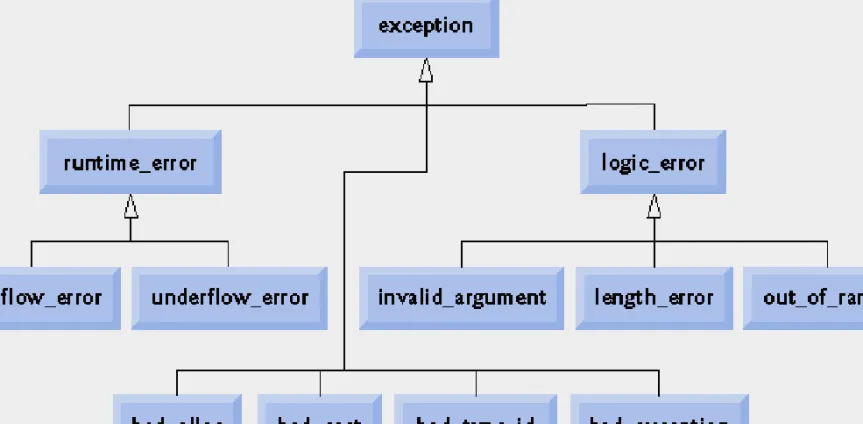
16.13 Standard Library Exception Hierarchy
• Exception hierarchy classes
– Base-class exception
• Contains virtual function what for storing error messages
• Exception classes derived from exception – bad_alloc – thrown by new
– bad_cast – thrown by dynamic_cast – bad_typeid – thrown by typeid
– bad_exception – thrown by unexpected
• Instead of terminating the program or calling the function specified by set_unexpected
• Used only if bad_exception is in the function’s throw list
Common Programming Error 16.8
Placing a catch handler that catches a base-class object before a catch that catches an object of a class derived from that base class is a logic error.
The base-class catch catches all objects of classes derived from that base class, so the derived-class catch will never execute.
74
© 2006 Pearson Education, Inc. All rights reserved.
Fig. 16.11 | Standard Library exception classes.
16.13 Standard Library Exception Hierarchy (Cont.)
• Exception hierarchy classes (Cont.)
– Class logic_error, derived from exception
• Indicates errors in program logic
• Exception classes derived from logic_error – invalid_argument
• Indicates an invalid argument to a function – length_error
• Indicates a length larger than the maximum size for some object was used
– out_of_range
• Indicates a value, such as an array subscript, exceeded its allowed range
76
© 2006 Pearson Education, Inc. All rights reserved.
16.13 Standard Library Exception Hierarchy (Cont.)
• Exception hierarchy classes (Cont.)
– Class runtime_error, derived from exception
• Indicates execution-time errors
• Exception classes derived from runtime_error – overflow_error
• Indicates an arithmetic overflow error – an
arithmetic result is larger than the largest storable number
– underflow_error
• Indicates an arithmetic underflow error – an
arithmetic result is smaller than the smallest storable number
Common Programming Error 16.9
Programmer-defined exception classes need not be derived from class exception. Thus, writing catch( exception anyException ) is not guaranteed to catch all exceptions a program could encounter.
78
© 2006 Pearson Education, Inc. All rights reserved.
Error-Prevention Tip 16.6
To catch all exceptions potentially thrown in a try block, use catch(...). One weakness with catching exceptions in this way is that the type of the caught exception is unknown at compile time.
Another weakness is that, without a named parameter, there is no way to refer to the
exception object inside the exception handler.
Software Engineering Observation 16.10
The standard exception hierarchy is a good starting point for creating exceptions.
Programmers can build programs that can
throw standard exceptions, throw exceptions derived from the standard exceptions or throw their own exceptions not derived from the
standard exceptions.
80
© 2006 Pearson Education, Inc. All rights reserved.
Software Engineering Observation 16.11
Use catch(...) to perform recovery that does not depend on the exception type (e.g., releasing common resources). The exception can be
rethrown to alert more specific enclosing catch handlers.
16.14 Other Error-Handling Techniques
• Other error-handling techniques
– Ignore the exception
• Devastating for commercial and mission-critical software
– Abort the program
• Prevents a program from giving users incorrect results
• Inappropriate for mission-critical applications
• Should release acquired resources before aborting
– Set error indicators
– Issue an error message and pass an appropriate error code through exit to the program’s environment
82
© 2006 Pearson Education, Inc. All rights reserved.
Common Programming Error 16.10
Aborting a program component due to an
uncaught exception could leave a resource—such as a file stream or an I/O device—in a state in
which other programs are unable to acquire the resource. This is known as a “resource leak.”
16.14 Other Error-Handling Techniques (Cont.)
• Other error-handling techniques (Cont.)
– Use functions setjump and longjump
• Defined in library <csetjmp>
• Used to jump immediately from a deeply nested function call to an error handler
– Unwind the stack without calling destructors for automatic objects
– Use a dedicated error-handling capability
• Such as a new_handler function registered with set_new_handler for operator new