저작자표시 2.0 대한민국 이용자는 아래의 조건을 따르는 경우에 한하여 자유롭게
l 이 저작물을 복제, 배포, 전송, 전시, 공연 및 방송할 수 있습니다. l 이차적 저작물을 작성할 수 있습니다.
l 이 저작물을 영리 목적으로 이용할 수 있습니다. 다음과 같은 조건을 따라야 합니다:
l 귀하는, 이 저작물의 재이용이나 배포의 경우, 이 저작물에 적용된 이용허락조건 을 명확하게 나타내어야 합니다.
l 저작권자로부터 별도의 허가를 받으면 이러한 조건들은 적용되지 않습니다.
저작권법에 따른 이용자의 권리는 위의 내용에 의하여 영향을 받지 않습니다. 이것은 이용허락규약(Legal Code)을 이해하기 쉽게 요약한 것입니다.
Disclaimer
저작자표시. 귀하는 원저작자를 표시하여야 합니다.
공학석사 학위논문
A Static Analyzer for Detecting Tensor Shape Errors in Deep Neural Network Training Code
심층신경망 학습 코드의 텐서 형상 에러를 찾아내는 정적분석기
2022 년 8 월
서울대학교 대학원
컴퓨터 공학부
주 호 영
A Static Analyzer for Detecting Tensor Shape Errors in Deep Neural Network Training Code
심층신경망 학습 코드의 텐서 형상 에러를 찾아내는 정적분석기
지도교수 허 충 길
이 논문을 공학석사학위논문으로 제출함
2022 년 8 월
서울대학교 대학원
컴퓨터 공학부
주 호 영
주호영의 공학석사 학위논문을 인준함
2022 년 8 월
위 원 장 문병로 (인)
부위원장 허충길 (인)
Abstract
This thesis presents an automatic static analyzer PyTea that detects tensor-shape errors in PyTorch code. The tensor-shape error is critical in the deep neural net code; much of the training cost and intermediate results are to be lost once a tensor shape mismatch occurs in the midst of the training phase. Given the input PyTorch source, PyTea statically traces every possible execution path, collects tensor shape constraints required by the tensor operation sequence of the path, and decides if the constraints are unsatisfiable (hence a shape error can occur). PyTea’s scalability and precision hinges on the characteristics of real-world PyTorch applications: the number of execution paths after PyTea’s conservative pruning rarely explodes and loops are simple enough to be circumscribed by symbolic abstraction. PyTea is tested against the projects in the official PyTorch repository and some tensor-error code questioned in the StackOverflow. PyTea successfully detects tensor shape errors in these codes, each within a few seconds.
Keywords: Static analysis, deep learning, tensor shape error, SMT solver, Python, PyTorch
Student Number: 2020-29856
Contents
Abstract 1
Chapter 1 Introduction 8
1.1 Our Goal . . . 8
1.2 Structure of PyTorch Programs . . . 8
1.3 Tensor Shape Errors . . . 9
Chapter 2 Overview of PyTea Analyzer 15 2.1 Assumptions . . . 16
2.2 Handling path explosions . . . 17
2.3 Handling Loops . . . 17
Chapter 3 Analysis Steps 19 3.1 PyTea IR . . . 19
3.2 Constraint generation . . . 20
3.2.1 Constraint generation rules for PyTea IR . . . 22
3.2.2 Constraint types . . . 22
3.2.3 Handling path explosion . . . 25
3.3 Constraint check . . . 26
3.3.1 Online constraint check . . . 26
3.3.2 Offline Constraint check . . . 26
Chapter 4 Evaluation 28 4.1 Results . . . 31
4.1.1 PyTea for PyTorch Examples . . . 31
4.1.2 PyTea for StackOverflow questions . . . 32
4.2 Discovered Errors in PyTorch Applications . . . 33
4.2.1 Detecting insufficient data preprocessing . . . 34
4.2.2 Handling path explosion . . . 34
4.2.3 Handling both regular and residual batch sizes in the training loop . . . 35
4.3 Limitation of PyTea . . . 36
Chapter 5 Related Works and Conclusion 38 Chapter AAppendix 41 A.1 Supported Python syntax . . . 41
A.2 Evaluation details . . . 43
A.2.1 Specification of injected shape error . . . 43
A.2.2 Analysis result of complete PyTorch project . . . 44
A.2.3 Complete command-line arguments . . . 45
A.2.4 Code modification points . . . 45
A.2.5 Experiment comparison criteria . . . 46
A.3 Complete definitions of PyTea IR syntax and semantics . . . 47
A.3.1 Syntax . . . 47
A.3.2 Constraint . . . 48
A.3.3 Domain . . . 49
초록 56
Acknowledgements 57
List of Figures
Figure 1.1 Typical structure of neural network training code in PyTorch. 9
Figure 1.2 Basic PyTorch training code. . . 10
Figure 1.3 Constraint generation example. . . 11
Figure 1.4 Path explosion example. . . 12
Figure 1.5 Various type of tensor shape errors. . . 14
Figure 2.1 Overall architecture of PyTea. . . 16
Figure 3.1 Abstract syntax of PyTea IR.1 . . . 19
Figure 3.2 Abstract syntax of constraints. . . 20
Figure 3.3 A tensor that has shape (2, 3, 4). The rank of this tensor is 3, and each dimension has size 2, 3, and 4. . . 21
Figure 4.1 Test result of PyTea command-line tool. . . 29
Figure 4.2 Example code of StackOverflow question. (Case 2) . . . 33
Figure 4.3 Insufficient preprocssing of image file. . . 34
Figure 4.4 Path explosion in Stochastic ResNet block. . . 35
Figure 4.5 Shape inference which requires the exact values of a tensor. . 36 Figure 5.1 Basic tensor operations that Pythia[1]fail to analyze correctly. 39
Figure A.1 Class and instance __mro__. . . 49
List of Tables
Table 4.1 Analysis result of pytorch/examples code repository. The lines of library APIs encapsulated with the analyzer were counted separately. ◦: Analysis succeeded and found injected errors,
△: Analysis succeeded but requires a modification of the main code (e.g., provide explicit input tensor),×: Failed to analyze. 30 Table 4.2 Analysis result of the StackOverflow questions. The numbers
in parenthesis denote the URL id of each question. . . 32 Table A.1 The list of complete command-line arguments . . . 45
Chapter 1
Introduction
1.1 Our Goal
Tensor shape mismatch is a critical bug in deep neural network machine learning applications. Training a neural network is an expensive process that intends to ter- minate only when it finishes processing a huge amount of data through a sequence of tensor operations. In the middle of this time-consuming training process, if the shape of an input datum failed to fit with a tensor operation, the whole process abruptly stops wasting the entire training cost spent thus far, losing the trained, if any, intermediate result.
Our goal is to automatically predict at compile-time such run-time tensor-shape mismatch errors in PyTorch neural network training code.
1.2 Structure of PyTorch Programs
Contemporary machine learning frameworks such as PyTorch[2],TensorFlow[3], and Keras [4]use Python APIs to build neural networks. Training a neural net-
1616 162 16 Linear ( X * 120 )
Linear ( 120 * 120 )
Linear ( 120 * 120 ) Linear ( 120 * Z )
( * Y times )
Define Network Structure
Linear ( 16 * 120 ) Linear ( 120 * 120)
Linear ( 120 * 120 ) Linear ( 120 * 10 ) X = 16, Y = 3, Z = 10
Linear ( 120 * 120 )
Initialize Model with Initialization parameters
Dataset
Preprocess Dataset Main Loop
16 16 16 ρ
batch_size = 16 M
Result 16 Epoch 1 Hyperparameters
M
Epoch 1 Dataset
Epoch 10 Epoch 2
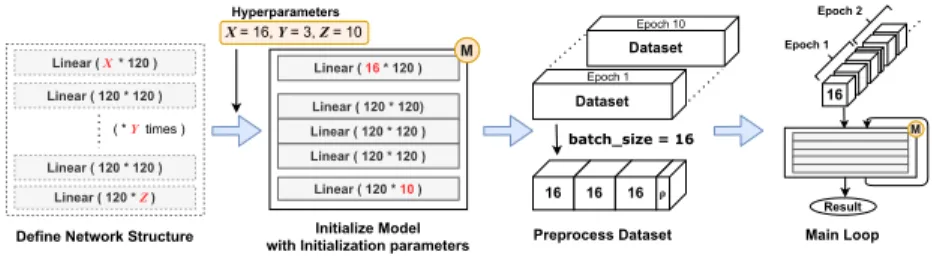
Figure 1.1: Typical structure of neural network training code in PyTorch.
work with such frameworks is mostly patterned after a standard procedure which is illustrated in Figure 1.1. Typical PyTorch neural network training code can be divided into four stages. Figure 1.2 shows a code example, a simplified image clas- sification code taken from the official PyTorch MNIST classification example [5].
We first define the series of neural network layers and make them into a single neural network module. To correctly assemble the layers, the returned tensor of the former layer must satisfy the input requirements of the next layer. We will see those requirements from the next section. The network is instantiated with some initialization parameters called hyperparameter, e.g., the number of hidden layers.
Next, the input dataset is preprocessed and adjusted to the requirements of the network. Every dataset is cut into smaller same-sized chunks (called minibatches) from this stage. Finally, the main loop starts, and the minibatches are sequentially fed to the network. One epoch means a single loop that an entire dataset is passed to the network, and the number of epochs (datasets)usually differs depending on the purpose and structure of the neural network. Including the number of epochs, the numbers of iterations in the training code are determined to be constants in most cases, except the main training loop which depends on the size of a dataset.
1.3 Tensor Shape Errors
Figure 1.5 presents the typical type of tensor shape errors, which are slight
1 ## 1. DEFINE NETWORK STRUCTURE
2 class Net(nn.Module):
3 def __init__(self, out_classes):
4 super(Net, self).__init__()
5 self.layers = nn.Sequential(
6 nn.Linear(28 ∗ 28, 120),
7 nn.ReLU(),
8 nn.Linear(120, out_classes)
9 )
10
11 def forward(self, x):
12 x = x.reshape(x.shape[0] , −1)
13 x = self.layers(x)
14 return x
15
16 ## 2. INITIALIZE MODEL
17 model = Net(out_classes=10)
18
19 ## 3. PREPROCESS DATASET
20 data = dataset.MNIST(’./data’, train=True,
21 transform=[ToTensor()])
22 loader = DataLoader(data, batch_size=16)
23
24 ## 4. RUN MAIN LOOP
25 for epoch in range(10):
26 for batch, label in loader:
27 # model(batch) == model.forward(batch)
28 output = model(batch)
29 loss = F.nll_loss(output, label)
30 loss.backward()
Figure 1.2: Basic PyTorch training code.
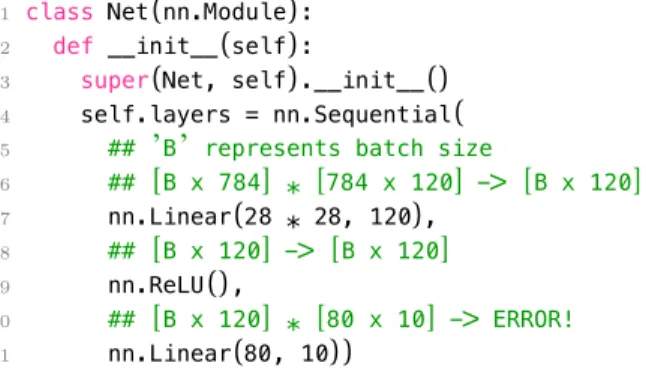
modifications of Figure 1.2. From the first example, the second Linearlayer (line 8), which multiplies the input with 80×10-matrix, requires a specific shape of a tensor as an input. The first layer(line 6),however, returns a wrong-shaped tensor, and the overall pipeline will malfunction. This kind of error is called tensor shape mismatch error, simply, shape error.
Shape error is rather hard to manually find, only to be detected by running the program with an actual input. Indeed, the most notorious error for machine learning engineers is the error that can only be occurred after an immense amount
mat1 = torch.rand(3, 5) mat2 = torch.rand(5, 7) mat3 = torch.mm(mat1, mat2)
mat1.rank == 2 mat2.rank == 2
mat1.shape[1] == mat2.shape[0]
Constraint
cond = random.randint(0, 1) if cond == 1:
result = 2 * mat1 else:
result = mat1 return result
PyTorch Code PyTea
0 <= X <= 1
Constraint X != 1
array = []
for i in range(3):
array.append(i)
array :=[]
array.append(2) return Tensor[3 X 5]
Conservative Path Pruning
loader = DataLoader(
dataset, batch_size=16) for x in loader:
y = network(x)
loader := DataLoader with Tensor[X x 32]
x := Tensor[16 x 32]
y := network(x)
x := Tensor[(X % 16) x 32]
y := network(x) Loop Unrolling for
Constant-bound Loops
Unknown-length Data Loop
array.append(1) array.append(0) X == 1
result :=
Tensor[3 X 5]
result :=
Tensor[3 X 5]
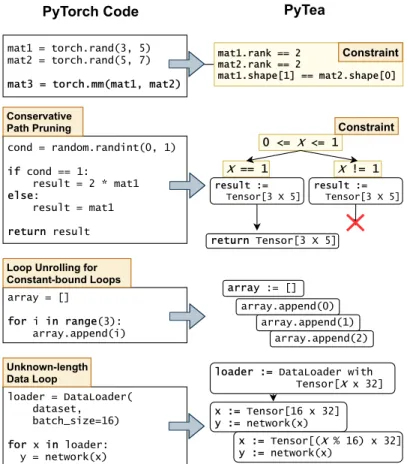
Figure 1.3: Constraint generation example.
of machine-hours.
Figure 1.5(b) shows another example. Its declaration of training data loader (line 14)hides a shape error. DataLoader class slices the dataset sequentially by batch_size and passes it to the model. If the total length of the dataset is not divisible by batch_size, however, the size of the residual minibatch will be the non-zero remainder of the total length. See line 16: because the third parameter drop_last is missing, the model assumes a consistent batch size(lines 10 and 6) hence the program will crash from the residual minibatch, losing the whole training hours. The recent massive networks like GPT-3 [6]require more than hundreds of
1 class RandBlock(nn.Module):
2 def __init__(self):
3 super(RandBlock, self).__init__()
4 self.layer = nn.Linear(32, 32)
5
6 def forward(self, x):
7 rand_num = random.randint(0, 1)
8
9 if rand_num == 1:
10 result = self.layer(x)
11 else:
12 result = x
13
14 return result
15
16 model = nn.Sequential(
17 [RandBlock() for _ in range(24)])
Figure 1.4: Path explosion example.
machine-hours to train. This type of error must be noticed before its run.
Figure 1.5(c)illustrates another shape error that can be arisen from a dataset, not a structure of the model. It does not take input from the pre-defined MNIST dataset but reads an image from a file. If the read image is RGB, which has 3×H×W dimensions, it will not fit into the reshape method that requires a tensor of 28×28-elements. That means we have to convert it to a monochrome image before feeding it to the network. Even though it had been successfully tested with monochrome images, there can be a user who tests it with an RGB image, crashing the execution of the code.
Though several works [7,1,8,9,10] have reported tools to detect the shape mismatch errors of machine learning libraries, especially for TensorFlow [3],none of them have presented any static analysis tool that statically detects the shape errors for realistic Python ML applications. Real-world machine learning appli- cations heavily utilize third-party libraries, external datasets, and configuration parameters, and handle their controls with subtle branch conditions and loops, but
the existing tools still lack in supporting some of these elements and thus they fail to analyze even a simple ML application. To ensure that the shape error will not happen for any input data, we should statically infer a precise yet conserva- tive range of each tensor shape and track its transformations through all possible execution paths.
1 class Net(nn.Module):
2 def __init__(self):
3 super(Net, self).__init__()
4 self.layers = nn.Sequential(
5 ## ’B’ represents batch size
6 ## [B x 784] ∗ [784 x 120] −> [B x 120]
7 nn.Linear(28 ∗ 28, 120),
8 ## [B x 120] −> [B x 120]
9 nn.ReLU(),
10 ## [B x 120] ∗ [80 x 10] −> ERROR!
11 nn.Linear(80, 10))
(a) Error on the network structure.
1 class Net(nn.Module):
2 def __init__(self, batch_size):
3 self.batch_size = batch_size
4 # ...
5 def forward(self, x):
6 x = x.reshape(self.batch_size, −1)
7 # ...
8
9 ## some models may require exact batch size
10 model = Net(batch_size=64)
11
12 ## POTENTIAL_ERROR 1:
13 ## argument ’drop_last=True’ is essential
14 loader = DataLoader(data, batch_size=64)
15 # loader = DataLoader(data, batch_size=64,
16 # drop_last=True)
17
18 for epoch in range(10):
19 for batch, label in loader:
20 out = model(batch)
21 ## ERROR ON THE LAST MINIBATCH
22 ## last batch size: 32 (!= 64)
(b)Error on the last minibatch.
1 ## POTENTIAL ERROR 2: channel size can be 3
2 img = PIL.Image.open(’./image.png’).resize([28, 28])
3 # img = img.convert(’L’)
4
5 ## ERROR WHEN THE IMAGE IS RGB.
6 tensor = to_tensor(img).reshape(28 ∗ 28)
7 out = model(tensor)
(c)Insufficient data preprocessing.
Figure 1.5: Various type of tensor shape errors.
Chapter 2
Overview of PyTea Analyzer
To find out shape errors before runtime, we present a static analyzer PyTea(Py- Torch Tensor Error Analyzer). PyTea statically scans PyTorch applications and detects possible shape errors. PyTea analyzes full training and evaluation paths of the Python/PyTorch applications with additional data processing and mixed usage of other libraries (e.g., Torchvision[11],NumPy [12])
Figure 2.1 illustrates the overall architecture of PyTea analyzer. It first trans- lates the original Python codes into a kernel language, PyTea Internal Representa- tion(PyTea IR).Then, it tracks every possible execution path of the translated IR and collects the constraints regarding tensor shapes that dictate the conditions for the code to run without a shape error. The collected constraint sets are given to Satisfiability Modulo Theories (SMT)solver Z3[13]to judge that those constraints are satisfiable for every possible input shape. Following the result of the solver, PyTea concludes which path contains a shape error or not. If the constraint-solving by Z3 takes too much time, PyTea stops and tells ”don’t know”.
Valid
Invalid (with debug info)
Unsolvable
Instantiation Info Python w/
PyTorch
PyTea Analyzer
… lstm(x,(…
linear(fx[…
conv(y,…) …
PyTea IR Paths &
Constraints Input
0 <= x <= 3 1 <= x <= 5 -1 <= x <= 2
Z3 SMT Solver Constraint
Check
Figure 2.1: Overall architecture of PyTea.
2.1 Assumptions
Given the typical structure of PyTorch neural network training code(Section 1.2), we assume for the PyTea’s input the followings about the PyTorch deep neural network training code:
A1 Other than the training or evaluation dataset, every input value required to execute the code is injected by command-line arguments.
A2 There is no infinite loop and recursion. We assume that every loop bound except for the datasets will be fixed to a constant.
A3 The unknown loop bound for the datasets is only for the size of each dataset in an epoch, and every iteration is either with a fixed-sized minibatch of the dataset or with a smaller, residual minibatch.
A4 We assume that string-manipulation expressions have no effect on tensor shapes.
These assumptions are based on our observations that most PyTorch networks and codes can be statically determined to fixed structures once we give precise command-line arguments. Real-world PyTorch applications mostly construct their structures by command-line arguments or external configuration files like JSON files. Therefore, PyTea chooses to analyze programs only with exact command-line arguments.
For a few networks that are not resolved to a single fixed structure, we consider all possible structures. The number of the possible structures is to be controlled by our path-pruning technique, and sometimes, for an inevitable case, by timeout.
2.2 Handling path explosions
The number of possible paths is exponential to the number of branches in sequence.
For some complex neural networks, such path explosion is possible. For exam- ple, Neural Architecture Search [14]or Networks with Stochastic Depth [15]have branches inside the network themselves. Figure 1.4 shows a representative path explosion case that utilizes a runtime random variable. We can notice that the feed-forward function (forward(self, x))has two execution paths in its body.
The final structure of the network is made with 24 same blocks (line 17),which makes 16M paths.
We handle this exponential cost blow-up by means of conservative path-pruning and simple-minded timeouts. If we can find that the result of the binding scope of that feed-forward function is pure (i.e., do not change any global value),and its bounded value is indeed equal for every path and not related with the branch conditions, we then safely ignore other paths except for one. If a path explosion arises even if using this method, we then use a timeout. See Section 3.2.3 for more details.
2.3 Handling Loops
For the loops in typical PyTorch neural network programs, as we discussed in Section 1.2 and accordingly assumed in Section 2.1, we do not need the full power of static analysis [16]. PyTea unrolls constant-bound loops (Assumption A2 in Section 2.1)and analyzes their straight-line code version.
For the unknown-bound loops for datasets, PyTea analyzes the loop body for just two cases with the aforementioned assumption A3. One is for the loop with a fixed-sized regular minibatch of an epoch. The other is for the loop with the residual minibatch. For example, see code in Figure 1.3. For the third code box of Figure 1.3, we can unroll the loop expression to 3 same expressions. If we do not know the length of the dataset, such as the fourth code box of Figure 1.3, we use assumption A3 and consider only two cases for the two different sizes of minibatches.
Chapter 3
Analysis Steps
3.1 PyTea IR
Expression
E → n∈Z|T|F|x (variable)
| letx E E
| ifE E E
| E bop E
| tensor-expr
bop → numeric-op|compare-op numeric-op → +|-|*| · · ·
compare-op → <|=| · · · tensor-expr → mmE E
| reshapeE E E
| readImage | · · ·
Figure 3.1: Abstract syntax of PyTea IR.1
As the first step of the analysis, the input Python code is translated into the
1For the explanatory purpose, we did not include function calls and definitions. See for detailed definitions of PyTea IR. Currently, we implemented 34 basic tensor expressions, and every other PyTorch API has been constructed with the basic expressions. The basic expressions are as
kernel language, PyTea IR. See Figure 3.1. PyTorch APIs are translated into tensor expressions that only define shape transformations, which PyTea IR focuses on.
The second step of the analysis is to scan the PyTea IR code and generate constraints.
3.2 Constraint generation
Constraint c → c∧c
| c∨c
| ¬c
| eb
| e=e
| en< en
| ∀αn∈[en, en].c Value Expr
e → es|en|eb Shape Expr
es → (en,· · · ,en)
| αs
| es[en:en]
| es@es
Number Expr
en → n (const number)
| αn (unknown number)
| enbop en (binary operator)
| rank (es) (rank of shape)
| es[en] (en-th dim of shape es)
| ∏
es (num of elements in shapees) bop → +|-|*| · · ·
Boolean Expr
eb → True|False
| αb (unknown boolean)
| eb∧eb (conjunction)
| eb∨eb (disjuction)
| ¬eb (negation)
| e=e (equality)
| en< en (less than)
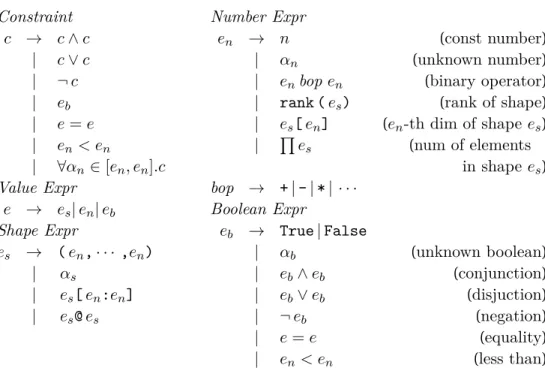
Figure 3.2: Abstract syntax of constraints.
following: Torch.__init__, Torch.__getitem__, isSameShape, scalar, identity, broadcast, matmul, mm, bmm, item, repeat, expand, expand_as, transpose, reduce, topk, view, conv2d, conv_transpose2d,pool2d,batchnorm2d,cross_entropy,cat,stack,unsqueeze,squeeze,diag, flatten,narrow,pixel_shuffle,layer_norm,pad,adaptive,interpolate.
1 0 1 0 1 1 0 0 3 0
2
4 1
1 1
Figure 3.3: A tensor that has shape(2, 3, 4).The rank of this tensor is 3, and each dimension has size 2, 3, and 4.
Constraints are the conditions required by a PyTorch application so that it can be executed without any tensor shape error. For example, two operands of a matrix multiplication operation must share the same dimension. For each tensor operation (mm,reshape,readImage,etc. of Figure 3.1),the shape of the input tensor must obey the requirement of the corresponding operation.
Figure 3.2 shows the abstract syntax of the constraints. Value expressionrepre- sents the value of PyTea IR expressions, which can be used inside shape constraints.
When PyTea analyzes a PyTea IR, it traces tensor shapes and primitive values of Python and constructs symbolic value expressions. Shape expressionrepresents the shape of tensors, which is basically a tuple of integers(en, . . . , en). Figure 3.3 shows an example of a tensor with a shape (2,3,4). Each integer is a dimension size. We call the number of dimensions as a rank of a shape. We can slice (es[en:en])a shape expression or concatenate(es@es)two shape expressions. For example, sup- pose a PyTea IR variable t has shape (2,3,4). Expression t[0], which means the first sub-tensor of talong the first axis, can be represented inside constraints as (2,3,4)[1:rank(t)], or simply (3,4). In case of expression t’s shape is un- known(αs),the shape of a sub-tensort[0]will be represented asαs[1:rank(αs)].
3.2.1 Constraint generation rules for PyTea IR
To capture Python semantics and PyTorch shape transformations, PyTea follows the static semantics (σ ⊢ E : e, C)of PyTea IR. Judgment (σ ⊢ E : e, C)means that the PyTea IR expression E is statically approximated by a symbolic value expression e under environment σ in case the constraint set C (⊆ Constraint)is satisfied. The environment σ (∈ Var →fin Value Expr)is a finite table that maps variables to symbolic value expressions.
σ⊢E1:e,C1 σ∪ {x→e} ⊢E2 :e′,C2 σ⊢letx E1E2 :e′,C1∪C2
The introduction of constraints happens for branch expressions or PyTorch APIs (See Section 3.2.2). The other expressions will collect constraints from their subexpressions. For example, for an add expression (E1+E2),see:
σ⊢E1 :en,C1 σ⊢E2:e′n,C2 σ⊢E1+E2:en+ e′n,C1∪C2
The result value is symbolically (en+e′n)where en and e′n are symbolic results of E1 and E2 respectively. The result constraint set will be a union of the result constraint sets of E1 andE2.
Every symbolic variable originates from external input, e.g., random function or a dataset. Every expression in the constraints is constructed by these variables and constant values.
3.2.2 Constraint types
In order to help the constraint resolution engine Z3 come up with a sensible counter- example that violates the derived constraints, we classify the constraints into two exclusive classes: soft and hard constraints. For Z3 to generate counter-examples, soft constraints can be violated, while hard constraints should not. Thus hard
constraints are, for example, those from branch conditions or about the value range of the input. See Figure 1.3 again. Python built-in random.randint function generates an unknown random variable within a given range [0, 1]. We mark that bound constraint as a hard constraint. On the other hand, torch.mm API demands that two input tensors have to be rank-2 (x, y)tensor and the second dimension (y-coordinate)of the first tensor have to be equal to the first dimension (x-coordinate)of the second tensor. This condition can be violated under the shape of the inputs, hence we mark it as a soft constraint.
Hard constraint generation Hard constraints are those for inputs and branch conditions. Input conditions restrict the initial ranges of each input. Branch con- ditions split each path into two.
Consider the following rule.
c1 = (1≤αn≤4) (new αn) c2 = (0< α′n) (new α′n) c3 = (0< α′′n) (new α′′n) es=(αn,α′n,α′′n)
σ ⊢readImage:es,{c1, c2, c3}
The readImage API is an image fetching API that creates a new 3-rank tensor which represents color channels, height, and width. The range of color channels is from 1 to 4, i.e., monochrome to RGBA, hence the constraintc1 in the above rule.
The symbolic value is a tensor of shape (αn, α′n, α′′n).
As another case, consider the following rule.
σ ⊢E1 :e1, C1 σ⊢E2:e2, C2
c= (e1 ≤αn≤e2) (new αn) σ⊢randIntE1E2 :αn,C1∪C2∪ {c}
The randInt API generates a new random variable which is bound to given two numbers. This expression is used from the Python APIrandom.randint.
For branching case, see below:
σ ⊢E1 :eb, C1 σ⊢E2:e, C2
σ⊢ifE1E2E3:e,C1∪C2∪ {eb} σ ⊢E1 :eb, C1 σ⊢E3:e, C3
σ ⊢ifE1E2E3 :e,C1∪C3∪ {¬eb}
The if expression creates two paths depending on the branch conditioneb. If the branch condition can be evaluated to a constant boolean, we can safely drop one branch.
Soft constraint generation Soft constraints are the conditions with which Py- Torch APIs must comply for them to run without a shape error. For instance, two operands of a matrix multiplication have to share the same middle dimen- sion, and the reshape operation requires that the number of elements of the input tensor must be matched with the number of elements of the target shape. Each PyTorch API holds unique requirements of input conditions, and PyTea collects these requirements as soft constraints.
Following three rules, for example, PyTea collects such constraints from three representative APIs (mm,reshapeand
transpose):
σ⊢E1:es,C1 σ⊢E2:e′s,C2 rank(es)=rank(e′s)= 2
e′′s =(es[0], e′s[1]) c= (es[1]=e′s[0]) σ ⊢mmE1E2 :e′′s,C1∪C2∪ {c}
The mmAPI calculates a matrix multiplication of two 2-rank matrices. The second dimension of the first matrix must be equal to the first dimension of the second matrix following the basic rules of linear algebra.
ThereshapeAPI redefines the shape of a tensor. Reshaping a tensor does not change or drop the value of a tensor, so the target shape must have the exactly
same number of values as the original shape (∏
es=∏ e′s):
σ⊢E1:es,C1 σ ⊢E2:en,C2 σ⊢E3:e′n,C3 e′s=(en,e′n) c= (0< en)∧(0< e′n)∧(∏
es=∏ e′s) σ⊢reshapeE1E2E3 :e′s,C1∪C2∪C3∪ {c}
The transpose API swaps two dimensions of the tensor E1 along the E2-axis and E3-axis. Unlike the normal 2-rank matrix transposition, transpose slices a tensor with (E2,E3)-plane and transposes each matrix on each cross-section:
σ⊢E1:es,C1 σ ⊢E2 :en,C2 σ⊢E3:e′n,C3 e1=es[0:en] @ (es[e′n]) e2=es[en+ 1:e′n] @ (es[en])
e′s=e1 @ e2 @ es[e′n+ 1:rank(es)]
c= (0≤en< e′n<rank(es))
σ⊢transpose E1E2E3:e′s,C1∪C2∪C3∪ {c}
From this rule, we only consider the shape of the result, not the movement of the value inside the tensor.
3.2.3 Handling path explosion
Splitting execution paths whenever the analyzer encounters a branch can make the analysis cost grow exponentially. We can ignore some of them using the online constraint check, but we cannot for branches that use run-time input values.
However, we can still avoid path split if both paths behave identically in terms of tensor shape. The conservative conditions are as follows:
1. Constraints collected from each path are not dependent on the branch con- dition, and
2. Each path has no global side-effect, and
3. Two paths’result symbolic values are the same.
PyTea checks the above conditions locally, within the boundary of the let expression containing each branch. When PyTea cannot statically decide on any of the three conditions, it safely assumes the conditions do not hold.
Most branches in PyTorch neural network blocks satisfy the above conditions.
Typically, network blocks should result in a tensor with a fixed shape that matches with a requirement of the next block or the training target tensor. Those blocks’
feed-forward path will be translated into nested let blocks with branches that return the same-shaped tensor.
3.3 Constraint check
3.3.1 Online constraint check
To reduce the number of constraints and paths, our analyzer eagerly simplifies the symbolic expressions and constraints with primitive arithmetics and comparisons.
By our eager, online constraint check, the ranges of each symbol can sometimes be known and be used to judge the subsequent constraints. If a branch condition can be simplified into constant true or false, we can trace only a single branch without splitting the path. If a constraint can be simplified to constant false, we can immediately report that the path is unsafe.
3.3.2 Offline Constraint check
PyTea feeds the collected constraints of each path to Z3. Algorithm 1 describes how we classify the Z3’s result. The final result of PyTea analyzer can be divided into four cases:
• Valid: Soft constraints are always satisfied under the hard constraints. It guarantees that shape error will not occur from this path.
Algorithm 1:Offline Constraint Check with SMT Solver
Input: H, S - logical conjunctions of hard, and soft constraint sets Output: valid,invalid,dontknow, orunreachable
Functionanalyze(H, S):
ifcheckSat(H) =unsat then return unreachable else ifS =∅then
return valid
v=checkSat(¬(H→S)) ifv=unsatthen
return valid else ifv=satthen
return invalid else returndontknow
• Invalid: A possible shape error is detected. There is a counterexample that makes soft constraints false under the hard constraints. We also report the generation position of the first broken constraint.
• Don’t know: Z3 failed to decide whether constraints are satisfiable or not.
• Unreachable: There is a conflict between hard constraints in this path. In other words, it is impossible to reach this path under the given conditions.
This can happen if a path had passed two contradicted branches.
If every path results in either unreachable or valid path, we can conclude that the input program has no tensor shape error.
Chapter 4
Evaluation
Our experiments show PyTea’s practical performance for real-world applications.
To see the practicality of PyTea, we have collected several complete PyTorch ap- plications and shape-related PyTorch bugs. First, we analyzed the official PyTorch example projects from GitHub repository pytorch/examples[5]. This repository consists 11 complete PyTorch applications about major machine learning tasks from Generative Adversarial Network(GAN) [17]to Natural Language Processing.
We also collected some PyTorch shape mismatch errors from StackOverflow and ran PyTea to statically detect them with PyTea. Finally, we conducted case analy- ses of several fully-functional, hand-made PyTorch applications such as Stochastic ResNet[15].
Experiment Settings PyTea analyzer is written in mainly TypeScript [18], and communicates with Python scripts to run Z3. We also used Pyright [19]to parse and track Python syntax. The experiments were conducted on R7 5800X CPU, node.js 16.0.0 with TypeScript 4.2.4, and Python 3.8.8 with Z3Py 4.8.10.0.
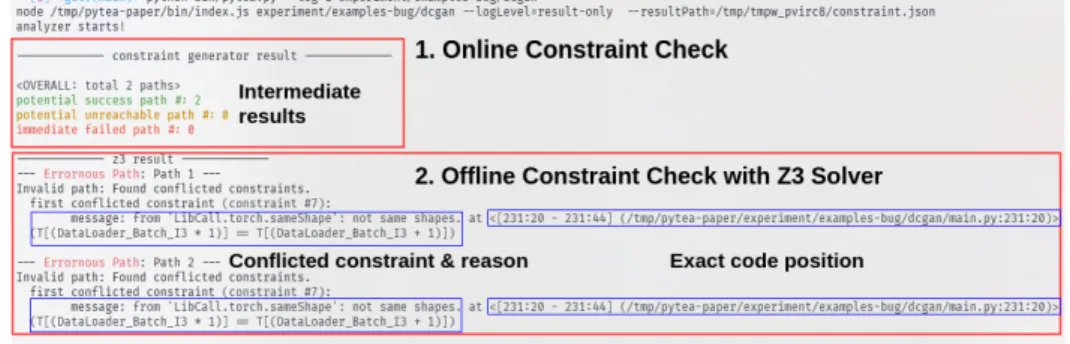
Figure 4.1: Test result of PyTea command-line tool.
We fixed the epoch size to 1 from the command-line arguments, but used default values for the other settings. We measured the total elapsed time from the cold boot to the termination of PyTea. The full options and codes are written in the appendix and the external repository. 1
PyTea command-line tool Figure 4.1 shows an example snapshot of the anal- ysis result of the PyTea command-line tool. It has analyzed one of the PyTorch example projects and prints the result of each phase of PyTea. It first prints out the online constraint check results and categorizes each path into three cases, po- tential success, potential unreachable, and immediate fail. The last one indicates that the online checker has found a constraint that can be false from that path.
The potential unreachable path is the path which the online checker has found a false constraint, but there are certain unresolved branch conditions. That path will be checked at the next phase, and PyTea will examine whether the path has conflicted constraints only within the hard constraint set, which means that the path is unreachable from the beginning.
From the second step, PyTea delivers the collected constraint set of each path
1Link: https://sf.snu.ac.kr/pytea/
Table 4.1: Analysis result of pytorch/examples code repository. The lines of li- brary APIs encapsulated with the analyzer were counted separately. ◦: Analysis succeeded and found injected errors, △: Analysis succeeded but requires a modifi- cation of the main code (e.g., provide explicit input tensor),×:Failed to analyze.
Network LOC(main + lib) PyTea [10] Total time (s)
dcgan 3714(214 + 3500) ◦ × 1.75
fast_neural_style 4394(338 + 4056) ◦ × 2.40
imagenet 3820(320 + 3500) ◦ × 2.40
mnist 3607(116 + 3491) ◦ × 1.59
mnist_hogwild 3620(129 + 3491) ◦ △ 1.94
reinforcement_learning 180(180 + -) × × -
super_resolution 3886(193 + 3693) △ △ 1.57
snli 223(223 + -) × × -
time_sequence_prediction 3333(88 + 3245) △ × 1.88
vae 3593(102 + 3491) ◦ △ 1.70
word_language_model 3278(361 + 2912) △ × 1.81
to Z3 solver and runs the offline constraint checks. The offline check will report the first conflicted constraint and its position of creation, i.e., the exact tensor expression or PyTorch API that causes an error. If the solver does not found any conflicted constraint, PyTea concludes that all the paths are valid, hence no tensor shape error is possible.
4.1 Results
4.1.1 PyTea for PyTorch Examples
For the experiment, we pass each project twice to the analyzer. For the first pass, PyTea analyzed the main code unmodified, and we check that PyTea does not inform false positives. Then, we injected artificial shape errors, which we subtract one from the first dimension of the target tensor, right before the neural network’s loss calculation.
This simple method is decided on purpose. From this experiment, we focused on the speed of PyTea which shows the practicallity in order to be integrated to the code editor such as VSCode. This configuration can check the analysis time of the main network, and also confirm that PyTea tracks the tensor operations from the main network thoroughly, and we check PyTea does not report false negative results.
We have compared PyTea against another PyTorch analyzer of Hattori et al. [10]. Table 4.1 shows the overall results. Among the 11 projects, PyTea suc- cessfully analyzed 6 projects without any modification of the original source code.
For three projects with a complex data preprocessing stage, PyTea needs a bypass (i.e., code modification)of that stage to infer the shapes of input tensors. PyTea has also succeeded in finding these injected errors. As these results show, PyTea is quick and effective enough to be integrated into code editors. Meanwhile, Hattori et al.’s analyzer failed for almost all benchmarks. Furthermore, since their semi- static approach requires an explicit shape of the input tensor, we needed to feed them an exact network model and input tensors to compare its performance with PyTea.
Although we have aimed to analyze the codes without any modification, two projects are heavily dependent on third-party data managing libraries likeOpenAI-Gym
Table 4.2: Analysis result of the StackOverflow questions. The numbers in paren- thesis denote the URL id of each question.
Question PyTea [10]
Case 1 (66995380) ◦ × Case 2 (60121107) ◦ × Case 3 (55124407) ◦ × Case 4 (62157890) ◦ × Case 5 (59108988) ◦ × Case 6 (57534072) ◦ ×
[20].Because, at the moment, we are focusing on the analysis of PyTorch-centered applications, we decided not to support those libraries for now. Supporting more libraries is straightforward and is our future work.
4.1.2 PyTea for StackOverflow questions
To show that PyTea can identify yet another set of real-world shape mismatches, we collected some PyTorch shape errors from StackOverflow questions. Recent TensorFlow analyzers [1,8]used a TensorFlow error dataset collected by Zhang et al. [21],but we manually gathered PyTorch shape mismatch cases rather than using their dataset, because of the fundamental difference of the structures between TensorFlow and PyTorch. We also considered porting the TensorFlow error dataset into PyTorch codes, but we concluded that the ported codes are fairly old and artificial and do not reflect the standard method to build a PyTorch application.
Table 4.2 gives the analysis results of the 6 questions that we have collected.
PyTea could detect every shape mismatch case from those questions. Following the analysis result, we could find the exact error positions and fix the shape mismatch
1 class LSTM(nn.Module):
2 def __init__(self, ...):
3 # 7 lines...
4 def forward(self, tokens):
5 # 5 lines ...
6 return out_scores
7
8 model = LSTM(embedding_matrix=np.zeros((1181, 100)))
9 loss_function = nn.NLLLoss()
10 optimizer = optim.Adam(model.parameters())
11
12 ## CUSTOM INPUT
13 input = torch.ones(256, 4, dtype=torch.long)
14 target = torch.ones(256, 4, dtype=torch.long)
15 output = model(input)
16
17 ## ORIGINAL
18 # output: [256 x 4 x 1181], target: [256 x 4]
19 # SHAPE MISMATCH: [256 x 1181] != [256 x 4]
20 loss = loss_function(output, target)
21
22 ## FIXED
23 # output: [1024 x 1181], target: [1024]
24 loss = loss_function(output.reshape(256∗4, 1181), target.reshape(256∗4))
Figure 4.2: Example code of StackOverflow question. (Case 2)
cases. For example, the main code(Figure 4.2)of Case 2 does not satisfy the shape conditions for the inputs ofNLLLoss(line 9).TheNLLLossmodule requires that the shape of the first input tensor without the second dimension is equal to the shape of the second input tensor. PyTea found out that NLLLosscould generate a shape error from our experiment. We then fixed the code according to the StackOverflow answer, and PyTea checked that every path became valid.
4.2 Discovered Errors in PyTorch Applications
We applied PyTea to several realistic PyTorch applications which contain potential shape errors or path explosion. PyTea-found shape errors include the typical type of shape errors that we introduced at Section 1.3. The complete projects and
1 def load_image(filename, size=None, scale=None):
2 # POTENTIAL ERROR: channel size can be 1.
3 img = Image.open(filename)
4 # img = Image.open(filename).convert(’RGB’)
5 # ...
6 return img
Figure 4.3: Insufficient preprocssing of image file.
experiment scripts from this section are in the external repository.
4.2.1 Detecting insufficient data preprocessing
We found a potential error at the data preprocessing stage fromfast_neural_style application of pytorch/examples repository. As shown in Figure 4.3, Image.open does not guarantee the loaded image has channel 3, i.e., RGB image. Therefore, any training or inference stage with a monochrome image will fail if we miss the channel converting method like line 4. This error was remained from the initial version and was fixed by the latest commit(a3f28a2)of the preprocessing script.
4.2.2 Handling path explosion
For a neural network model which contains a runtime path-explosion, PyTea analyzed it without a timeout. Thestochastic-resnetexample uses several deep learning techniques, mainly stochastic depth training [15]. See Figure 4.4. From this application, the building block of the network contains runtime branches (line 9)that can cause a path explosion. PyTea’s path handling algorithm can success- fully prune those branches and finishes without timeout. (Caveat: the overall data handling is somewhat hard to follow; we did not automatically reduce the repeat count of the main training loop. We explicitly reduced the length of the dataset (CIFAR-10)with a configuration file(pyteaconfig.json),and without modifying the code itself.)
1 def forward(self, x):
2 residual = x
3
4 if self.training:
5 # sample random float value
6 sample = self.m.sample().item()
7
8 ### PATH EXPLOSION
9 if sample> 0:
10 out = self.conv1(x)
11 out = self.bn1(out)
12 out = self.relu1(out)
13 out = self.conv2(out)
14 out = self.bn2(out)
15
16 if self.downsample is not None:
17 residual = self.downsample(x)
18 out = out + residual
19 else:
20 if self.downsample is not None:
21 residual = self.downsample(x)
22 out = residual
23 # ...
24
25 out = self.relu2(out)
26 return out
Figure 4.4: Path explosion in Stochastic ResNet block.
4.2.3 Handling both regular and residual batch sizes in the train- ing loop
PyTea considers a residual minibatch in the training loop which leads to a shape error, as we discussed in Section 2. We simplified the SimCLR [22,23]application to a single PyTorch-only script. From line 4 of Figure 4.5, the main network class NTXentLoss takes an exact batch size to initialize itself. So if we omit drop_last parameter that removes the last batch at line 32, the last residual minibatch will lead to a crash if the total data size cannot be divided into the batch size. PyTea finds that the inequality between two batch sizes from line 14 of Figure 4.5 generates a shape error.
1 class NTXentLoss(torch.nn.Module):
2 def __init__(self, batch_size, temperature):
3 super(NTXentLoss, self).__init__()
4 self.batch_size = batch_size
5 # ...
6 def forward(self, zis, zjs):
7 batch = self.batch_size
8 ## ...
9 ## zis: [B x N] , sim: [2B x 2B]
10 ## CONSTRAINT: −sim.shape[0] <= b<= sim.shape[0]
11 l_pos = torch.diag(sim, b)
12 # ...
13 diag = torch.eye(2 ∗ b)
14 l1 = torch.diag(torch.ones(b), −b)
15 l2 = torch.diag(torch.ones(b), b)
16 mask = diag + l1 + l2
17 mask = (1 − mask).type(torch.bool)
18 # ’mask’ tensor has (4b^2 − 4b) True values.
19 negatives = sim[mask].view(2 ∗ b, −1)
20 # shape of ’negatives’: (2b, 2b − 2)
21 # ...
22 # ...
23 train_loader = DataLoader(train_dataset, batch_size=256,
24 # drop_last=True, # ERROR
25 )
26 losses = train(net, train_loader)
Figure 4.5: Shape inference which requires the exact values of a tensor.
4.3 Limitation of PyTea
The main focus of PyTea is the detection of shape errors, so it does not perform general value analysis such as tracking the value of the tensor or array index out- of-bound exception.
If a shape of a tensor is dependent on the value of the other tensor, PyTea can miss a shape error. For instance, theviewmethod at line 18 of Figure 4.5 requires that the element count of an input tensor is divisible by 2b. Tensor masking by a boolean tensor (similarity_matrix[mask])returns a 1-D tensor whose length is equal to the number of True of the masking tensor. Although lines 10 to 14 guarantee that the masking tensor has 4b2−4b True, we do not know the view
API will succeed since we do not track the exact value of a tensor.
Chapter 5
Related Works and Conclusion
We have developed an automatic static analyzer PyTea that detects tensor-shape mismatch errors in PyTorch’s deep neural network code. Our experiments have shown that PyTea’s performance is practical in reality.
Related Works There is only one work [10]of statically detecting shape mis- match of PyTorch applications. Hattori et al. [10]presented a semi-static anal- ysis of PyTorch applications that requires explicit tensor inputs. Because of the path-insensitive and semi-static approach, their tool is premature to fully statically analyze real-world applications. As shown in Table 4.1, the performance of their tool is impractical.
For TensorFlow applications, the latest static analyzer is Pythia [1],follow- ing the same group’s previous work Ariadne [7]. Pythia is dependent on the Doop framework[24,25]for Java pointer analysis and the Datalog language. Since Pythia’s target is not Python, their coverage of Python and TensorFlow is still insufficient to handle real-world applications. For example, Pythia cannot analyze
1 import tensorflow as tf
2
3 target = tf.ones((4, 5))
4 one, four = 1, 1
5 if one == 1:
6 four = 4
7
8 with tf.Session() as sess:
9 t0 = tf.ones((3, 4)) # [3 x 4] ∗ [4 x 5]
10 p0 = tf.matmul(t0, target) # Pass: Correct
11 t1 = tf.ones((3, 5)) # [3 x 5] ∗ [4 x 5]
12 p1 = tf.matmul(t1, target) # Error: Correct
13 t2 = tf.ones((3, 5 % 2)) # [3 x 2] ∗ [4 x 5]
14 p2 = tf.matmul(t2, target) # Pass: False Negative
15 t3 = tf.ones((3, 5))[0] # [5] ∗ [4 x 5]
16 p3 = tf.matmul(t3, target) # Pass: False Negative
17 t4 = tf.ones((3, 5))[0:1] # [1 x 5] ∗ [4 x 5]
18 p4 = tf.matmul(t4, target) # Pass: False Negative
19 t5 = tf.ones((3, four)) # [3 x 4] ∗ [4 x 5]
20 p5 = tf.matmul(t5, target) # Error: False Positive
Figure 5.1: Basic tensor operations that Pythia[1]fail to analyze correctly.
integer modular operation and tensor indexing and slicing, as shown in Figure 5.1.
ShapeFlow [8]is a tester, a dynamic analyzer with fake TensorFlow libraries that only track shape transformations. Their dynamic approach achieved better perfor- mance and coverage than Ariadne and Pythia, but it requires a reduced dummy dataset to run their tool. It cannot detect a possibility of shape mismatch caused by an untested input dataset.
There are several works to solve the shape mismatch problems[7,1,8,9,10], but they all have fundamental limitatio