비 암호화 프로그램 사용자의 토르망 익명성 보장 분석
신석주*ㆍ사우라브 다할*ㆍ아모드 푸다사이니*ㆍ강문수**
Anonymity of Tor Users on Unsecured Applications
Seok-Joo Shin
*ㆍSaurav Dahal
*ㆍAmodPudasaini
*ㆍMoon-Soo Kang
**요 약
Tor망은 인터넷 사용자의 트래픽 정보 및 경로 흔적을 은폐하여, 사용자에게 온라인 익명성을 제공해주는 인 기 있는 개방형 네트워크이다. 그러나 동시에, Tor의 익명성을 훼손하여 사용자 정보를 획득하기 위한 트래픽 분 석 기반의 수동/능동적인 사이버 공격 방법들이 제안되고 있으며, 사용자 정보를 암호화하지 않는 특정 응용프로 그램의 트래픽을 통해 사용자의 IP주소가 공개될 수 있다. 이러한 문제는 응용프로그램의 트래픽이 사용자의 시 스템에서 Tor 프록시 설정을 우회하여 Tor망 외부로 연결을 형성하기 때문에 발생한다. 본 논문에서는 특정 응용 프로그램이 이러한 문제를 유발하는지 확인할 수 있는 테스트 방법을 제시한다. 다양한 응용프로그램들을 테스트 해본 결과, Flash 및 BitTorrent와 같은 애플리케이션이 Tor사용자의 IP주소를 나타낼 수 있음을 보여 준다.
ABSTRACT
Tor is a popular, low-latency open network that offers online anonymity to users by concealing their information from anyone conducting traffic analysis. At the same time, a number of conventional passive and active attacking schemes have been proposed to compromise the anonymity provided by the Tor network. In addition to attacks on the network through traffic analysis, interacting with an unsecured application can reveal a Tor user’s IP address.
Specific traffic from such applications bypasses Tor proxy settings in the user’s machine and forms connections outside the Tor network. This paper presents such applications and shows how they can be used to deanonymize Tor users. Extensive test studies performed in the paper show that applications such as Flash and BitTorrent can reveal the IP addresses of Tor users.
키워드
Anonymizing Networks, Deanonymization, Tor, Unsecured Applications 네트워크 익명성, 비익명화, 토르, 비암호화 응용프로그램
* 조선대학교 컴퓨터공학과([email protected], [email protected], [email protected])
** 교신저자 : 조선대학교 컴퓨터공학과 ㆍ접 수 일 : 2017. 09. 04 ㆍ수정완료일 : 2017. 10. 02 ㆍ게재확정일 : 2017. 10. 18
ㆍReceived : Sep 04, 2017, Revised : Oct 02, 2017, Accepted : Oct 18, 2017 ㆍCorresponding Author : Moon-Soo Kang
Dept. of Computer Engineering, Chosun University, Email : [email protected]
Ⅰ. Introduction
The proliferation of the Internet over time[1]
allows people to easily exchange their views online.
Recently, the network layer security is more
importantly considered[2-4]. However, the Internet
cannot assure anonymity because the identities can
be easily revealed by tracing the packets between
communicators. The importance of anonymity over
the Internet became more apparent once some
http://dx.doi.org/10.13067/JKIECS.2017.12.5.805
countries began arresting people for dissent opinions online. Taking into account its importance, the researchers in [5] developed an anonymity system to provide nearly perfect anonymity in high-latency applications such as e-mail. However, this system is not suited to low-latency applications such as Web browsers.
The demand for low-latency anonymizing systems led to the development of Tor
1)which consists of the second generation onion routers. It is featured as a distributed onion routing network to blockade traffic analysis in order to guarantee anonymous communications. This is the primary reason why Tor is so popular to people who want the right to freely speak.
Even though Tor is very secure to protect the route information such IP addresses among users, Tor is vulnerable to end-to-end data stream at the application layer. The consequence is that all streams appear in plain text at the exit node of Tor if the application does not encrypt the data.
Thus, any attacker at the exit node can analyze the data stream.
Since Web communication on Tor was one of the representative applications, a number of passive and active attacking schemes [6-10] have been developed to deanonymize Tor Web users. To reinforce the anonymity of Web on Tor, the Tor community has focused on countermeasures against these techniques and most efforts in this vein have been dedicated to improving protection for the HTTP protocol atop Tor.
However, the kinds of applications are not limited to Web on Tor. Adobe Flash
2)is an application used by millions of users to create features such as animation, video, and interactivity on Web pages. This application can be exploited to reveal Tor users’ IP addresses [11].
BitTorrent also contributes significant amount of
data to the Tor network because many users of the application want to enjoy anonymity from Tor [12-13]. However, BitTorrent may reveal the IP addresses of users due to the inherent weakness of BitTorrent protocol.
To protect user anonymity on Tor when using unsecured applications, the user needs to pay more attention to leaking his/her identity data. Tor users may unintentionally expose their IP addresses when using certain unsecure applications. Here in this paper, we present the security test methods for behavior of unsecured applications, such as Flash, BitTorrent, and File Transfer Protocol(: FTP) based on real Tor environment, which subsequently causes security risks to reveal user identity.
The remainder of this paper is structured as follows: Section 2 provides the basics of Tor, whereas Section 3 is dedicated to an overview of unsecured applications on Tor, followed by an account of the methodology and test environments pursued in this study in Section 4. Section 5 contains the test results and Section 6 summarizes the findings.
Ⅱ. Tor Basics
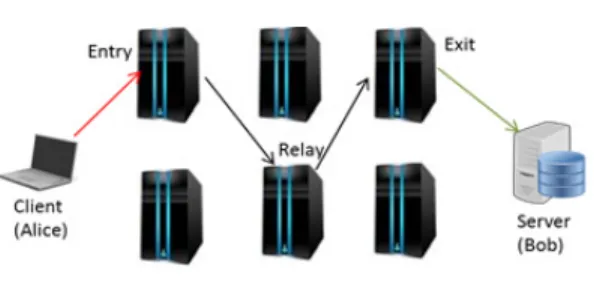
As stated in [14], Tor is a low-latency anonymous communication service providing high degree of anonymity. The primary objective of Tor is to prevent traffic analysis from linking comm- unication partners or multiple communications to or from a single user. The distributed overlay network and onion routing [15] are the key techniques to anonymize Internet activities such as Web browsing, secure shell, or P2P communication in Tor. Three basic components of Tor are shown in Fig. 1 [10].
1) Tor Project Inc, “The Tor Project,” available at: https://www.tor project.org.
2) Adobe Flash, Available at: https://en.wikipedia.org/wiki/Adobe_Flash.
Fig. 1 Tor network
⚫Alice (i.e., Client): These are users of the Tor network that request the Web server for services. The local software, called onion proxy (OP), is executed on the client’s computer to anonymize client data in Tor.
⚫Onion routers (ORs): Onion routers are classified into special proxies—entry, relay, and exit nodes. Traffic enters the Tor network through the entry node and leaves through the exit node. Relays pass application data between the entry and the exit nodes. Any two onion routers in Tor are encrypted using Transport-layer security(: TLS) connections. The application data are packed into equal-sized cells of 512 B carried through the TLS connections.
⚫Bob (i.e., Server): These are Web servers that run Transmission Control Protocol(: TCP) applications, such as Web services. They can be located outside or inside the Tor network. They send Web pages in response to client requests.
When a client wants to request data from a server via Tor, prior to forming a circuit, he/she selects n Tor nodes (n is usually 3). To create a circuit, consecutive hops of communication are established between the chosen nodes. Encryption of messages is then done n times using the following onion encryption scheme: Using the TLS protocol, a TLS connection is set up between client and OR1. Using this connection, a CELL_CREATE cell is sent by the client with half of the Diffie–
Hellman(: DH) handshake protocol as payload to compute a symmetric key with OR1. A CELL_CREATED cell is responded by OR1 with other half of the DH handshake protocol in the payload.
3)Thus a symmetric key K = g
xyis created. In this way, a one-hop circuit C1 is formed. To extend this circuit to two hops, a CELL_EXTEND cell to is sent by OR1. This command cell is wrapped by OR1 with CELL_CREATE, and forwards it to OR2. This OR then responds with a CELL_CREATED cell to OR1, which in turn responds by sending CELL_
EXTENDED to the client. In the same way, client extends this circuit to three hops. Followed by circuit establishment between the client and OR3, the RELAY_COMMAND_BEGIN cell is sent by the client to the exit OR, i.e., OR3. The cell is encrypted in the format of the onion router as {{{Begin <Website, Port no.>} kf3} kf2} kf1. Here, kf3, kf2, and kf1 refer to the keys used for the encryption of the onion layer at OR3, OR2, and OR1, respectively. As the cell traverses an OR through the circuit, the three layers of encryption are removed one by one, just like an onion is peeled off. Once the last layer of the onion is removed by OR3 by decryption, it recognizes the request to open a TCP stream to the destination IP and port, which belong to Bob. Therefore, OR3, acting as a proxy, sets up a TCP connection with Bob, and sends back a RELAY_COMMAND_
CONNECTED cell back to the client via inter- mediate hops. The client can then download the file. Moreover, onion encryption ensures that each node knows only its predecessor and successor, and that only the last node can recover the original message.
A Tor client can simultaneously use multiple circuits. As a result, all streams generating from a user are multiplexed over different circuits. For 3) R. Dingledine and N. Mathewson, “Tor protocol specification,”
Available at: https://gitWeb.torproject.org/torspec.git?a=blob_plain;hb=HEAD;f=tor-spec.txt
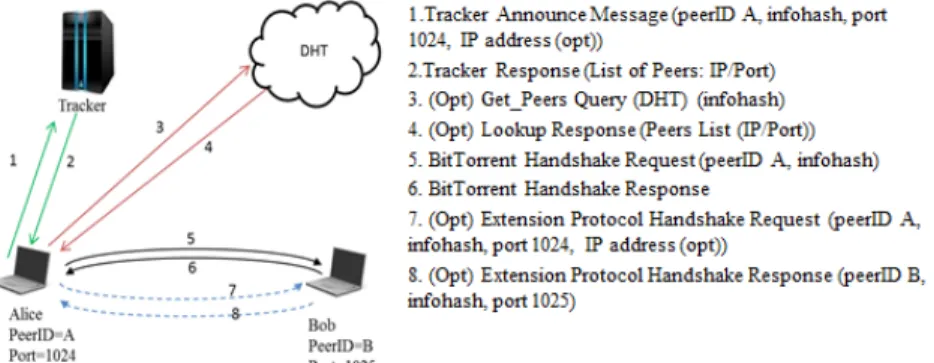
Fig. 2 BitTorrent protocol diagram example, a BitTorrent user can use one of the
circuits to connect to the tracker and others to connect to the peers to download files.
Some ISPs may prevent users from entering the Tor network by blocking the IP addresses of Tor nodes. To bypass this censorship, the Tor project has created a special type of proxy called bridges.
Bridges are new types of Tor routers that are not listed in the main Tor directory. Thus, bridge IP addresses are not publicly known and hence cannot be blocked. Tor restricts access to this list and provides a small numbers of bridge IPs (three bridge IP addresses) per unique requester IP for a fixed period of time.
Ⅲ. Overview of unsecured applications on Tor
3.1 Flash
Flash is a multimedia and software platform used to create vector graphics, animation, games, and rich multimedia that can be viewed, played, and executed in Web browsers using third party extensions or plugins. Scripting language is utilized for interactive webpage content through Flash files.
Displaying Flash content (video, audio, games, etc.) in the Web browser requires a Web plugin, which is generally third party software that adds features to the browser for customization. Adobe Flash is
widely used in Web browsers to play Flash content. In order to execute flash contents, the client (web browser) first sends an HTTP GET request for an HTML webpage containing text, images, scripts, Flash file etc. On receiving the request, the server searches its database for corresponding files. These files are delivered to the client as an HTTP response. The web browser then renders the HTML content while calling the plugins to display it.
The action script, which is a scripting dialect for Adobe Flash, provides an implicit XML socket class that allows the client to open continuous association with a server. The XMLSocket.connect() method builds up a socket connection with a Web server port. On conjuring the XMLSocket.connect() strategy, the Flash player opens a TCP/IP association with the server and maintains the connection until the socket is closed. This method can be activated by a button click event or can begin when a page begins to load.
Real-time video streaming service through Flash
requires different features. The requested video is
delivered to a user using the Real-Time Messaging
Protocol (RTMP). Once the real time streaming
service is approved at the server side, the content
is played through the video plugin at the client
side. Only video codecs supported by the plugin are
played. The client requests the page containing
real-time video through an HTTP request. The server responds to it by sending an HTML file along with the Flash information. For the video, the Flash server is invoked using an RTMP request, and the response is played using the plugin.
3.2 BitTorrent
BitTorrent is one of the popularly used P2P file sharing protocols. In BitTorrent, a file called torrent has a set of peers sharing the same content. Fig. 2 [16] describes the methodology for downloading a file using the BitTorrent convention. To join a torrent, the client sends an announcement message to the tracker that keeps up the list of all peers in the relevant torrent (Step 1 in Fig. 2). The announcement is an HTTP GET message containing three essential identifiers of the requested torrent: i) infohash, which is the 160-bit unique identifier of a torrent, ii) the TCP port number on which the peer is listening, and iii) the peer ID of the client. iv) Optionally, the IP address of the client. The tracker, on receiving the announcement message for a specific torrent recognized by the infohash, chooses an arbitrary subset of peers in that torrent and returns the IP and port of these endpoints to the client (Step 2).
Other than utilizing the tracker, the client can use a DHT(: Distributed Hash Table), which continues to run on top the User Datagram Protocol(: UDP) to get a list of peers in a torrent.
With the specific end goal of obtaining the list of peers, Alice performs a “find_node” inquiry containing the infohash. The aftereffect of this inquiry is the ID of the DHT node that maintains the tracker for the infohash in question. At this point, Alice sends a “get_peers” query to the DHT node in order to retrieve the endpoints of the torrent (Steps 3 and 4). Likewise, with a tracker, Alice can retrieve all the endpoints of a torrent using the DHT. Alice then builds up a TCP connection and sends a handshake message to
every peer (Steps 5 and 6). This handshake message contains the infohash of the torrent, and the peer ID. When the alternative “extended messages” are empowered in the BitTorrent (Steps 7 & 8), the port number of the peer is present in the handshake. The extended handshake sometimes contains the IP address of Alice.
A BitTorrent client can use Tor by configuring the Tor interface as a SOCKS proxy for autonomous communication with the tracker or peers. The client can then interface with the tracker through Tor. Alice favors direct connection with peers in order not to trade off on performance.
3.3 FTP
FTP is a standard system convention to exchange computer files that are hosted at a host and downloaded at the next host over a TCP-based system, such as the Web. It is a client-server protocol that depends on two interchange channels between client and server; a command channel to control the discussion and a data channel to transmit file content. FTP operates in two modes: PORT mode (Normal or Active mode) and PASV mode (Passive mode). FTP operates in PASV mode when a specific proxy setting is applied in its web browser.
Ⅳ. Test Methodology and Environment
The behavior of applications using protocols like HTTP, RTMP, BitTorrent, and FTP over Tor has been studied in the paper. This section provides description of the methodology for testing anonymity of Tor users in such applications.
Testing packets were sniffed and analyzed using
Wireshark, which is free and open-source network
protocol analysis software that allows the browsing
and monitoring of network packets. It is useful for
recording traffic, and supports a wide range of protocols.
4.1 Flash over Tor Network
Various Flash files were tested. In all cases, a Flash plugin has been installed in clients’ browsers.
A1. A normal Flash file was created using Adobe Flash with extension “.swf”. Here the word “normal” is used to distinguish the Flash file from code-embedded flash file. This file was embedded, along with the Web page, into HTML using an embed tag. The corresponding website was then hosted and subsequently requested by a Tor client.
A2. A modified Flash file requesting a socket connection was developed using Action Script in Adobe Flash. The behavior of the request from the Tor client was analyzed.
A3. Real-time video service from a Flash server with video delivery using the RTMP protocol was requested from the Tor client.
In order to get a glimpse of the Flash test on Tor, the structure of the Web browser need to be understood. A browser consists of different sections, such as the address bar, HTML content, Flash content, etc. A page is requested through the address bar. The browser engine displays HTML content while the Flash content is rendered by the Flash plugin at a specified area in the browser.
Fig. 3 shows a representation of Flash content within a browser.
Any web browser needs to provide proxy settings to direct all the traffics through Tor network. Thus browsers with configuration of SOCKS proxy settings of Tor constitutes a Tor enabled browser. Tor browser is the integration of Mozilla Firefox browser with Tor software and is provided by Tor project in the form of Tor Browser Bundle (TBB).
Fig. 3 Representation of a Flash content within a Web Browser
To test cases A1 and A2 involving Flash on the Tor network, a server hosting a website on an arbitrary IP address was used. Using Adobe Professional CS5, a Flash file was created. This Flash file was embedded into the webpage and hosted on the server. The object tag was used to embed the Flash files into the webpage.
<object>
<embed src=”Flash.swf”>
</object>
This particular page with Flash content was requested from another client using a Tor browser and Tor-enabled browsers. For second case A2, the following socket connection code, to be executed at button click, was embedded into the Flash file using Action Script.
Var Socket = new XML Socket ();
// creating a variable socket Socket.connect(IP,PORT);
// calling a socket method with argument IP and PORT
This Flash file was embedded into the webpage in the same manner as above and hosted on the server. This file was requested from another client using the Tor browser and Tor-enabled browsers.
For case A3, a real-time streaming video was requested from the site www.kantipurtv.com/live as an example from a Tor client on.
4.2 BitTorrent over Tor Network
Regarding to BitTorrent application over Tor
network, two testing environments were set to be
studied.
B1. Using a BitTorrent client software, a unique torrent file was created with a list of UDP trackers, HTTP trackers, or both. The file was then hosted on a BitTorrent application. This seed file was requested by another BitTorrent client with a fixed IP. The client was arranged to work in the Tor network by adjusting the proxy setting in the client application. The request and response were analyzed.
B2. The Tor software for android “Orbot” and a BitTorrent client named “tTorrent V1.5.2” were installed on an Android device. A unique file was downloaded from tTorrent. Mobile devices used both WiFi and cellular networks, which provide dynamic IPs for BitTorrent users. The tTorrent traffic over Tor was then studied.
To test behavior of BitTorrent over Tor, BitTorrent software was used as a client. The proxy was set on a BitTorrent client to download a file through Tor while the seed is kept outside Tor.
According to the case B1, the client was assigned a certain fixed IPwhile the seed was in another fixed IP. For the test, the option “Disable connections unsupported by the Proxy” was toggled in the BitTorrent client.
In B2, BitTorrent on Tor was tested on a mobile device. The BitTorrent software called “tTorrent”
was installed on a mobile device connected to WiFi or cellular network, respectively. The seed was hosted on a fixed IP server while the mobile user downloaded the file from a public IP address (for instances, 1.218.42.89 on WiFi and 110.70.47.115 on cellular network). For the test, the option “Proxy peer connections” was toggled in the tTorrent client.
4.3 FTP over Tor Network
Tor user anonymity on FTP applications was tested in the consideration of the following case.
C1. A downloadable file was created and hosted on a Web server using FTP. The contents were
then downloaded by Tor users using the Tor browser and Tor-enabled browsers.
To test the FTP over Tor, FTP server was hosted in a server having a fixed IP address, while the file was downloaded from Tor client hosted in different IP. In C1, the FTP file in the server was requested by client through Tor in the consideration of two Tor exit node selection scenarios; an arbitrary node selection and the predefined controlled node selection, respectively.
Ⅴ. Results
5.1 Flash
A1. A normal Flash file: Table 1 shows the observed result in which the table is divided into three headings. Browsers represent the type of browsers used. File type is the type of file requested by a browser to get from the server.
From the observation, it came to know that the flash file (.swf file) that was requested to web server, through Tor network using Tor browser as well as Tor-enabled browser, the flash content was delivered via Tor network and it is not possible to find the real IP address of the source and destination.
Browsers File types Observed IP of destination at client side Tor enabled Normal flash file Tor entry node IP
Tor Normal flash file Tor entry node IP
Table 1. Test results for normal Flash file request;
packets captured at client side
A2. A code-embedded Flash file: The request
and response from client and server were recorded
and the results are outlined in Table 2.
Browsers File types Observed IP at client
Observed IP at Server Tor
enabled
Code-embedd ed Flash file
Real destination
IP Real user IP
Tor Code-embedd
ed Flash file
Real destination
IP Real user IP
Table 2. Test results for code-embedded Flash file request; packets captured at client and server side
The observed results show that the socket connection feature embedded in the flash file no longer preserves the anonymity. The traffic goes outside of the Tor network.
Browsers File types Observed IP at client
Observed IP at Server Tor
enabled Live video RTMP Real server IP
Tor Live video RTMP Real server IP
Table 3. Test results for Real time video request;
packets captured at client side
A3. Real time video request: The request and response from client and server were recorded and the results are outlined in Table 3. There is no trail of Tor entry router IP address when the real time video was requested. Thus, whenever a real time video streaming service was requested, using tor browser as well as tor-enabled browsers from Flash server, the video contents were delivered using RTMP protocol by the server which bypasses Tor network and thus the client’s IP and the destination IP address were revealed. The result depicts that RTMP protocol is not supported on Tor.
Tracker
type Client’s connection type Remarks
HTTP
tracker Connection through Tor • TCP connection with peer
• Tor entry IP UDP
tracker No connection • UDP connection with peer
Table 4. Test results when “Disable connection unsupported by the proxy” is checked
5.2 BitTorrent test
B1. A user with fixed IP: When the option
“Disable connection unsupported by the proxy” in BitTorrent client was checked, the results in Table 4 were obtained. The client uses UDP protocol to connect to UDP tracker to get the lists of the peers. But, it is found that the UDP connection is not supported to work in the Tor network so that the connection is stopped. However, the connection through http tracker could be established. The peer list is provided to the client by HTTP tracker using HTTP protocol. TCP connection supported by Tor is used to download the files from the corresponding peers. Therefore in this case, BitTorrent users on top of Tor are not revealed.
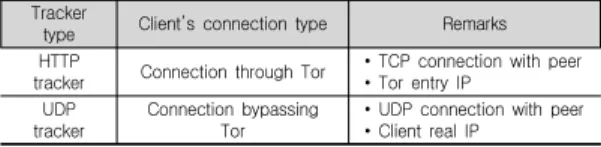
When this option “Disable connection unsupported by the proxy” in BitTorrent client was unchecked, the results in Table 5 were obtained.
The connection to the tracker for peer list is done through the Tor network. When this option is unchecked, the BitTorrent application, however, bypasses the Tor-Proxy setting. In this case, the original IP of BitTorrent users is revealed.
Tracker
type Client’s connection type Remarks
HTTP
tracker Connection through Tor • TCP connection with peer
• Tor entry IP UDP
tracker
Connection bypassing Tor
• UDP connection with peer
• Client real IP
Table 5. Test results when “Disable connection unsupported by the proxy” is unchecked
B2. Mobile user with dynamic IP: When the option “Proxy peer connections” was checked, the results in Table 6 were observed.
Tracker type
Client’s connection with
peer Remarks
HTTP
tracker No connection IP not revealed
UDP
tracker No connection IP not revealed
Table 6. Test results when “Proxy peer connections”
is checked
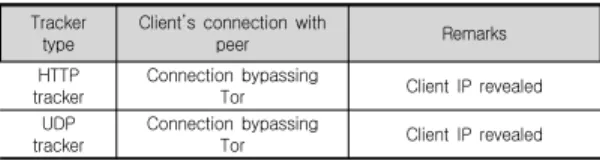
When the option “Proxy peer connections” was unchecked, the results in Table 7 were observed.
Tracker type
Client’s connection with
peer Remarks
HTTP tracker
Connection bypassing
Tor Client IP revealed
UDP tracker
Connection bypassing
Tor Client IP revealed
Table 7. Test results when “Proxy peer connections”
is unchecked
Although there is option for proxy setting in application "tTorrent", it may not be designed to work on top of Tor. This may be the inefficiency of this particular software. In addition, for mobile, other torrent software are not designed to work with proxy.
Browser Request Protocol Connection Remarks
Tor
enabled File FTP Control
channel Tor entry IP FTP Data channel No connection
Tor File FTP Control
channel Tor entry IP FTP Data channel No connection
Table 8. Test results for FTP using any arbitrary Tor exit node
5.3 FTP test
C1-1. Using any arbitrary Tor exit node: The results in Table 8 were obtained in FTP test over Tor for an arbitrary exit node selection. In FTP, a control channel is established using TCP connection. Therefore, the connection request passes through Tor network and the user’s IP is not revealed. After establishing control channel, data channel needs to be built up. In this work FTP is in Passive mode. In FTP passive connection, the server picks a new port for data connection and tells the client to connect to the server at that port.
So in this case, the Tor exit node may not allow the connection to that random Port. Thus data connection channel cannot be established.
Browser Request Protocol Connection Remarks
Tor
enabled File FTP Control
channel Tor entry IP FTP Data channel Tor entry IP
Tor File FTP Control
channel Tor entry IP FTP Data channel Tor entry IP
Table 9. Test results for FTP using controlled Tor exit node
C1-2. Using the predefined controlled Tor exit node: The results in Table 9 were obtained for the case. The results show that both the control channel and data channel are established with Tor exit nodes that allow all the ports to establish connection.
VI. Conclusion
In this paper, behavior of unsecured applications on user’s anonymity over the Tor network was studied. Applications widely used on the Web, such as Flash, BitTorrent, and FTP, were scrutinized in the Tor network environment. For Flash, three distinctive Flash files such as normal Flash file, socket connection-coded Flash file, and real-time Flash video were used. Compared with the normal Flash file, which gets delivered via Tor, the deployment of the socket connection function in the Flash file was found to bypass the Tor network.
Similarly, real-time video traffic, which was
delivered by RTMP protocol, was found to route
beyond the Tor network. Thus it can be concluded
that code-embedded Flash file and Real time Flash
file can reveal Tor user’s IP address. Similarly, for
BitTorrent the option of “Disable connections
unsupported by the Proxy” was toggled in the
BitTorrent client for both HTTP trackers and UDP
trackers. It was observed that if this option was
enabled, BitTorrent traffic gets routed through Tor
with the HTTP tracker, whereas for UDP tracker
the connection was ignored. However, when this option was disabled by the user, the Tor network was bypassed. It was also observed that BitTorrent for mobile users can also reveal users’ IP addresses. The inefficiency of the torrent software enables to reveal the Tor user’s IP. For FTP, the results showed that the control connection channel to establish the FTP connection followed the Tor network while the connection to establish a data channel was rejected because of Tor exit node policy. If Tor exit node allows any ports forwarding then FTP can be used on top of Tor.
Of the three applications, Flash and BitTorrent affected the anonymity of Tor users whereas FTP seemed to follow the path of the Tor network.
Thus, the degree of anonymity was directly related to the user’s willingness to request Flash content and misconfigure the application setting in the BitTorrent client, which consequently bypassed the Tor network.
Internet hosts a massive amount of popular Flash content delivered to end users and executed through plugins. This creates space to compromise the anonymity of users as Flash application bypass the path of the Tor network. Thus, an alternative engine in the browser that can parse Flash content and handle its traffic can help mitigate the risk incurred by using the plugin. A large number of users seek anonymity using BitTorrent over Tor.
With some improper configurations, however, the traffic bypasses Tor using the BitTorrent client.
Hence, a BitTorrent client with the capability to seed and download from other clients and strictly adhering to the path of the Tor network can be developed in order to preserve anonymity.
References
[1] D. Clark, “Design Philosophy of the DARPA Internet Protocols,” In Proc. on Communications
architectures and protocols (SIGCOMM '88), New York, USA, August, 1988.
[2] K. Kim and S. Han "Home Security System Based on IoT," J. of the Korean Institute of Electronic Communication Sciences, vol. 12, no. 1, 2017, pp. 147-154.
[3] D. Kim, "Implementation Plan and Requirements Analysis of Access Control for Cyber Security of Nuclear Power Plants," J. of the Korean Institute of Electronic Communication Sciences, vol. 11, no.
1, 2016, pp. 1-8.
[4] Y. Tscha, "Concealing Communication Paths in Wireless Sensor Networks," J. of the Korean Institute of Electronic Communication Sciences, vol.
9, no. 12, 2014, pp. 1353-1358.
[5] D. Chaum, “Untraceable electronic mail, return addresses, and digital pseudonyms,” ACM Communications, vol. 24, no. 2, 1981, pp. 84-90.
[6] X. Fu and Z. Ling, “One cell is enough to break tor’s anonymity,” In Proc. Black Hat DC, Arlington, USA, Feburary, 2009.
[7] Z. Ling, J. Luo, W. Yu, X. Fu, D. Xuan, and W.
Jia, “A New Cell-Counting-Based Attack Against Tor,” IEEE/ACM Trans. Networking, vol. 20, no.
4, Aug. 2012, pp. 1245-1261.
[8] S. Chakravarty, A. Stavrou, and A. D.
Keromytis, “Traffic analysis against low-latency anonymity networks using available bandwidth estimation,” 15th European Symp. on Research in Computer Security (ESORICS2010), Athens, Greece, September, 2010.
[9] S. Nepal, S. Dahal, and S. Shin, “Deanonymizing schemes of hidden services in tor network: A survey,” 2015 Int. Conf. on Information Networking (ICOIN), Siem Reap, Cambodia, January, 2015.
[10] S. Dahal, J. Lee, J. Kang, and S. Shin, “Analysis on end-to-end node selection probability in Tor network,“ 2015 Int. Conf. on Information Networking (ICOIN), Siem Reap, Cambodia, January, 2015.
[11] T. Abbott, K. Lai, M. Lieberman, and E. Price,
“Browser-based attacks on Tor,” In Proc. the 7th
Int. Conf. on Privacy Enhancing Technologies (PET’07), Ottawa, Canada, June, 2007.
[12] D. McCoy, K. Bauer, D. Grunwald, T. Kohno, and D. Sicker, “Shining light in dark places:
Understanding the tor network,” In Proc. the 8th Int. Symp. on Privacy Enhancing Technologies (PET’08), Leuven, Belgium, July, 2008.
[13] S. Blond, P. Manils, C. Abdelberi, M. Dali Kaafar, C. Castelluccia, A. Legout, and W.
Dabbous, “One bad apple spoils the bunch:
exploiting P2P applications to trace and profile Tor users,” In Proc. the 4th USENIX conf. on Large-scale exploits and emergent threats (LEET’11), Boston, USA, March, 2011.
[14] K. Peng, “Anonymous Communication Net- works: Protecting Privacy on the Web,” New York, CRC Press, 2014.
[15] R. Dingledine, N. Mathewson, and P. Syverson,
“Tor: the second-generation Onion Router,”
Proc. of the 13th Conf. on USENIX Security Symp., San Diego, USA, August, 2004.
[16] P. Manils, C. Abdelberri, S. L. Blond, M. Ali Kaafar, C. Castelluccia, A. Legout, and W.
Dabbous, “Compromising tor anonymity exploiting p2p information leakage,“ In Proc. of the 3rd Hot Topics in Privacy Enhancing Technologies, Berlin, Germany, July, 2010.
저자 소개
신석주(Seok-Joo Shin)
1997년 2월 한국항공대학교 전자 공학과 졸업(공학사)
1999년 2월 광주과학기술원 정보 통신공학과 졸업(공학석사) 2002년 2월 광주과학기술원 정보통신공학과 졸업 (공학박사)
2003년 조선대학교 컴퓨터공학과 교수
※ 관심분야 : 5G무선통신시스템, 센서네트워크, 네트워크보안
사우라브 다할(Saurav Dahal)
2010년 8월 네팔트리부번대학교 전자통신공학과(공학사)
2015년 8월 조선대학교 컴퓨터공 학과(공학석사)
※ 관심분야 : 5G무선통신시스템, 네트워크보안
아모드 푸다사이니(Amod Pudasaini)
2013년 8월 네팔퍼반철대학교 전 자통신공학과(공학사)
2017년 2월 조선대학교 컴퓨터공 학과(공학석사)
※ 관심분야 : 무선통신시스템, 센서네트워크, 네트 워크보안
강문수(Moon-Soo Kang)