• 검색 결과가 없습니다.

Secure Password-based Authentication Method for Mobile Banking Services

N/A
N/A
Protected

Academic year: 2021

Share "Secure Password-based Authentication Method for Mobile Banking Services"

Copied!
10
0
0

로드 중.... (전체 텍스트 보기)

전체 글

(1)

1. INTRODUCTION

Recently, the number of people using their smartphone has drastically increased. In addition to making calls, people are using smartphones for a wide range of tasks such as social networking, mobile banking, and mobile healthcare services [1, 2]. Among those services, mobile banking and its service applications handle sensitive user in- formation to access a customer's bank account be- cause mobile banking services involve account in- quiries that include cash deposits, withdrawals, and transfers. Because of data transfers via wire- less mobile devices, the risk of information leakage is increasing. In addition, on Android OS, anony- mously developed applications can be uploaded to the Google Play Store. Sometimes, Android appli-

cations require permission to access users’ phone information [3], and some include malware that can access critical information when the smartphone user downloads it. Thus, when malware is installed on a smartphone before a user uses mobile banking services, the smartphone remains weak with re- spect to security, even if the user installs an an- ti-theft application. Thus, it is necessary to provide an authentication method such as a strong an- ti-theft program and secure virtual keyboard sol- utions [4-12]. One of several authentication meth- ods, the secure virtual keyboard is a front-end user authentication method to identify genuine users, thus it must be highly secure. On the other hand, it also should achieve a high level of user con- venience because the age of users can be wide- spread. In addition, it is a widely accepted method

Secure Password-based Authentication Method for Mobile Banking Services

Dongmin Choi

, Dongkil Tak

††

, Ilyong Chung

†††

ABSTRACT

Moblie device based financial services are vulnerable to social engineering attacks because of the display screen of mobile devices. In other words, in the case of shoulder surfing, attackers can easily look over a user’s shoulder and expose his/her password. To resolve this problem, a colour-based secure keyboard solution has been proposed. However, it is inconvenient for genuine users to verify their password using this method. Furthermore, password colours can be exposed because of fixed keyboard colours. Therefore, we propose a secure mobile authentication method to provide advanced functionality and strong privacy. Our authentication method is robust to social engineering attacks, especially keylogger and shoulder surfing attacks. According to the evaluation results, our method offers increased security and improved usability compared with existing methods.

Key words: Virtual Keyboard, Colour-blind, Shoulder Surfing Attack, User Authentication, Social Engineering Attack

※ Corresponding Author : Ilyong Chung, Address: (501- 759) Chosun Univ., Seoseok-dong, Dong-gu, Gwangju, Korea, TEL : +82-62-230-7712, FAX : +82-62-230-7754, E-mail : [email protected]

Receipt date : Oct. 10, 2015 , Revision date : none Approval date : Dec. 7, 2015.

†††

Div. of Undeclared Majors, Chosun University (E-mail : [email protected])

†††

Dept. of Computer Eng., Chosun University (E-mail : [email protected])

†††
Dept. of Computer Eng., Chosun University

(2)

because of its usability. Thus, recent virtual key- board layouts are similar to the QWERTY key- board [13] in order not to affect user convenience.

However, these types of secure virtual keyboard solutions, including user authentication, are easily hacked via a keylogger [14] or social engineering [15] attack because of their keyboard layout. In particular, shoulder surfing attacks (a type of social engineering attack that uses direct observation techniques, such as looking over a user’s shoulder to get information) [16] are commonly used to ob- tain passwords, PINs, and security codes. Shoulder surfing is not a sophisticated method, but it has a huge impact, and therefore we focus on it.

Furthermore, secure virtual keyboard solutions send user input data only to identify genuine users.

This is not adequate for user authentication be- cause the authentication server does not know whether the user input data has been clearly trans- ferred from the genuine users’ device. Therefore, new secure authentication mechanisms must be designed to address these weaknesses.

In this paper, we propose a novel password au- thentication method that provides user convenience and strong privacy. The proposed method includes a secure virtual keyboard and user authentication scheme. The remainder of this paper is organized as follows: In Section 2, we describe related work.

In addition, we explain the proposed method in Section 3. In Section 4, we present the evaluation results of our method compared with several exist- ing methods. Finally, we conclude the paper in Section 5.

2. RELATED WORK

2.1 Security threats

Previous research [17-18] has investigated pos- sible threats against mobile users, including at- tackers that physically and technically observe mobile devices and users. First, with respect to mobile device users, attackers physically observe

a user’s mobile device by shoulder surfing, filming, or recording acoustic or electromagnetic emanations.

In the case of social engineering, personal in- formation such as phone calls or personal in- formation can be compromised. In the case of phishing, users may be victims of traditional phishing email attacks. Second, with respect to users' mobile devices, there is physical theft, where users have their mobile devices stolen.

Another method is tampering, where a user can be victimized by brute force, side channel attacks, or keyloggers. In the case of malicious software, at- tackers can use traditional malware to implement man-in-the-middle attacks. Third, with respect to communication networks, attackers can attempt pharming, eavesdropping, interception, and hijack- ing attacks. Fourth, with respect to remote banking services, attackers can exploit the vulnerabilities of web applications and servers through code in- jections, brute force attacks, and data breaches. In the case of mobile banking services on smart- phones, user-friendly smartphone devices have display screens that are at least 5 in wide and hence especially vulnerable to shoulder surfing attacks. The large display screen allows higher typing accuracy and speed along with lower typo- graphic errors because of the wider virtual key size [19]. However, even if the attacker does not obtain any information, other recording devices or coop- erative attackers can still be used. Therefore, we

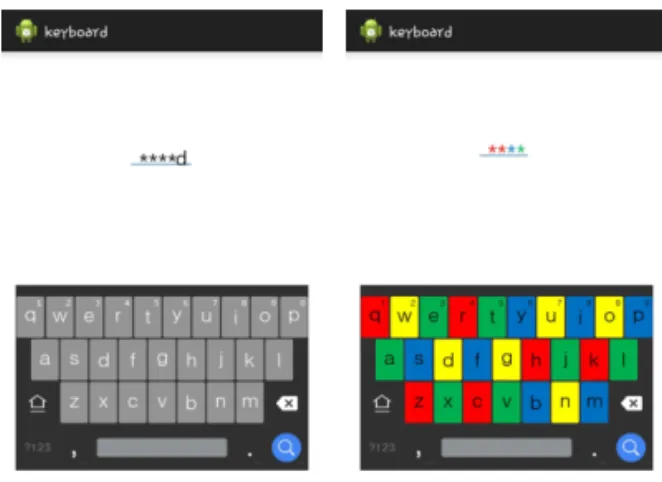
Fig. 1. Existing methods comparison.

(3)

have developed new authentication methods.

2.2 Password authentication methods

Password authentication methods are used in most computer environments. In basic password authentication methods, the user simply enters a password using the keyboard. A graphic password is a method where a user selects an image. This method has been developed by Passfaces [20]. In this method, users register the password from among several presented face images. They then select the image registered as the password during authentication. According to research, human faces are easier to remember than character strings over long periods of time [21-22]. In the pattern lock authentication method [23], a user draws a con- nected line pattern on a selection of several dots to register his/her password in the registration phase. To then unlock the smartphone, users must draw the same line on the screen. Numeric keypads are another popular method for passwords on smartphones. However, because of the fixed layout of numeric keypads, shoulder surfers can easily determine the password. To deal with this problem, randomized keypads have been proposed. With the randomized keypad solution, it is difficult for an at- tacker to estimate a password [24]. In order to re- duce the burden of remembering the password, biometric authentication has also been proposed.

Among the several biometric authentication meth- ods, fingerprint and iris scanning are possible au- thentication methods running on smartphones [25- 27]. To unlock the smartphone, the fingerprint and iris scanning methods verify the owner’s finger- print and iris information by comparing it with stored information in the device. However, if the fingerprint is damaged, the error rate of verification is increased. In the case of iris authentication, high resolution iris images can pass the authentication process in place of a real iris [28-29]. Moreover, biometric authentication methods are expensive to implement on smartphones.

2.3 Usability

When evaluating the usability of software key- boards [30-31], researchers have focused on key- board size and layout. Several studies [32-33] have also evaluated the usability of mobile phones oper- ated by one-handed users. Usability is clearly a highly important factor. However, none of these studies have considered colour-blind users. There- fore, we address the usability of smartphone pass- word input method for the colour-blind. Recently, mobile devices, including smartphones, have be- come a globally bestselling product. People use smartphones for maintaining and enjoying their lifestyles. However, Mclntyre [34] determined that about 8.5% of the world’s population is col- our-blind. Hence, about 8.5% of the population is not fully supported by their smartphone as the product has been developed. Thus, it is mandatory to develop a method that allows all users to exploit the full functionality of their smartphones. As ex- amples, several popular games such as League of Legends [35], World of Tanks [36], and World of Warcraft [37] offer a colour-blind mode to support colour-blind players. This option changes several colours such that they are all recognizable by the colour-blind.

3. PROPOSED METHOD

In this paper, we propose a secure authentication method for smartphones. For secure user password input, our method modifies the colour-based algo- rithm. For secure user authentication, our method employs not only the genuine user’s password, but also the smartphone serial number, MAC address, and K-box. Furthermore, for user convenience, we implemented a novel colour-generating and chang- ing algorithm.

3.1 Secutity

For secure password input, we modified the col-

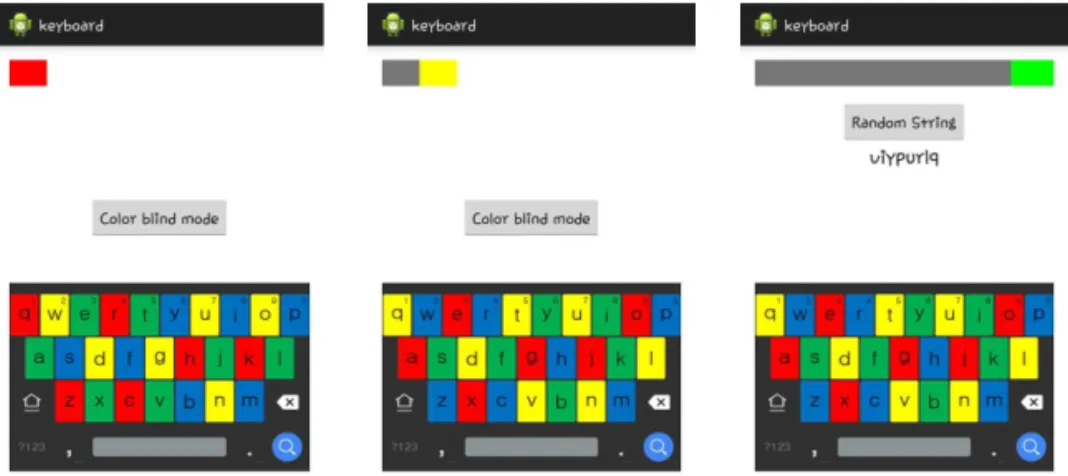
our-based keyboard method. Fig. 2 shows our pro-

(4)

posed keyboard.

As shown in Fig. 2, we employed two major fac- tors for secure user password input. The first one is a keyboard colour-changing algorithm. The ex- isting colour-based method applies a colour mask- ing to the keyboard. However, the colours are fixed until the user finishes inputting his/her password.

Thus, an attacker can estimate the correct pass- word by the colour that appears in the indication window. In this way, we have applied a colour- generating and changing algorithm. In our method, at every keystroke, the colours of the keyboard are changed randomly. For example, in Fig. 2(a), the yellow “W” key is changed to blue after one keystroke. In addition, the colour is never the same as that of the neighbouring keycap colours.

Therefore, an attacker cannot estimate the pass- word using the colours.

The second factor is the indication window. In this window, a user may verify whether his/her

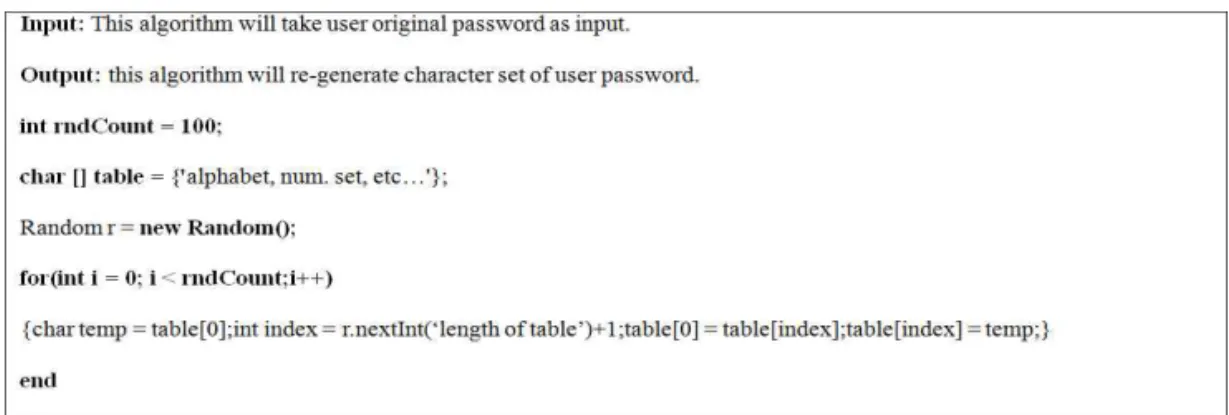
input is correct or not. However, this gives the at- tacker a chance to estimate the user input. Thus, we modified the existing method’s indication algorithm. In our method, after one keystroke by the user has been verified, the colours appearing in the indication window are changed to shades of grey. Therefore, there is no opportunity for the at- tacker to estimate the password. Fig. 3 shows the pseudo code of our colour-generating and chang- ing algorithm.

3.1 User authentication

For genuine user authentication, we used K- box. As shown in Fig. 2(c), after typing his/her password, K-box assigns the user a new password that is matched to his/her own original password.

The K-box algorithm is operated by the user by pushing a random string of buttons. The user then uses the new password instead of his/her own password. Thus, if the user desires a password au- Fig. 2. Password input method using the proposed keyboard.

Fig. 3. Pseudo code of colour-generating and changing algorithm.

(5)

thentication service that is robust to attacks, s/he register his/her own password and enters a ran- dom string of buttons in the registration process.

This randomly-changed password is robust be- cause only the user remembers the changed pass- word, and each result of the K-box algorithm is different from the other. Fig. 4 shows an example of the K-box algorithm.

As shown in Fig. 4, there is a matching table in the K-box that has a structure that is different for every smartphone. The matching table struc- ture is randomly generated and stored in each smartphone. In other words, when the user types in the same password as used in another smart- phone, the result is different from that generated when using his/her own smartphone. This means that even if the attacker determined the password, it still does not enable him/her to log in to the banking services with his/her smartphone because

of the different table structure in the K-box algorithm. Fig. 5 illustrates the K-box character matching algorithm process.

Thus, if the user inputs the password “security,”

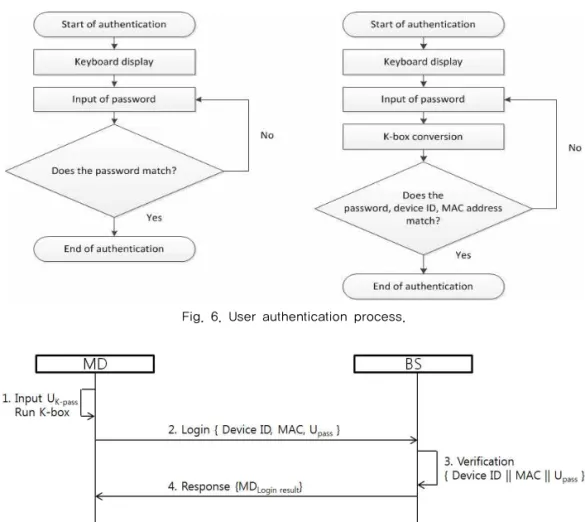
“viypurlq” is generated by K-box. The regenerated password is not intended to be remembered be- cause of the uniqueness of the K-box table stored in the smartphone. Fig. 6 compares the authentica- tion process of our method with the existing method.

As shown in Fig. 6, in contrast to the existing method, our method introduces K-box and a proc- ess that verifies the device ID and MAC address.

These are transferred to the authentication server for genuine user authentication. During the au- thentication process, the smartphone sends the se- cret information that includes the original pass- word, device ID and MAC address after the K-box conversion process. Fig. 7 shows the authentica- tion process between the server and smartphone.

In this figure, MD indicates the mobile device and BS indocates the bank server.

3.2 Usability

For the colour-blind, we modified the colour- based method with easy-to-distinguish colours where appropriate. Fig. 8 shows the proposed method in the colour-blind mode.

Because the colours of the existing colour-based method are yellow, green, red, and blue, several of these colours are not distinguishable by the col- Fig. 4. K-box algorithm.

Fig. 5. Character matching table set.

(6)

our-blind. Thus, we changed several colour pat- terns to enable the colour-blind to see them. Fig.

9 shows the pseudo code of the colour-blind mode.

In the colour-blind mode, there are two modes

to choose from. The mode for red and green weak- ness changes from green to black, and the mode for yellow and blue weakness changes from yellow to grey. Consequently, those who are colour-blind can freely choose the correct colour-changing op- tion so they may type in their password using dis- tinguishable colours.

4. SECURITY AND USABILITY EVALUATION

In this section, we present the results of a se- curity and usability evaluation in terms of simple shoulder surfing and continuous shoulder surfing attacks using various smartphones.

4.1 Attack modeling

As shown in Table 1, three types of smart- phones were used in the evaluation. We evaluated Fig. 6. User authentication process.

Fig. 7. Authentication process of the proposed method.

Fig. 8. Colour-blind mode.

(7)

two types of shoulder surfing attack models. The first is the simple shoulder surfing attack (SA), where the attacker looks over the owner’s shoulder to view only the upper part of the smartphone screen. Thus, the attacker does not know which keys are under the owner’s finger. The second is the continuous shoulder surfing attack (CA), where the attacker knows the partial or full information of the keyboard layout from continuous attack, such as by filming or recording. Thus, the attacker estimates the owner’s password by finger position.

Typing speed varies by user, but in this evaluation, we assume 100 characters per minute. For the evaluation, we evaluated the secure virtual key- board method (SVK), modified virtual keyboard method (MVK), and colour-based virtual keyboard method (CBK) along with the proposed method.

4.2 Security

Fig. 10 shows the SA and CA success rates.

As shown in the figure, MVK is more vulnerable to attacks. This appears to be caused by the MVK user input display method. In MVK, for the con- venience of password confirmation and correction,

the final keystroke information is displayed in the indication window without any mask. Therefore, an attacker may look over and use it. With the ex- ception of MVK, other methods are robust to SA.

Because an attacker cannot determine any in- formation about the password in the SA scenario, the attacker can view the indication window only.

However, in the CA case, SVK and CBK are vulnerable. This is because in the CA scenario, an attacker can see some part of the virtual keyboard.

Thus, the attacker can estimate the user password.

Even in this case, however, the proposed method still achieves a stronger privacy than the existing methods because the key colours are randomly Fig. 9. Pseudo code of colour-blind mode.

Table 1. Device specifications

Specification Samsung Galaxy S2 Samsung Galaxy S3 Samsung Galaxy S4

Resolution (pixels) 480 × 800 720 × 1280 1920 × 1080

Screen size (in) 4.3 4.8 5

Key size (cm) 0.5*0.8 0.6*0.75 0.6*0.85

Screen brightness 50% 50% 50%

Fig. 10. attack success rate comparison.

(8)

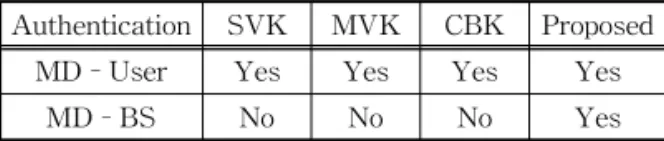
changed at every keystroke. Furthermore, the pro- posed method employs an additional user authenti- cation method. Table 2 lists the capabilities of the user authentication methods with respect to the mobile device, user, and bank server.

As shown in Table 2, all the methods can serve as an authentication method between the mobile device and a user. However, in the case of au- thentication between the mobile device and bank server, existing methods do not provide that capability. Thus, even if an attacker determines the original password and attempts to log onto the bank server, there is no way to verify him/her as a legitimate user. This is because in our method, the bank server verifies whether the user is legit- imate or not using the password, K-box, MAC, and device ID.

4.3 Usability

In contrast to the colour-based method, our method introduced a new colour-changing algo- rithm for the colour-blind. Thus, compared with the colour-based method, the proposed method is more convenient for typing and correcting typo- graphical errors for the colour-blind. Table 4 lists a comparison of the methods for ordinary and col- our-blind users.

5. CONCLUSION

In this paper, we proposed a secure password-

based user authentication method for mobile bank- ing services. Current smartphones tend to have bigger screens, higher resolution rates, and bright- er backlights. In addition, they are used in various ways to support modern life. In particular, for fi- nancial services, it is necessary to develop a user authentication method that is robust to attack. As shown in the evaluation and comparison results, the proposed method is secure even in the CA case.

Furthermore, it also provides a user-friendly menu for changing colours.

REFERENCE

[ 1 ] Mobile and Money, http://www.iab.net/me- dia/file/iab-inmobiviggle%20mobile%20fina- ncial%20services-final.pdf (Accessed April, 22, 2013).

[ 2 ] Mobile Health Trends for 2012, http://man- hattanresearch.com/Images—Files/Data- Snapshots/Mobile-Health-Trends-for-2012.a spx (Accessed April, 22 2013).

[ 3 ] A. Bartel, J. Klein, Y. Le Traon, and M.

Monperrus, "Automatically Securing Permis- sion-based Software by Reducing the Attack Surface: an Application to Android," Proce- edings of the 27th IEEE/ACM International Conference on Automated Software Engin- eering, ASE 2012, pp. 274-277, 2012.

[ 4 ] E. Chin, A.P. Felt, K. Greenwood, and D.

Wagner, "Analyzing Interapplication Commu- nication in Android," Proceedings of the 9th international conference on Mobile systems, applications, and services, pp. 239-252, 2011.

[ 5 ] E. Chin, A.P. Felt, V. Sekar, and D. Wagner,

"Measuring User Confidence in Smartphone Security and Privacy," Proceedings of the Eighth Symposium on Usable Privacy and Security, Article No. 1, 2012.

[ 6 ] W. Enck, P. Gilbert, B.G. Chun, L.P. Cox, J.

Jung, P. McDaniel, and A.N. Sheth, "Taint- Droid: An Information-flow Tracking Sys- tem for Realtime P rivacy Monitoring on Table 2. Authentication method comparison

Authentication SVK MVK CBK Proposed

MD–User Yes Yes Yes Yes

MD–BS No No No Yes

Table 3. Comparison of typographical errors Typographical

Errors SVK MVK CBK Proposed

Ordinary Low Lowest Low Lowest

Colour-blind Low Lowest High Lowest

(9)

Smartphones," Proceeding of 9th USENIX Symposium on Operating Systems Design and Implementation, Article No. 1-6, 2012.

[ 7 ] A.P. Felt, E. Ha, S. Egelman, A. Haney, E.

Chin, and D. Wagner, "Android Permissions:

User Attention, Comprehension, and Behavior,"

P roceedings of the Eighth Symposium on Usable Privacy and Security Article No. 3 , pp. 3, 2012.

[ 8 ] A.P. Felt, H.J. Wang, A. Moshchuk, S. Hanna, and E. Chin, "Permission Re-delegation:

Attacks and Defenses," SEC'11 Proceedings of the 20th USENIX conference on Security, pp. 22-22, 2011.

[ 9 ] M. Frank, B. Dong, A.P. Felt, and D. Song.

“Mining Permission Request Patterns from Android and Facebook Applications,” Pro- ceeding of International Conference on Data Mining, pp. 870-875, 2012.

[10] M. Nauman, S. Khan, and X. Zhang, "Apex:

Extending Android Permission Model and Enforcement with User-defined Runtime Constraints," P roceedings of the 5th ACM Symposium on Information, Computer and Communications Security, ASIACCS ’10, pp.

328-332, 2010.

[11] P. Pearce, A.P. Felt, G. Nunez, and D. Wagner,

"Addroid: Privilege Separation for Applica- tions and Advertisers in Android," P roceed- ing of Aisa Conference on Computer and Communications Security, pp. 71-72, 2012.

[12] D. Choi, C. Baek, I. Chung, "Virtual Keyboard against Social Engineering attacks in Smartphones," J ournal of Korea Multimedia Society, Vol. 18, No. 3, pp. 368-375, 2015.

[13] D. Gelormini and B. Bishop, “Optimizing the Android Virtual Keyboard: A Study of User Experience,” 2013 IEEE International Con- ference on Multimedia and Expo Workshops, pp. 1-4, 2013.

[14] CNET-Pop-up Program Reads Keystrokes, Steals Passwords, http://www.cnet.com/news/

pop-up-program-reads-keystrokes-steals-

passwords (accessed Oct., 10, 2015).

[15] M. Nohlberg, Securing Information Assets : Understanding, Measuring and Protecting Against Social Engineering Attacks, Docter’s Thesis of Stockholm University, 2008.

[16] Oxford University Press, Shorter Oxford English Dictionary (6th ed.), Oxford Univer- sity Press, New York, 2007.

[17] C.K. Dimitriadis, "Analyzing the Security of Internet Banking Authentication Mechanisms,"

Information Systems Control J ournal, Vol. 3 No. 1 pp. 1-8, 2007.

[18] J.A. Vila, J.S. Olvera, L. Fernandez, M.

Medina, and A. Sfakianakis, “A Professional View on Ebanking Authentication: Challenges and Recommendations,” Proceeding of 2013 9th International Conference on Information Assurance and Security, pp. 43-48, 2013.

[19] D.H. Nyang, A. Mohaisen, and J. Kang,

"Keylogging-resistant Visual Authentication Protocols," IEEE Transactions on Mobile Computting, Vol. 13, No. 11, pp. 2566-2579, 2014.

[20] Mobile Password Authentication Methods, http://www.passfaces.com/ (accessed July, 22, 2010).

[21] T. Valentine, An Evaluation of the Passface P ersonal Authentication System, Technical Report, 1998.

[22] T. Valentine, Memory for Passfaces after a Long Delay, Technical Report, 1999.

[23] How to Enable Pattern Lock Security on Android Devices, http://www.groovypost.

com/howto/security/how-to-enable-pattern- locksecurity-on-android-devices (accessed May, 22, 2011).

[24] Y.S. Ryu, D.H. Koh, B.L. Aday, X.A. Gutierrez, and J.D. Platt, "Usability Evaluation of Randomized Keypad," J ournal of Usability Studies, Vol. 5, No. 2, pp. 65-75, 2010.

[25] X. Chen, J. Tian, Q. Su, X. Yang, and F. Wang,

"A Secured Mobile Phone based on Embedded

Fingerprint Recognition Systems," Proceed-

(10)

ing of Springer LNCS 3495, pp. 549-553, 2005.

[26] D. Jeong, H. Park, K. Park, and J. Kim, "Iris Recognition in Mobile Phone based on Adap- tive Gabor Filter," P roceeding of Springer LNCS 3832, pp. 457-463, 2006.

[27] K.W. Bowyer, K. Hollingsworth, and P.J.

Flynn, "Image Understanding for Iris Biomet- rics: a Survey," Comput Vision Image Understanding, Vol. 110, No. 2, pp. 281-307, 2008.

[28] M. Stamp, Information Security: P rinciples and Practice, Willey InterScience 1st edition, John Wiley & Sons, Inc., Hoboken, New Jersey, 2006.

[29] S.M. Lim, H.J. Kim, and S.K. Kim, "Designing Password Input System Resistant on Shoulder Surfing Attack with Statiscal Analysis,"

J ournal of the Institute of Electronics Engi- neers of Korea, Vol. 49, No. 9, pp. 215-224, 2013.

[30] I.S. MacKenzie and J.C. Read, “Using Paper Mockups for Evaluating Soft Keyboard Lay- outs,” Proceeding of 2007 Conference of the Center for Advanced Studies on Collaborative Research, pp. 98-108, 2007.

[31] A. Sears and Y. Zha, “Data Entry for Mobile Devices Using Soft Keyboards: Understand- ing the Effects of Keyboard Size and User Tasks,” International Journal of Human Computer Interaction, Vol. 16, No. 2, pp. 163- 184, 2003.

[32] K.B. Perry and J.P. Hourcade, “Evaluating One Handed Thumb Tapping on Mobile Tou- chscreen Devices,” Proceeding of Graphics Interface 2008, pp. 57-64, 2008.

[33] Y.S. Park and S.H. Han, “Touch Key Design for One-handed Thumb Interaction with a Mobile Phone: Effects of Touch Key Size and Touch Key Location,” International Journal of Industrial Ergonomics, Vol. 40, No. 1, pp.

68-76, 2010.

[34] Donald Mclntyre, Colour Blindness: Causes and Effects, Dalton Publishing, 33, Eaton Road, Chester CH4 7EW, UK, 2002.

[35] League of Legends, http://forums.na.leagueo-

flegends. com/board/showthread.php?p=33632375 (accessed Dec., 23, 2014).

[36] World of Tanks, http://forum.worldoftanks.

com/index.php?/tags/forums/ Colorblind/ (acc- essed Dec., 23, 2014).

[37] World of Warcraft, https://us.battle.net/ sup- port/en/article/color-blind-mode (accessed Dec., 23, 2014).

Dongmin Choi

received his B.E. degree from the Kyunghee University in 2003 and M.S. and Ph.D. degrees in computer Science from Chosun University in 2007 and 2011, respectively. Since 2014, he has been a Professor in College of General Education, Gwangju, Korea. His research in- terests are in information security, sensor network systems, mobile ad-hoc systems, smart grid home network systems and internet ethics.

Dongkil Tak

received her M.S. and Ph.D. de- grees in computer Science from Chosun University in 1998 and 2006. respectively, Since 2000, She has been a visting Professor in Department of Computer Sci- ence, Gwangju, Korea. Her re- search interests are in information security, Security on Electronic Commerce.

Ilyong Chung

received the B.E. degree from

Hanyang University, Seoul, Ko-

rea, in 1983 and the M.S. and

Ph.D. degrees in Computer Sci-

ence from City University of

New York, in 1987 and 1991,

respectively. From 1991 to 1994,

he was a senior technical staff of Electronic and

Telecommunication Research Institute (ETRI), Dajeon,

Korea. Since 1994, he has been a Professor in Depart-

ment of Computer Science, Gwangju, Korea. His re-

search interests are in computer networking, security

systems and coding theory.

수치

Fig. 1. Existing methods comparison.
Fig. 3. Pseudo code of colour-generating and changing algorithm.
Fig. 5. Character matching table set.
Fig. 7. Authentication process of the proposed method.
+3

참조

관련 문서