FDM 풀 컬러 3D프린터 GUI디자인 사용성을 위한 체크리스트 개발
박지훈1, 장중식2*
1국민대학교 테크노디자인대학원 제품이노베이션학과 석사과정
2국민대학교 조형대학 공업디자인학과 교수
FDM Full Color 3D Printer GUI Design Development of Checklist for Usability
Ji-Hoon Park1, Jung-Sik Jang2*
1Master’s Course, Department of Product innovation, Graduate School of Techno Design, Kook min University
2Professor, Department of Industrial Design, College of design, Kookmin University
요 약 최근 3D프린터의 발전에 따라 실제 제품과 유사하게 제작하고 싶은 니즈가 늘어가고 있다. 이에 따라 FDM 풀 컬러 3D프린터가 개발되어 활발하게 보급되고 있으나, GUI디자인은 그에 미치지 못하여 사용자로 하여금 혼란을 야기한다. 이에 따라 본 연구는 문헌조사를 진행하였고, 사례 조사를 통하여 FDM 풀 컬러 3D프린터의 현황을 파악하 고 선행연구를 바탕으로 GUI디자인의 구성요소를 분석하였다. 도출한 GUI디자인의 구성요소에 맞춰 체크리스트 초안 을 도출하였으며, 세 차례의 델파이 조사를 통해 초안 50항목 중 24항목을 삭제하였으며 나머지 26가지 항목에 대한 타당성을 검증하였다. 그 결과 레이아웃은 직관적인 화면 구성과 사용빈도가 높은 메뉴 위주로 구성하여야 하며, 텍스트 는 직관적으로 눈에 띄며 기능을 명확하게 전달하여야 한다. 또한 아이콘은 눈에 잘 보이는 위치에 위치하고 실생활에서 차용하여 이미지화하여야한다. 마지막으로 컬러는 강조색을 사용하여 사용자에게 피드백을 주고, 출력물과의 색상이 겹 치지 않도록 하여야 함을 알 수 있었다.
주제어 : 3D프린팅, 풀 컬러 3D프린팅, GUI디자인, 사용성, 융합 디자인
Abstract With the recent development of 3D printers, there is a growing need to make them similar to real products. As a result, FDM full-color 3D printers have been developed and actively distributed, but GUI design has fallen short of that, causing confusion among users. Accordingly, this study conducted a literature survey, and through a case study, the current status of FDM full-color 3D printers was identified and the components of GUI design were analyzed based on prior research. The draft checklist was drawn up according to the components of the derived GUI design, and 24 items were deleted through the three Delphi surveys and the validity of the remaining 26 items was verified.
As a result, the layout should consist of intuitive screen configuration and menus with high frequency of use, and the text should be intuitive and clearly communicated. In addition, the icon should be placed in a visible position and used in real life to image it. Finally, we could see that the color should be used to give feedback to the user using the highlight color and not overlap the output.
Key Words : 3D Printing, Full Color 3D Printing, GUI Design, Usability, Convergence Design
*Corresponding Author : Jung-Sik Jang([email protected]) Received September 8, 2020
Accepted November 20, 2020 Revised October 26, 2020
Published November 28, 2020
1. 서론 1.1 연구목적 및 배경
제품 디자인에 있어 시제품 제작은 필수 요소이다. 시 제품을 통하여 비용 지출이 많은 양산 단계로 가기 전 사 용자의 니즈를 반영하고, 실제 제품으로서의 가치가 있는 지 검토하기 위하여 시제품 제작은 필수적이라고 볼 수 있다. 최근에는 시제품 제작에 소모되는 시간과 비용을 줄이고 실제 제품과 비슷한 수준을 요구하고 있으며 이 에 따라 컬러 구현의 중요성도 대두되고 있다[1]. 풀 컬러 3D프린터는 이에 큰 강점을 가지고 있어 관심이 몰리고 있다. 세계경제포럼(World Economic Form)에선 미래 를 선도할 10대 기술로 3D프린터를 두 번째 주요 기술 로 언급하였다. 현재는 과거의 소품종 대량생산의 시대에 서 다품종 소량 생산 시대로 향하고 있으며, 이에 3D프 린팅의 기술이 준 파급은 급진적이다. 또한 3D프린터는 디자
이너의 환경에도 큰 영향을 미쳐 디자인뿐만 아니라 설계자의 역할까지의 가능성을 제시한다[2]. 2013년 3D 프린터 기술들의 특허가 만료되면서 개인이 사용할 수 있는 3D프린터의 종류가 다양해지고 있다. 현재까지 일 반 사용자들이 가장 사용하기 쉬운 방식의 3D프린터는 FDM(Fused Deposition Modeling)방식이며 이와 함 께 FDM 3D프린팅에 필요한 소프트웨어도 동반 성장을 하고 있다[3]. 하지만 이와 달리 풀 컬러 3D프린팅은 하 드웨어와 기술적인 측면에 연구가 집중되어 있고 다양한 회사의 각기 다른 인터페이스로 인하여 사용자의 불편을 초래하고 있다. 하드웨어와 기술적인 측면을 뒷받침할 소 프트웨어 연구의 필요성이 요구되고 있으며, 특히 GUI디 자인의 경우 표준화의 필요성이 대두되고 있다. 또한 GUI디자인의 개발 및 사용성 평가를 위한 체크리스트의 개발이 선행되어야 한다.
1.2 연구방법 및 범위
본 연구는 문헌 및 사례 조사와 선행연구를 바탕으로 FDM 풀 컬러 3D프린터 GUI디자인의 구성요소를 분석 하여 GUI 디자인 개발 및 사용성 평가를 위한 체크리스 트를 작성하고자 한다. 연구의 방법으로 첫째, 이론적 배 경을 통해 3D프린팅과 FDM 풀 컬러 3D프린터 및 GUI 디자인에 대한 개념을 정리한다. 둘째, 사례 조사를 통해 현황을 알아보고 선행연구를 토대로 GUI디자인 구성요 소를 파악하고 분석한다. 셋째, 앞서 파악한 사례 조사 및
선행연구를 바탕으로 체크리스트 초안을 작성한다. 넷 째, 전문가를 대상으로 세 차례 델파이 조사를 실시하여 타당성 확보 및 체크리스트를 도출하고자 한다.
2. 이론적 배경 2.1 3D프린팅
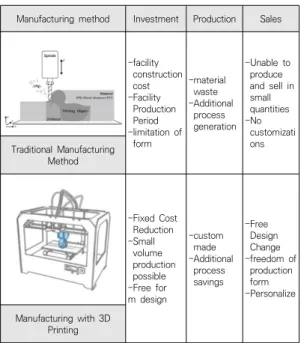
2014년 과학기술정보통신부와 산업통상자원부는 3D 프린팅 산업 발전전략에서 ‘3D프린팅은 재료를 절단하거 나 절삭하여 생산하는 절삭가공과 대비되는 개념으로 디 지털 디자인 데이터를 이용하여 소재를 적층하고 3차원 물체를 제작하는 프로세스’라고 정의하였다. 기존의 제조 방식 중 하나인 절삭 등의 복잡한 과정을 통하여 제작 가 능한 형태를 단순한 작업으로 적층하여 제작이 가능하게 만든 개념으로 적층 제조라고도 불린다[4]. 특히 밀링·절 삭 등의 공정에서 재료 낭비와 같은 효율성이 떨어지고 소품종 대량생산의 일률적인 생산 방식에서 소비자의 니 즈를 반영하는 다품종 소량생산의 개인 맞춤 제작에 강 점을 보인다. 개개인의 개성과 니즈에 부합하는 방향으로 산업이 변화하는 지금 3D 프린팅 기술은 변화를 선도할 것으로 기대된다[5].
Manufacturing method Investment Production Sales
-facility construction -Facility cost
Production Period -limitation of
form
-material waste -Additional
process generation
-Unable to produce and sell in small quantities -No customizati Traditional Manufacturing ons
Method
-Fixed Cost Reduction -Small
volume production possible -Free for m design
-custom -Additional made
process savings
-Free Design Change -freedom of
production -Personalize form Manufacturing with 3D
Printing
Table 1. Manufacturing method comparison
2.1.1 3D프린팅 방식
3D 프린팅 방식은 크게 7가지 기술로 나누어진다. 압 출, 분사, 광경화, 소결, 인발, 접합 등으로 나누어지며, 재료는 폴리머, 금속, 종이, 목재 등 여러 가지 소재를 활 용할 수 있다. 재료에 열을 가하여 노즐을 통해 압출하여 적층하는 FDM(Fused Deposition Modeling)방식, 액 상의 광경화 수지에 UV선을 노출하여 응고시켜 고체화 하는 방식인 SLA(Stereo Lithography Apparatus), 플 라스틱, 금속 소재 분말 등을 선택적으로 레이저 조사를 통해 소결하여 파우더를 도포하는 방식인 SLS(Selective Laser Melting)방식 등이 있다. 광범위하게 쓰이고 사용 자의 진입장벽이 가장 낮은 3D프린팅 방식으로는 재료 를 압출하여 쌓는 FDM 방식이다[6].
Fig. 1. FDM 3D Printing
2.1.2 FDM 풀 컬러 3D프린팅
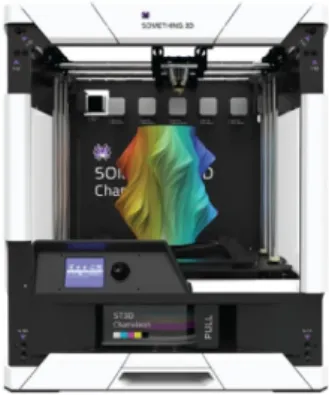
FDM 3D프린터의 활발한 보급으로 현재는 개인도 FDM 3D프린터를 쉽게 접할 수 있게 되었다. 그에 따라 더 실제 제품과 같은 출력물을 원하는 사용자들의 니즈 가 생겨나게 되었고, 현재에 이르러선 풀 컬러 3D프린터 가 활발하게 개발되고 있다. FDM 풀 컬러 3D 프린터는 필라멘트 자체 혹은 잉크 카트리지의 CMYK 색상의 재 료나 잉크를 혼합하여 전체 색상 범위를 제공하고 미세 한 변화도 3D 출력 모델에 반영된다. 최대 500,000가지 의 컬러가 구현이 가능하다. 다른 말로 간접 색상 인쇄 (Indirect Color 3D Printing)라고 한다. 이와 비슷한 개념으로 멀티 컬러 3D 프린터가 있는데 전체 색상의 스 펙트럼을 출력할 수 있는 것이 아니라 고정된 색상의 필 라멘트만 이용하여 제한된 색상만 출력할 수 있다[7].
Fig. 2. FDM Full Color 3D Printer
2.2 GUI디자인
인간은 통계적으로 문자가 아닌 컬러, 이미지, 그림 등 의 시각적 요소를 우선으로 인식하고 학습한다. 문자를 대신해 컴퓨터 그래픽을 활용하여 의미와 이미지를 시각 적 요소로 나타내는 것이 바로 그래픽 사용자 인터페이 스(Graphical User Interface)라고 한다[8]. GUI디자 인은 사용 목적에 따라서 컨셉과 사용 메뉴, 시스템 등이 결정되고 구성 요소가 달라질 수 있다.[9] 본 연구에서는 FDM 풀 컬러 GUI디자인 체크리스트 작성에 활용하기 위해 시각적 요소의 GUI디자인 선행 연구를 조사하고 파악하였다. 내용은 다음 Table 2.와 같다.
Researcher Title GUI Design Components
J. W. Lee (2017)
A Study on Slice Pr ogram GUI Design for FDM 3D Print
Layout, Text, Icon, Co lor
J. W. Seong (2007)
A Study on the Evaluation of Comp
onents for GUI Des ign of Automobile N avigator
Layout, Text, Icon, Multimedia
C. S. Cho (2012)
A Study on the GUI Design Elemen t of SmartPhone To uchscreen
Layout, Icon, Color, Interaction M. S. Oh
(2008)
Preference Analysis Between Mobile GU I Entity and Design Factor
Layout, Text, Icon, Co lor
Y. J. Choo (2007)
A study of usability evaluation based on the visual elements of GUI design in ki
osk of general hosp ital setting
Layout, Text, Icon, Co
lor, Shape
Table 2. Manufacturing method comparison조사한 선행연구를 바탕으로 본 연구는 사용자가 직관 적으로 프린터의 파악하고 사용할 수 있는 레이아웃, 아 이콘의 의미를 보조하거나 오류의 의미를 지각적으로 나 타내주는 텍스트, 의미를 이해하기 쉽고 보다 직관적으로 나타내는 아이콘, 목적에 부합하는 행동을 할 수 있게 보 조해 주거나 통일감을 나타내는 컬러를 선정하였다.
Components Contents
Layout Menu, Arrangement, Function, Grouping Text formal elements, perceptual elements of an image Icon an intuitive representation of the meaning Color Evaluation item for a sense of unity
Table 3. FDM Full Color 3D Printer GUI Design Components
2.3 사용성
사용성에 대한 개념은 국제기구인 ISO에 의하면 ‘사 용성은 사용에 요구되는 노력을 가지는 특성의 집합이며, 밀접한 관련이 있는 사용자들에 의한 사용의 개인적인 평가’ 라고 정의내리고 있다[10]. 사용성은 제품의 구조, 조작부 위치를 포함하는 하드웨어적인 요소만이 아니라 레이아웃, 색상, 인터페이스 등의 소프트웨어적인 요소를 판단하는데 중요한 지표로 활용되고 있다[11]. 사용성에 대한 유명 학자인 Jakob Nielsen은 사용성이 얼마나 쉽 게 사용자 인터페이스를 사용할 수 있는지 평가하는 여 러 가지 요소로 구성되어 있다고 했으며 학습성, 효율성, 기억성, 오류, 만족성 등 5가지 요소가 결합된다고 하였 다[12].
Components Contents
Learnability It should be designed so that users can learn naturally.
Efficiency Resources required for accuracy and completeness required to achieve user’s goals.
Memory degree A design that can be understood without bringing back memories.
Error It is better to design carefully to prevent problems from occurring.
satisfaction Ease of use or degree of user satisfaction.
Table 4. Evaluation Component of Jakob Nielsen
3. 사례 조사 및 분석
3.1 FDM 풀 컬러 3D프린터 GUI디자인 사례 조사
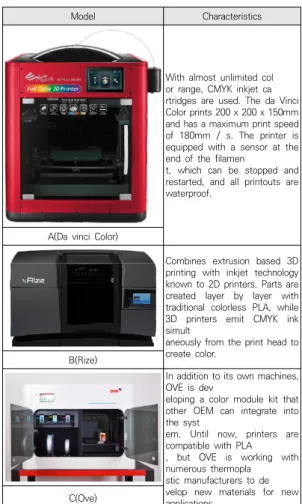
현재 수많은 FDM 풀 컬러 3D프린터가 출시되었으 며, 본 연구에서는 LCD패널이 장착되어 있는 FDM 풀 컬러 3D프린터 GUI디자인으로 사례를 한정하였다. 이 에 미국의 유명 국제 온라인 미디어 플랫폼인 3D natives에서 선정한 상위 3가지 풀 컬러 3D프린터 GUI 디자인의 현황을 파악하였으며[13], 이론적 배경에서 문 헌 조사를 통해 선정한 구성 요소인 레이아웃, 텍스트, 아 이콘, 컬러를 분석하여 GUI디자인의 특징과 개선점을 도 출하였다.
Model Characteristics
With almost unlimited col or range, CMYK inkjet ca rtridges are used. The da Vinci Color prints 200 x 200 x 150mm and has a maximum print speed of 180mm / s. The printer is equipped with a sensor at the end of the filamen
t, which can be stopped and restarted, and all printouts are waterproof.
A(Da vinci Color)
Combines extrusion based 3D printing with inkjet technology known to 2D printers. Parts are created layer by layer with traditional colorless PLA, while 3D printers emit CMYK ink simult
aneously from the print head to create color.
B(Rize)
In addition to its own machines, OVE is dev
eloping a color module kit that other OEM can integrate into the syst
em. Until now, printers are compatible with PLA , but OVE is working with numerous thermopla stic manufacturers to de velop new materials for new applications.
C(Ove)
Table 5. An object of Research
FDM 풀 컬러 3D 프린터의 GUI디자인은 컬러 출력 관련 메뉴가 가장 큰 특징인데, 이를 비교할 수 있도록 Ink Jet 방식의 프린터만 선정하였고, 세 가지 각기 다른 회사의 GUI디자인이 위치는 각기 상이하며 사이즈도 다 른 것을 알 수 있다. 이는 3D프린터의 조형적 형태에 따 라 위치를 설정한 것으로 판단된다.
Model Component
A(Da vinci
Color) Contents1 (Information)
Contents2 (Color menu) Contents3 (Output menu) Contents4 (Settings menu)
Table 6. LayoutB(Rize)
Contents1 (Information) Contents2 (Main Screen) Contents3 (Bottom Menu bar)
C(Ove)
Contents1 (Stop Menu) Contents2 (Extruder Menu) Contents3 (Bottom Menu bar)
3.2 GUI디자인 구성 요소 분석 3.2.1 레이아웃
A(Da vinci Color)는 세 가지 GUI디자인에서 가장 해상도가 높은 그래픽 레이아웃을 가지고 있다. 상단에 Wifi, 노즐 온도, 설명서 등의 정보를 나타내는 영역이 있고, 스크린 중앙에 좌측부터 컬러(필라멘트), 출력, 세 팅 등의 필수 메뉴가 위치해 있어 사용자의 직관적인 이 해를 가능하게 한다. B(Rize)는 A와 마찬가지로 상단부 에 현재 상태, Wifi 등의 정보를 나타내는 영역이 위치해 있고, 스크린의 중앙에는 제품명이 위치해 있다. 하단부 에 프린터의 필수 기능인 출력 기능과 취소, 필라멘트 공 급, 라이브러리가 위치해 있다. 하지만 레이아웃에 세팅 의 기능은 없고, Print 메뉴 안에 세팅이 존재한다.
C(Ove)는 위 두 가지의 레이아웃과 다르게 정보를 표시 하는 영역이 없고, 스크린의 중앙은 비어있다. 특징으로 는 하단부에 익스트루더 메뉴가 외부에 독립적인 버튼으 로 나와 있으며 하단부에 프린팅 관련 메뉴, 잉크, 세팅 메뉴가 위치해 있다. 세 가지 GUI디자인 모두 공통적으 로 컬러 출력 관련 메뉴는 외부에 독립적으로 위치한 것 을 알 수 있다. 레이아웃을 정리한 표는 다음 Table 6와 같다.
3.2.2 텍스트
A(Da vinci Color)는 메인 스크린에서 텍스트는 존 재하지 않고 아이콘을 누르면 하위 메뉴에 텍스트로 표 기가 된다. 특히 출력 메뉴에선 USB의 파일명을 텍스트 로 보여주어 사용자가 파일을 지각하기 쉽게 한다. 또한 컬러(필라멘트) 관련 메뉴에선 잉크의 카트리지의 잔여 량을 그래픽과 텍스트를 혼합하여 나타낸다. B(Rize)는 메인 스크린은 전부 텍스트이다. 출력(Print)을 누르면 파일명이 텍스트로 나타나고, A와 마찬가지로 컬러 (Supplies)의 메뉴를 누르면 필라멘트와 잉크의 잔여량 을 그래픽과 텍스트를 혼합하여 나타낸다. 전체적인 텍스 트의 선택이 A와 C와는 많이 다른 것을 알 수 있다.
C(Ove)는 B와 마찬가지로 메인 스크린이 USB 버튼을 제외하면 전부 텍스트이며 출력(Print)의 버튼을 눌러도 전부 텍스트로 표기가 되어 있다. 잉크(Ink)의 메뉴를 누 르면 가로의 막대그래프로 그래픽과 텍스트를 혼합하여 나타낸다. 세 가지 GUI디자인 모두 공통적으로 텍스트의
Model Component
A(Da vinci Color)
Table 8. IconIcon
B(Rize)
Icon
C(Ove)
Icon
선택에서 조금의 차이가 있었지만 기능은 비슷했고 오류 문제에 있어서는 텍스트를 주로 사용하였다. 대부분 좌측 정렬인 것을 알 수 있다.
Model Component
A(Da vinci Color)
Print Color
B(Rize)
Print Supplies
C(Ove)
Print Ink
Table 7. Text
3.2.3 Icon
A(Da vinci Color)는 필수 아이콘만 외부에 배치하 여 사용자의 직관성을 높인다. 아이콘마다 프린터의 성능 을 나타내줄 수 있게 다색상 그라데이션을 통해 컬러 프 린터의 기능을 나타낸다. 컬러와 필라멘트를 하나의 옵션 으로 묶고, 출력 아이콘에선 출력 관련 메뉴만 볼 수 있 게 하였다. 또한 설정에선 온도, 압출, 오토 레벨링 등의 메뉴가 묶여있다. 아이콘은 평면적인 형태이다. B(Rize) 는 간단한 평면 아이콘과 그 기능을 알 수 있게 텍스트를 배치했다. 또한 각 메뉴별 하위 메뉴에선 아이콘 사용은 최대한 줄이고 텍스트 위주로 표현한 것이 특징이다.
C(Ove)는 메인 스크린에서 USB 라이브러리를 볼 수 있 는 메뉴 이외에는 아이콘이 존재하지 않고, 프린트 기능 에서 평면적인 아이콘들이 간단하게 위치해있다.
3.2.4 Color
A(Da vinci Color)는 그레이 배경에 화이트를 메인 으로 구성하고 있고 강조색으로 다색상 그라데이션을 사 용하였다. 버튼을 누르면 화이트 색상으로 외부 라인을 강조하여 사용자의 인식을 돕는다. B(Rize)는 짙은 푸른 색 배경에 옅은 푸른색으로 구성하였고 화이트 라인을 통해 경계를 주었다. A와 마찬가지로 버튼을 누르면 화 이트 색상으로 외부 라인을 강조하여 사용자의 인식을 돕는다. C(Ove)는 화이트 배경에 블랙 라인으로 구성이 되어 있고 상단부는 레드 색상이 위치해 있다. 버튼을 누 르면 강조가 없고 바로 하위 메뉴로 이동을 한다. 가장 단조로운 색상을 활용한 것을 알 수 있다. 세 가지 모두 컬러 관련 메뉴에선 CMYK의 색상을 표현한 것을 알 수 있다.
Model Component
A(Da vinci Color)
B(Rize)
C(Ove)
Table 9. Color
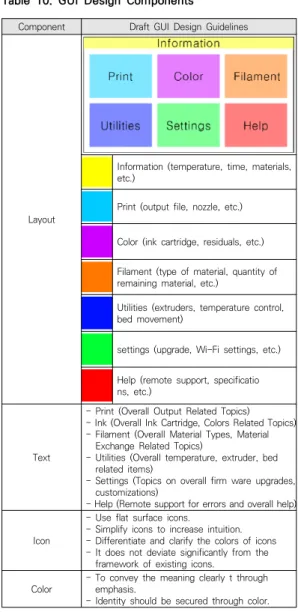
Component Draft GUI Design Guidelines
Layout
Information (temperature, time, materials, etc.)
Print (output file, nozzle, etc.)
Color (ink cartridge, residuals, etc.) Filament (type of material, quantity of remaining material, etc.)
Utilities (extruders, temperature control, bed movement)
settings (upgrade, Wi-Fi settings, etc.) Help (remote support, specificatio ns, etc.)
Text
- Print (Overall Output Related Topics) - Ink (Overall Ink Cartridge, Colors Related Topics) - Filament (Overall Material Types, Material
Exchange Related Topics)
- Utilities (Overall temperature, extruder, bed related items)
- Settings (Topics on overall firm ware upgrades, customizations)
- Help (Remote support for errors and overall help) Icon
- Use flat surface icons.
- Simplify icons to increase intuition.
- Differentiate and clarify the colors of icons - It does not deviate significantly from the
framework of existing icons.
Color - To convey the meaning clearly t through emphasis.
- Identity should be secured through color.
Table 10. GUI Design Components
Model Component
Heuristic Evaluation
- Intuitive System Status
- Systems suitable for real world use environments - Give users freedom and initiative
- Consistency and Standardization - error prevention
- intuitive design - Flexibility and efficiency - Simple and beautiful design - support for errors
- Preparing Help and Documentation
Table 11. Prior Study3.3 분석 결과
FDM 풀 컬러 3D프린터 GUI디자인의 구성 요소를 분석한 결과 레이아웃은 프린팅에 필요한 출력, 컬러, 세 팅 메뉴들이 가장 큰 비율을 차지하며 시각적으로 가장 잘 보이는 영역에 위치해 있었고, 상단부에 정보를 나태 는 영역이 두 번째로 큰 비율을 차지함을 알 수 있었다.
텍스트는 공통적으로 출력의 하위 메뉴에서 사용자가 파 일을 지각하기 쉽게 하였고 대부분 좌측 정렬을 사용하 였다. 또한 오류는 주로 텍스트로 상세하게 나타내어 사 용자에게 확실한 피드백을 제공하였다. 하지만 단어의 선 택에 있어 각기 다른 단어를 사용하여 사용자로 하여금 혼란을 줄 수 있음을 알 수 있었다. 아이콘은 공통적으로 평면적인 형태의 아이콘을 사용하였고, 특히 잉크와 필라 멘트 관련 아이콘은 동일한 아이콘을 사용하여 사용자에 게 혼란을 줄 수 있음을 알 수 있었다. 또한 전체적으로 동일한 색상을 적용하면 기능을 보다 직관적이게 파악할 수 있을 것으로 사료된다. 컬러는 각기 다른 강조색을 가 지고 있고 브랜드 아이덴티티를 나타내기 위하여 일정 수준의 통일성도 갖추고 있었다. 공통적으로 동일한 색상 을 차용하여 전개하여 사용하였고, CMYK의 색상을 표 현하는 것을 알 수 있었다.
결론적으로 구성요소를 살펴보자면 첫째, 레이아웃은 가장 기본적인 프린팅에 필수적인 메뉴와 정보를 위주로 구성하여야 한다. 둘째, 텍스트는 오류에 대한 피드백을 명확히 전달하여야 하며 단어 선택의 통일성을 필요로 한다. 셋째, 아이콘은 평면적인 형태의 아이콘을 지향하 고, 프린팅 관련 아이콘은 기존의 이미지에서 크게 벗어 나지 않는 아이콘을 필요로 한다. 또한 사용자가 의미를 명확하게 파악할 수 있어야 한다. 넷째, 컬러는 강조색을 필수로 포함하여 의미를 명확하게 전달하여야 하며 프린 터의 아이덴티티를 나타내기 위하여 적절한 통일성을 갖 춰야 한다. 이를 반영하여 FDM 풀 컬러 3D프린터 GUI 디자인 구성요소에 맞춰 작성한 내용은 다음 Table 10 과 같다.
4. GUI디자인 체크리스트 작성 4.1 선행연구 조사
본 단계에선 앞서 사례 조사 및 분석을 토대로 체크리 스트를 작성하기 위해 선행연구를 조사하였다. 사용성 평 가의 대표 연구자 Jacob Nielsen의 Heuristic Evaluation
를 비롯하여 Macintosh Human Interface guidelines, Preece et al을 조사하였으며 내용은 다음 Table 11과 같다[14].
Macintosh human interface guidelines
- Use familiar metaphors - Direct manipulation - See and Point - Consistency - User’s Control - Feedback and Dialogue - Forgiveness - Aesthetic Intergrity - Atypical
- Knowledge of Audience - Accessibility
Preece et al
- Effectiveness - Efficiency - Saftey - Learnability - Utility - Memoryability - Visibility - Feedback - Constrains - Consistency - Affordance
Component valuation
principle Contents
Layout
Intuition
1.Does it give users a quick, at a glance view of information?
2.Do you often use menus that are supported by the interface?
consistency
3.for user remain consistent to avoid confusion?
4.Is the location of each content consistently divided?
accessibility
5.Easy to find information or feature that users want?
6.Are frequently used menus easily recognized?
efficiency
7.Is the configuration of the layout easy to reach the desired information or goal?
8.Are there any size differences depending on importance?
aesthetic
9.Does the design make good use of the printer's characteristics?
10.Does color and screen arrangement help focus?
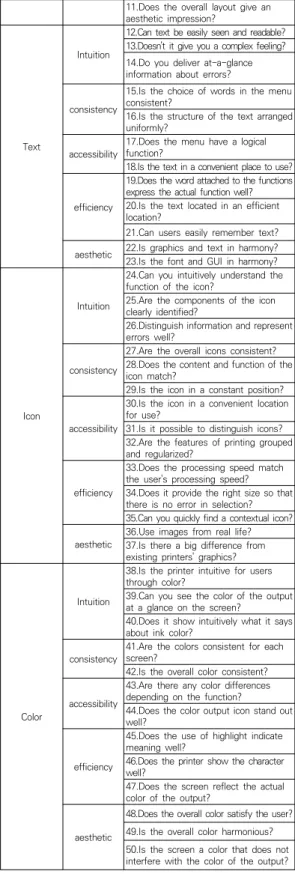
Table 12. GUI Design Checklist Draft
11.Does the overall layout give an aesthetic impression?
Text
Intuition
12.Can text be easily seen and readable?
13.Doesn't it give you a complex feeling?
14.Do you deliver at-a-glance information about errors?
consistency
15.Is the choice of words in the menu consistent?
16.Is the structure of the text arranged uniformly?
accessibility 17.Does the menu have a logical function?
18.Is the text in a convenient place to use?
efficiency
19.Does the word attached to the functions express the actual function well?
20.Is the text located in an efficient location?
21.Can users easily remember text?
aesthetic 22.Is graphics and text in harmony?
23.Is the font and GUI in harmony?
Icon
Intuition
24.Can you intuitively understand the function of the icon?
25.Are the components of the icon clearly identified?
26.Distinguish information and represent errors well?
consistency
27.Are the overall icons consistent?
28.Does the content and function of the icon match?
29.Is the icon in a constant position?
accessibility
30.Is the icon in a convenient location for use?
31.Is it possible to distinguish icons?
32.Are the features of printing grouped and regularized?
efficiency
33.Does the processing speed match the user's processing speed?
34.Does it provide the right size so that there is no error in selection?
35.Can you quickly find a contextual icon?
aesthetic 36.Use images from real life?
37.Is there a big difference from existing printers' graphics?
Color
Intuition
38.Is the printer intuitive for users through color?
39.Can you see the color of the output at a glance on the screen?
40.Does it show intuitively what it says about ink color?
consistency 41.Are the colors consistent for each screen?
42.Is the overall color consistent?
accessibility
43.Are there any color differences depending on the function?
44.Does the color output icon stand out well?
efficiency
45.Does the use of highlight indicate meaning well?
46.Does the printer show the character well?
47.Does the screen reflect the actual color of the output?
aesthetic
48.Does the overall color satisfy the user?
49.Is the overall color harmonious?
50.Is the screen a color that does not interfere with the color of the output?
4.2 체크리스트 초안 작성
앞서 조사한 세 가지의 선행연구에서 각 중복되는 내 용과 FDM 풀 컬러 3D프린터 GUI디자인에 필요치 않은 항목은 제거하였고, GUI디자인 구성요소인 레이아웃, 텍 스트, 아이콘, 컬러에 접목하여 직관성, 일관성, 접근성, 효율성, 심미성의 다섯 가지 항목을 도출하였다. 사용자 의 정보 지각 관점에서 직관성 및 일관성을 분석하고, 프 린터 기능의 관점에서 접근성, 효율성을 분석하였다. 마 지막으로 사용자의 조작 욕구를 불러올 수 있는 관점에 서 심미성을 분석하였으며, 사례 조사 및 선행연구를 바 탕으로 50가지 체크리스트 초안을 도출하였다. 작성한 체크리스트 초안은 다음 Table 12.와 같다.
Compon
ent valuation
principle Contents Delete
Layout
Intuition
1.Does it give users a quick, at a glance view of information?
2.Do you often use menus that are supported by the interface?
consistency
3.for user remain consistent to avoid confusion?
4.Is the location of each content
consistently divided? X
accessibility 5.Easy to find information or feature that users want?
Table 14. The first Delphi Result
6.Are frequently used menus easily recognized?
efficiency
7.Is the configuration of the layout easy to reach the desired information or goal?
8.Are there any size differences depending on importance?
aesthetic
9.Does the design make good use of the printer's characteristics? X 10.Does color and screen
arrangement help focus?
11.Does the overall layout give an
aesthetic impression? X
Text
Intuition
12.Can text be easily seen and readable?
13.Doesn't it give you a complex
feeling? X
14.Do you deliver at-a-glance information about errors?
consistency
15.Is the choice of words in the menu consistent?
16.Is the structure of the text arranged uniformly?
accessibility
17.Does the menu have a logical function?
18.Is the text in a convenient place to use?
efficiency
19.Does the word attached to the functions express the actual function well?
20.Is the text located in an efficient location?
21.Can users easily remember text?
aesthetic 22.Is graphics and text in harmony? X 23.Is the font and GUI in harmony?
Icon
Intuition
24.Can you intuitively understand the function of the icon?
25.Are the components of the icon
clearly identified? X
26.Distinguish information and represent errors well?
consistency
27.Are the overall icons consistent?
28.Does the content and function of the icon match?
29.Is the icon in a constant position?
accessibility
30.Is the icon in a convenient location for use?
31.Is it possible to distinguish icons?
32.Are the features of printing
grouped and regularized? X
efficiency
33.Does the processing speed match the user's processing speed? X 34.Does it provide the right size so that there is no error in selection?
35.Can you quickly find a contextual icon?
aesthetic
36.Use images from real life?
37.Is there a big difference from existing printers' graphics? X
4.3 체크리스트 도출 4.3.1 델파이 조사의 개요
본 단계에선 체크리스트 개발을 위해 델파이 기법 (Delphi technique)을 활용하였다. 델파이 기법은 관련 전문가 집단을 선정하여 견해를 바탕으로 미래에 대한 예측, 불확실한 문제의 해결 방안 제시 등을 이끌어내는 방법이고, 통상 세 차례에 걸쳐 조사를 진행하게 된다 [15]. 또한 전문가의 수는 정해진 규칙은 없지만 보편적 으로 5명에서 20명의 전문가를 활용할 것으로 권고하고 있다[16]. 앞서 조사한 내용을 바탕으로 전문가 집단을 선정하였으며, 5년 이상의 UI/UX 디자인 전문가와 5년 이상의 3D프린터 경력을 가진 전문가 10명을 선정하여 세 차례에 걸쳐 델파이 조사를 실시하였다.
No. Survey Schedule Survey Contents
1 2020.08.21 Review and Remove Drafts 2 2020.08.28 Likert 5 scale, modification and
supplementation for primary su rvey
3 2020.09.04 Modification and supplementat ion of secondary investigation
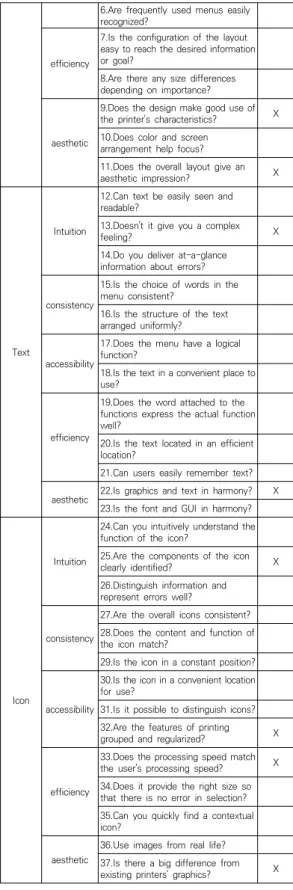
Table 13. Overview of Delphi Survey4.3.2 1차 델파이 결과
UI/UX 디자인 전문가 및 3D프린터 경력을 가진 전문 가 총 10명을 대상으로 수정 사항 및 각 요소 별 불필요 항목 삭제, 자유로운 의견을 기술하게 하였다. 그 결과 총 50개의 항목에서 4번, 11번, 13번, 22번, 25번, 32번, 33번, 37번, 40번, 42번, 48번의 11가지 항목은 FDM 풀 컬러 3D프린터 GUI디자인 체크리스트 항목으로 적 합하지 않다는 의견으로 삭제하였고, 9번은 46번과 중복 되어 삭제하여 총 12가지 항목을 삭제하였다.
Color
Intuition
38.Is the printer intuitive for users through color?
39.Can you see the color of the output at a glance on the screen?
40.Does it show intuitively what it
says about ink color? X
consistency
41.Are the colors consistent for each screen?
42.Is the overall color consistent? X accessibility
43.Are there any color differences depending on the function?
44.Does the color output icon stand out well?
efficiency
45.Does the use of highlight indicate meaning well?
46.Does the printer show the character well?
47.Does the screen reflect the actual color of the output?
aesthetic
48.Does the overall color satisfy the
user? X
49.Is the overall color harmonious?
50.Is the screen a color that does not interfere with the color of the output?
No. M SD CVR Cronbach a Delete
1 4.90 0.316 1 0.701
2 4.80 0.422 1 0.705
3 3.00 1.764 0 0.624 X
4 4.90 0.316 1 0.716
5 4.80 0.422 1 0.696
6 4.20 0.632 0.8 0.698
7 1.10 0.316 -1 0.692 X
8 3.70 0.675 0.2 0.697 X
9 4.60 0.699 0.8 0.720
10 4.90 0.316 1 0.709
11 1.90 0.876 -1 0.639 X
12 4.40 0.699 0.8 0.698
Table 15. Secondary Delphi Result
13 4.90 0.316 1 0.714
14 4.80 0.422 1 0.715
15 4.80 0.422 1 0.696
16 4.80 0.422 1 0.675
17 4.40 0.699 0.8 0.670
18 1.90 0.876 -1 0.712 X
19 4.90 0.316 1 0.681
20 3.60 0.699 0 0.699 X
21 4.70 0.483 1 0.673
22 4.90 0.316 1 0.716
23 4.80 0.422 1 0.675
24 4.70 0.483 1 0.687
25 4.90 0.316 1 0.697
26 4.80 0.632 0.8 0.665
27 4.70 0.483 1 0.700
28 4.80 0.422 1 0.689
29 1.40 0.516 -1 0.716 X
30 4.90 0.316 1 0.697
31 1.40 0.516 -1 0.706 X
32 1.60 0.699 -1 0.668 X
33 4.70 0.483 1 0.720
34 4.90 0.316 1 0.681
35 1.90 0.994 -0.8 0.711 X
36 4.90 0.316 1 0.697
37 4.80 0.422 1 0.695
38 4.90 0.316 1 0.697
No. M SD CVR Cronbach a Delete
1 4.60 0.516 1 0.626
2 4.90 0.316 1 0.638
3 4.00 1.155 0.8 0.609
4 4.60 0.516 1 0.613
5 4.60 0.516 1 0.636
6 4.30 0.483 1 0.614
7 4.30 0.675 0.8 0.570
8 4.20 0.632 0.8 0.620
9 4.50 0.527 1 0.648
10 3.30 1.252 -0.4 0.647 X
11 4.40 0.699 0.8 0.636
12 2.70 1.160 -0.6 0.664 X
13 4.80 0.422 1 0.600
14 4.40 0.516 1 0.640
15 4.80 0.422 1 0.630
16 4.80 0.422 1 0.607
17 4.40 0.699 0.8 0.576
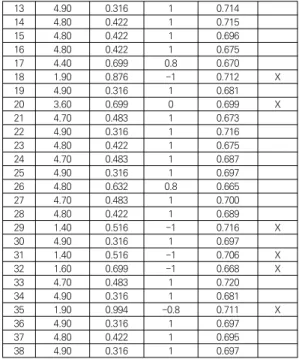
Table 16. Secondary Delphi Result 4.3.3 2차 델파이 결과
2차 델파이 조사에서는 앞서 조사한 1차 델파이 조사 결과를 반영하여 12가지의 항목을 삭제하였고, 나머지 38가지 평가항목에 대한 리커트 5점 척도를 실시하였다.
리커트 5점 척도에 대한 설문조사의 결과를 토대로 Lawshe(1975)의 이론에 근거하여서 CVR 최솟값인 0.62 미만의 항목과 평균 값 3.7 미만의 항목인 3번, 8 번, 10번, 15번, 23번, 26번, 38번, 41번, 43번, 46번 항 목을 삭제하였다. 또한 신뢰도 분석을 위한 Cronbach’s a 값을 산출하였다. 그 결과 모든 항목은 Cronbach’s a 값이 0.60 이상이므로 신뢰도에 문제가 없는 것으로 나 타났다.
4.3.4 3차 델파이 결과
2차 델파이 결과를 바탕으로 28개의 항목에 대한 리 커트 5점 척도에 대한 설문조사를 진행하였고, CVR 최 솟값인 0.62 미만과 평균값 3.7미만의 항목인 18번, 20 번을 삭제하였으며, 신뢰도 분석에선 모든 항목이 Cronbach’s a 값 0.600 이상으로 신뢰도에 문제가 없 는 것으로 나타났다.
18 4.70 0.483 1 0.597
19 4.90 0.316 1 0.623
20 4.30 0.675 0.8 0.628
21 4.50 0.707 0.8 0.620
22 4.80 0.422 1 0.642
23 4.50 0.707 0.8 0.629
24 4.50 0.707 0.8 0.609
25 4.80 0.422 1 0.617
26 4.70 0.675 0.8 0.623
27 4.70 0.483 1 0.630
28 4.80 0.422 1 0.630
Component valuation
principle Contents
Layout
Intuition
1.Does it give users a quick, at a glance view of information?
2.Do you often use menus that are supported by the interface?
accessibility
5.Easy to find information or feature that users want?
6.Are frequently used menus easily recognized?
efficiency 7.Is the configuration of the layout easy to reach the desired information or goal?
Text Intuition
12.Can text be easily seen and readable?
14.Do you deliver at-a-glance information about errors?
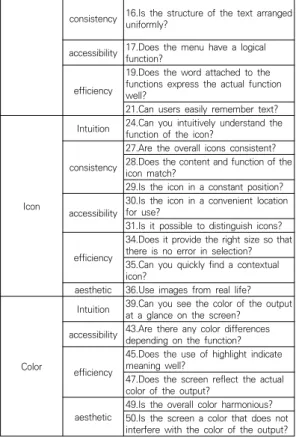
Table 17. Final GUI Design Checklist Draft
consistency 16.Is the structure of the text arranged uniformly?
accessibility 17.Does the menu have a logical function?
efficiency
19.Does the word attached to the functions express the actual function well?
21.Can users easily remember text?
Icon
Intuition 24.Can you intuitively understand the function of the icon?
consistency
27.Are the overall icons consistent?
28.Does the content and function of the icon match?
29.Is the icon in a constant position?
accessibility 30.Is the icon in a convenient location for use?
31.Is it possible to distinguish icons?
efficiency
34.Does it provide the right size so that there is no error in selection?
35.Can you quickly find a contextual icon?
aesthetic 36.Use images from real life?
Color
Intuition 39.Can you see the color of the output at a glance on the screen?
accessibility 43.Are there any color differences depending on the function?
efficiency
45.Does the use of highlight indicate meaning well?
47.Does the screen reflect the actual color of the output?
aesthetic 49.Is the overall color harmonious?
50.Is the screen a color that does not interfere with the color of the output?
4.4 GUI디자인 체크리스트 개발
FDM 풀 컬러 3D프린터 GUI디자인 체크리스트 초안 을 바탕으로 타당성을 검증하기 위하여 전문가를 선정하 여 세 차례 델파이 조사를 진행하였다. 그 결과 총 24가 지의 항목을 삭제하였고, 최종적으로 각 GUI디자인의 요 소인 레이아웃, 텍스트, 아이콘, 컬러에 맞춰 체크리스트 를 정리하여 작성하였다. 그 결과 첫째, 레이아웃에선 사 용자가 정보를 한눈에 파악할 수 있으며, 메뉴는 자주 사 용하는 작업으로 구성해야 한다. 또한 사용하기 쉬워야 한다. 둘째, 텍스트는 눈에 쉽게 들어와야 하고 기능들에 붙인 텍스트가 그 기능을 잘 표현하며, 텍스트를 쉽게 기 억할 수 있어야 한다. 셋째, 아이콘은 사용하기 편리한 위 치에 있어야 한다. 또한 실생활에서 따온 이미지를 사용 하여 사용자의 혼란을 최소화하여야 한다. 넷째, 컬러는 강조색을 활용하여 사용자의 행동에 적절한 피드백을 전 달해야 하며, 특히 출력물의 색상을 방해하지 않는 화면 색상을 선택하여야 한다. 작성한 내용은 다음 Table 17 과 같다.
5. 결론
최근 일반인도 접근하기 쉬운 FDM 3D프린터의 보급 이 활발히 이루어지고 있으며, 사용자는 실제 제품과 같 은 질적인 요소에 대한 니즈가 점차 증가하고 있다. 이를 만족시키기 위해 FDM 풀 컬러 3D프린터의 개발이 이루 어져 있고 보급이 확산되고 있으나 기술적인 측면의 개 발이 앞서가며 소프트웨어적인 요소인 인터페이스는 그 에 미치지 못하고 있다. 또한 각기 다른 회사의 인터페이 스에 의하여 사용자로 하여금 혼란을 야기하며, 특히 GUI디자인은 표준화의 필요성이 요구되고 있다. 이에 따 라 GUI디자인의 개발을 진행하기에 앞서 사용성 평가를 위한 체크리스트 개발이 선행되어야 한다.
이에 본 연구는 3D프린팅, FDM 풀 컬러 3D프린터, GUI디자인에 대한 문헌조사를 진행 하였다. 그 후 사례 조사를 통해 현재 FDM 풀 컬러 3D프린터의 현황을 파 악하고 선행연구를 통해 GUI디자인의 구성요소를 분석 하였다. 이를 바탕으로 FDM 풀 컬러 3D프린터 GUI디 자인의 구성요소인 레이아웃, 텍스트, 아이콘, 컬러를 도 출하였다. 도출한 GUI디자인의 구성요소에 맞춰 사용성
평가를 위한 체크리스트 초안을 50가지 항목으로 도출하 였고, 세 차례의 델파이 조사를 걸쳐 12가지 항목, 10가 지 항목, 2가지 항목을 삭제하여 26가지 항목에 대한 타 당성을 검증하였다. 그 결과 레이아웃은 정보를 한눈에 파악하여야 하며 자주 사용하는 메뉴를 위주로 구성해야 한다. 텍스트는 눈에 직관적으로 들어오며 기능의 뜻을 명확하게 전달하여야 한다. 아이콘은 사용이 용이한 적소 에 위치하여야 하며 실생활에서 따온 아이콘을 이미지화 하여야 한다. 컬러는 강조색을 활용하여 사용자에게 피드 백을 주어야 하며 화면의 색상과 출력물의 색상이 겹치 지 않도록 하여야 한다.
본 연구의 제한점으로는 개발된 체크리스트를 토대로 피험자들에 대한 검증이 이루어지지 않았다. 향후 연구에 서 FDM 풀 컬러 3D프린터 GUI디자인 개발에 활용하여 검증을 진행하여, 개발된 GUI디자인의 사용성 평가를 바 탕으로 사용성에 얼마나 영향을 미치는지에 대한 연구가 진행되어야 한다.
REFERENCES
[1] S. C. Lim. (2014). An Establishment of Development Strategy for 3D Printer Related Industry of Korea.
Master’s dissertation. Graduate School of Korea University.
[2] S. J. Kim. (2014). A Research of 3D Printers in Industrial Toy Production ; Mainly in Manufacturing Design. Journal of Korean Society of Communication Design, 17(2), 21-29.
[3] J. W. Lee. (2017). A Study on Slice Program GUI Design for FDM 3D Print. Journal of Integrated Design Research, 16(1), 21-30.
[4] Ministry of Science and ICT&Ministry of Trade, Industry and Energy (2014). Strategies for Developing the 3D Printing Industry, Sejong : Ministry of Science and ICT&Ministry of Trade, Industry and Energy.
[5] Ministry of Food and Drug Safety. (2018). Understanding 3D Printing Technology for Easy Medical Devices PART
Ⅱ. General Foundation for 3D Printing, Cheongju-si : Ministry of Food and Drug Safety.
[6] S. H Kim. & H. W. Song. (2015). A Third Industrial Revolution 3D Printing. Journal of Industrial and Engineering Chemistry, 18(1), 27-44.
[7] 3Dsourced. (2020. 07. 13). 3D SOURCED . Ranking of 3D Printers.
https://3dsourced.com/3d-printers/color-3d-printer-f ull-multi-color/
[8] B. G. Oh. & S. J. Kang. (2008). information design
textbook, Seoul : AHNGRAPHICS.
[9] J. E Seong. & J. W. Han. (2007). A Study on the Evaluation of Components for GUI Design of Automobile Navigator with A focus on Layout, Text, Graphics, and Multimedia. Journal of Korea Design Association, 74-75.
[10] S. M Chung. (2018). A Study on Interface Usability of Slicer Program ; Focused on Personal FDM Printer.
Journal of Industrial Design, 12(2), 75-84.
[11] T. H. Gim. (2017). Study on Personal 3D Printer Interface Usability Based on Cognitive Load Theory.
Master’s dissertation. Graduate School of Techno Design Kookmin University.
[12] W. J. Chung. (2019). A Study on Usability Evaluation Tool in Virtual Reality Platform. Master’s dissertation.
Graduate School of Techno Design Kookmin University.
[13] 3Dnatives. (2019. 11. 19). 3D Natives . News of 3D Printing.
https://www.3dnatives.com/en/top-14-color-3d-print ers-191120194/#!
[14] J. H. Park. (2018). Open Source Based Knitting Machine Pattern Program Interface Usability. Journal of The Korea Convergence Society, 11(3), 163-170.
[15] S. H. Choi. (2014). The Priority Analysis of Dispute Factor in Overseas Construction Based on FIDIC Contract Conditions. Master’s dissertation. Graduate School of Sungkyunkwan University.
[16] G. Rowe & G Wright. (2017). Expert Opinion in Forecasting : The Role of the Delphi Technique, Boston : Springer.
DOI : 10.1007/978-0-306-47630-3_7
박 지 훈(Ji-Hoon Park) [학생회원]
․ 2019년 3월 ~ 현재 : 국민대학교 테크 노디자인전문대학원 제품이노베이션 학과 석사과정
․ 관심분야 : 3D 프린팅, 제품디자인, 니 팅기
․ E-Mail : [email protected]
장 중 식(Jung-Sik Jang) [정회원]