모바일 웹 사용자 인터페이스의 사용성 향상을 위한 평가에 관한 연구
김 희 완*
목 차
요약 1. 서론 2. 관련 연구
2.1 모바일 특성과 유저 인터페이스 2.2 모바일 앱과 모바일 웹 3. 모바일 유저 인터페이스(UI/UX) 3.1 유저 인터페이스
3.2 모바일 기기에서 유저 인터페이스 3.3 사용성
4. 사용성 향상을 위한 평가 4.1 모바일 웹 접근성과 준수지침 4.2 모바일 웹 호한성과 준수사항 4.3 모바일 웹 UI/UX 구성 4.4 모바일 웹 평가 기준 5. 결론
참고문헌 Abstract
요약
ㄴ
스마트폰 시장은 애플에서 아이폰을 출시하면서 다양한 사이즈와 운영체제를 갖춘 모바일 기기가 활성화되기 시작했다.
사용자들은 스마트폰을 이용하여 언제 어디서나 원하는 콘텐츠를 바로 사용하여 정보의 검색뿐만 아니라 동영상, 음악 플레이 등 다양한 콘텐츠를 사용이 가능하다. 최근 모바일을 포함한 디지털 기기들이 일상생활에서 차지하는 비중이 커질수록 사용자와 모바일 기기 간의 커뮤니케이션을 담당하는 UI/UX는 매우 중요하다. 사용자 입장에서 기기를 얼마나 사용하기 쉬운가를 좌우하는 중요한 요소로 인식되고 있다. 본 논문은 모바일 웹을 구성하는 UI/UX의 편리함을 증가시키면서 사용의 불편을 최소화하기 위한 방법에 대해 알아보고, 모바일 기기의 사용성 향상을 위한 모바일 웹 UI/UX의 평가기준을 제시하였다.
표제어: 모바일 웹, 웹 UI/UX, 사용성 향상, 평가기준
접수일(2016년 2월 29일), 수정일(1차: 2016년 4월 5일), 게재확정일(2016년 4월 10일)
* 삼육대학교 컴퓨터학부 교수, [email protected]
1. 서론
스마트폰 시장은 2007년 애플에서 아이폰을 출시 하면서 다양한 사이즈와 운영체제를 갖춘 스마트폰 의 출시가 활성화되었고, 그 소비 또한 급격히 증가 하고 있다 [1] . 해외 조사기관 Portio Research에서는 2013년 상반기에 발간한 ‘Mobile Application Futures 2013-2017’을 통해, 세계 모바일 어플리케 이션 이용자수가 2011년 7월 4천만, 2012년 약 12억 명으로 연평균 20~60%의 성장률로 지속적으로 증가 할 것으로 전망했다 [2] . 사용자들은 스마트폰을 이용 하여 “언제 어디서나 원하는 콘텐츠를 바로 사 용” [3] 하여 정보의 검색뿐만 아니라 동영상, 음악 플레이 등 다양한 콘텐츠를 사용이 가능하다. 스마 트폰에 의존적인 점은 서비스를 제공하는 모바일 서 비스가 스마트폰의 특성을 고려하여 설계 되지 않으 면 사용에 불편함을 줄 수 있다는 점을 시사한다.
본 논문은 모바일 웹을 구성하는 UI/UX의 편리함 을 증가시키면서 사용의 불편을 최소화하기 위한 방 법에 대해 알아보고, 그 평가 항목을 도출하여 사용 자 관점에서 모바일 기기 사용성 향상을 위한 방안 을 제시하고자 한다.
2. 관련 연구
2.1 모바일 특성과 유저 인터페이스
스마트 모바일 기기의 무선인터넷 서비스를 통해 우리는 원하는 정보서비스를 실시간으로 어디에서나 제공받을 수 있다[2][4]. 또한 모바일 기기만의 다 양하고 새로운 입력장치(보이스 인식, 화면터치 등) 를 통한 서비스 접근 방법은 사용자에게 새로운 경 험을 제공하고 있으며, 우리는 유저 인터페이스에 대한 새로운 정의가 필요하게 되었다[1][5]. 모바일 기기는 그림 1과 같은 다양한 센서를 지니고 있으 며, 사용자는 PC의 키보드 타이핑과 마우스 조작
방식이 아닌 스크린 터치, 음성입력, 버튼 조작 등을 통한 새로운 입력 경험을 하게 되었다.
그림 1. 모바일 기기의 다양한 센서와 기능[5]
Fig. 1. Sensors and Functions of Mobile Phone
2.2 모바일 앱(App)과 모바일 웹(Web)
애플의 아이폰 출시와 함께 앱 스토어(App Store)를 통해 일반 사용자들에게 애플리케이션 보 급이 보편화 되었으며, 애플리케이션이라는 용어는 앱(App)이라는 단축된 표현으로 자연스럽게 실생활 에 스며들었다. 이러한 표현은 모바일 애플리케이션 의 종류를 구분하는데도 영향을 주고 있으며, 최신 모바일 기기에서 동작하는 애플리케이션의 종류는 표 1과 같이 구분해 볼 수 있다 [6] .
안전행정부에서는 대국민 모바일 서비스 사업에 서는 모바일 웹 방식을 권장하고 있으며 그 이유는 웹 방식이 다양한 사용자의 디바이스 환경에서 호환 이 되어 누구나 동일한 조건에서 서비스 사용이 가 능하기 때문이다 [7-8] . 만약 필요에 의해 앱 기술을 적용해야 하는 경우라면 하이브리드 앱 방식을 우선 적으로 고려하도록 하고 있다 [7-8] .
각 어플리케이션 개발 방식을 비교해 보면 표 1 과 같다.
모바일 웹앱과 하이브리드 앱의 장점은 개발 비
용이 적게 들고, 개발 진입 장벽이 낮으며, 실시간
업데이트, 즉각적인 반응이 가능하고 하나의 소스로
다양한 플랫폼에 대응할 수 있다는 점이다. 또한
Hybrid, HTML5, CSS3등을 접목하여 네이티브 앱
의 기능과 사용성을 따라잡을 수 있으며, 앱 스토어
Kind Characteristics Native
App
Native app is developing with the programming languages and SDK which is optimized for mobile devices, and it is installed through app stores.
Mobile Web
Mobile web is optimized for small mobile devices and to re-configure the Web site so that users can use conveniently, it is developed by a common web technologies (HTML, CSS, Script).
Mobile Web
App
Mobile web app is combined web applications and web, it provides a user experience similar to the features such as a native application with web technology.
Hybrid App
Hybrid app has the advantage of mobile web that can flexibly respond to changes in benefits and services, content and access to service in mobile apps.
표 1. 모바일 애플리케이션의 종류와 특징 Tab. 1. Kind and Characteristics of Mobile
Application
그림 2. 스와이프를 이용한 화면 전환 Fig. 2. Screen Switch using the Swipe 에 등록하고 판매할 수 있다[6].
모바일 웹이 지니는 가장 큰 특징은 호환성으로 하나의 소스로 여러 단말기에 대응이 가능하고, 실 시간으로 업데이트가 가능하다는 것이다. 모바일 웹 의 상대적인 단점은 하이브리드 형태나 HTML5와 같은 기술을 통해 해소 할 수 있으며 “원 소스 멀 티 플랫폼을 실현하면서 네이티브 앱의 장점을 수용 하는 모바일 웹앱과 하이브리드 앱은 모바일 대응에 주요한 전략이 될 것” [6] 이며 본 논문에서는 웹앱 과 하이브리드 앱의 기본 바탕인 모바일 웹에 대해 서 다루고자 한다.
3. 모바일 유저 인터페이스(UI/UX)
3.1 유저 인터페이스
유저 인터페이스(User Interface, UI)는 사용자 (User)와 제품(Object)이 서로 상호작용(Interaction) 하게하는 매개체(Interface)를 의미하며 인터페이스는 입력과 출력으로 구성 된다[5]. 사용자가 입력을 통
해 제품을 제어하여 출력결과물을 산출하고 원하는 목적을 이루게 하는 매개가 인터페이스이다 [9] .
3.2 모바일 기기에서 유저 인터페이스(UI/UX)
모바일 기기에서 유저 인터페이스의 의미는 입력 신호와 출력결과물을 전달하는 통로의 역할로 제한 되지 않고, 발전된 입출력 장치(터치센서, 음성인식 등)를 통해 새로운 경험(User Experience, UX)을 창 출하는 도구로 발전하였다[1][5]. 다음 커뮤니케이션 UX팀[9]에서는 UX는 사용자와 사용자의 목적, 목적 물 등 다양한 요소가 어우러져 다른 형태, 다른 모 습으로 나타나는 것이다. 이여리[10]는 사용자가 직 관적으로 다음 사항을 쉽게 예측 할 수 있고 조작할 수 있도록 도와주는 것이다. 즉 “사용자에게 사용 성에 대한 만족감을 주며 조작을 통해 창조적인 경 험을 제공하는 도구이다”라고 정의하고 있다.
모바일에서 유저 인터페이스는 사용자에게 사용 성의 만족을 주며 새로운 사용 패턴을 경험하게 하 는 상호작용이 강조된 도구로 발전하고 있다. 일반 적인 어플리케이션에서 사용자는 손가락으로 화면의 오른쪽에서 왼쪽으로 쓰는 동작(Swipe)을 통해 페이 지를 전환하고 있으며 사용자는 경험을 통해 동작을 학습하고 새로운 어플리케이션 실행 시에도 어려움 없이 스와이프(Swipe) 동작을 통해 화면 전환을 시도 한다.
최종적으로 모바일 유저 인터페이스 UI/UX는 두
개체간의 단순한 상호작용의 의미를 넘어 사용자가
Definitions
Jakob Nielson
Usability is a quality attribute that assesses how easy user interfaces are to use. The word "usability" also refers to methods for improving ease-of-use during the design process[11].
ISO9241 -11
“The extent to which a product can be used by specified users to achieve specified goals with effectiveness, efficiency and satisfaction in a specified context of use”[12]
Jim Thatche
r(2003)
Usability is effective as a higher concept of accessibility, and it is the satisfied user interface design[13].
J.M.
Sim (2008)
Usability is that we can use easily the tools or human-made stuff in order to achieve a certain objectives[12].
경험을 통해 제품의 기능을 쉽게 인식하게 하여 사 용목적에 편리하고 신속하게 다다를 수 있게 하는 것을 의미한다. 모바일 UI/UX는 인간 가치와 기술력, 경제성을 동시에 고려하여 사용자에게 좋은 경험을 주어 사용자가 더 빠르고 편리하게 사용할 수 있게 하는 것을 목표로 하며 사용성 증대와 관련이 있다 [1].
3.3 사용성(Usability)
사용성은 인터페이스의 성능평가에 중요한 요인 으로 사용성에 대한 다양한 정의를 살펴보면 아래의 표 2와 같다.
표 2. 사용성의 다양한 정의 Tab. 2. Definition of Usability
4. 사용성 향상을 위한 평가
4.1 모바일 웹 접근성과 준수지침
PC웹에서 접근성은 내비게이션의 편리성과 이미 지동영상 콘텐츠의 대체 텍스트를 제공하기 위한 것 에 한정 되었다. 대표적인 웹 접근성의 예로 W3C의
WAI(2006)와 Thatcher(2006)은 웹 접근성을 장애를 가진 사람들이 웹 콘텐츠를 인지하고, 편리하게 사 용할 수 있으며, 그 내용이 이해하기 쉬워야 하는 것으로 정의하였다[11].
이러한 현상의 이유는 웹 서비스에 접근하는 인 터페이스의 변화로 그 사용방법이 달라진 것이 큰 이유로 한 예로 모바일 기기의 화면은 평면으로 시 각장애인이 자판을 인식 할 수 있는 요철이 없어 텍 스트 입력뿐만 아니라 메뉴 접근을 위한 버튼 터치 도 어렵다. 또한 보인다 하더라도 신체의 운용이 어 려운 사람에게 다양한 터치 제스처 동작을 작은 화 면에서 연속적으로 실행하는 것도 쉬운 일은 아니 다. 이에 아이폰의 보이스오버(VoiceOver)와 갤럭시 폰의 토크백(TalkBack) 서비스는 모바일 디스플레이 의 화면의 구성을 파악할 수 있도록 음성서비스를 통해 접근성을 지원하며, 아이폰의 시리(Siri)와 같은 기능은 사용자의 음성인식 기능을 통해 서비스 접근 이나 텍스트 입력이 가능하도록 하여 서비스 사용을 돕고 있다.
이러한 기능적 특성을 반영하여 한국정보화진흥 원에서는 모바일 접근성에 대한 인식을 높이기 위해 2011년 ‘모바일 접근성 점검 매뉴얼’을 발표했으 며 모바일 접근성을 준수하기 위한 지침 내용은 표 3과 같다.
위의 접근성 준수사항 중 모바일 특징을 정리하 면 아래와 같다.
- 초점(Focus)적용과 초점의 순서 준수 - 운영체제의 접근성 기능 지원 - 누르기 기능 지원
- 컨트롤간의 충분한 간격 - 인터페이스의 일관성
웹 접근성의 편리성은 모바일 특성에서의 편리성
과 연결되며 편리하다는 것은 사전적의미로 이용하
Contents
Provide Alternate Text: The contents should be provided with text.
Every object has applied with the Focus, the focus should be moved one by one.
Operating system support accessibility features:
The accessibility features and attributes provided by the operating system must be used.
Tapping Support: All controls on the touch-based mobile device should be able to control the press operation.
Recognized regardless of the color: all information displayed on the screen must be able to recognizethe color regardless of the color.
Brightness Contrast: all information displayed on the screen shall be provided with a minimum of preparation.
Providing captions, sign language: multimedia content are to be provided with subtitles, sign language, and documents equivalent to the information.
Sufficient distance between the control: control is preferably arranged with a sufficient distance.
Notification: It is desirable to provide so that users can select a variety of ways such as vibration, vision, sound.
Consistency of the interface: it is desirable to provide a consistent arrangement of the UI element.
Flashing limited use: it is preferable not to provide content that could cause photosensitive epilepsy..
The background sound forbidden: it is desirable not to use the background sound to be played back automatically.
표 3. 모바일 접근성 준수 지침[14]
Tab. 3. Compliance Guideline of Mobile Accessibility
기 쉽다는 것으로 서비스 사용자의 경험(UX)을 기반 으로 한 인터페이스 구성은 사용자에게 사용을 편리 하게 한다.
4.2 모바일 웹 호환성과 준수사항
호환성의 사전적 의미는 다양한 장치에서도 변경 없이 그대로 사용할 수 있는 성질로 단어적 정의보
다 호환성을 준수하기 위한 조건에 초점을 맞추어 설명한다. PC에서 웹의 호환성은 상호 호환성(Cross Browsing)으로 브라우저의 종류와 버전에 관계없이 사용자가 같은 서비스를 제공받을 수 있는 조건을 의미하였고, 웹 표준 기술을 통한 상위 호환성 (Forward Compatibility)을 기반으로 한다[11].
안전행정부에서는 모바일 웹의 호환성의 조건으 로 3종 이상의 웹 브라우저에서 동등하게 서비스를 제공하여야 하며, 사용되는 모든 모바일 기기에서 동등하게 접근성이 보장될 것을 제시했다[8].
호환성 준수와 관련 된 접근성은 모바일 화면 사 이즈의 변화와 관계없이 사용자가 편리하게 서비스 를 사용할 수 있음을 의미하는 것으로 반응형 웹과 관련이 있다.
4.2.1 모바일 웹 표준
전 세계적인 웹 기술 표준을 주도하고 있는 W3C 에서 제정한 Mobile Web Best Practices의 준수사항 은 모바일 장비에서 사용자가 보다 편리하게 콘텐츠 를 이용할 수 있도록 제정한 웹 표준으로, 내용 중 웹 표준 준수와 관련 된 내용은 아래와 같다[15].
- 유효한 MARKUP: 표준 문법에 유효한 문서를 작성한다.
- 콘텐츠 포맷 지원: 장비가 지원하는 콘텐츠를 전송한다.
- 선호하는 콘텐츠 포맷 제공: 가능하면 장비가 지원하는 포맷으로 콘텐츠를 전송한다.
- 문자 인코딩 지원: 장비가 지원하는 캐릭터 인 코딩을 사용한 콘텐츠를 제공해야 한다.
- 문자 인코딩 정보 활용: 장비에서 사용되는 캐 릭터 인코딩을 확인한다.
- 스타일 시트 사용: 모바일 기기가 지원하지 않 는 경우를 제외하고, 레이아웃과 형식의 설계는 스 타일시트를 사용한다.
- 구성: 논리적인 문서 구성을 위해 마크업 언어
Core
Scheme Contents
Variable Grid
The technique of using a grid with variable resolution is optimized use of equipment, and it is define the width of the screen, as a percentage value responding to the horizontal size.
Variable Image
It is to automatically adjust the size of the image presented as percentage using the image by using the calculated percent of the width value.
Media Query
Media queries to detect changes in unit value width resolution is to set the CSS value depending on the width.
표 4. 반응형 웹 디지인 핵심 기법[16]
Tab. 4. Core Scheme of Responsive Web Design
Compliance
It is enhance efforts to provide the mobile web approach for such universal accessibility.
We should seek to provide equal service in three or more web browsers.
It may provide a service to the app manner, but preferentially considering the hybrid app manner.
The size of the screen is scalable to the size of 320px * 480px.
Different browser resolutions by the manufacturer must be applied to all devices, and it must be tailored to support the two resolutions of the horizontal and vertical modes.
Since the resolution of the new device is released to be considered it continues to increase the scalability, and develop flexible so as to fit each device-specific screen resolution, lower versions should be able to accommodate.
Set as a relative value without setting the width value with the absolute value to develop a wide variety of values to fill the browser and the resolution
The screen should not be used to flow the absolute coordinates of the fixed value in the layout.
Because these features are supported by different platforms it should be developed around the function that is applied after identifying the common elements.
표 5. 모바일 호환성 준수사항[7]
Tab. 5. Mobile Compatibility Compliance (markup language)기능을 사용한다.
- 오류 메시지: 발생한 오류 정보를 알 수 있는 메시지를 제공하고, 그러한 오류를 피해 브라우징을 계속 할 수 있도록 한다.
안전행정부에서는 웹 표준 준수 사항에서 HTML 웹 표준은 HTML 4.0 이상 버전을 적용해야 하며, HTML 5.0 이상의 적용을 권고 하고 있다[7].
4.2.2 반응형 웹 디자인
스마트 기기의 대중화로 다양한 모바일 사이트가 구축되었고, 기기 별 해상도를 정확하게 이해해야만 기기에 맞는 사이트를 구축할 수 있다. 스마트 기기 의 해상도는 다양하고 반응형 웹 디자인에 있어서는 화면의 가로 값을 민감하게 생각해야 한다[16].
반응형 웹의 구현은 HTML5와 CSS3의 속성을 통 해 최적의 구현이 가능하고, PC브라우저는 일부의 브라우저의 경우 위의 기술을 표현하지 못하지만 모 바일 브라우저 대부분은 HTML5와 CSS3을 지원하고 있다.
반응형 웹 디자인을 구현하는 핵심 기법은 표 4 와 같다.
4.2.3 호환성 준수사항
안전행정부는 호환성과 함께 다양한 모바일 사이 즈에 대응하는 반응형 웹 특성으로 확장성을 제시하 였으며 모바일 서비스의 호환성과 확장성 준수사항 은 표 5와 같다.
4.3 모바일 웹 UI/UX 구성
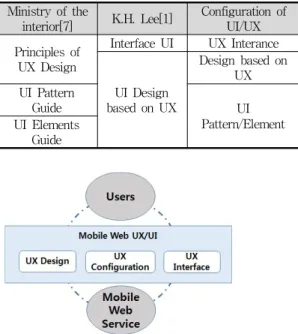
Ministry of the
interior[7] K.H. Lee[1] Configuration of UI/UX Principles of
UX Design
Interface UI UX Interance
UI Design based on UX
Design based on UX UI Pattern
Guide UI
Pattern/Element UI Elements
Guide
표 6. 모바일 웹 UI/UX 설계지침의 분류 Tab. 6. Classification of Mobile Web UI/UX
Design Guidelines
모바일 인터페이스는 사용자가 자신의 목적을 달 성하기 위해 상호작용하는 도구로 사용자는 목적을 달성하기 위해 사용성을 요구한다. 안전행정부[7]와 이광훈[1]은 모바일 웹 UI/UX의 설계지침을 제시하 면서 지침의 카테고리를 표 6과 같이 제시하였다.
안전행정부는 UX디자인 원칙에서 인터페이스 기술 구현 시 준수해야 할 사항에 대해 기술하고 있으며 이광훈은 기술내용을 상호작용 UI로 분리해 낸 반면 UX기반의 UI디자인 안에서 디자인 지침과 UI패턴에 대한 내용을 기술 하고 있다.
그림 3. 모바일 웹 UI/UX의 구성 Fig. 3. Config. of Mobile Web UI/UX
위의 같이 카테고리를 상세화 한 뒤, 같은 속성의 요소를 정리하여 모바일 웹 UI/UX의 구성을 그림 3 과 같이 도출하였다. 안전행정부[7]와 이광훈[1]의 모 바일 웹 서비스 설계지침을 참조하여 UX디자인, UI
구성과 UX상호작용으로 모바일 웹 UI/UX를 구성하 였다.
정의된 모바일 웹 UI/UX의 구성에 따라 모바일 웹 UI/UX의 구성 항목을 정의하면 아래의 표 7과 같 다.
Definitions UX
Design
Design that made conveniently to use the web service based on the user experience UI
Compone nt
Web layout in consideration of user convenience with compatibility and accessibility of the web-based, and details of the internal configuration of the UI layout and navigation
UX Interface
Action to get the information you want from the experience of the UX-based interaction between the user and the mobile web
표 7. 모바일 웹 UI/UX 구성요소 정의[1][7]
Tab. 7. Definition of Mobile Web UI/UX Components
모바일 웹 UI/UX는 사용자가 웹을 사용하기 위한 요소로 웹으로부터 비롯되며, 모바일 웹 UI/UX도 모 바일 웹 특성을 따라 사용성 향상에 그 목적이 있 다.
4.4 모바일 웹 평가 기준
모바일 웹 평가 기준을 연구하여 모바일 웹 UI/UX평가를 위한 평가영역과 평가 항목을 도출하고 자 한다.
4.4.1 앱 어워드의 웹과 모바일 앱 평가 기준 웹을 평가하기 위한 방법 중 웹어워드코리아의
‘웹어워드 평가방법론’의 평가지표는 웹사이트의
디자인, 기술, 콘텐츠, UI/UX, 서비스 등 8가지 영역
의 평가 영역으로 구성되어 있으며 2011년부터 스마
트앱에 대한 평가도 진행되면서 스마트앱 평가를 위
한 평가지표로도 사용되고 있다.
Elements Contents Function
fitness
Degree which provide the ability to meet the requirements stated or implied
P e r f o r m efficiency
Relative performance for the size of the resources used under specified conditions
Compatibili ty
Degree which is exchange of other components during the service such as the use environment
Usefulness
Degree that can be used by the user specified by the system to achieve the stated purpose of the effectiveness, efficiency and satisfaction in the specified environment
표 9. 모바일 품질 주특성[17]
Tab. 9. Mobile Quality Main Properties
Elements Contents
Time Reactivity
Degree which the response processing time and throughput of the system is to meet the requirements
Elements Utilization
Degree which the amount of time and the degree of elements is used as a system is to meet the requirements
표 10. 모바일 품질 부특성[17]
Tab. 10. Mobile Quality Sub Properties
Elements Contents
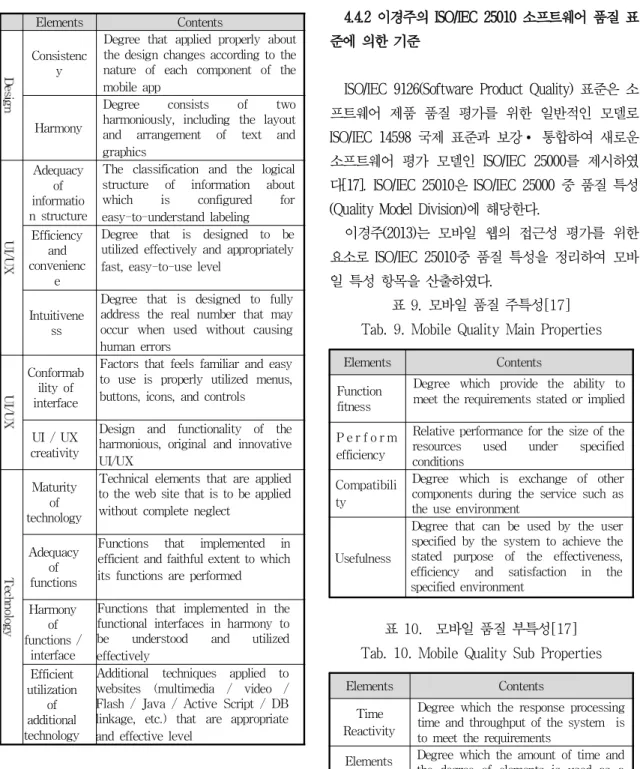
Consistenc y
Degree that applied properly about the design changes according to the nature of each component of the mobile app
Harmony
Degree consists of two harmoniously, including the layout and arrangement of text and graphics
Adequacy of informatio n structure
The classification and the logical structure of information about which is configured for easy-to-understand labeling Efficiency
and convenienc
e
Degree that is designed to be utilized effectively and appropriately fast, easy-to-use level
Intuitivene ss
Degree that is designed to fully address the real number that may occur when used without causing human errors
Conformab ility of interface
Factors that feels familiar and easy to use is properly utilized menus, buttons, icons, and controls
UI / UX creativity
Design and functionality of the harmonious, original and innovative UI/UX
Maturity of technology
Technical elements that are applied to the web site that is to be applied without complete neglect
Adequacy of functions
Functions that implemented in efficient and faithful extent to which its functions are performed Harmony
of functions /
interface
Functions that implemented in the functional interfaces in harmony to be understood and utilized effectively
Efficient utilization
of additional technology
Additional techniques applied to websites (multimedia / video / Flash / Java / Active Script / DB linkage, etc.) that are appropriate and effective level
표 8. 웹어워드 평가기준 Tab. 8. Web Award Criteria
표 8은 웹어워드 평가 전체 항목 중 인터페이스 요소와 그 사용성에 대한 항목을 도출하였다.
4.4.2 이경주의 ISO/IEC 25010 소프트웨어 품질 표 준에 의한 기준
ISO/IEC 9126(Software Product Quality) 표준은 소 프트웨어 제품 품질 평가를 위한 일반적인 모델로 ISO/IEC 14598 국제 표준과 보강∙ 통합하여 새로운 소프트웨어 평가 모델인 ISO/IEC 25000를 제시하였 다[17]. ISO/IEC 25010은 ISO/IEC 25000 중 품질 특성 (Quality Model Division)에 해당한다.
이경주(2013)는 모바일 웹의 접근성 평가를 위한
요소로 ISO/IEC 25010중 품질 특성을 정리하여 모바
일 특성 항목을 산출하였다.
Coexisten ce
Level to operate the required function effectively without the influence on other elements
Learning
Degree that can be used by the user specified to achieve the stated purpose of learning to use the system Operabilit
y
The degree of product or system attributes that made it easy and automatic control
User error protection
Degree to which the system is to protect the user against the failure occurred
UI aesthetics
Degree to which the user interface may be satisfactory to the exchange of users
Accessibi lity
Ability to achieve the stated objectives in the use of the system in specified circumstances, and degree that can be used by people with a wide range of properties
Immediac y
Degree that can use portable and available at all times about the event Availabili
ty
Extent a component of the system is available and accessible when required for use
Defects mitigation
Degree that component of the system is to work as intended, even if a defect in the hardware or software present Recovery
possibilities
Degree to recover the desired data to the reset state of the system
Portabilit y
Finite nature of Immediacy and power of the nature that you can carry in hand
Limitatio n
Degree to limit input/output type and size of product
Linkages Degree of which is associated with system and network (3G, 4G)
4.4.3 백혜진의 웹 평가영역 및 평가요소
백혜진은 웹사이트 평가항목의 비교를 통해 디자 인, 콘텐츠 평가영역 항목을 도출하였고, 그 중 디자 인 항목을 웹사이트를 표현하는 시각적 요소와 사용 자 측면의 인터페이스가 적절히 구현되었는지 평가 하는 것으로 인터페이스 평가 항목으로서 정리하였 다.
Component Contents
D e s I g n
Metaphor
Degree that can reduce the amount of data to be processed comfortable viewing level out to represent any object by a very simple
Clarity
Degree that gives clarity to the user with appropriate margins, color contrast
Consistency
Degree that allows the user to use the site conveniently to maintain the unity of the entire site
Structure Structural design that the web front considers the user
Navigation
Extent that a user can easily find information to know its own location information from the complex structure such as a web Usability
Ease of learning the system, use of the person who connected to the site, convenience of use
Bidirectionals
Activation of the hyperlink for the user, the site of reaction such as messages for a user accidentally
Harmony
Harmony degree of visual elements such as color, fonts, images
Conformability Degree the user feels easy and familiar
Efficiency
Degree visual graphic design element is developed and applied effectively
F u n c t I o n
System security
Degree of security for web servers, databases, and network System
performance
Stability for a web site such as connection time, load time, optimal performance and connections
Utilization
Degree of technologies that are applied appropriately and use the website effectively
Adequacy
Degree to which the objective functions are appropriately performed
표 11. 디자인 영역의 평가요소[18]
Tab. 11. Evaluation Elements of Design Area
4.4.4 평가영역 및 평가요소
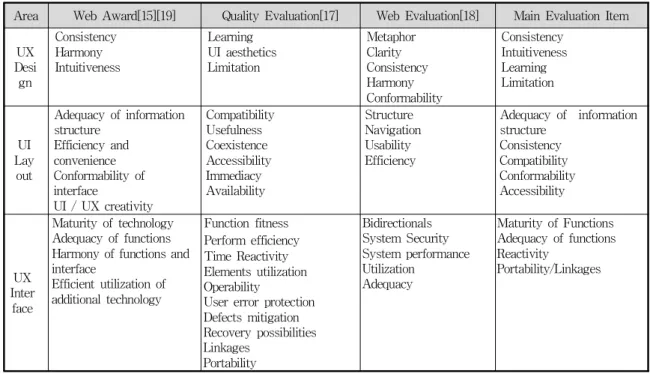
앞에서 정리한 모바일 UI/UX의 구성과 웹 평가 항목을 통한 평가 기준을 표 12와 같이 도출하였다.
주요 항목의 평가요소를 평가 영역에 따라 정의하면 아래와 같다.
1) UX 디자인
웹사이트를 표현하는 디자인 요소가 사용자의 경 험기반으로 적절히 구현되었는지 평가한다.
- 일관성 : UI가이드 라인을 준수하여 디자인하여 디자인한 서비스에 대해 스타일의 미적 일관성을 준 수한 정도
- 직관성 : 핵심기능을 중점적으로 디자인하거나 폰트, 여백 등을 고려하여 사용자의 인지를 돕는 정 도
- 학습성 : 보편적인 디자인 또는 아이콘을 사용 하여 누구나 학습 없이도 이해하기 용이한 정도
- 제한성 : 작은 화면 사이즈를 감안한 디자인으 로 한 손으로 제어가 가능한 정도, 화면의 구성요소 가 간결한 정도
기존의 PC웹에서 디자인이 사용자가 눈에 보기 좋은 정도를 의미한다면, 모바일에서 디자인은 모바 일 웹의 사용성을 증대시키기 위한 전략적 요소로 접근해야 한다. 일관성 있는 디자인은 사용자는 서 비스에 대한 친밀감과 학습성을 높이고, 작은 화면 사이즈의 제한을 고려하여 편리하도록 디자인해야 하며, 사용자가 주요 정보나 원하는 정보를 쉽게 인 지할 수 있도록 주의한다.
2) UI 구성
웹사이트를 표현하는 레이아웃과 UI요소가 사용자 경험기반으로 사용에 알맞게 구현되었는지 평가한 다.
- 정보구조의 적절성 : 정보구조는 2계층을 초과 하지 않도록 하고 내비게이션은 4~5개정도로 설정하
여 접근성을 높인 정도.
- 일관성 : 유형에 따라 일관된 레이아웃의 적용 을 통해 사용성을 높인 정도
- 호환성 : 다양한 모바일 환경에 제한 없이 사용 자는 동일하게 서비스를 제공받을 수 있는 정도
- 접근성 : 누구나 효율적으로 서비스에 접근할 수 있으며 서비스 내용을 제공받을 수 있는 정도
- 친숙성 : 메뉴, 버튼, 아이콘 등 컨트롤 요소들 이 적절히 활용되어 사용하기 쉽고 친숙하게 느껴지 는 정도
UI구성은 사용의 편리를 위한 정보구조의 적절성 과 서비스 타입에 따른 화면 일관성 그리고 모든 디 바이스에서 동일하게 서비스를 제공하기 위한 호환 성 등 사용성의 향상을 목표로 한다.
3) UX 상호작용
웹사이트의 사용을 위한 상호작용 요소가 사용자 경험기반으로 적절하게 구현되었는지 평가한다.
- 기능 완성도 : 서비스에 적용된 기술적 요소들 이 완결되게 적용 되 있는 정도
- 기능 적합성 : 사용된 기능이 목적하는 바에 따 라 효율적으로 구현 되었고 적절하게 수행되는 정도 - 반응성 : 사용자가 서비스의 처리의 진행사항이 나 결과를 알 수 있는 정도
- 휴대성 : 손에 지니거나 가지고 다닐 수 있는 특성/시스템 혹은 무선네트워크와 연계되는 특성의 정도
상호작용은 무선네트워크 통신을 통해 결과가 이
루어지며 모바일 기기의 휴대성으로 사용이 불안정
하고 네트워크 사용에 의한 비용처리 등의 특성을
고려하여 사용자 동작에 대한 진행사항, 결과처리,
선택사항에 대한 반응이 반드시 필요하며, UI구성과
호응하는 기능 구현이 중요한 요소라고 할 수 있다.
Area Web Award[15][19] Quality Evaluation[17] Web Evaluation[18] Main Evaluation Item
UX Desi gn
Consistency Harmony Intuitiveness
Learning UI aesthetics Limitation
Metaphor Clarity Consistency Harmony Conformability
Consistency Intuitiveness Learning Limitation
UI Lay
out
Adequacy of information structure
Efficiency and convenience Conformability of interface
UI / UX creativity
Compatibility Usefulness Coexistence Accessibility Immediacy Availability
Structure Navigation Usability Efficiency
Adequacy of information structure
Consistency Compatibility Conformability Accessibility
UX Inter
face
Maturity of technology Adequacy of functions Harmony of functions and interface
Efficient utilization of additional technology
Function fitness Perform efficiency Time Reactivity Elements utilization Operability
User error protection Defects mitigation Recovery possibilities Linkages
Portability
Bidirectionals System Security System performance Utilization
Adequacy
Maturity of Functions Adequacy of functions Reactivity
Portability/Linkages
표 12. 모바일 웹 평가를 위한 평가항목 비교
Tab. 12. Comparison of Evaluation Items for Evaluation of Mobile Web
5. 결론
정보통신 기술의 발달은 사회를 빠르게 변화시키 고 있으며, 그 변화의 중심에는 모바일이 있다. 최근 모바일을 포함한 디지털 기기들이 일상생활에서 차 지하는 비중이 커질수록 사용자와 기기 간의 커뮤니 케이션을 담당하는 UI/UX가 중요성을 갖기 시작했 다. 사용자 입장에서 기기를 얼마나 사용하기 쉽고 편한가를 좌우하는 중요한 요소로 인식되고 있다.
본 논문은 모바일 웹을 구성하는 UI/UX의 편리함 을 증가시키면서 사용의 불편을 최소화하기 위한 방 법에 대해 알아보고, 사용성 향상을 위한 모바일 웹 UI/UX의 평가기준을 제시하였다. 이를 통하여 사용 자 관점에서 모바일 기기 사용성 향상을 위한 평가
방안을 제시하고자 하였다.
향후 과제로는 도출한 모바일 웹 UI/UX의 평가기 준을 근거로 실제 설계에 따라 평가기준을 적용하 고, 이에 대한 평가를 통하여 좀 더 효율적인 평가 기준을 마련할 필요가 있을 것이다.
참 고 문 헌
[1] Kwang Hoon, Lee(2013), “Mobile UX/UI Guide Book creating Uiser’s Experience,” FreeRec ( 이광훈(2013), 『사용자 경험을 창조하는 모바일 UX/UI 가이드 북』: 프리렉 )
[2] Yoo Chea, Lee(2014), “Design proposal for
museum application interface design using smart
phone : focusing on the national museum of
Korea,”Graduate School of Hanyang University,
Master Thesis ( 이유채(2014), “스마트폰을 활용 한 박물관 어플리케이션 인터페이스 디자인 제 안,” 한양대학교 대학원 석사학위논문 )
[3] Kwang Choi, Jae Hee Hong(2014), “Is the Smartphone uncomfortable mobile phone to people with disabilities?,” MoneyToday ( 최광, 홍재희(2104), “장애인에게 스마트폰은 불편한 휴대폰?,”머니투데이, 2014.04.17, http://www.mt.co.kr/view/mtview.php?type=1&no=
2014040911201404091&outlink=1(April 27, 2013) ) [4] Yong Jun, Choi(2011), “ A study for design of
mobile web framework,”Graduate School of Information Communication, Konkuk University, Master Thesis ( 최용준(2011), “모바일 웹 프레 임워크 설계에 관한 연구,”건국대학교 정보통신 대학원 석사학위논문 )
[5] J.S Park, H Kim(2013), “UX Design Secret 7,”, Ahn Graphics ( 박지수, 김헌(2013), 『UX 디자인 7가지 비밀』: 안그라픽스 )
[6] Jong Myung, Park(2011), “Beginning Mobile Web Development with Javascript Frameworks,”Wikibooks ( 박종명(2011), 『시작 하세요! 모바일 웹 개발』: 위키북스 )
[7] Ministry of the Interior(2014), “User Interface Design Guideline of Mobile e_Government Services.” ( 안전행정부(2014), 모바일 전자정 부 서비스 사용자 인터페이스 설계 가이드라인.) [8] Ministry of the Interior(2014), “Mobile
e_Government Services Implementation Guideline.” ( 안전행정부(2014), 모바일 전자정 부 서비스 구축 가이드라인. )
[9] Daum Communication UX Lab(2012), UX Design Process based on Story, Road Book ( 다음커뮤 니케이션 UX랩(2012), 마켓인사이트팀, 『스토리 로 이해하는 UX 디자인 프로세스』: 로드북 ) [10] Yeori, Lee(2012), “A study on user interface
based on the user's sensitivity : focus on the analog experience,” Graduate School of Sookmyung Woman University, Master Thesis ( 이여리(2012), “사용자 감성을 기반으로 한 유저 인터페이스에 관한 연구,”숙명여자대학교 대학 원 석사학위논문 )
[11] H.W Kim, S.Y Kang, J.H Kang and D.S Kim(2010), “A Design on the Audit Framework of the User Interface for the Web Accessibility,” Journal of the Korea Society of Computer and Information, 15(4), 107~118. ( 김 희완, 강소영, 강재화, 김동수(2010), “웹 접근성 강화를 위한 유저 인터페이스 감리 프레임워크 설계”, 한국컴퓨터정보학회 논문지, 15(4) 107~118. )
[12] Eun Soon, Kang(2014), “Research of Usability of Academic Information Mobile Service,”
Graduate School of Chungnam National University, Master Thesis. ( 강은순(2014), 『학술 정보 모바일서비스의 사용성 평가 연구』, 충남 대학교 대학원 석사학위논문 )
[13] Tae-Eun Moon, Hyung Nam, Moon(2009), “A study on the evaluation and improvement methods of web accessibility and usability of Korea government department websites,”Korea Journal of Business Administration, 22(3), 1511~1535 ( 문태은, 문형남(2009), “국내 중앙행 정기관 웹사이트의 접근성과 사용성 평가 및 개 선방안 연구,”대한경영학회 22(3), 1511~1535. ) [14] Korea Information Society Agency(2011),
“Mobile App Accessibility Check Manual;
iPhone/Android.” ( 한국정보화진흥원, “모바일 앱 접근성 점검 매뉴얼 아이폰/안드로이드,” ) [15] Web Award Korea(2014),
http://www.i-award.or.kr/(May 14, 2014)
( 웹 어워드 코리아, http://www.i-award.or.kr/(May
14, 2014) )
[16] Tae Min, Song(2013), “Responsive web design,”Wikibooks ( 송태민(2013), “반응형 웹 디자인 - 어비의 실무노트” 위키북스 )
[17] Kyung Joo, Lee(2013), “Establishment of information system audit process that takes into the mobile web accessibility,”Graduate School of Information Communication, Konkuk University, Master Thesis ( 이경주(2013), “모바 일 웹 접근성을 고려한 정보시스템 구축 감리프 로세스 정립,” 건국대학교 정보통신대학원 석사 학위논문 )
[18] D.S Kim, H.J Baek, J.H Kang and H.W
Kim(2009),“A Study on the Audit Framework for Web Contents and Design,” Journal of Korea IT Service, 8(4), 87~101. ( 김동수, 백혜진, 강재화, 김희완(2009), “웹 컨텐츠 디자인 점검 강화를 위한 감리모형 연구,”, 한국IT서비스학회 지 8(4), 87~101 )
[19] Smart App Award(2014), http://www.i-award.or.kr/Smart/(May 14, 2014) (
스마트 앱 어워드(2014),
http://www.i-award.or.kr/Smart/(May 14, 2014) )
Hee Wan, Kim
Hee Wan Kim
received the bachelor’s degree in the Department of Computer Science
from Kwangwoon University in 1987. He received the MS degree and the Ph.D. degree in
the Department of Computer Engineering from Sungkyunkwan University in 1995 and 2002,
respectively . He has two Certificate as a Professional Engineer(P.E.) in Information
Systems Management and Chief Information System from Korean Ministry of Science
and Technology. He worked as a computer programmer for 4 years at Korea Electric Power
Cooperation(KEPCO). He has been a professor in the Department of Computer Engineering at
Shamyook since 1996. His current research interests include database, information system
audit, database security, software engineering.
A Study on Evaluation for Improving the Usability of Mobile Web User Interface
Hee Wan, Kim*
1)ABSTRACT
ㄴ
Smart phone market launched Apple iPhone, and mobile devices having various sizes and operating system began to be enabled. The users search the necessary contents any time and everywhere by a smart phone. And they can use various contents immediately such as information, videos, music etc. Recently, digital devices including mobile has become a large proportion of in everyday life. Therefore, UI/UX which is responsible for the communication between the user and the mobile device is very important. It has been recognized as an important factor for users to determine how easy to use the mobile device. In this paper, it is discussed how to minimize the inconvenience of use while improving the convenience of the UI / UX that make up the mobile web. Then, it is presented an evaluation criteria of Mobile Web UI/UX for improving the usability of the mobile device.
Keywords: Mobile Web, Web UI/UX, the usability, evaluation criteria
1)
![그림 2. 스와이프를 이용한 화면 전환 Fig. 2. Screen Switch using the Swipe에 등록하고 판매할 수 있다[6].모바일 웹이 지니는 가장 큰 특징은 호환성으로 하나의 소스로 여러 단말기에 대응이 가능하고, 실시간으로 업데이트가 가능하다는 것이다](https://thumb-ap.123doks.com/thumbv2/123dokinfo/5264706.632485/3.799.427.688.777.886/스와이프를-등록하고-호환성으로-단말기에-가능하고-실시간으로-업데이트가-가능하다는.webp)
![표 3. 모바일 접근성 준수 지침[14]](https://thumb-ap.123doks.com/thumbv2/123dokinfo/5264706.632485/5.799.75.389.212.864/표-모바일-접근성-준수-지침.webp)
![표 11. 디자인 영역의 평가요소[18]](https://thumb-ap.123doks.com/thumbv2/123dokinfo/5264706.632485/9.799.78.379.144.745/표-디자인-영역의-평가요소.webp)