• 검색 결과가 없습니다.

Optimization of DB Server and Web Server to Enhance the Performance of ECM

N/A
N/A
Protected

Academic year: 2021

Share "Optimization of DB Server and Web Server to Enhance the Performance of ECM"

Copied!
8
0
0

로드 중.... (전체 텍스트 보기)

전체 글

(1)

Optimization of DB Server and Web Server to Enhance the Performance of ECM

Sun-Woo Lee

, Jong-Soo Kim

††

, Tai-Suk Kim

†††

ABSTRACT

In order to develop ECM system, there are a number of methodologies. Adopting Microsoft's solution and methodology is one of them. ECM has a large number of users to save the documentations in various types of multimedia data. So, managing multimedia database is very critical in ECM. Therefore the unit and integration test to evaluate the performance can detect the flaws of the system early on, and it has to be enables to reflect the user's requirements thru the user acceptance test. In this paper, we are discussing how to optimize the SQL database before the ECM system is built and used in the real situation thru unit and integration tests.

Key words: Performance, Optimization, Enterprise, Contents, DB Server, Web Server

※ Corresponding Author : Tai-Suk Kim, Address : Dept.

of Computer Software Engineering, Dong-eui University 176 Eomgwangno Busan_jin_gu, Busan 614-714, Korea, TEL : +82-51-890-1707, FAX : +82-51-890-1724, E-mail

: [email protected]

Receipt date : Apr. 24, 2013, Revision date : Aug. 8, 2013 Approval date : Aug. 29, 2013

†††

Dept. of Computer Software Engineering, Dong-Eui University

(E-mail: [email protected])

†††

Institute of Industrial Technology Development, Dong-Eui University

(E-mail: [email protected])

†††
Dept. of Computer Software Engineering, Dong-Eui University

※ This work was supported by Dong-eui University Grant.(2013AA148).

1. INTRODUCTION

In companies which employ large numbers of knowledge workers, the large volume of non- structured contents generated by knowledge workers are increasingly viewed as vital in- tellectual assets. In order to manage such con- tents efficiently, it is necessary to implement an Enterprise Content Management(ECM) system to address the inefficiencies arising from personal PC-based document management[1-2].

To implement an ECM system, several well- known market alternatives exist: IBM FileNet,

ECM Documentum and SharePoint-based ECM which adopts MSF(Microsoft Solutions Frame- work) development methodology[3-6].

Given the familiarity users across the world typically feel for Microsoft software, which ex- tends to Office applications such as Excel and PowerPoint, there is wide scope for benefits to be derived from the ease of adoption of Windows OS, along with similar server management soft- ware, such as Windows Server[7].

This paper thus contributes to the field through providing a workable example of the benefits of optimizing the performance of Web and SQL DB Server through unit and integration testing con- ducted prior to system operation. And also it could be applied to improve specific performance value of MS Windows server systems[8-9].

2. RELATED RESEARCH

System testing allows a high-quality, error- free system to be implemented in a way that sat- isfies customer requirements. ECM testing is carried out in the following sequential phases:

(1) Application of MSF methodology to use the

(2)

Performance object Counter

Processor % Processor Time

System Processor Queue Length

Physical Disk Avg.Disk Queue Length Disk Reads/sec Table 2. The performance monitoring counters for the DB

SQL Database Server: User Connections

SQL Database Server: Average Latch Wait Time(ms) Latch Waits/sec

SQL Database Server:

Locks Lock Timeouts/sec SQL Statistics Batch Requests/sec Access Methods Full Scans/sec

testing technique

(2) Test based on hierarchical queries for effi- cient management of resources used in the test- ing

(3) Compliance with the quality assurance sys- tem through confirmation of the standard by phase-based compliance, test results and trouble- shooting

(4) Efficient allocation of resources to segment relevant tasks and the integration of the con- nection parts of each unit

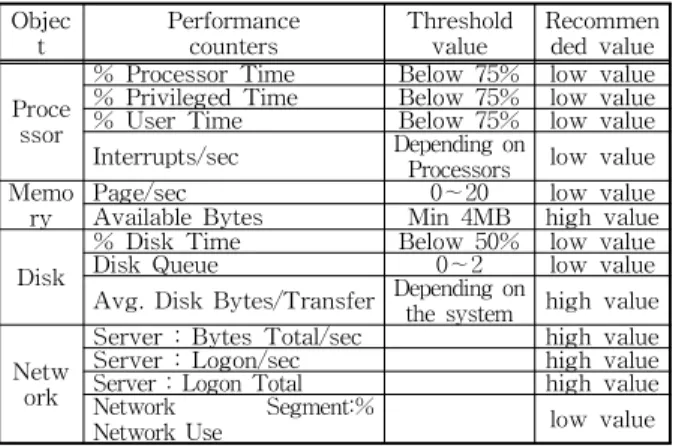
The logon process can have the heaviest traffic in ECM system, as a business portal, which has attribute that the employees go to work and logon at the same time. They use different doc- umentations at work. Therefore we have to con- centrate the performance tuning in logon process.

The most important performance counters and threshold values in logon process were analyzed as shown in table 1.

Objec

t Performance

counters Threshold

value Recommen ded value Proce

ssor

% Processor Time Below 75% low value

% Privileged Time Below 75% low value

% User Time Below 75% low value Interrupts/sec Depending on

Processors low value

Memo ry Page/sec 0∼20 low value

Available Bytes Min 4MB high value Disk

% Disk Time Below 50% low value

Disk Queue 0∼2 low value

Avg. Disk Bytes/Transfer Depending on the system high value Netw ork

Server : Bytes Total/sec high value Server : Logon/sec high value Server : Logon Total high value Network Segment:%

Network Use low value

Table 1. The performance counters and Threshold values

The performance evaluation counters for data- base in ECM system among various counters were listed in table 2.

The priority of the performance counters for the file & printer servers summarized in previous table summary files is "memory > processor >

disk > network". Here are the important perform- ance counters among these as shown below.

• Simultaneous log-on user session(Server : Server Session)

• Number of opened files(Server : Files Open)

• Average transfer size(PhysicalDisk : Avg. Disk Bytes/Transfer)

• Disk access amount(PhysicalDsik : % Disk Time)

• Disk access type(PhysicalDisk : % Read Time,

% Write Time)

• Network utilization(Network Segment : % Network Utilization)

3. ECM system design with Microsoft solution

The hardware of ECM system for a large number of knowledge workers can be configured as shown in Figure 1.

Fig. 1. Sample of the hardware configuration.

We can monitor the performance of Fast

search in Sharepoint through SCOM(System

Center Operations Manager). MGE, storage con-

trol, can identify the individual space and control

the certain area of storage. It will determine

(3)

Area Type CPU(RAM) Server

ECM &

integrated search

WFE SP 2.5GHz+, Hex-Core

2CPU(16GB) 5 servers SP App 2.5GHz+, Hex-Core 2CPU(16GB)

2 servers : SAN Switch required (when implementing a search function)

F·S 2.5GHz+, Hex-Core

2CPU(32GB) 3 servers S·S 2.5GHz+, Hex-Core

2CPU(32GB)

3 servers : configured as 2A-1P; SAN Switch required Monitorin

g SCOM 2.5GHz+, Hex-Core 2CPU(16GB) 1 server Storage

control MGE 2.5GHz+, Hex-Core

2CPU(16GB) 1 server : storage con- trol solution

Table 3. Hardware specification for ECM

where to store the working data ensuring the business continuity.

The ECM system design is implemented to best utilize the 64-bit server and interact with the latest desktop environments. High-level load bal- ancing and stability are ensured through SharePoint configuration information backup and recovery, application-service duplexing, data sharing and partitioning and DB mirroring.

Figure 2 shows an overview of the server struc- ture, built around such features.

Fig. 2. ECM structure design with MS solution.

For service duplexing, two search servers - searcher and collector - were configured as Active-Active to ensure high-availability. The indexer was configured as Active-Passive to ac- tivate the indexer in the second search server when executing indexing. Table 3 shows the specifications of the ECM system.

Abbreviation - EP: Enterprise, ST: Standard, W·S: Windows Server, S·S: SQL Server, SP:

SharePoint, SP·S: SharePoint Server, App: Appli-

cation, F·S: FAST Search, STP: Storage Point

4. ECM implementation using Microsoft solution

Figure 3 shows an example of the master page implemented using SharePoint.

Fig. 3. An example of the master page using SharePoint

Item ① on the screen above provides features like web part, functions listed in the tab, advanced search, history. Meanwhile, item ② shows the navigation information as it relates to the search result. Developers may click on relevant item to navigate to the search results.

Item ③ searches relevant people who are ex- perts in the search topics and shows their work - documents - and item ④ is a feature that shows the most popular search terms in that week. If a term is clicked, users are forwarded to the rele- vant search results.

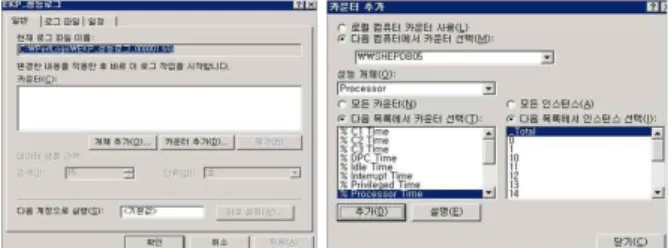
In order to monitor the servers, we can use the performance monitor monitoring program pro- vided by Windows Server, As shown in Figure 4, after we create the log file, we can start the per- formance objects and counters.

Fig. 4. Create performance log files and add the counters.

(4)

When we firstly select the performance object, counter and instance lists are shown. After select a performance object, we can select a counter &

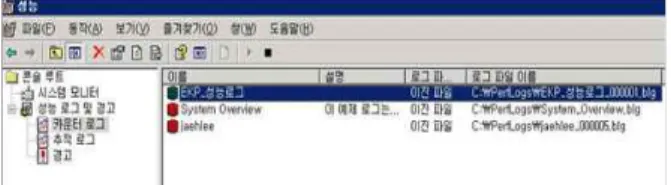
instance, and add the required counter. When we add a counter list, we can choose the data sample interval considering the disk space. The gen- erated performance counter log files are shown in Figure 5.

Fig. 5. Status of creation of performance counter log.

In the figure, we can see the three performance logs such as "EKP_performance logs", "System Overview", and "jaehlee". In addition, it shows the information about the route of each logs.

5. ECM performance testing with Microsoft solution

5.1 Overview of web server performance improvement In regard to the improvement of web server performance, the problems identified were as fol- lows:

5.1.1 Memory leak

IIS was being recycled on a regular basis due to a suspected memory leak from a specific process. Hence, when memory usage dropped to nearly 0%, a log of IIS Recycling was created.

This problem was primarily found to have oc- curred in source code which permitted web appli- cations to over-use the memory. Its cause is sus- pected to have been an absence of deallocation of the memory used from the ASP page. Indeed, the ASP page uses about 30-40MB of memory ac- cording to performance. Thus, the memory usage of the ASP page takes up only a small proportion of the total memory usage. It was, however, de-

termined that there were some memory leaks.

5.1.2 IIS Recycling(web server rebooting) In principle, a normal system does not need to restart IIS or reboot the web server. However, the main causes for the current IIS recycling were found to be Dead Lock State and in- sufficient memory.

Dead Lock State occurs when the ASP.NET worker process has been idle for the time speci- fied by responseDeadlockInterval in the Machine.

config file. At this point, ASP.NET assumes that there is a deadlock and thus, the ASP.NET worker process (Aspnet_wp.exe) is recycled, al- beit unexpectedly.

5.1.3 Excessive use of session

The use of the session to archive user-gen- erated data is not recommendable and it may cause overheads when managing sessions in the server. If a user logs on, creates a session and then terminates the browser, the session remains on the server, leading to resources being tied up on redundant tasks.

5.1.4 Problem with transaction handling

There were a number of codes in which a lock is obtained using Begin Tran and other logic, rather than actual DB-related operations. The solution to this problem is as in the following:

ü Do not call Marshal.ReleaseComObject in the Finally statement when using Legacy Com ü Change to deallocate resources after using

Legacy Com

5.2 Overview of DB server performance improvement

The following problems were found in the DB Server through the unit and integrating testing:

• Excessive CPU usage on regular days(above 80%)

• CPU usage reaches the limit at the end of a

month (100%)

(5)

As-Is Facts To-Be after improvement USERDATA, USERINFO

UserID varchar 8 BranchID varchar 5 WKSTName varchar 40 IpAddress varchar 5 ServerName varchar 20

USERDATA, USERINFO UserID char 8 BranchID char 5 WKSTName char 40 IpAddress char 5 ServerName char 20 Table 4. Review of new DB operation modules

SignedOn int 4

SignedDate datetime 8 SignedOn int 4 SignedDate datetime 8

CREATE PROCEDURE dbo.USP_LOGIN //Data type defined as VARCHAR

@USERID VARCHAR(8),

@BRANCHID VARCHAR(5),

@WKSTNAME VARCHAR(40),

@IP VARCHAR(15),

@SERVERNAME VARCHAR(20) AS DECLARE @TEMPUSER TABLE(

USERID VARCHAR(8),

BRANCHID VARCHAR(5),

…… INSERT INTO USERDATA( USERID, BRANCHID, WKSTNAME, IPADDRESS, SERVERNAME, SIGNEDON, SIGNEDDATE )

VALUES(@USERID, @BRANCHID, @WKSTNAME,

@IP, @SERVERNAME, 1, GETDATE()) // <> / NOT operator used in WHERE clause // in RETURN query

SELECT USERID, BRANCHID, WKSTNAME, IPADDRESS, SERVERNAME FROM @TEMPUSER

WHERE IPADDRESS <> @IP

……

Table 5. Login Stored Procedure : As-Is

• Slow response to handling request on regular days

• Slow retrieving speed at Peak Time (4 p.m.)

The main causes of the bottlenecks are as in the following:

• Excessive lock escalation

• Complicated query statement(sub-query &

sub-query…)

• A large number of Longrun Queries(index scan)

• Excessive page read for insert and update

• Inconsistent data type handling when perform- ing query

In order to distribute the load of DB and web servers, the table used in the new test module re- lated to DB management and several relevant procedures were examined. A significant im- provement in performance was found to be ach- ievable through tuning.

The review of the 5 data tables used in the new test module revealed several columns in USERDATA and USERINFO tables in which INSERT frequently occurs, which are defined as VARCHAR data type.

As CHAR is a fixed-length data type, it is stored in the reserved memory, making it faster in terms of reading and writing speeds.

VARCHAR, by contrast, is fast in reading, but slow in writing as it requires the system to com- pute the length of input first and to then dynam- ically allocate the memory accordingly. Table 4 shows As-Is and To-Be, the latter being the im- provements realized through analysis of the new module schema operating the DB.

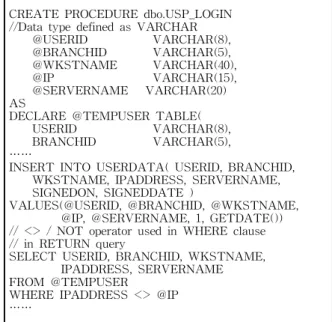
The review of user log-in stored procedure among new test modules revealed that a temporal variable was used to store the information of users with an IPADDRESS that is the same or identical to the USERID of those who log in from the USERDATA table.

USERID and IPADDRESS columns in USERDATA table are unique, and as these col- umns store only two rows, they may negatively affect performance.

As shown below, the OR, <> or NOT oper- ators were used in the WHERE clause in SELECT and DELETE statements. This oper- ator, however, cannot make full use of the index.

Therefore, it is more effective, in terms of per- formance, to separate it into two lines. Further- more, when deleting a record, the system first re- trieves the relevant data, which again may act to degrade the performance. Table 5 below shows the current user Log-in Stored Procedure among new test modules.

Based on the analysis of the modules im-

plemented, it was found that by declaring a local

(6)

ALTER PROCEDURE dbo.USP_LOGIN

@USERID CHAR(8),

@BRANCHID CHAR(5),

@WKSTNAME CHAR(40),

@IP CHAR(15),

@SERVERNAME CHAR(20) AS DECLARE

@USERID1 CHAR(8),

@BRANCHID1 CHAR(5),

…… INSERT INTO USERDATA (USERID, BRANCHID, WKSTNAME, IPADDRESS, SERVERNAME, SIGNEDON, SIGNEDDATE)

VALUES(@USERID, @BRANCHID, @WKSTNAME,

@IP, @SERVERNAME, 1, GETDATE()) IF @IPADDRESS1 <> @IP

SELECT @USERID1 AS USERID,

@BRANCHID1 AS BRANCHID,

@WKSTNAME1 AS WKSTNAME,

@IPADDRESS1 AS IPADDRESS,

@SERVERNAME1 AS SERVERNAMEELSE SELECT USERID, BRANCHID, WKSTNAME,

IPADDRESS, SERVERNAME FROM USERDATA WHERE 1>2

……

Table 6. Login Stored Procedure : To-Be

Test 400 users in USP-GETSUPERVISOR and 200 users in USP_LOGIN at the same time Before

tuning

EXECUTION TOTAL COST : 79.23%

TOTAL PAGE READ count : 38 Average CPU usage : 25.738%

The number of SQL query handed : 1,192.963/sec After

tuning

EXECUTION TOTAL COST : 20.77%(↓) TOTAL PAGE READ count : 22(↓) Average CPU usage: 17.178%(↓)

The number of SQL query handed: 1,303.129(↑)/sec

Table 7. Comparison of performance after DB server tuning variable instead of the table variable in the Stored

Procedure called upon in USP-LOGIN, significant performance improvements can be realized.

For USER and IPADDRESS columns in the USERDATA table, the general, local variable was declared, instead of the table variable.

An improvement was thus shown to be real- ized through the table variable least used in the new module and the OR operator in the WHERE clause in SELECT statement being handled with the local variable only.

Further improvement was found to be realized through alterations to code which does not make the most of the index due to the use of <> and NOT operator in the WHERE clause. Changing it into a query statement that uses a clustered index in the USERDATA table leads to performance gains. Table 6 shows USP_LOGIN module im- proved through tuning.

5.3 Evaluation after DB Server improvement

The modified USP_LOGIN procedure was test- ed through a process of first tuning by focusing on the alterations made. It was found that CPU usage is reduced while processing speed per sec-

ond has been increased, as shown in Figure 6.

Fig. 6. Evaluation of DB-related module performance

Table 7 shows the performance of the DB server before and after the tuning.

With Stored Procedure in which advanced USP_LOGIN is applied, EXECUTION TOTAL COST was reduced by 20.77% compared to that of the existing module, which is 79.23%. TOTAL PAGE READ count was reduced from 38 to 22 and the average CPU usage decreased to 17.178%

while the number of SQL queries handled per second increased from 1,192.963 to 1,303.129 – clearly demonstrating that the performance of the server has been improved.

Figure 7 shows a chart picture about the measure value of % Processor Time and Batch requests\sec, which are the important perform- ance counters of database server.

Fig. 7. % Processor Time and Batch requests\sec monitoring.

(7)

Component Counter Peak Time

Before Average Min Max

After Average Min Max

Processor Processor Time 52.618 37.596 79.782 36.476 13.071 69.973 System Processor

Queue Length 0.605 0 14

0.09 0 2

Physical Disk

Avg.Disk Queue

Length 20.081 3.972 70.892 14.313 0.002 36.049 Disk Reads/sec 893.096 588.395 1483.337 557.677 225.347 791.231 Server: SQL

Connections User 2609.765 1015 5906 786.01 602 1417 Average Latch

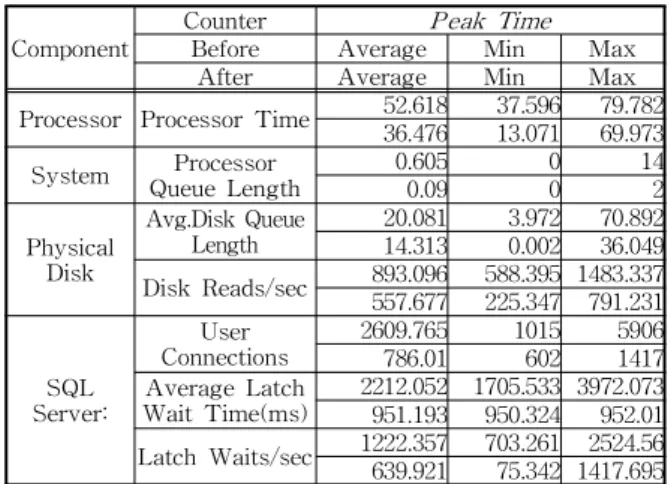
Wait Time(ms) 2212.052 1705.533 3972.073 951.193 950.324 952.01 Latch Waits/sec 1222.357 703.261 2524.56 639.921 75.342 1417.695 Table 8. Result of DB server improvement

Among the measured performance counters, % Processor Time showed average 0.4% up to 1.2%

per day with the even curve regardless of the peak time. Batch requests\sec showed average 11 process per second per day, not so heavy. Table 8 shows the final report on DB server improve- ment project.

In addition, the number of log-ins were sur- veyed for the period following the system improvements. Figure 8 below clearly shows an increasing number of log-ins over time.

Fig. 8. Increase in the number of log-ins after improving DB server.

After this performance improvement project, the number of daily log-ins increased. Signifi- cantly, the number of users of each DB server marked a significant increase in the third week.

Such continued increase in the number of users is evidence of the system being stabilized in the initial stages of its implementation and deployment.

6. CONCLUSIONS

This paper has shown a way to optimize DB and web servers in order to improve the perform- ance of ECM as based on MSF development methodology.

In terms of the web server performance, this paper provides an example of how the use of ac- curate code can resolve performance degradation issues. Such issues were in this paper caused by a memory leak due to inadequate handling of an exception in ASP pages, IIS recycling resulting from a Deadlock State involving insufficient mem- ory, and a problem with transaction handling.

In order to improve the performance of the DB server, the new module schema that controls the DB was analyzed and the complicated query statements which resulted in bottlenecks were modified. Such bottlenecks were found to be the cause of excessive page reading.

The evaluation of new Stored Procedure, in which the improvement scheme for DB control module is applied, showed that execution total cost, total page read and CPU usage were re- duced compared to that of the previous module.

The number of SQL queries handled per second was found to have increased, evidence of server performance having been improved.

Finally, the number of users was surveyed for a period following the DB performance improve- ment project. There was found to have been an increase in the number of log-ins over time.

With the improved system, the number of users had increased significantly by the third week following implementation, proving that the system can be stabilized in the early stages of its deployment through tuning.

REFERENCES

[ 1 ] Yun-Kyoung Kim, Research of Using Web

Log Analysis For Design and Implementa-

tion of Effective Cyber Educational System ,

(8)

Master‘s Thesis of Ewha Womans University, 2003.

[ 2 ] Seung-Bae Choi, Kyu-Kon Kim, Chang-Wan Kang, Sung-Ki Cho, and Jong Kwang Son,

"A Study on th Comparison of Web Log Analyzers," Journal of the Korean Data Analysis Society , Vol. 4, No. 3, pp. 327-340, 2002.

[ 3 ] Sun-Woo Lee, Jong-Soo Kim, and Tai-Suk Kim, “A Design of EDMS for the Smart Work based on the Integration of IT Infras- tructure,” The Korea Multimedia Society, Spring Conference , Vol. 15, No. 1, pp. 396- 397, 2012.

[ 4 ] Sun-Woo Lee, Jong-Soo Kim, and Tai-Suk Kim, “A Design of the Groupware Portal based on the Smart Work for the Individual Peculiarities,” Korea Convergence Software Society, Summer Conference , Vol. 2, No. 1, pp. 58-60, 2012.

[ 5 ] Jae-Jin Shim, Strategy of Introduction Enterprise Content Management System for Document Innovation , Master‘s Thesis of Dankook University, 2010.

[ 6 ] Dong-Heon Lee, Overall Structure and Record Management Functions of Enterprise Content Management(ECM) , Master‘s Thesis of Myeongji University, 2009.

[ 7 ] Microsoft, Microsoft Smart Work White Paper , 2010.

[ 8 ] Jooyoung Son, “Implementation of a Windows NT Based Stream Server for Multimedia School Systems,” Journal of th Korean Multimedia Society , Vol. 2, No. 3, pp. 277- 288, 1999.

[ 9 ] Jung-Yee Kim, “Real-Time Sensor Moni- toring Service based on ECA,” Journal of th Korean Multimedia Society , Vol. 15, No. 1, pp. 87-89, 2012.

Sun-Woo Lee

He received his B.A. degree from Sogang University in 1989, his MBA degree from Sogang University in 2001, and his Ph.D. degree from the de- partment of Computer Software Engineering of Dong-eui University in 2013. He has worked at the global IT companies of Fujitsu, Sun Microsystems, Cisco Systems and Microsoft as a systems engineer, a proj- ect manager, an account executive and a director. His current research interests are contents management &

social analytics based on the Microsoft’s technology.

Jong-Soo Kim

He received his B.S. degree from Pukyong National Univer- sity in 1992, his M.S. degree from the department of Compu- ter Engineering, Busan University of Foreign Studies in 2003, and his Ph.D. degree from the de- partment of Software Engineering, Dong-eui Univer- sity in 2006. He has worked at the Institute of Telecommunications Information in Dong-eui University as a researcher. His current research interests are net- work game design and web applications.

Tai-Suk Kim

He received his B.S. degree

from the department of electrical

engineering, Kyungpook Natio-

nal University in 1981 and his

M.S. and Ph.D. degrees from the

department of computer science,

Keio University in 1989 and

1993, respectively. Since 1994,

he has been a faculty member of the Dong-eui

University, where he is now the professor in the de-

partment of software engineering. His current research

interests are information system and Internet business.

수치

Fig. 1. Sample of the hardware configuration.
Figure 3 shows an example of the master page implemented using SharePoint.
Fig. 5. Status of creation of performance counter log.
Table 5. Login Stored Procedure : As-Is
+3

참조

관련 문서