Ⅰ. INTRODUCTION
The 3D virtual reality(VR) is the new technology and popular topic for researching
[1]. Many companies try to develop their VR technology for making
*학생회원, 충북대학교 전기전자컴퓨터공학부 컴퓨터과학 전공 (School of Electronics & Computer Engineering, Chungbuk National University)
**정회원, ㈜조이펀 (JoyFun, Korea)
***정회원, 충북대학교 전기전자컴퓨터공학부 컴퓨터과학 전공 (School of Electronics & Computer Engineering, Chungbuk National University)
ⓒCorresponding Author(E-mail : [email protected]) Received ;
October 19, 2016
Revised ;December 16, 2016
Accepted ;December 26, 2016
customers convenience with HMD devices, but most of HMD VR applications are implemented with mobile build-in. If we imagine that we can run the virtual reality application on the web browser, thus only one VR web application can be accessed widely anywhere any time. Web-3D based on computer graphic technology, is used to display three-dimensional 3D on the web browser. It means the 3D virtual scene, 3D stereo effect embedded on the browser, thus internet users can be experienced with 3D virtual scene, they feel look like reality and directly manipulation such as rotate and other action. To support that, there are many frameworks such as WebVR
[2]and A-Frame
[3], that can be visualized 논문 2017-54-1-20
X3DOM을 이용한 가상현실
( Virtual Reality Using X3DOM )
부 띠 에*, 류 가 애*, 정 상 권**, 이 국 환**, 류 관 희****
( Vuthea Chheang, Ga-Ae Ryu, Sangkwon Jeong, Gookhwan Lee, and Kwan-Hee Yoo
ⓒ)
요 약
웹 3D 기술은 과학, 의료, 공학 그리고 멀티미디어 가시화의 경험을 시뮬레이션하기 위해 사용될 수 있다. 웹 환경에서 3D 가상현실은 운영체제 등에 관계없이 사용될 수 있으며, 가상현실은 3차원 컴퓨터에 의해 생성된 현실적인 영상, 음향과 다른 감각을 표현하고 사람들과의 사용작용을 원활하게 하기 위해 사용될 수 있다. 특히 가상현실에 참여하는 사람들은 몰임하여 객체를 조작할 수도 있고, 원하는 목표를 위해 단계별 행동을 실행할 수 있다. 일반적으로 웹 환경에서 3D 상호작용 콘텐츠를 정의한 ISO 국제표준인 X3D를 이용하여 가상현실 공간을 생성한다. 본 논문에서는 X3D 가상현실 공간에서 스테레오 렌더링 을 논의하고, HMD VR을 위한 새로운 X3D 노드를 제안한다. 제안한 노드들은 X3D 웹 브라우저인 X3DOM에 의해 가시화되 었다.
Abstract
Web 3D technology can be used to simulate the experiments of scientific, medical, engineering and multimedia visualization. On the web environment, 3D virtual reality can be accessed well without strictly on operating system, location and time. Virtual Reality (VR) is used to depict a three-dimensional, computer generated realistic images, sound and other sensations to replicated a real environment or an imaginary setting which can be explored and interacted with by a person. That person is immersed within virtual environment and is able to manipulate objects or perform a series of action. Virtual environment can be created with X3D which is the ISO standard for defining 3D interactive, web-based 3D content and integrating with multimedia. In this paper, we discuss about X3D VR stereo rendering scene and propose new X3D nodes for the HMD VR (head mounted display virtual reality). The proposed nodes are visualized by the web browser X3DOM of X3D.
Keywords : X3DOM Virtual Reality, X3D, X3DVR, HMD VR, Web 3D
virtual reality on the web browser which provided to access to HMD virtual reality devices such as Google Cardboard or Oculus. But most of those frameworks are worked closely with a 3D graphics library including Three.js
[4].
Since 3D graphics library is providing pure rendering functions, it is redundant to use WebVR for the stereo rendering with respecting to 3D virtual space.
The goals in this paper is proposing the stereo rendering of X3DOM Virtual Reality on the web browser for X3D virtual space. The idea is about the implementation by using X3DOM
[5]which is the X3D
[6]
nodes can be integrated 3D contents seamlessly into HTML5 DOM content. X3DOM will be integrated directly into HMD devices and display the stereo scene of the virtual reality. We also propose the new X3DOM nodes for this research.
Ⅱ. THE PROPOSED X3DOM VIRTUAL REALITY ON THE WEB
Various experiments are also worked on X3DOM stereo rendering scenes but it was different from those experiments. We are trying to research deeply about X3DOM virtual reality how to separate the stereo scenes and integrate X3DOM content directly to display on HMD devices. By creating new X3DOM nodes for virtual reality services, the X3DOM content will be integrated seamlessly and fast directly loaded into HMD devices. Furthermore, in order to develop X3DOM virtual reality, there are three steps that need to understand. First one, 3D/Image generating is the generation of images, 3D objects and 3D virtual world by using X3DOM. Second, manipulation and the controlling of HMD devices, which is the key element for interacting within virtual world, is to track the orientation, position, head tracking and user inputs from the HMD devices. Third, stereo vision is accomplished by creating two different stereo scenes of the world once for each eye.
1. Global Scheme of X3DOM Virtual Reality
X3DOM Virtual Reality features are intuition to be dealt on the browser by the rendering of WebGL technique which is a API for rendering interactive 3D graphics within any compatible web browser.
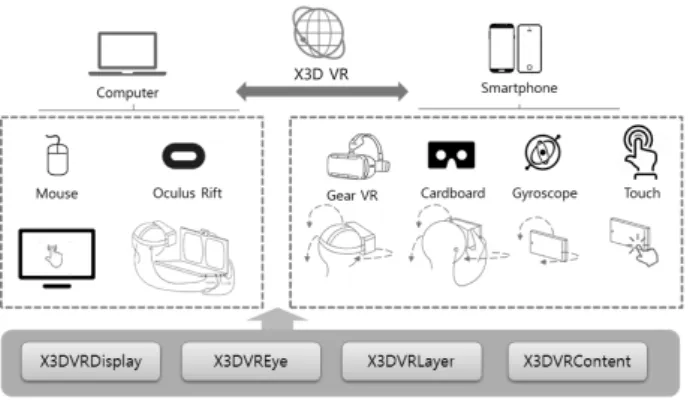
Fig. 1. shows the global scheme of X3DOM virtual reality that works on web browser which can be accessed from both computer and smart phone. Web browser on computer can access to the URL and display stereo views; by clicking and moving the mouse, we can look around the contents. For smart phone, we can move around the phone to see full contents of virtual reality because of gyroscope sensor.
그림 1. X3D 가상 현실의 전체적인 구조 Fig. 1. Global scheme of X3D Virtual Reality.
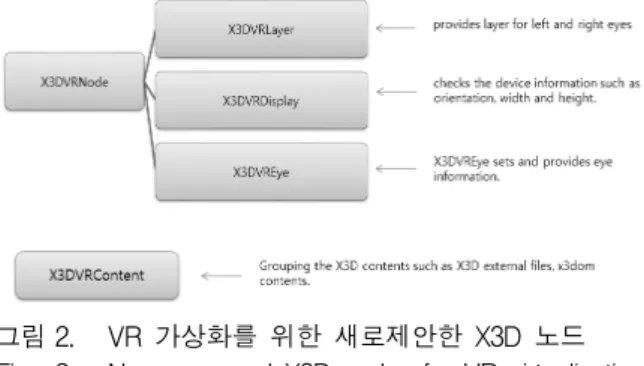
2. The proposed new X3DOM node for VR X3DOM nodes are important for implementation 3D contents and interaction in virtual reality. There are many X3DOM nodes related with sensor, but there is no node that related with HMD VR. Thus, Fig. 2.
shows about our proposed nodes for X3DOM VR to display and render scene of virtual reality on HMD devices.
The basic structure of the scenes for rendering
Stereoscopic is used to separate left eye, right eye
and model content. Left/Right eyes will be defined in
X3DVRLayer node which provides layer for each eye
and rendering process. Model content is used to
define the 3D model which created by X3DOM or
external X3D files. Node that represented the model
content is X3DVRContent. X3DVRDisplay node will
be used to check the HMD devices information such
as width, height and orientation, then response as a
Boolean value. X3DVREye is used to set and provide
HMD VR eye information such as offset, renderWidth, renderHeight and interpupillaryDistance.
그림 2. VR 가상화를 위한 새로제안한 X3D 노드 Fig. 2. New proposed X3D nodes for VR virtualization.
2.1 X3DVRNode
X3DVRNode is the abstract node of X3DVR that extended from X3DChildNode and it also a parent node for other X3DVR child nodes such as X3DVRLayer, X3DVRDisplay, and X3DVREye. Its functionalities are just the abstract or namespace for X3DOM Virtual Reality which are include two fields description and metadata.
- metadata uses for adding the metadata information into X3DVRNode.
- description attribute uses to present the users with more detail information of X3DVRNode.
2.2 X3DVREye
This nodes extends from X3DVRNode which provides and set the eye information. There are five fields such as metadata, description, renderWidth, renderHeight, and interpupillaryDistance which worked for input and output the eye information.
- metadata allows users to add metadata information into X3DVREye.
- description attribute allow users to add the detail information of the node processing.
- renderWidth describes the render target width of each eye viewport, the renderWidth for left and right eye must not overlap and the right eye must be to the right of the renderWidth of the left eye.
- renderHeight describes the render target height of each eye viewport in pixel. If multiple eyes are rendered in a single render target, then the
render target should be made large enough to fit both viewports.
- interpupillaryDistance used for setting the distance between the center of the pupils of the two eyes.
2.3 X3DVRDisplay
X3DVRDisplay is one of the child nodes that implemented from X3DVR, uses for checking the HMD VR devices information. In order to present a VR scene, we need to check some informations or conditions for better work. X3DVRDisplay provides many important functionalities such as checking the HMD VR devices connection, checking devices has displayed and checking the capability of presenting to HMD devices.
- metadata attribute in X3DVRDisplay node using for adding the metadata information to the node.
- description is used to describe the node more detail information about its process.
- By using isConnected attribute, this attribute will be returned the boolean value of the VR devices connection status.
- isPresenting is used for returning the VR presentation state as boolean value, thus we can know whether virtual reality display is currently having presented through it.
- canPresent which is the attribute using for checking the capability of presenting content to HMD device, checking the device landscape for smart phone while first viewing the stereo scenes, and suggests users to view the stereo scenes in landscape mode.
- hasDisplay used for disable or enable the X3D content display which users can give the true/
false value through this attribute, then if value is
“true” it means display the 3D contents and
“false” means not display the contents.
2.4 X3DVRLayer
The X3DVRLayer is the layer which provided the
functionalities to left and right eye layer. The
rendering for virtual reality is used to separate the
left and right eye. In order to do that, we need the
layer for rendering each eye, so we propose this node
for rendering the stereo view of the virtual reality.
- metadata is the field using for adding the metadata information into this node.
- description field in the X3DVRLayer node specifies a textual description for the node. This field wish to present users with more detailed information about the X3DVRLayer.
- leftBounds attribute defines the texture bounds for rendering the left eye layer which represented in virtual reality. In this attribute, users just defined the same name of leftBounds and group id for left layer. For developer view point, we use renderedTexture node which applied the attribute such as stereoMode to the left eye and set the default value for interpupillary distance.
- rightBounds attribute define the texture bounds for the right eye rendering. Its process is the same of leftBounds attribute, but just render to the right parts of right eye layer.
2.5 X3DVRContent
The virtual reality contents will be represented in X3DVRContent which is the node for grouping the 3D virtual world design and animation. Actually, VR contents can be included from external X3D files or created with X3DOM. As we mentioned earlier, the X3D is the standard file format for creating the 3D virtual world and animation. X3DOM is the javascript library used for integrating 3D content seamlessly to webpage. Thus we can write or include the X3D files within X3DVRContent in order to show those 3D to the virtual reality world. In this nodes we proposed three attributes for representing the X3DVRContent.
- metadata which is the filed using for adding the metadata information into the node.
- description attribute specifies the detail information of the node and describe what the node can do.
- hasContent is the attribute using for checking the content for viewing the virtual reality.
Sometime, when the rendering error it won't show the 3D content to show in the device, thus we can define this attribute to check the content exist.
Ⅲ. IMPLEMENTATION RESULTS
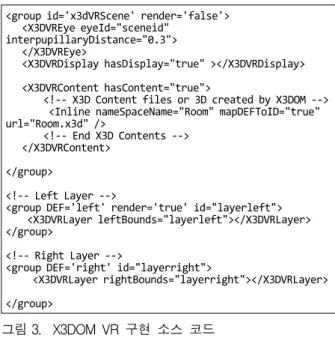
Fig. 3. shows the implementation of X3DOM virtual reality by using new X3DOM nodes which described above. Actually, we are implementing with this work, thus the nodes need to define many attributes and default values to each node. As the result, X3DOM VR can virtualize the virtual reality on the web browser and can be accessed from both computer and smart phone devices via web page URL or IP address.
<group id='x3dVRScene' render='false'>
<X3DVREye eyeId="sceneid"
interpupillaryDistance="0.3">
</X3DVREye>
<X3DVRDisplay hasDisplay="true" ></X3DVRDisplay>
<X3DVRContent hasContent="true">
<!-- X3D Content files or 3D created by X3DOM -->
<Inline nameSpaceName="Room" mapDEFToID="true"
url="Room.x3d" />
<!-- End X3D Contents -->
</X3DVRContent>
</group>
<!-- Left Layer -->
<group DEF='left' render='true' id="layerleft">
<X3DVRLayer leftBounds="layerleft"></X3DVRLayer>
</group>
<!-- Right Layer -->
<group DEF='right' id="layerright">
<X3DVRLayer rightBounds="layerright"></X3DVRLayer>
</group>
그림 3. X3DOM VR 구현 소스 코드
Fig. 3. The implementation source code of X3DOM VR.
Fig. 4. shows the stereoscopic of 3D virtual reality
which visualized the room into virtual reality. After
wearing the HMD devices we can look inside the
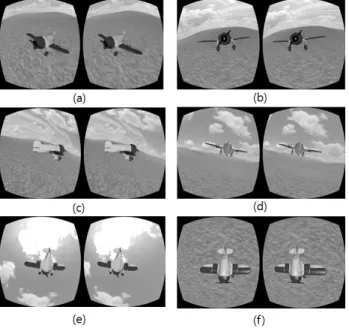
room to see a real-like room. Moreover, Figure 5 also
shows the new X3DOM node that we have defined
and described above to visualize stereo scene in
virtual reality. In the figure we can see the air plan
in the virtual reality and the camera viewpoint from
the front, back, left, right, top and down. The air plan
can be animated and moved by using timer and route
function of X3DOM, thus the thing of virtual reality
is about stereo rendering. The 3D content, camera
viewpoint, animation and timer; they all depend on
the X3DOM node which we have used for creating
those content.
그림 4. 웹 브라우저에서 X3DOM VR 렌더링 예
Fig. 4. Examples of X3DOM VR rendering on web browser.
그림 5. 가상현실에서 X3DOM의 양안 렌더링
Fig. 5. Stereoscopic rendering of X3DOM in virtual reality.
Furthermore, we also can visualize the multiple animation with a single TimeSensor node of X3DOM as we can see in Figure 6. The objects animation is fade in and fade out according to cycleInterval of TimeSensor node. Totally, we can visualize the 3D content and animation that created by X3DOM or external X3D files to virtual reality world by includes those content between the X3DVRContent node.
Ⅲ. CONCLUSION
In this paper, we specified and discussed about virtual reality with X3D that is a really interesting
그림 6. 가상현실에서 다중 객체의 애니메이션 결과 Fig. 6. The multiple animation objects in VR.