1. Introduction
The Internet is constantly evolving and presents a lot of challenges for web application developers[1]. Excessive traffic requires services to better handle multiple sessions at the same time[2]. "Slashdot Effect" also shows how many times the traffic can change[3]. The web enables real-time service to be provided in corporate security system operation[4], and to provide real-time service to enterprise marketing strategy[5]. So, web applications must be able to process concurrent requests efficiently and in real time. Lauer and Needham argue that processing can be modeled by a threading or messaging system, claiming extensive duality in computing[6]. A web application that processes concurrent requests implements threading by allocating each incoming request to a separate execution thread. Conversely, message passing
or event-based systems use a single thread to process events, such as incoming requests, in the queue. Each approach has advantages and disadvantages depending on implementation.
Node.js is one of the more recent frameworks that implement event models through the entire stack. Node.js (or Node) is a single-threaded server-side JavaScript environment implemented in C and C ++[7]. The node architecture is easy to use as a expressive and functional language for popular server-side programming among developers[7]. Nodes use JavaScript V8 engine developed by Google to quickly and robustly implement JavaScript[8,9] to get the best performance from the nodes. Most web applications want users to get real-time responses. For example, in the case of a movie theater selection, while selecting a screening place and making a payment, if someone else makes a reservation, you should know the fact
* Division of Computer-mechatronics Engineering, Shamyook University
Received February 05, 2018 Revised February 09, 2018 Accepted February 13, 2018
Automatic Alignment System for Group Schedule of Event-based Real-time Response Web Processing using Node.js
Hee-Wan Kim*
Abstract A web application running on the Internet is causing many difficulties for a program developer, and it requires to process multiple sessions at the same time due to the occurrence of excessive traffic. Web applications should be able to process concurrent requests efficiently and in real time. Node.js is a single-threaded server-side JavaScript environment implemented in C and C ++
as one of the latest frameworks to implement event models across the entire stack. Nodes implement JavaScript quickly and robust to achieve the best performance using a JavaScript V8 engine developed by Google. In this paper, it will be explained the operation principle of Node.js, which is a lightweight real-time web server that can be implemented in JavaScript for real-time responsive web applications. In addition, this application was practically implemented through automatic alignment system for group scheduling to demonstrate event-based real-time response web processing.
Key Words : HTML5, event-based, Node.js, real-time response, web application
and cancel the payment. At this time, the reservation of the seat should be reflected on the screen in real time.
In this paper, it is explained the operation principle of Node.js, which is a lightweight real-time web server that can be implemented in JavaScript for real-time responsive web applications. The prototype is based on HTML5 canvas and textarea. It will be discussed web services. In addition, this application is practically implemented through automatic alignment system for group scheduling to demonstrate event based real - time response web processing.
2. Operation of Realtime Web Application
2.1 Event-Driven and Non-Blocking I/O The very first web pages were hypertext based[10], where links in one page will load a different related page. Traditional web UIs follow this paradigm but the content is dynamically generated based on the parameters attached to a given link. Key characteristics of such UIs are multi-page interface, full-page load for each user interaction, and server-side view generation. Fig. 1 shows a typical user interaction with a traditional web UI, highlighting these characteristics (the technologies referenced in the figure are those used within Experiment Dashboard applications in particular)[11].
Fig. 1. Typical user interaction with a traditional web UI
Since its inception in 1995, JavaScript has solved the problems of the front-end and back-end domains.
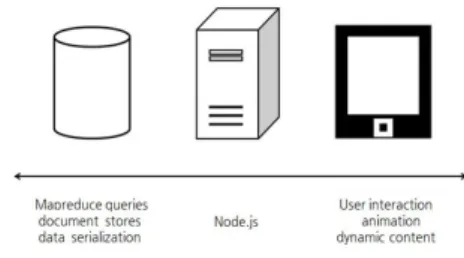
Fig. 2. Node.js in the javascript spectrum
In Fig. 2, JavaScript in the web browser on the right hand side is often used to wait for user input. The left-hand side of the back-end database uses JavaScript extensively, from editing records to performing ad-hoc queries and mapreduce tasks. Much of the work of middleware is tied to I/O like client-side scripting or databases. These server side programs often have to wait for the results of the database or for feedback or connection requests from external web servers to come in.
Node.js solves this problem.
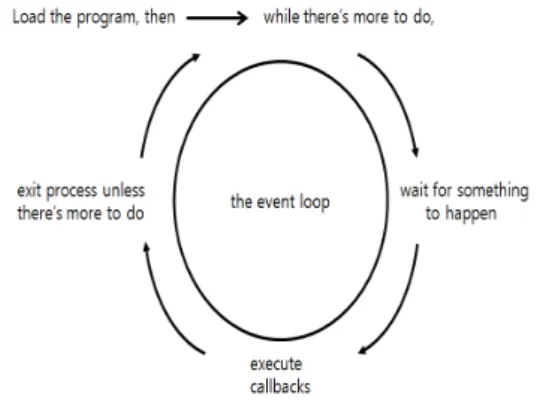
Node.js connects the JavaScript to the event loop so that it can be processed quickly when an event occurs. The event loop shown in Fig.
2 runs endlessly and when an event occurs, the node activates a callback function that is listening to the event. Other systems try to achieve parallelism by executing a lot of code at the same time and usually create many threads for this purpose. However, Node is a single-threaded environment and in any case it executes only one line of code at a time. Node can do this because most I / O operations are handled using non-blocking techniques. Rather than wait one line at a time until the operation
finishes, you can create a callback function that will be called when the operation succeeds or fails.
Fig. 3. Event loop of Node.js
2.2 Module
The concept of a module is a kind of library concept that allows you to load modules from other files. You can think of the concept of a
#included library in another class that imports java. The module is implemented in file units, which are exposed to the outside using export.
Think of it as a public method of a java class.
If a function in the file does not exports, it can not be called from the outside.
If you have a hello function in your Hello.js file and want to load it in another file, you can define it in the Hello.js file as follows
var hello = function(){...}
exports = hello;
Use this hello function to invoke the module with require (for example, from app.js) and invoke it.
var hello = require('./Hello');
hello();
require specifies the filename of the module you want to use, except for the ".js" extension.
Anything that can be exports from a module becomes a function and a JavaScript object. In
the above example, the module is used by using the function type. If you want to export the object type,
exports.hello = function(){...}
To export and use, can use as follows.
var h = require('./Hello');
h.hello();
2.3 Prototype System
In this section, it will be seen how the service of the Node.js server is done through the prototype system. The Node.js module used in the server application of the prototype system is as follows.
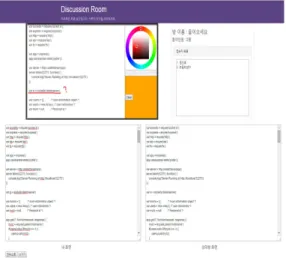
The page in Fig. 4 has a canvas and a textarea. The canvas can be dragged with a mouse to draw lines, and the canvas screen can be broadcast to any page connected to the server. This is because the event corresponding to the drag is registered, and the coordinates of the dragged mouse are passed as arguments to the callback function, so that the callback function draws the same line at the coordinates received. In addition, the input text can be broadcasted by registering an event for text input and executing a callback function on it.
Therefore, the user can receive real-time responses to the contents displayed on the canvas in real time and the contents inputted in the textarea.
Fig. 4. Canvas / Textarea Pages
In Node.js, you register (define) the event with the on method and emit a specific event with the emit method. In the canvas drag event of the prototype system shown in Fig. 5, the server is registered in the form of socket.on ('drag', callback), and the client emits an event by emit ('drag').
Fig. 5. Event processing flow of the prototype system
The server executes a callback function for the event that occurs, and what it does is broadcast the data received to the connected clients. The broadcast is also triggered by the event. When the broadcast event is emited, the canvas can be updated by executing the
callback method for the update event that is turned on in the client-side script.
Fig. 6. Sequential processing with callback
3. Automatic Alignment System for Group Schedule
3.1 Overview of automatic alignment system for group schedule
A group has to schedule a large number of people to schedule a meeting, but during such a time, the group schedule that has been laid out due to personal circumstances that have been forgotten is often canceled. For example, in Google Calendar, only the function of checking personal schedule and friend's schedule is implementing. In order to meet all of these requirements, this service allows users to customize and apply the group schedule by not only searching for personal schedule but also searching for and applying the user's ID so that the group schedule can be canceled as much as possible.
3.2 Requirement of group schedule automatic alignment
3.2.1 Functional requirements
The functional requirements for the automatic alignment system from the user's
point of view are as follows.
Table 1. Functional requirements
3.2.2 Non-functional requirements The non-functional requirements of this system are as follows.
Table 2. Non-functional requirements
3.3 Data Modeling
The DB structure of this website is shown in Fig. 7.
Fig. 7. Data Modeling
The member table refers to the PK of the question table, and the note able refers to the PK of the member table and the group schedule table. In order to prevent duplication of repeated data in individual schedule and group schedule table, time schedule table is created separately and the schedule start time and end time are managed according to schedule number.
3.4 Flow chart of system
The flow of the automatic alignment system for group scheduling is as shown in Fig. 8.
Non-members sign in after signing up. After logging in, the member inputs the content of his/her schedule, and the web site registers the contents in the DB table through data verification of the schedule contents. When registering a group schedule, search for and add members to schedule together, and send a group calendar invitation message. The member who receives the invitation message decides whether to accept or reject the schedule, and when the conditions are satisfied according to the registration conditions of the group schedule, the schedule is registered in the members' schedule database. The registered member's schedule is displayed in the calendar of the main page in a different color according to the category.
Fig. 8. System Flow
3.5 Initial Screen
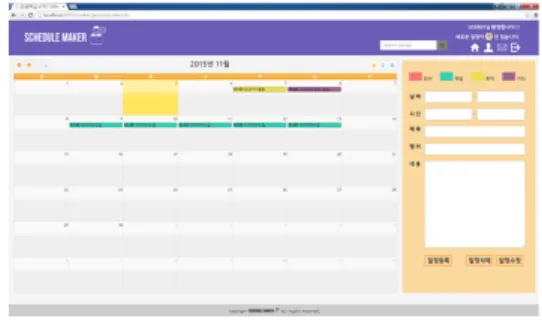
When you run this web application, the screen shown in Fig. 9 is displayed. Upon connection, the corresponding calendar is displayed along with the calendar corresponding
to the date and month. On the right side of the main screen, there is a schedule registration button.
Fig. 9. Initial Screen
This screen is output screen by searching the personal schedule and the group schedule. This application is implemented so that it can be output separately by searching its schedule on the search window at the upper part of the main screen.
Fig. 10. Schedule Search Screen
4. Conclusion
The real-time response mechanism of the canvas and the textarea prototype can be applied to various services. We can simply implement a real-time response web application by registering the events in the script code of the server and client and generating them. By placing Node.js as a server, users can chat and
real-time interact with the browser by implementing a canvas-based web game, and can provide a satisfactory service to users through various modules such as file I/O.
In this paper, it is introduced Node.js, a lightweight web server that can be produced using JavaScript, and examined the mechanism of real-time response through a prototype system. JavaScript can implement on the server-side beyond the client-side by creating lightweight web applications. The prototype was based on HTML5 canvas and textarea. In addition, this application was implemented through automatic alignment system for group scheduling to demonstrate event-based real-time response web processing.
Future research will be able to easily and user-friendly web service for most web applications by systemizing framework for lightweight event-based real-time response web based on Node.js server.
REFERENCES
[1] Labovitz, C., Iekel-Johnson, S., McPherson, D., Oberheide, J., and Jahanian, F.
“Internet Inter-Domain Traffic”, SIGCOMM
’10, 2010.
[2] L. A. Wald and S. Schwarz. “Seismological Research Letters”, The 1999 Southern California Seismic Network Bulletin, vol.
71, No.4, 2000.
[3] Matt Welsh, David Culler, and Eric Brewer,
”SEDA: An Architecture for
Well-Conditioned, Scalable Internet Services”, ACM Symposium on Operating Systems Principles, 2001.
[4] Y. W. Jeong, J. Y. Sohn, J. C. Chun, and K.
S. Choi, “Development of a RADIUS WLAN Security System for Industrial Applications
Based on WEB”, The Journal of Korea Institute of Information, Electronics, and Communication Technology, pp.599-603, Vol.9, No.6, December 2016.
[5] B. K. Lee, E. H. Jeong, and Y. N. Jung, “A Design of SNS and Web Data Analysis System for Company Marketing Strategy”, The Journal of Korea Institute of Information, Electronics, and Communication Technology, Vol.6, No.4, pp.195-200, December 2016.
[6] Lauer, H.C., Needham, R.M., ”On the Duality of Operating Systems Structures,”
in Proc. Second International Symposium on Operating Systems, IR1A, Oct. 1978, reprinted in Operating Systems Review, 13, pp. 3-19, April 1979.
[7] Tilkov, S., Vinoski, S. “Node.js: Using Javascript to Build High-Performance Network Programs. Internet Computing”, IEEE, STRIEGEL, GRAD OS F’11, PROJECT DRAFT 6, 2010
[8] Paruj Ratanaworabhan, Benjamin Livshits, and Benjamin Zorn, “JSMeter: Comparing the behavior of JavaScript benchmarks with real web applications”, In USENIX Conference on Web Application Development (WebApps), June 2010.
[9] Google Javascript V8,
http://code.google.com/p/v8/
[10] Berners-Lee T, Cailliau R, “1990 WorldWideWeb: Proposal for a HyperText Project”
(http://www.w3.org/Proposal.html retrieved 2012-06-22)
[11] J Andreeva, I Dzhunov, E Karavakis, L Kokoszkiewicz, M Nowotka, P Saiz, D Tuckett, “Designing and developing portable large-scale JavaScript web applications within the Experiment Dashboard framework“, International Conference on Computing in High Energy and Nuclear Physics, pp.1-11, 2012
Hee-Wan Kim [종신회원]
•Aug. 1995 : Sungkyunkwan Univ, Computer Eng. MS
•Feb. 2001 : Sungkyunkwan Univ, Computer Eng. Ph.D
•May. 1996 : Professional Engineer(IT)
•Mar. 1996 ∼ current : Shamyook Univ., Dept. of Computer, Professor
<Research Interests>
Database, Information Audit, Software Engineering