간호학과의 컴퓨터 활용 교과목 수업을 위한 브랜디드 러닝을 적용한 교과과정 설계
윤성자
*
ㆍ김노환**
ㆍ박진섭***
Blended Learning Applied Curriculum Design for Nursing Department’s Computer-Utilizing Academic Subjects
Sung-Ja Yoon
*ㆍNo-Whan Kim
**ㆍJin-Seob Park
***요 약
본 논문은 간호학과의 컴퓨터 활용 교과목의 내실 있는 수업을 위하여, 관련 자격시험의 검정요강과 국내 대학에서 강의중인 교재와 강의계획서의 내용들을 분석한 후 효과적인 수업이 이루어질 수 있도록 브랜디드 러닝을 적용하여 교과과정을 설계하면서, 컴퓨터 활용 관련 국내외 자격시험의 출제경향과 실무활용 사례를 분석하여 자격증 취득 및 실무능력 제고가 가능한 새로운 교과과정을 제안하였다.
본 논문에서 제안하는 컴퓨터 활용 교과목의 교과과정은 강의와 실습의 두 가지 트랙을 면대면 수업과 이 러닝 강좌를 혼합한 브랜디드 러닝을 기반으로 주차별로 핵심영역, 교육목표, 강의 등을 포함하고 있으므로, 교수자에게는 좋은 교수방안이 될 것이며 학생에게는 컴퓨터 활용 분야의 자격 취득과 취업을 위한 동기부여 로 우수한 학습 결과가 기대된다.
ABSTRACT
This paper is intended to provide a good lecture to computer utilizing courses in the Department of Nursing, therefore first analyzes the outlines of relevant qualifying examinations as well as the contents of the textbooks and syllabus that are currently taught in universities, and then design the curriculum by applying blended learning for effective proceedings of computer-utilizing course.
The curriculum for computer-utilizing course which this paper suggests is based on blended learning which blends face-to-face classes with e-learning classes, and its two tracks of teaching and practice include weekly core areas, teaching goals, and subjects. Therefore, this curriculum is expected to lead to excellent learning outcomes as it will become a good teaching scheme for teachers and will motivate students to acquire license. and to find employment.
키워드
Computer Application, Curriculum, Syllabus, Certificate, Practical Use, MOS 컴퓨터 활용, 교과 과정, 강의 계획서, 자격증, 실무 활용, MOS
* 경동대학교 간호학부 ([email protected])
** 경동대학교 간호학부 ([email protected],
*** 교신저자 : 경동대학교 간호학부 ㆍ접 수 일 : 2016. 12. 16 ㆍ수정완료일 : 2017. 04. 13 ㆍ게재확정일 : 2017. 04. 24
ㆍReceived : Dec. 16, 2016, Revised : Apr. 13, 2017, Accepted : Apr. 24, 2017 ㆍCorresponding Author : Jin-Seob Park
School of Nursing, Kyungdong University Email : [email protected]
http://dx.doi.org/10.13067/JKIECS.2017.12.2.375
Ⅰ. 서 론
대학에서 개설하는 교양전산 또는 컴퓨터 활용 교 과목은 컴퓨터의 기초 이론과 기본 사용법, 워드프로 세싱 프로그램 운영 및 편집능력, 스프레드 시트 및 데이터베이스, 그래픽 활용능력을 강의하고 있어, 정 보화 사회에서 그 중요성은 아무리 강조해도 지나치 지 않다.
이를 반영하듯 국내 대학 간호학과의 대부분도 대 학의 교양교육 체계에 따라 컴퓨터 활용 교과목을 교 양필수 또는 교양선택으로 한 두개 강좌를 학기별로 분산 개설하여 운영하고 있다.
그럼에도 불구하고 국내 대학 간호학과의 교육과정 에서 컴퓨터 활용 교과목은 교수자의 의지에 맡겨진 채 전자계산일반, 워드프로세서, 엑셀, 파워포인트, 그 래픽 등 중 한 분야를 강의하거나 1 ∼3개 분야에 걸 쳐 일부 내용 위주로 교수하여 온 것이 사실이다. 또 한 학습자 중심으로 이론과 실습을 병행하면서 스스 로 탐구하고 성취해 갈 수 있는 효과적인 교과과정 설계에 대한 연구는 거의 이루어지지 않았다.
본 논문에서는 국내대학 간호학과에 개설되어 있는 컴퓨터 활용 교과목의 교재와 강의계획서의 내용을 분석하였다. 이를 통하여 컴퓨터 활용 교과목의 수업 이 효과적으로 이루어질 수 있도록 체계화하고, 수업 의 이해도와 자격증 취득률을 제고하기 위한 새로운 교과과정 설계를 제안하고자 한다.
이를 위해, 선행연구로 관련 논문들을 연구한 후, 컴퓨터 활용 관련 자격시험의 검정요강을 조사 분석 하고, 국내 대학 간호학과에서 사용 중인 컴퓨터 활용 교재들의 주요 내용과 강의계획서를 조사 분석하였다.
본론에서는 각 분석결과를 정리한 후, 대학에서 2-3학점 주당 3시간을 기준으로 15주간 수업할 수 있 는 컴퓨터 활용 교과목의 새로운 교과과정 설계를 제 안하였다.
II. 관련 연구
2.1 선행연구
김미라(2007)는 오늘날과 같은 새로운 지식사회에 아직도 대학 교육은 산업현장과 동떨어진 교육이 일
부 이루어지고 있음을 지적하고, 산업체에서는 해마다 재교육을 해야 하는 악순환이 계속되고 있으므로, 컴 퓨터 교양교육의 기초교육을 강화하기 위한 개선안을 제안하였다. 또한 컴퓨터 교육은 평생교육의 개념으로 계속적인 교육이 필요함을 강조하였다[1].
정혜명(2008)은 간호학과의 컴퓨터 활용 교육은 교 양과목으로 진행되는 일방적이고 획일적인 공급자 중 심의 교육이 아닌 현장 환경에 맞는 학습자 중심의 교육이 이루어져야 하며, 현재의 단순한 정보지식 교 육에서 정보시스템 지식 습득 및 실습으로 변경할 것 을 제안하였다[2].
김혜정, 최재혁(2011)은 대학의 교양교육 과정 및 전공 수업을 위한 웹 2.0 기반 인터넷 정보화 교육의 효과적인 교수-학습 모형을 개발하고, 이에 대한 학 습 효과를 설문을 통해 분석하였다[3].
노현아 외 2인(2012)은 2010년 9월부터 2011년 6월 까지 201개 대학 중 84개교가 교양필수 과정으로 실 시한 정보교육 중 29개 대학에 대해 구체적인 교육과 정 내용을 분석한 결과, IT 유창성(Fluency) 영역 중 현대기술 영역에서는 응용 소프트웨어 활용교육에 집 중되어 있었으며, 지적능력에서 요구되는 학습내용은 거의 다루어지지 않고 있다는 등 고등교육에서 이루 어져야 할 학습내용과 현황을 분석하였다[4].
이경미(2012)는 그룹별 컴퓨터 활용 교육에서 발생 하는 문제점들을 사전 조사한 후 창의성을 고려한 웹 기반 수업 모형을 제안하였다. 수업 모형의 이론적 배 경으로 PBL(:Problem-Based Learning)을 기반으로 한 웹 마인드 맵을 토론과 자료공유를 위한 도구로 활용하였다[5].
최진호(2013)는 교양교육에서 신뢰성 있는 강의평 가 결과를 얻기 위해 고려해야할 여러 요소 가운데 학생들의 출석률과 강의평가의 관계를 살펴보았다[6].
피수영(2014)은 SNS(:Social Networking Service) 를 활용하면 학습자들의 생각과 의견을 보다 다양하 고 효과적으로 파악이 가능하며, 실시간으로 문제를 해결 할 수 있도록 도움을 줄 수 있어 학업성취도 향 상에 기여함을 주장하였다[7].
김완섭(2015)은 전통적 강의에서 브랜디드 러닝
(Blended Learning) 강의로 변경하고 적용 전후의 학
생만족도 조사 데이터를 분석하여 그 효과성을 검증
하였으며 긍정적인 효과가 있음을 확인하였다[8].
2.2 컴퓨터 활용 교과목의 필요성
삼성서울병원, 서울아산병원, 서울대학교병원 등 대 부분의 종합병원에서는 신규 간호사 채용 시 자격증 기재 및 사본을 제출 하도록 요구하는 바, 간호학과 학생들은 엑셀/워드 등의 OA 및 그래픽 분야의 자격 증을 취득할 경우 경쟁에서 비교 우위에 설 수 있다.
신규 간호사의 정보 활용능력은 병원정보시스템 사 용 시 많은 영향을 미치기 때문에 신규 간호사 입문 교육 시에도 대부분 전산실습 프로그램 교육을 포함 한다. 이는 대부분의 병원에서 간호사들이 처방전달시 스템(OCS : Order Communication System), 전자의 무기록(EMR : Electnonic Medical Record)과 의료영 상저장전송시스템(PACS : Picture Archiving Communication System)을 이해하고 자유롭게 운용 하기를 원하기 때문이다.
예비 간호사를 위한 간호학과에서의 컴퓨터 활용교 육은 현장 환경에 맞는 학습자 중심의 교육이 이루어 져야 한다. 실제 업무용 병원의료정보시스템 운용 외 에 통계처리, 재입원율, 예약, 진료과별 입퇴원 현황 등을 위한 엑셀과 사례발표를 위한 파워포인트가 가 장 많이 사용되는 것으로 알려져 있다.
따라서, 간호학과 재학 시 컴퓨터관련 자격증 취득 과 실무 활용능력을 배양해 준다면 신규 간호사의 적 응력 및 간호업무 효율성 증진을 기대할 수 있다.
2.3 컴퓨터 활용 교과목 분석
컴퓨터 활용은 컴퓨터입문, 컴퓨터 이해와 활용, 교 양전산, 전산실무 등의 교과목으로, 각 대학에서 주로 1학년 1학기에 2∼3학점으로 개설하거나 2개 학기에 걸쳐 개설한다. 일부 대학에서는 교과과정에 개설하지 않고 비교과과정으로 방학을 이용하여 특강으로 개설 하기도 하며, 졸업필수 요건화 한 대학도 있다,
주요 분야는 오피스 프로그램인 문서작성, 스프레 드 시트, 파워포인트, 데이터베이스 등이며 이들 프로 그램을 복합과정으로 구성하여 개설하기도 한다.
2.4 컴퓨터 활용 관련 자격시험 분석
2.4.1 Microsoft [MOS Core/Expert/Master]
MOS(:Microsoft Office Specialist)는 Microsoft사 가 자사의 OA 활용능력을 측정하여 인증하는 국제공
인 자격증으로, CBT(:Computer-Based Test) 시험으 로 시행되고, 시험 종료 즉시 결과를 알 수 있으며, 전 세계적으로 그 공신력을 인정받고 있다. 표 1에 나 타난 바와 같이, Core/Expert/Master 자격이 구분되 며, 워드/엑셀/파워포인트/액세스/아웃룩의 5개 과목 으로 구성되어 있다.
2.4.2 대한상공회의소 [워드프로세서/컴퓨터활용능력]
워드프로세서는 2012년부터 단일등급으로 전환되었 고, 컴퓨터의 기초사용법과 효율적인 문서작성을 위한 워드프로세싱 프로그램 운영 및 편집능력을 평가한다.
컴퓨터 활용능력은 컴퓨터, 스프레드 시트, 데이터 베이스 활용 능력을 평가하며, 필기와 실기시험이 별 도로 치러지고, 2012년부터 1,2급 체제로 전환되었다.
표 1. OA 분야 주요 자격 구분 Table 1. Main certificate category of OA field
Management Level Test Certificate
Microsoft (MOS)
Master CBT necessary : Word(E)+Excel(E)+Powerpoint(C) select : Access(C) or Outlook(C)
Expert CBT Word, Excel
Core CBT Word, Excel, Powerpoint, Access, Outlook E : Expert, C : Core
Management Type Level Test Exam. subject Exam. type
KCCI (Word processor, Computer Application
Ability) Comp
uter profici
ency
First Written
General Computer General spreadsheet General database
Multiple-choice 60 items Practical Practical spreadsheet
Practical database Computer Processing
Second Written General Computer General spreadsheet
Multiple-choice 40 items Practical Practical spreadsheet Computer
Processing
Word proce ssor
Single Written
General word processing PC operating system PC & Information application
Multiple-choice 60 items
Practical Text editng skill Computer Processing
Management Certification item Level Test ITQ Test Program of 2016 Test S/W Formal Version
KPC (ITQ)
HWP
A/B/C PBT Hancom Office
2007/2010 ver.
HWP Cell 2010 ver.
HWP Show MS Word
MS Office 2007/2010 ver.
HWP Excel HWP Excess HWP PowerPoint
Internet PBT embedded browser: ≥IE8.0 Manage
-ment Certification item Score
First grade Second Third Fourth Samsung
SDS (e-test)
Professional Word 400-360 359-320 319-280 279-240
Professional Excel 300-270 269-240 239-210 209-180
Professional PowerPoint 300-270 269-240 239-210 209-180
Professional Master 1,000-920 919-820 819-720 719-600
2.4.3 한국생산성본부 [ITQ]
한국생산성본부에서 주관하는 ITQ(:Information Technology Qualification)는 한회 차에 아래한글/MS 워드, 한글엑셀/한셀, 한글액세스, 한글파워포인트/한 쇼, 인터넷의 5개 과목 중 3개 과목까지 선택하여 응 시할 수 있다.
2.4.4 삼성 SDS [e-Test]
삼성 SDS에서 주관하는 e-Test는 파워포인트, 아 래한글, 엑셀 등 3개 과목에 대한 OA 활용능력을 측 정하여 인증하는 인터넷 기반의 평가시험으로, e-Test Professional 워드/엑셀/파워포인트 3개 과목 별로 1-4급이 있다. e-Test professional Master는 e-Test professional 1급 3개 과목 취득 시 발급된다.
2.5 컴퓨터 활용 관련 교재 분석
2.5.1 조사대상 교재 선정
네이버에서 2014년 이후 국내에서 발간된 도서 중
“컴퓨터 활용”을 키워드로 상세검색 한 결과, 총 163 건의 자격시험을 위한 수험서와 일반교재가 있었다.
이 중에서 대학에서 주교재로 사용 중인 일반교재 5권을 조사대상으로 선정하였는데, 이는 이들 도서들 이 현재 국내 대학에서 주교재로 사용 중이고 판매 순위도 상위권에 랭크되어 있어 조사대상으로 문제가 없다고 판단하였다.
2.5.2 조사대상 교재 분석
표 2에 보인 바와 같이 컴퓨터 활용 관련 교재 5권 의 주요내용은 컴퓨터기초, 문서작성, 스프레드 시트, 프레젠테이션, 데이터베이스 등으로, 컴퓨터기초와 윈 도우를 제1장에 기술한 A교재를 포함하여 전반적으 로 한글(워드), 엑셀, 파워포인트 등 오피스 프로그램 위주로 편성되어 있다.
컴퓨터 활용과 관련된 다양한 분야의 업무를 수행 할 때 실무에 바로 활용할 수 있는 현장 밀착형 내용 과 MOS, ITQ, 컴퓨터활용능력, e-Test 등의 자격시 험에 대비하도록 구성되어 있으며, 주로 엑셀과 파워 포인트를 근간으로 하고 있다.
표 2. 컴퓨터 활용 교재의 목차 및 주요내용 Table 2. Contents and major subjects of the computer application textbooks
Text Chap
-ter A Text B Text C Text D Text E Text
1 Basics of computer &
window
Basic edit function of WORD
Search of Date
Simply word processing &
editing Basic Excel
2 Basic of HWP 2014
Utilize graphic elements of WORD
Classification and arrangement of data
Making a simple document by inserting a table
Filing and inputting data
3 Application of HWP 2014
Word document's layout managing
Writing &
basic building of Report &
Thesis
Making a good document to insert photos and images
Editing cells and worksheets
4 Basic of Excel 2013
Utilize additional functions of WORD
Basic creation of Text
Make a excellent of Hangul with special function
Worksheet Formatting
5 Application of Excel 2013
Create a default document in PowerPoint
Create of contents using the specified style
Excel document handling
Formula Input and function skill
6 Basic of PowerPoint 2013
Utilize Visual Objects in PowerPoint
Insert tables and graphics and create table of contents
Use functions to simplify complex formulas
Logical functions and applications
7
Application of PowerPoint 2013
Utilize PowerPoint's functional objects
Data processing using functions
Chart handling
Text and find / reference functions
8
Create dynamic multimedia presentation documents
Process of data's Visualization
Data management learning
Date and time functions
9
Running and managing presentations
Create success factors and plans of PowerPoint
PowerPoint learning Database
functions
10 Managing
Excel's date Auto generated of PowerPoint data using reports
Excellent multimedia and design presentation
Statistical function
11
Application of Excel's Form &
Function Design settings(Clipa rt, Font table)
Build a great slideshow Database
Management
12
Use Excel's advanced filters and basic functions
Designate animation effect
Arrange the PowerPoint
Data management and analysis
13 Use of Excel
Chart and
Advanced Make a chart
14 Basic
PowerPoint
15 Make a
presentation
16 Completing
presentations
2.6 컴퓨터 활용 교과목 관련 강의계획서 분석
2.6.1 조사대상 대학 선정 및 자료수집
대한간호협회에 등록되어 있는 총 203개 대학 간호 학과를 대상으로 홈페이지를 방문하여 검색하였으나, 대부분 교육과정은 있으나 강의계획서는 없었고 있는 경우도 로그인을 요구하여 자료수집이 불가하였다.
이에, 네이버 및 구글 포털 사이트에서 "컴퓨터 활 용(컴퓨터 실무) 강의계획서를 키워드로 검색한 결과, 연세대, 동국대, 한성대, 한경대 등 20여개 대학의 강 의계획서를 수집하여 이를 분석하였다.
2.6.2 조사대상 강의계획서 분석
각 대학에서 정규 교과과정으로 개설되고 있는 컴 퓨터 활용 관련 강좌는 컴퓨터입문, 교양전산, 컴퓨터 실무, OA 실무 등 교과목명은 달라도 1, 2학년을 대 상으로 2-3학점으로 개설하여 학기당 15주 또는 16주 로 수업을 운영하고 있었으며, 일부 대학은 2개 학기 에 걸쳐서 강의가 이루어지는 경우도 있었다.
수집된 강의계획서들을 분석한 결과, 각 대학들은 컴퓨터기초, 문서작성, 스프레드 시트, 프레젠테이션, 데이터베이스, 그래픽 분야 중, 어떤 한 분야를 강의 하거나 1 ∼3개 분야를 복합 강의하고 있었으며, 대부
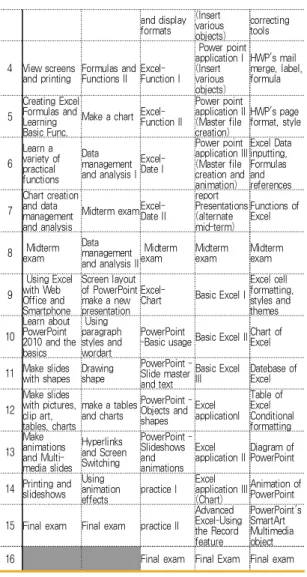
분 대학은 표 3과 같이 엑셀과 파워포인트 또는 이에 문서작성을 포함하는 교육과정을 운영하고 있었다.
또한, 교양 컴퓨터 교과목 개설은 이론과 개별 기 능에 치우친 컴퓨터 교육이 아니라 실무에 활용할 수 있으면서도 취업에 도움이 될 수 있도록, 컴퓨터 관 련 자격증을 취득할 수 있는 실무 교육과정을 개설하
여 운영하고 있음을 보여 주고 있다[9]. 2.7 관련연구 결과
컴퓨터 활용 교과목의 강의 교재와 강의계획서를 분석한 결과는 다음과 같다.
첫째, 교재가 추구하는 목표나 강의계획서의 내용 은 차이가 있었지만 컴퓨터 활용 교과목의 핵심영역 과 각 영역별 핵심요소들을 확인할 수 있었다.
둘째, 컴퓨터 활용 교과목은 대부분 실습 위주의 교육을 통해 학습자의 학습의욕을 고취하고 있었다.
셋째, OA 분야의 MOS, ITQ, e-Test, 컴퓨터활용 능력, 워드프로세서 등의 자격증 취득을 교과목의 교 육목표로 설정하고 관련 내용을 반영하고 있었다.
본 논문에서는 이러한 컴퓨터 활용 교과목에 대한 분석 결과와 간호학과의 특성상 미국, 캐나다 등의 해 표 3. 컴퓨터 활용 강의계획서 예시
Table 3. Examples of syllabus for computer application
Univ ersiti es Week
A
University B
University C
University D
University E University
1 Lecture overview and Prior knowledge survey
Course Introduction, Evaluation, Excel Screen Configuration
Course Introduction
Course Introduction and questionnaire
Shapes of HWP characters, and Paragraph
2 Handling Excel Data
inputting data and Worksheet handling
Excel- Basic usage
Introduction to PowerPoint
Hangul Font, Table, Chart , drawing 3 Making Excel
Data Formulas and Functions I Excel-
Formulas Power point application I HWP's
editing and
and display formats
(Insert various objects)
correcting tools
4 View screens
and printing Formulas and Functions II Excel-
Function I
Power point application I (Insert various objects)
HWP's mail merge, label, formula
5
Creating Excel Formulas and Learning Basic Func.
Make a chart Excel- Function II
Power point application II (Master file creation)
HWP's page format, style
6 Learn a variety of practical functions
Data management and analysis I
Excel- Date I
Power point application III (Master file creation and animation)
Excel Data inputting, Formulas and references
7
Chart creation and data management and analysis
Midterm exam Excel- Date II
report Presentations (alternate mid-term)
Functions of Excel
8 exam Midterm Data management and analysis II
Midterm
exam Midterm
exam Midterm
exam
9
Using Excel with Web Office and Smartphone
Screen layout of PowerPoint make a new presentation
Excel-
Chart Basic Excel I Excel cell formatting, styles and themes 10
Learn about PowerPoint 2010 and the basics
Using paragraph styles and wordart
PowerPoint
-Basic usage Basic Excel II Chart of Excel
11 Make slides with shapes Drawing
shape
PowerPoint - Slide master and text
Basic Excel
III Datebase of Excel
12
Make slides with pictures, clip art, tables, charts
make a tables and charts
PowerPoint - Objects and shapes
Excel applicationI
Table of Excel Conditional formatting 13
Make animations and Multi- media slides
Hyperlinks and Screen Switching
PowerPoint - Slideshows and animations
Excel
application II Diagram of PowerPoint
14 Printing and slideshows
Using animation
effects practice I Excel application III (Chart)
Animation of PowerPoint
15 Final exam Final exam practice II
Advanced Excel-Using the Record feature
PowerPoint's SmartArt Multimedia object
16 Final exam Final Exam Final exam
외 취업이 용이 한 점을 고려하여 국제적으로 통용될 수 있는 MOS 자격 취득을 목표로 설정하고 각 핵심 영역별로 추출된 교육목표 달성을 위해 효율적이고 체계적인 교과과정을 개발하였다.
III. 본 론
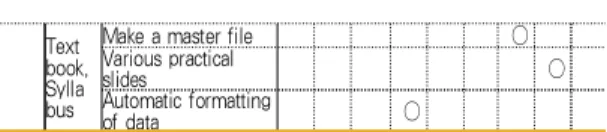
3.1 MOS 자격시험, 교재 및 강의계획서 분석 표 4와 같이, MOS 자격시험 교재에서 중요하게 다루어지고 있는 분야는, 엑셀 영역의 공유 및 통합문 서 유지, 수식 및 함수, 시각적인 데이터 표현, 매크로 작업 및 양식과 파워포인트 영역의 환경정리, 프레젠 테이션 생성, 그래픽 및 멀티미디어 요소 사용, 차트 및 표, 애니메이션 및 전환 적용, 프레젠테이션 공동 작업, 프레젠테이션 배포 준비 및 배포로 분석되었다.
컴퓨터 활용 관련 강의교재와 강의계획서에서 상기 분야 이외에도, 엑셀 영역의 통계함수, 데이터베이스 함수, 데이터베이스 관리 및 분석, 실무함수와 파워포 인트 영역의 마스터파일 생성, 실무 슬라이드, 자료의 자동생성 등이 강의되고 있는 것으로 분석되었다.
3.2 브랜디드 러닝을 적용한 교과과정 설계
3.2.1 핵심영역 설정
그림 1과 같이 MOS 시험 기출문제를 분석한 결 과, Excel-Expert에서는 통합 문서 공유 및 유지 관 리, 공식 및 함수 적용, 시각적으로 데이터 표현, 매크 로 및 양식 사용 섹션에서 문제가 출제되고 있었고, Powerpoint에서는 환경 관리, 슬라이드 프레젠테이션 생성, 그래픽 및 멀티미디어 요소 사용, 차트 및 표 생성, 전환 및 애니메이션 적용, 프레젠테이션 공동 작업, 프레젠테이션 배포 준비, 프레젠테이션 배포 섹 션에서 문제가 출제되고 있었다.
이들 2개 교과목의 핵심영역은 교육목표, 강의 및 실습 주제로 보아 컴퓨터 활용 교과목을 대표하는 영 역으로서의 타당성을 충분히 가지고 있었고, 실습 주 제 또한 MOS 자격취득을 위한 적절한 과정으로서, 강의와 실습의 두 가지 트랙 모두가 신뢰성을 담보할 수 있도록 설계되었다.
또한, 이들 10가지 핵심영역으로부터 실제 강의에 적용할 수 있는 교육목표와 강의 및 실습주제를 선정 하였다[10].
그림 1. 컴퓨터 활용 핵심영역별 요소 Fig. 1 Components in each core area
of computer application
3.2.2 교과과정 개발 설계
본 연구에서 제안하는 브랜디드 러닝을 적용한 컴 퓨터 활용 교과과정 개발은 2∼3학점, 주당 2∼3시간, 15주간 수업을 기준으로 그림 2와 같이 온ㆍ오프라인 표 4. 컴퓨터 활용 관련 핵심영역 및 내용요소
Table 4. Core areas and components regarding computer application
Class ificat ion
Core
area Content Element MOS Textbook Syllabus
① ② ③ ⓐ ⓑ ⓒ ㉠ ㉡ ㉢
Excel qualify ing exami nation
Share and maintain
Integrated Document ○ ○ ○ ○ ○ ○ ○ ○ ○
Formulas and
Functions ○ ○ ○ ○ ○ ○ ○ ○ ○
Visual data
representation ○ ○ ○ ○ ○ ○ ○ ○ ○
Macro process and
forms ○ ○ ○ ○ ○ ○ ○ ○ ○
Text book, Sylla bus
Statistical function ○ ○
Datebase function ○ ○ ○ ○ ○
DB management and
analysis ○ ○ ○ ○ ○
Various Practical
Functions ○ ○
Powe rPoint qualify ing exami nation
Environmental
cleanup ○ ○ ○ ○ ○ ○ ○ ○ ○
Make a presentation ○ ○ ○ ○ ○ ○ ○ ○ ○
Use graphics and
multimedia elements ○ ○ ○ ○ ○ ○ ○ ○ ○
Chart and Table ○ ○ ○ ○ ○ ○ ○ ○ ○
Animation and apply
conversion ○ ○ ○ ○ ○ ○ ○ ○ ○
Collaborate on
presentations ○ ○ ○ ○ ○ ○ ○ ○ ○
Preparing and deploying a
presentation ○ ○ ○ ○ ○ ○ ○ ○ ○
Text book, Sylla bus
Make a master file ○
Various practical
slides ○
Automatic formatting
of data ○
두 가지 트랙으로 설계하였다.
또한 교재와 강의계획서 분석을 토대로, 엑셀과 파 워포인트의 2개 과목을 복합 운영하는 것으로 하였다.
⑴ 브랜디드 러닝 적용
브랜디드 러닝은 면대면 학습 상황과 실시간 e-learning, 자기주도적 학습과 실시간, 협력학습의 브 랜딩 등의 다양한 사례 기반 활동이 혼합된 수업방식 이다. 그러나 일반적인 브랜디드 러닝은 면대면 교육 에서의 취약한 부분을 e-learning에서 수행토록하고, e-learning의 학습결과를 면대면 수업의 상담 및 진도 결정에 적용하는 온ㆍ오프라인 통합 학습 체제로서, e-learning에서의 부족한 교육활동을 보완해 주면서, 동시에 면대면 수업이 갖고 있는 교육적 유용성을 활 용하여 학습효과를 극대화 하고자 하는 교수방법이다.
그림 2와 같이, 컴퓨터 활용 수업처럼 실습이 중요 한 경우 사전에 e-learning 강의를 통해 예습하고, 면 대면 수업을 통해서 궁금했던 점을 해결한 후, 실습을 통해 복습 및 이해정도를 확인 반복하는 브랜디드 러 닝 교수학습 방법을 적용한 교과과정 개발이 매우 중 요하다.
그림 2. 브랜디드 러닝 적용 Fig. 2 Application of blended learning
⑵ 온․오프라인 수업 설계
1주차는 교과목 및 MOS 자격시험을 안내한 후, Powerpoint 소개, 보기 전환, 눈금 및 안내선, 확대/축 소, 컬러/회색조, 새창/모두정렬을 수업한다.
2~3주차는 사진 앨범 만들기/편집, 슬라이드 크기 와 방향 설정, 새 구역 만들기, 구역 이름 바꾸기/머 리글 슬라이드 삭제/테마 설정, 개요 파일로 새 프레
젠테이션 만들기, 슬라이드 숨기기, 테마/배경 서식, 머리글/바닥글 삽입, 텍스트 상자 스타일 지정, 글머 리 기호목록 서식, SmartArt 그래픽 변환을 수업한다.
4주차는 그림 삽입, 배치 순서 변경, 그림 스타일/
다시 설정(재설정), 이미지 조작, SmartArt 레이아웃 수정/색 변경, 도형 편집/레이블 변경/스타일 수정, 기 본 도형 설정, 오디오 콘텐츠 재생 수정을 수업하며, 5주차는 표 삽입 및 편집, 표 스타일, 표 크기 변경, 차트 유형 변경, 차트 레이아웃 수정, 차트 스타일 및 계열 요소 변경, 차트 선택 영역 서식을 수업한다.
6주차는 기본 애니메이션 적용 및 효과 옵션, 고급 애니메이션 수정, 모든 슬라이드 화면 전환 효과, 특 정 슬라이드만 화면 전환 효과를 수업하고, 7주차는 프레젠테이션 메모 삽입/삭제, 언어교정 옵션 변경, 파일 형식 변경 저장, 프레젠테이션 인쇄 옵션 설정, 프레젠테이션 보호, 프레젠테이션 도구 적용, 슬라이 드 쇼 설정, 녹화 시간 설정을 수업한다.
9주차는 Excel 소개, 속성 및 파일형식 변경 저장, XML 요소 매핑 및 내보내기, 통합문서와 워크시트 보호적용 및 속성공유, 공유 통합문서 유지관리를 수 업하고, 10~11주차는 수식 추적, 오류 추적, 오류 검 사, 수식 오류 설정 옵션, 수식 계산, 수식 옵션, 반복 계산 사용, sumif, sumifs, averageif, averageifs, countif, countifs 함수와 vlookup, hlookup, if, left, mid, right 함수, 배열 수식 합계를 수업한다.
12~13주차는 데이터 범위 변경, 추세선 추가, 최고 /최저값 연결선, 하강선, 오차 막대 추가, 차트 서식 변경, 차트 서식 파일 저장, 스파크 라인 만들기, 스파 크라인 서식, 시나리오, 목표값 찾기, 데이터표 작성, 데이터 통합, 피벗 테이블 작성, 피벗 차트 작성, 슬라 이서, 중복 데이터 제거를 수업한다.
14주차는 매크로 기록, 매크로 실행, 매크로 사용 통합 문서로 저장, 매크로 보안 설정, 양식 컨트롤 도 구 수업을 하고 기출문제를 반복 실습하도록 하였다.
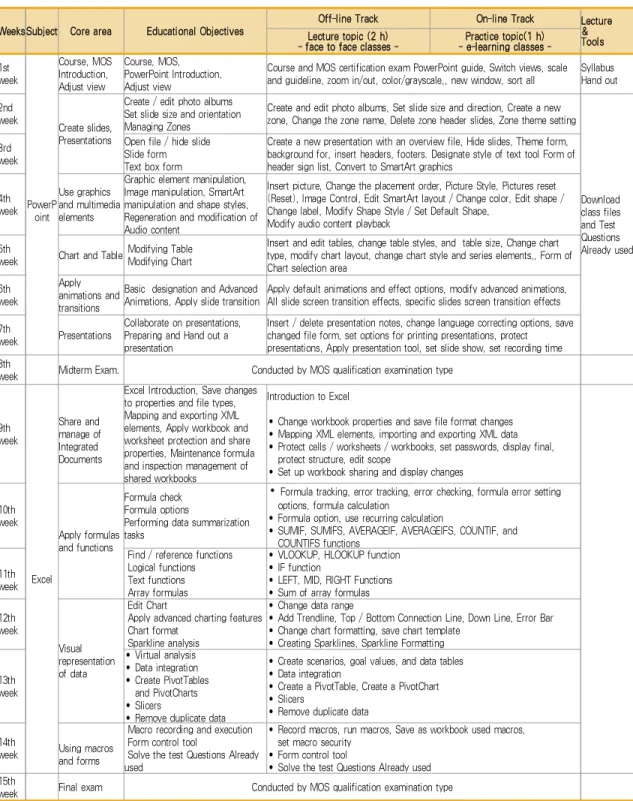
8주차와 15주차는 중간고사와 기말고사 기간으로 중간고사는 파워포인트, 기말고사는 엑셀을 MOS 자 격시험 유형으로 실시할 것을 제안했다[11-12].
위에 기술한 MOS 자격시험에 기반 한 10가지 핵
심영역 설정, 출석수업 및 온라인 수업이 혼합된 브랜
디드 러닝을 적용한 컴퓨터 활용 교과목의 교과과정
을 표 5와 같이 설계하여 제안하였다.
표 5. 제안된 컴퓨터 활용 교과목의 교과과정 설계가 반영된 강의계획서
Table 5. Syllabus based on Proposed Design of the Curriculum of Computer Application Courses
WeeksSubject Core area Educational Objectives
Off-line Track On-line Track Lecture
&
Tools Lecture topic (2 h)
- face to face classes - Practice topic(1 h) - e-learning classes - 1st
week
PowerP oint
Course, MOS Introduction, Adjust view
Course, MOS, PowerPoint Introduction, Adjust view
Course and MOS certification exam PowerPoint guide, Switch views, scale and guideline, zoom in/out, color/grayscale,, new window, sort all
Syllabus Hand out 2nd
week Create slides, Presentations
Create / edit photo albums Set slide size and orientation Managing Zones
Create and edit photo albums, Set slide size and direction, Create a new zone, Change the zone name, Delete zone header slides, Zone theme setting
Download class files and Test Questions Already used 3rd
week
Open file / hide slide Slide form Text box form
Create a new presentation with an overview file, Hide slides, Theme form, background for, insert headers, footers. Designate style of text tool Form of header sign list, Convert to SmartArt graphics
4th week
Use graphics and multimedia elements
Graphic element manipulation, Image manipulation, SmartArt manipulation and shape styles, Regeneration and modification of Audio content
Insert picture, Change the placement order, Picture Style, Pictures reset (Reset), Image Control, Edit SmartArt layout / Change color, Edit shape / Change label, Modify Shape Style / Set Default Shape,
Modify audio content playback 5th
week Chart and Table Modifying Table Modifying Chart
Insert and edit tables, change table styles, and table size, Change chart type, modify chart layout, change chart style and series elements,, Form of Chart selection area
6th week
Apply animations and transitions
Basic designation and Advanced Animations, Apply slide transition
Apply default animations and effect options, modify advanced animations, All slide screen transition effects, specific slides screen transition effects 7th
week Presentations
Collaborate on presentations, Preparing and Hand out a presentation
Insert / delete presentation notes, change language correcting options, save changed file form, set options for printing presentations, protect presentations, Apply presentation tool, set slide show, set recording time 8th
week Midterm Exam. Conducted by MOS qualification examination type
9th week
Excel Share and manage of Integrated Documents
Excel Introduction, Save changes to properties and file types, Mapping and exporting XML elements, Apply workbook and worksheet protection and share properties, Maintenance formula and inspection management of shared workbooks
Introduction to Excel
• Change workbook properties and save file format changes
• Mapping XML elements, importing and exporting XML data
• Protect cells / worksheets / workbooks, set passwords, display final, protect structure, edit scope
• Set up workbook sharing and display changes
10th week
Apply formulas and functions
Formula check Formula options
Performing data summarization tasks
• Formula tracking, error tracking, error checking, formula error setting options, formula calculation
• Formula option, use recurring calculation
• SUMIF, SUMIFS, AVERAGEIF, AVERAGEIFS, COUNTIF, and COUNTIFS functions
11th week
Find / reference functions Logical functions Text functions Array formulas
• VLOOKUP, HLOOKUP function
• IF function
• LEFT, MID, RIGHT Functions
• Sum of array formulas 12th
week
Visual representation of data
Edit Chart
Apply advanced charting features Chart format
Sparkline analysis
• Change data range
• Add Trendline, Top / Bottom Connection Line, Down Line, Error Bar
• Change chart formatting, save chart template
• Creating Sparklines, Sparkline Formatting
13th week
• Virtual analysis
• Data integration
• Create PivotTables and PivotCharts
• Slicers
• Remove duplicate data
• Create scenarios, goal values, and data tables
• Data integration
• Create a PivotTable, Create a PivotChart
• Slicers
• Remove duplicate data
14th
week Using macros and forms
Macro recording and execution Form control tool
Solve the test Questions Already used
• Record macros, run macros, Save as workbook used macros, set macro security
• Form control tool
• Solve the test Questions Already used 15th
week Final exam Conducted by MOS qualification examination type
IV. 결 론
본 연구는 각 대학 간호학과에서 정규 교육과정으 로 개설되어 있는 컴퓨터 활용 관련 교과목들의 효율 적인 교수학습을 위해 관련 자격시험 검정요강과 국 내 대학에서 강의중인 교재 및 강의계획서 내용들을 분석한 후 효과적인 학습이 이루어질 수 있도록 교 과과정을 설계하였다.
제안된 교과과정 설계는 MOS 자격시험을 염두에 두고 강의와 실습을 온․오프 라인의 두 가지 트랙으 로 설계하였고, 강의내용은 자격취득이 용이하도록 표 5와 같이 MOS 시험의 모든 항목을 반영하였다. 따라 서, 제안된 교과과정 설계는 MOS 자격 취득을 수월 하게 할 수 있는 동기부여로 우수한 학습 결과를 성 취할 수 있을 것으로 기대된다.
그러나 MOS 자격취득을 위해서는 off-line 출석 수업도 중요하지만 e-learning을 활용한 예습과 복습 이 필수적이며 학습자 스스로 가능한 한 기출문제들 을 풀어 볼 수 있도록 실습실을 상시 개방하여 팀별 로 방과 후 자율학습과 상호작용을 권장한다.
본 연구에서 제안한 컴퓨터 활용 교과목의 교과과 정 설계는 그동안 교수자의 강의계획서에 의거 대학 별로 심도 있게 운영해 왔지만, 관심을 갖고 체계화하 여 논문으로 발표된 적이 없기 때문에 기존 논문과 비교분석하여 장단점이나 개선점을 제시할 수 없었던 점을 아쉽게 생각한다.
향후, 제안한 교과과정 설계를 실제 수업에 적용하 여 문제점을 도출하여 취약점을 보완하고, 평가도구를 개발하고 분석하여, 제안한 교과과정 설계의 타당성을 검증할 필요가 있다.
References
[1] M. Kim, "The research for the improvement of the computer education in the subject of the computer, being based on practical use,”
Master's thesis, Busan University of Foreign School, 2007.
[2] H. Choung, “The Study of the Improvement of Nursing Department Computer Education to the Adaption for the Hospital Information
System,” J. of Korean association of computer education, vol. 11, no. 4, July 2008, pp. 59-69.
[3] H. Kim and J. Choi, “Development of a Teaching and Learning Model for Educational Usage of Web 2.0 and Its Effect Analysis,” J.
of the Korea Society of Computer and Information, vol. 16, no. 10, Oct. 2011, pp.
45-52.
[4] H. Noh, J. Kim, and W. Lee, "The Content Analysis of Informatics Education as a General Education Course in Universities in terms of Information Technology (IT) Fluency,” J. of the Korean Association of Information Education, vol. 16, no. 1, Feb.
2012, pp. 41-49.
[5] K. Lee, “Development of PBL-Based Computer Application Instruction Model,” J.
of Korean association of computer education, vol.
16, no. 2, Mar. 2013, pp. 164-167.
[6] J. Choi, “The Relation of Attendance Rate and Course Evaluation in Computer Practice Liberal Education,” J. of The Korea Institute of Information and Communication Engineering, vol.
17, no. 5, May 2013, pp. 1233-1238.
[7] S. Pi, "Utilization Plan of SNS for Computer Utilization Ability Improvement of University Students,” J. of Digital Convergence, vol. 12, no. 6, June 2014, pp. 587-595.
[8] W. Kim, "Analysis of Student Satisfaction Survey on Computer Practice Subject by Applying Blended Learning,” J. of The Korean Association of Information Education, vol. 19, no.
3, Sep. 2015, pp. 373-384
[9] H. Kim and H. Park, “A study on the Improvement of Liberal Computer Education based on Analysis Self-evaluation and Real-test for Computer Literacy,” Conf. of Korean Educational Research Association, Daejeon, Korea, vol. 18, no. 1, Jan. 2014, pp.
267-272.
[10] S. Choi, “A Design of the Database Curriculum for College Students,” J. of the Korea Institute of Electronic Communication Sciences, vol. 10, no. 5, May 2015, pp. 599-606.
[11] C. Choi and S. Joo, “A Curriculum Design of
Computer Application Department for
Non-Commissioned Officers,” J. of the Korea
Institute of Electronic Communication Sciences,
vol. 9, no. 5, May 2014, pp. 583-588.
[12] J. Park, "Design of Department Curriculum Management System based on Ontology," J. of The Korea Institute of Electronic Communication Sciences, vol. 7, no. 6, 2012, pp. 1362-1368.
저자 소개
윤성자(Sung-Ja Yoon)
1998년 가톨릭대학교 보건대학원 보 건학과 졸업(보건학석사)
2015년 강원대학교 대학원 간호학과 졸업(간호학박사)
2016~현재 : 경동대학교 간호학부 교수
※ 관심분야 : 임상의료정보
김노환(No-Whan Kim)
1978년 숭실대학교 전자공학과 졸업 (공학사)
1983년 연세대학교 산업대학원 전자 전공 졸업(공학석사)
2002년 강원대학교 대학원 전자공학 과 졸업(공학박사)
1993~현재 : 경동대학교 간호학부 교수
※ 관심분야 : 컴퓨터네트워크
박진섭(Jin-Seob Park)